



Accessibility Audit – WCAG & EAA Compliance Checker

 Recently Updated
Well Documented
Sold Only On WPBay
Recently Updated
Well Documented
Sold Only On WPBay
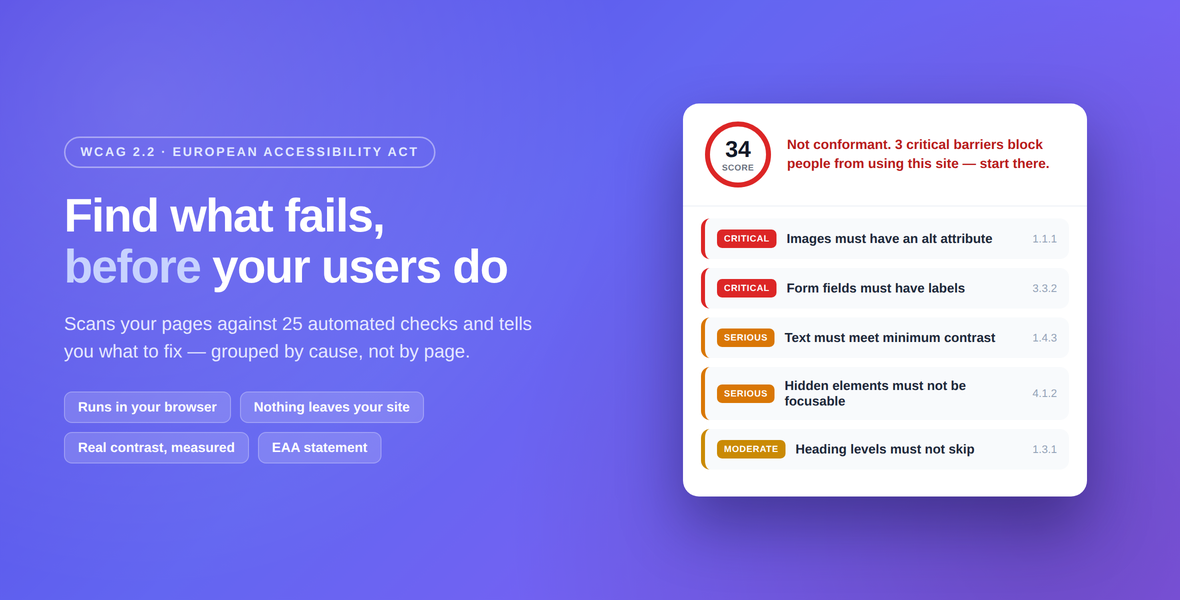
Find out where your site fails WCAG 2.2 — and build the accessibility information the European Accessibility Act requires you to publish. Accessibility Audit scans your published pages and posts against 25 automated checks and reports what to fix, grouped so that one theme colour failing on twelve pages reads as one fix, not twelve problems.
The scan runs in your own browser
No page content is ever sent anywhere. The scan loads each page in a frame inside your WordPress admin and reads the finished, rendered result — which is why it can measure real colour contrast, resolving inherited colours, translucent overlays and CSS variables. A server-side HTML parser cannot see any of that: it reads the source, not what a visitor sees.
That also means: no scanning service, no API key, no per-scan fee, and nothing added to your front end for visitors. The plugin contacts WPBay to validate your purchase code and check for updates, which carries licence and site metadata only — never page content, scan results, or anything about your visitors. Usage analytics are switched off.
What it checks
25 automated checks. Eighteen map to a WCAG 2.2 success criterion, across fourteen distinct criteria at levels A and AA: 1.1.1, 1.3.1, 1.3.5, 1.4.2, 1.4.3, 1.4.4, 2.4.1, 2.4.2, 2.4.4, 2.5.8, 3.1.1, 3.1.2, 3.3.2 and 4.1.2 — images without alternative text, buttons and links with no accessible name, form fields with no label, insufficient contrast, tables without header cells, frames without a title, focusable elements hidden from screen readers, blocked pinch-zoom, autoplaying audio, and more.
The other seven are recommended practice, and the report says so. A skipped heading level, a missing h1, an empty heading, a duplicate id, a positive tabindex, vague link text, a missing main landmark: all worth fixing, none of them a conformance failure. WCAG does not require sequential heading levels, “read more” can satisfy 2.4.4 from its surrounding context, and 4.1.1 Parsing was removed from WCAG 2.2 altogether. Tools that present these as WCAG failures inflate their own numbers and yours. Every finding here is labelled, so you always know which ones a conformance claim rests on.
A report you can act on
- Grouped by rule, not by page. Each group shows impact, the WCAG criterion where there is one, and how widespread it is — “12 occurrences across 3 pages”.
- Straight to the fix. Where possible each finding links to that page’s editor or to the Media Library entry. That is the advantage of running inside WordPress instead of as an external scanner.
- A verdict in words, not just a number. A bare score invites the wrong conclusion; the report says plainly whether critical barriers are blocking people.
- Comparison between scans. Fix something, scan again, and see exactly which rules cleared — and which are new.
The European Accessibility Act information
Since 28 June 2025 businesses providing services to consumers in the EU must publish information about the accessibility of those services. With a licence, the generator builds it and publishes it as a real page you can link from your footer.
It follows Annex V of Directive (EU) 2019/882, which is what actually applies to a business: a description of the service in accessible formats, what someone needs in order to understand how it works, how the accessibility requirements in Annex I are met, and how your delivery process and its monitoring keep it that way. If you are a public sector body it builds the other document instead — the model in Implementing Decision (EU) 2018/1523, under Directive (EU) 2016/2102. Most tools conflate the two; they are different obligations.
The known-barriers section is prefilled from your latest scan, with a success criterion attached only where there genuinely is one. The generator argues back when the document does not hold together: full conformity claimed while your own scan still shows failures, disproportionate burden invoked with no assessment date behind it, or a microenterprise being handed a compliance claim that Article 4(5) exempts it from making.
Publishing a page is not a filing. Where your country requires submission through a national portal, this does not replace that — and nothing here is legal advice.
Free and licensed
Without a licence the scanner is complete and genuinely usable: 20 checks, up to five pages per scan, the last three scans kept, full report and comparison.
A licence adds:
- Every page, with no five-page limit
- Five further checks: touch target size (2.5.8 AA), autocomplete on personal data fields (1.3.5 AA), list structure (1.3.1 A), language of parts (3.1.2 A), and a main landmark, which is recommended practice
- Unlimited scan history
- The accessibility information generator, for the EAA or the public sector regime
One download either way. Entering your purchase code unlocks everything in place — nothing to re-install.
Requirements
- WordPress 6.2 or newer
- PHP 7.4 or newer
- A modern browser for the admin screen — the scan runs there
What it does not do
Being straight about this saves us both time.
- Automated testing finds roughly a third of accessibility barriers. A clean report is a good sign, not a conformance statement. Keyboard and screen reader testing by a person is still required for WCAG or EAA conformance, and no tool on the market changes that.
- It scans pages and posts. Individual WooCommerce product pages are not in the scan list. Your shop, cart and checkout pages are, because those are pages.
- Pages that refuse to be framed cannot be scanned. If a page sends
X-Frame-Options: DENYor a restrictiveframe-ancestors, you get a clear error rather than a false “clean” result.
Tested against
WordPress 7.0, six themes (Twenty Twenty-Five, Twenty Twenty-One, Astra, GeneratePress, OceanWP, Kadence), Elementor and SiteOrigin, multisite, a 510-item site, and a single page with 3000 paragraphs. Alongside WooCommerce, Contact Form 7, WPForms and ACF with no conflicts.
During that testing the scanner found a genuine WCAG 4.1.2 failure in WooCommerce’s own Mini Cart — a drawer marked aria-hidden="true" whose buttons stay visible and reachable by keyboard. It finds real problems in real software.
Questions worth asking before you buy
Will this make my site compliant?
No, and no automated tool can. Automated testing finds roughly a third of real accessibility barriers; the rest needs a person with a keyboard and a screen reader. This plugin finds and explains the mechanical failures fast, and says plainly in the report that a clean result is not a conformance statement. Any tool that promises compliance is selling you a false sense of safety — in 2025 the US Federal Trade Commission fined an overlay vendor $1 million for exactly that claim.
Is it an overlay?
No. It changes nothing on your front end and adds no script for visitors. It reports what is wrong so you can fix it. Overlays do not make a site conformant, and in the first half of 2025, 22.6% of US accessibility lawsuits targeted sites that had one installed.
Do I even need this?
Possibly not. Article 4(5) of Directive (EU) 2019/882 exempts microenterprises providing services — fewer than 10 people, and turnover or balance sheet not above €2 million — from the accessibility requirements for services altogether. The generator asks, and if you say yes it explains the exemption instead of building you a conformity claim you do not owe. Accessibility is still worth doing; the exemption is from the obligation, not from your users.
Is the document it generates legally sufficient?
It is a starting point built from what you tell it and what your site actually does, structured on the provision that applies to you — Annex V of Directive (EU) 2019/882 for a business, or the Implementing Decision (EU) 2018/1523 model for a public sector body. It is not a filing: where your country requires submission through a national portal, publishing a page does not replace that. And nothing in the plugin is legal advice.
Does anything leave my site?
The scan contacts nothing — no API, no account, no per-scan fee, and your page content never leaves the browser it is scanned in. The plugin does contact WPBay to validate your purchase code and check for updates, which carries licence and site metadata only. Usage analytics are switched off.
Are all 25 checks WCAG failures?
No, and this is the question most tools answer badly. Eighteen map to a WCAG 2.2 success criterion, across fourteen distinct criteria at levels A and AA. The other seven are recommended practice, and the report labels them as such. A tool that presents every finding as a WCAG failure inflates its own numbers and yours — and yours is the one that ends up in a published conformance claim.
A fuller statement of what these products claim and what they do not is at groundedwp.com/what-we-claim.
Changelog:
Fixed: the plugin declared PHP 7.4 as its minimum, which it could not honour. The bundled WPBay SDK uses match(), a PHP 8.0 construct, in a file it loads unconditionally, so on PHP 7.4 activation ended in a fatal error instead of the "requires a newer PHP version" notice WordPress shows when the header is accurate. The stated minimum is now 8.0.
The scanner's own code has always run on 7.4. The requirement comes from the licensing SDK, not from the audit.
Only logged in customers who have purchased this product may leave a review.
Loading...
WPBay support
 Support by Grounded
Support by Grounded
Grounded supports this product through WPBay
Questions are handled in WPBay's private ticket system, keeping your purchase details and support conversation together.
Go to My Downloads
After purchase, open this item in My Downloads and choose Get Support.
What support includes
- Answers to product-related questions
- Help with reported bugs and issues
- Guidance for included third-party assets
What support does not include
- Customizations or new features
- Installation or setup services
Plugin
Maintenance snapshot
See recent updates, compatibility, support, and developer activity.
- Updated 77 days ago
- Developer active
- WPBay support available
- WordPress 7.1 tested
Snapshot updated 56 minutes ago
View details Hide details
Maintenance details
This is maintenance data. It does not measure product quality or sales.
- Last update Updated 77 days ago
- Compatibility WordPress 7.1 tested · PHP 8.5 tested · WooCommerce 11 tested
- Releases 2 releases in the 90 days since listing
- Developer activity Developer active
- Support No recent support tickets to measure
- Docs and demo Documentation available · Changelog available · No demo listed
Health reflects increased activity during the last 90 days.
How this snapshot works
Plugin Health
The score is out of 100 and uses data WPBay can check. Ratings, popularity, and sales are not used.
- Last update 30 points
-
Plugins receive full recency points under 30 days, then step down at 90, 180, 365, and 545 days.
- Compatibility 20 points
-
WordPress, PHP, and WooCommerce (when relevant) are scored separately. The latest two PHP lines count as current. Nearby previous versions keep most of the points.
- Current version 100%
- One version behind 75%
- Two versions behind 50%
- Three versions behind 25%
- Older or not listed 0%
- Releases 15 points
-
One release earns 10, two or three earn 13, and four or more earn 15. Each accepted product ZIP counts once; reprocessing the same upload and listing-only edits do not count.
- Developer activity 15 points
-
Based on WPBay login and dashboard activity. Exact last-login dates are never shown.
- Support 15 points
-
There are no recent WPBay tickets to measure.
- Docs and demo 5 points
-
Documentation: 2. Changelog: 1. Working demo or preview: 2.
Score ranges
- 90–100 Excellent
- 75–89 Healthy
- 60–74 Fair
- 40–59 Needs attention
- 0–39 Limited
Long gaps
WPBay also checks for long gaps between updates, developer activity, support replies, and releases. Buyers do not see this score.
- Time since update 35 points
- Last developer activity 25 points
- WordPress compatibility 15 points
- Support replies 15 points
- Fewer releases 10 points
-
Quality verified by WPBay
WPBay review- Reviewed version
- 2.0.1
- Review completed
- Reviewer
- CodeRevolution
- Review type
- Initial
No unresolved approval blocker was identified during WPBay’s proportionate review of this release. This is not a security certification or a guarantee that the product contains no defects.
-
 Future updates
-
WPBay support from Grounded
-
GPL code, proprietary assets
-
Covered by the WPBay refund policy
-
Plugin maintenance snapshot
Relevant picks
You may also like
Similar products selected by category, features, popularity and freshness.

From this seller
View seller store
More by Grounded
Explore more bestselling products from this creator.
 7 days free
Reviews
There are no reviews yet.