


WooCommerce Size Chart Recommender

 Recently Updated
Well Documented
Recently Updated
Well Documented
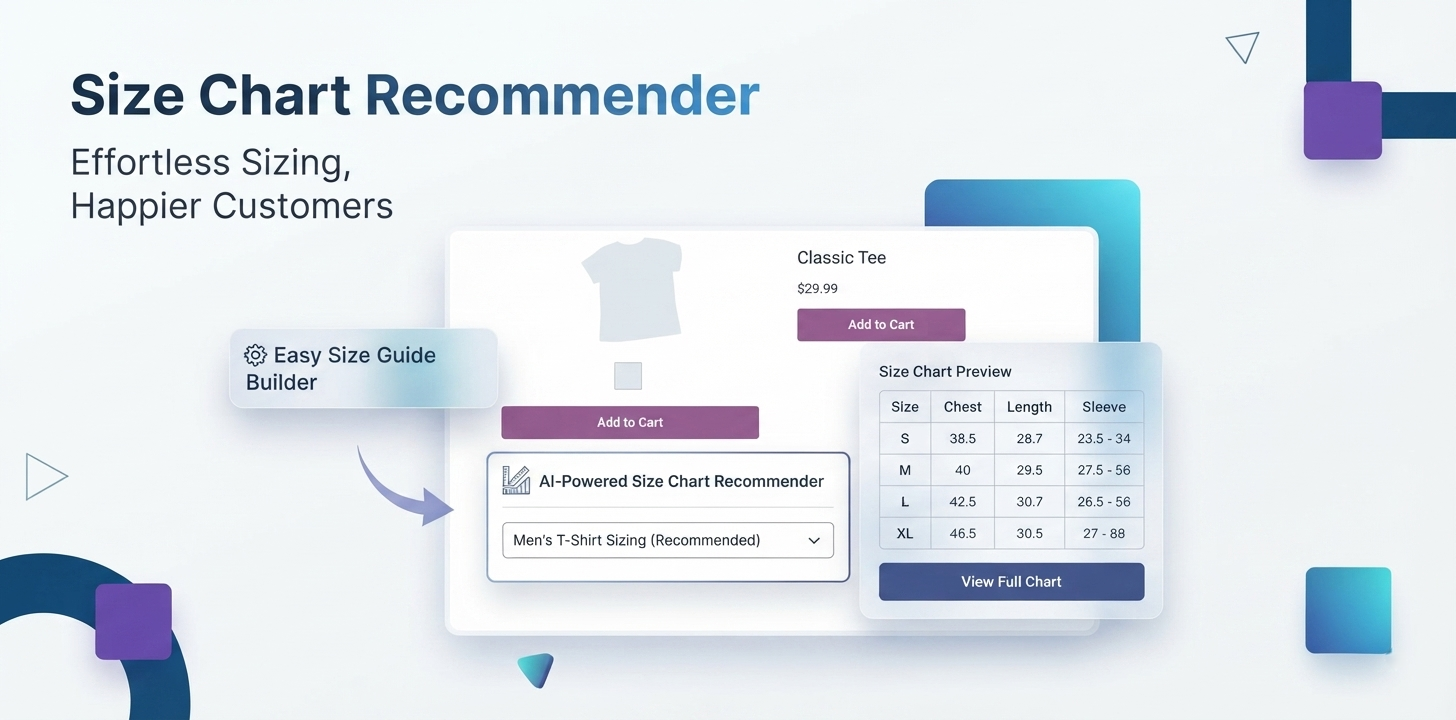
Size Chart Recommender for WooCommerce combines customizable product size charts with a built-in size recommender, so customers can view detailed measurements or use their own measurements to find a suitable size.
Create and manage size guides for your WooCommerce products, assign different charts to products or categories, display them in flexible layouts, convert measurements between inches and centimeters, and import or export chart data with CSV.
It is specially designed for fashion, apparel, footwear, sportswear, uniforms, custom-sized products, and international WooCommerce stores.
Key Features
- Create Multiple Size Charts — Create and manage custom size charts for different products, categories, brands, and sizing requirements
- Smart Size Recommender & Fit Finder — Help customers find a suitable size using a guided recommendation experience based on their measurements and fit preferences.
- Product-Specific Size Charts — Assign the most relevant size guide to individual products for more precise sizing information.
- Category, Tag & Brand-Based Charts — Automatically display the appropriate size chart based on product categories, tags, or brands.
- Customer & User Role Targeting — Show different size charts to specific customers, customer groups, or user roles when needed.
- Country-Specific Size Guides — Display relevant sizing information based on the customer’s country for stores serving multiple markets.
- Multiple Display Options — Display size charts inline, in a popup, as a floating widget, in product tabs, or using a shortcode.
- Customizable Size Chart Popup — Customize the size chart popup experience to match your store’s layout and branding.
- Inches, Centimeters & Millimeters — Let customers view sizing information using different measurement units with built-in conversion.
- CSV Import & Export — Import and export size chart data using CSV files for easier catalog and size-guide management.
- One-Click Size Chart Duplication — Quickly duplicate an existing size chart and customize it for another product or sizing requirement.
- Custom Icons & Button Styling — Choose predefined icons or add custom icons, and customize the appearance of size chart and recommender buttons.
- Live Customization Preview — Preview your size chart and styling changes while configuring the appearance.
- Custom CSS Support — Add custom CSS for deeper control over your size chart design and store branding.
- Flexible Display Conditions — Control where size charts appear using configurable product and catalog conditions.
- Shortcode Support — Add size charts to supported product pages and content areas using a shortcode.
- Improved Size Recommendations — Benefit from improvements to the recommendation and suggestion system introduced in the latest release.
- Developer-Friendly Recommender Fields — Extend and customize recommender fields using the available filter hooks.
Powerful Features Built for Better Sizing
Size Chart Recommender for WooCommerce gives you more than a basic size table. Build a complete sizing experience that helps shoppers understand product measurements, find a suitable size, and access the right size guide wherever they shop.
Help Customers Find Their Size With Fit Finder
Give shoppers a guided way to find a suitable size instead of making them manually compare every measurement.
With the built-in Size Recommender, customers can enter relevant measurements and preferences, then receive a size suggestion based on your configured sizing information.
Why it matters:
- Make sizing easier for first-time shoppers
- Give customers an alternative to manually reading a size table
- Keep the sizing experience directly on the product page
- Configure the recommender around your store’s sizing requirements
Perfect for: clothing, apparel, sportswear, uniforms, footwear, and other size-dependent products.
Show the Right Size Chart for Every Product
Different products often need different measurements.
Create multiple WooCommerce size charts and assign the appropriate chart to individual products, categories, tags, brands, customers, user roles, or countries.
For example:
Men’s Shirts → Men’s Shirt Size Chart
Women’s Dresses → Women’s Dress Size Chart
Sportswear → Sportswear Size Chart
Brand A → Brand A Size Guide
This gives you precise control over which sizing information customers see.
Display Size Guides Your Way
Make your size chart easy to discover without disrupting the shopping experience.
Choose from multiple display options:
- Inline — Keep the size guide directly on the product page.
- Popup — Open the chart in a convenient modal window.
- Floating Widget — Keep sizing information accessible while shoppers browse.
- Product Tab — Add sizing information as a dedicated product tab.
- Shortcode — Place size charts in supported content areas.
Choose the presentation that works best for your store design and customer journey.
Make Sizing Easier for International Shoppers
Customers don’t always use the same measurement system.
Let shoppers work with familiar units using built-in conversion between inches, centimeters, and millimeters.
This makes your international size guide easier to understand and helps you serve customers across different markets.
Manage Large Size Catalogs Faster
Managing dozens of product size charts doesn’t have to mean starting from scratch every time.
Duplicate existing charts with one click, make the required changes, and assign the new chart where it’s needed.
For larger catalogs, use CSV import and export to manage size-chart data more efficiently.
Whether you’re creating a new chart, updating existing measurements, or preparing sizing data for multiple products, these tools help simplify ongoing store management.
How It Works
Set up a simple, flexible sizing experience for your WooCommerce store in just a few steps.
1. Create Your Size Chart
Add your product measurements and sizing information to create a custom WooCommerce size guide.
2. Assign the Right Chart
Display specific size charts for products, categories, brands, tags, customers, or countries using flexible display conditions.
3. Set Up Fit Finder
Configure the Size Recommender so customers can enter their measurements and get a suitable size suggestion.
4. Choose Your Display Style
Show your size guide inline, in a popup, as a floating widget, in a product tab, or with a shortcode.
5. Let Customers Find Their Size
Customers can view detailed measurements or use Fit Finder directly from the product page to make a more informed size choice.
Built for Your Store
A great product deserves a great sizing experience.
Give shoppers the information they need to understand your products, compare measurements, and choose a suitable size all without leaving the product page.
Size Chart Recommender for WooCommerce combines a detailed product size guide with a guided Fit Finder, making sizing simpler for both your customers and your store.
Give Clothing Shoppers More Confidence
From T-shirts and shirts to dresses, jackets, jeans, and trousers, create detailed clothing size charts that match the measurements of your products.
Let customers compare sizes manually or use the Size Recommender when they want help choosing a suitable size.
Create Better Footwear Size Guides
Different footwear products can require different sizing information.
Create dedicated shoe size guides and display the relevant sizing information for the products your customers are viewing.
Built for Sportswear & Uniforms
Sportswear, team jerseys, workwear, and uniforms often use their own measurement requirements.
Create product-specific size charts and assign them exactly where they are needed, so customers can access the right measurements before ordering.
Ready for International Shoppers
Make your sizing information easier to understand across different markets with built-in conversion between inches, centimeters, and millimeters.
Whether your store serves local customers or sells worldwide, provide a more familiar sizing experience.
Perfect for Custom-Sized Products
When standard S, M, L, and XL sizing isn’t enough, give customers detailed measurements to help them understand the fit of your products.
Create custom product size guides and use Fit Finder to provide a more guided sizing experience.
From “Which Size?” to “This One.”
Don’t make customers guess.
Give them a clear WooCommerce size chart when they want to compare measurements and a size recommender when they want a guided way to find a suitable size.
With the right sizing information available at the right moment, customers can shop with greater confidence and spend less time searching for answers.
Create a better sizing experience with Size Chart Recommender for WooCommerce.
Changelog:
=== Size Chart Recommender Changelog ===
2026-08-12 - version 1.0.3
* Added - Predefined icons customizations
* Added - One click duplicate size chart
* Update - Introduced filters hook to recommender fields
* Update - Imroved the suggestion system
* Fixed - Assign size chart to unrelated products
* Fixed - Security measures
2026-08-11 - version 1.0.2
* Added - Create sample size chart
* Added - Support wp-color-picker
* Fixed - Plugin header contains Author URI and Developer URI
* Fixed - AJAX handler does not verify a nonce before processing
* Fixed - array_walk_recursive sanitization
2026-08-10 - version 1.0.1
* Added - ShortCode column in post table
* Fixed - Search products in display conditions
* Fixed - Changing text/hover color in customizations
* Fixed - Inconsistency in preview customizations
2026-08-09 - version 1.0.0
* Initial release of the plugin!
Only logged in customers who have purchased this product may leave a review.
Loading...
WPBay support
 Support by WPStoreTools
Support by WPStoreTools
WPStoreTools supports this product through WPBay
Questions are handled in WPBay's private ticket system, keeping your purchase details and support conversation together.
Go to My Downloads
After purchase, open this item in My Downloads and choose Get Support.
What support includes
- Answers to product-related questions
- Help with reported bugs and issues
- Guidance for included third-party assets
What support does not include
- Customizations or new features
- Installation or setup services
Plugin
Maintenance snapshot
See recent updates, compatibility, support, and developer activity.
- Updated 29 days ago
- Developer active recently
- WPBay support available
- WordPress 7.0 tested
Snapshot updated 22 hours ago
View details Hide details
Maintenance details
This is maintenance data. It does not measure product quality or sales.
- Last update Updated 29 days ago
- Compatibility WordPress 7.0 tested, one version behind · PHP 8.5 tested · WooCommerce 10 tested, one version behind
- Releases 1 release in the 52 days since listing
- Developer activity Developer active recently
- Support No recent support tickets to measure
- Docs and demo Documentation available · Changelog available · No demo listed
Health reflects increased activity during the last 90 days.
How this snapshot works
Plugin Health
The score is out of 100 and uses data WPBay can check. Ratings, popularity, and sales are not used.
- Last update 30 points
-
Plugins receive full recency points under 30 days, then step down at 90, 180, 365, and 545 days.
- Compatibility 20 points
-
WordPress, PHP, and WooCommerce (when relevant) are scored separately. The latest two PHP lines count as current. Nearby previous versions keep most of the points.
- Current version 100%
- One version behind 75%
- Two versions behind 50%
- Three versions behind 25%
- Older or not listed 0%
- Releases 15 points
-
One release earns 10, two or three earn 13, and four or more earn 15. Each accepted product ZIP counts once; reprocessing the same upload and listing-only edits do not count.
- Developer activity 15 points
-
Based on WPBay login and dashboard activity. Exact last-login dates are never shown.
- Support 15 points
-
There are no recent WPBay tickets to measure.
- Docs and demo 5 points
-
Documentation: 2. Changelog: 1. Working demo or preview: 2.
Score ranges
- 90–100 Excellent
- 75–89 Healthy
- 60–74 Fair
- 40–59 Needs attention
- 0–39 Limited
Long gaps
WPBay also checks for long gaps between updates, developer activity, support replies, and releases. Buyers do not see this score.
- Time since update 35 points
- Last developer activity 25 points
- WordPress compatibility 15 points
- Support replies 15 points
- Fewer releases 10 points
-
Quality verified by WPBay
WPBay review- Reviewed version
- 1.0.3
- Review completed
- Reviewer
- CodeRevolution
- Review type
- Initial
No unresolved approval blocker was identified during WPBay’s proportionate review of this release. This is not a security certification or a guarantee that the product contains no defects.
-
 Future updates
-
WPBay support from WPStoreTools
-
GPL code, proprietary assets
-
Covered by the WPBay refund policy
-
Plugin maintenance snapshot
Relevant picks
You may also like
Similar products selected by category, features, popularity and freshness.


 15 days free
From this seller
View seller store
More by WPStoreTools
Explore more bestselling products from this creator.
Reviews
There are no reviews yet.