


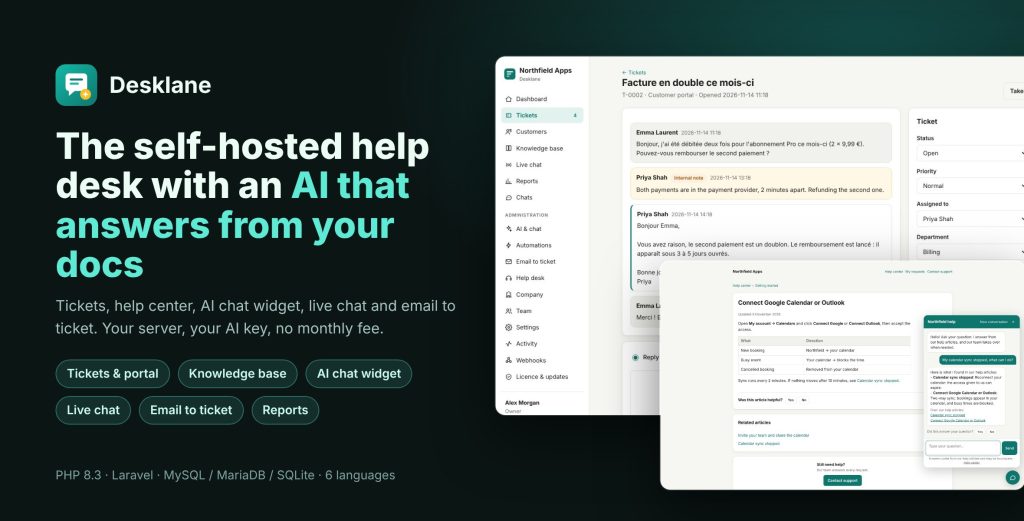
Slotlane – Self-hosted Appointment Booking: Website Widget, Team Calendars, Deposits and Reminders

 Recently Updated
Well Documented
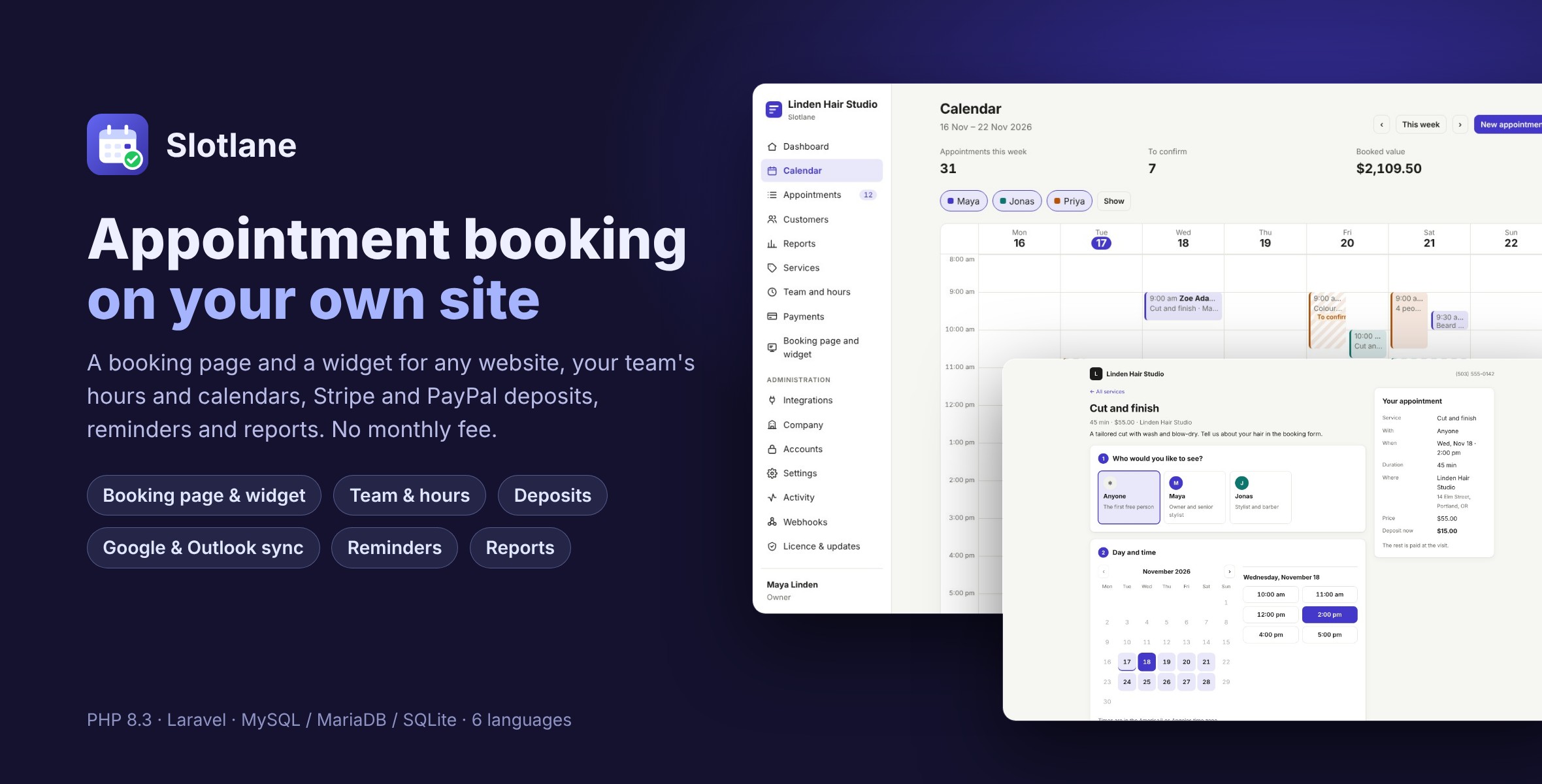
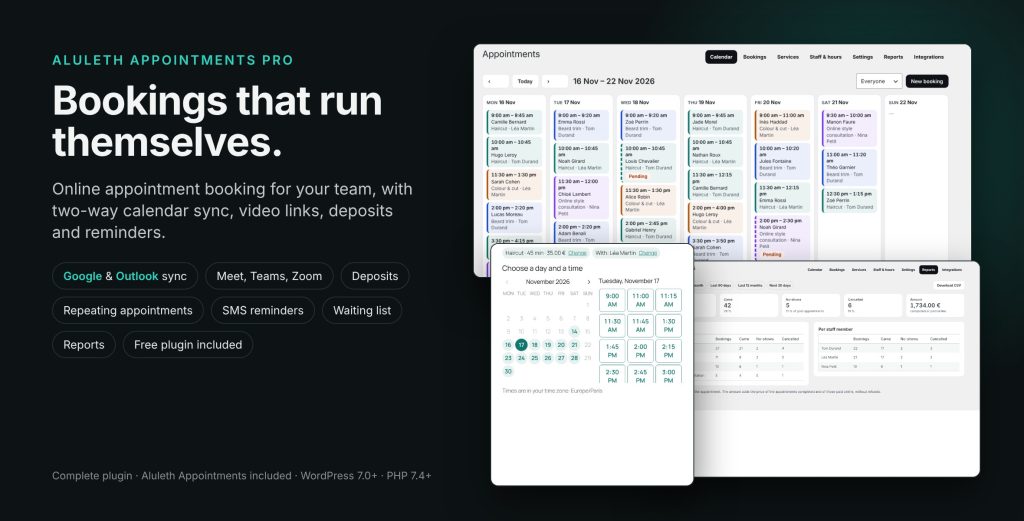
A booking page and a widget for your website, your team’s hours and calendars, deposits with your own Stripe or PayPal account, reminders and reports. A PHP script you install on your own server, with no monthly fee and no commission.
Slotlane is an appointment booking script you install on your own server, for salons, studios, clinics, coaches, tutors and any business that sells time. Customers book on your booking page or in a widget on your website: they choose a service, who they see (or “Anyone”), a day and a free time, then pay a deposit or the full price with your own Stripe or PayPal account, or pay at the visit. They get a confirmation with a calendar file, a private link to move or cancel, and a reminder by email or text message. Your team sees everything in one calendar, and there is no monthly fee and no limit on staff, services or bookings.
Every booking is checked again at the moment it is saved: two people can never get the same time, even with Google or Outlook calendars, buffers, group classes and payments waiting.
Features
– Booking page: services by category, the person or “Anyone” (the first free person, sharing the work), a month calendar with the free days, free times in the business time zone, extra questions, a link for each service
– Widget for any website: one script tag, a button or your own link opens the booking panel, allowed sites only, colour, text and position set in the admin
– Team and hours: weekly hours with up to three ranges a day, time off, services per person, colours, staff accounts that see only their own calendar
– Services: duration, free time before and after, start times, minimum notice, how far ahead, group classes with places, “I confirm each booking myself”
– Payments with your own Stripe and PayPal accounts: deposit or full price when booking, the time kept while the customer pays, refunds when cancelled in time, payments taken at the desk
– Discount codes and packages of prepaid visits, with a “My visits” page for customers (sign-in by email link)
– Customers move or cancel from their private link, until the number of hours you set
– Reminders by email, and by SMS or WhatsApp with your own Twilio account
– Google Calendar and Outlook sync: busy events block bookings, appointments are written into the staff member’s calendar; Google Meet, Teams or Zoom links for video appointments – Waiting list: customers are emailed when a time frees up on their day
– Review requests after a visit, with the link to your review page
– Admin: dashboard, week calendar, appointments (confirm, move, no-show, notes, history), customers with their visits and packages, appointments booked by the team
– Reports: appointments, booked value, money received, no-shows, new customers, by day, service, staff member and source, CSV export
– Optional AI with your own key: customers ask for a time in their own words, and the AI writes service descriptions
– Team roles (owner, admin, staff member, viewer), two-factor sign-in, an activity log, signed webhooks (Zapier, Make, n8n), dark mode; admin and customer pages in English, French, Spanish, German, Portuguese and Tagalog
– Web installer, MySQL / MariaDB or SQLite, cron by command or URL, one-click updates from a zip with an automatic backup first
Requirements
– PHP 8.3 or later (pdo, mbstring, openssl, curl, json, tokenizer, xml, ctype, fileinfo, zip, iconv)
– MySQL 8 / MariaDB 10.6+ (an empty database), or SQLite (no database server needed)
– A domain or subdomain with HTTPS; any PHP host, shared hosting included
– A cron job every minute (command line or web cron)
– Optional: Stripe / PayPal, Google Cloud or Microsoft Entra (calendars), Zoom, Twilio and an AI provider, each billed by that service; an email account (SMTP) to send confirmations and reminders
Live demo: https://demos.alulethmarketing.com/slotlane/
Documentation: https://market.alulethmarketing.com/docs/slotlane/
Changelog:
Slotlane 0.1.6 – self-hosted appointment booking (PHP script, Laravel)
= 0.1.6 – 21 November 2026 =
* Reminders and review requests (app/Services/Bookings.php, sendReminders and askReviews): entries that wait never hold back the ones that are due. Each booking also keeps the time from which its reminder or review request may be handled again (reminder_due_at and review_due_at, new columns), set by the Booking model whenever the delivery state is saved: the end of the 10-minute wait after a failed email, the end of a 15-minute claim, none for a new entry. The cron selects only the entries that may be handled now, by booking id, 100 at a time and up to 500 in one run (the next run goes on with the rest); the decision is still made on the booking read again under its lock. Before, it read the first 100 entries whatever their state, so failed entries waiting for their retry, or claims of another run, could fill the batch and keep due reminders from being sent before the appointment, or review requests before they ran out.
* Review requests of a customer with several visits: when another visit of the same customer is being sent, this visit waits 10 minutes ("wait" state) instead of being read again at every run, then is skipped if the other request went out, or asked if it failed.
* Update: the due times of the delivery states written by 0.1.5 are filled in by the update.
= 0.1.5 – 21 November 2026 =
* Reminders (app/Services/Bookings.php, Bookings::remindOne): reminded_at is written only once the reminder email went out. Each booking keeps a delivery state (reminder_state, new column), changed only on the booking read again under its lock (Atomic::run + lockForUpdate): a run claims the reminder ("sending") before sending it, so two cron runs at the same moment send it once; after sending it writes the result only if it still holds the claim. A failed email ("failed") is tried again 10 minutes later, up to 5 times, while the appointment is still confirmed and in the reminder time; a claim left by a request that stopped is taken over after 15 minutes; after the last try the history says that the reminder could not be sent. The text message of the reminder is sent once (sms_reminded_at, noted as soon as it went out), not again when only the email is tried again. Moving an appointment resets its reminder for the new time.
* Review requests (Bookings::askOne): review_sent_at is written only once the email went out, with the same delivery state (review_state, new column). A failed request is tried again during the three days after the visit and does not count for the once-a-week rule; a request sent counts, and one being sent makes the other visits of the customer wait for its result, so two runs never ask the same customer twice (the booking and the customer are locked).
* Update: the migration puts back in the queue the coming reminders and the review requests of the last three days that 0.1.4 had marked although their email failed.
= 0.1.4 – 20 November 2026 =
* Automatic completion is one locked transition (app/Services/Bookings.php, Bookings::autoComplete): the cron reads the list of due appointments, then for each one, inside Atomic::run(), locks the booking and reads it again (Booking::lockForUpdate), the same lock as cancelOnce(), setStatus() and move(). It is marked completed only if it is still confirmed and ended more than two hours ago; the "completed" history entry is written in the same unit.
* An appointment cancelled after the list was read stays cancelled (its package visit and code use stay given back); one moved to a later time stays confirmed; one marked done by the team is not marked twice. Only the run that changed it from confirmed to completed sends the booking.completed webhook, after the commit.
* The same for the other cron jobs that change a booking: a reminder is noted on the booking read again under its lock (still confirmed, not reminded, its time still in the reminder window) before it is sent, so a cancelled or moved appointment gets no reminder of its old time and two runs never send it twice; a review request is noted on the booking and its customer read again under their locks (the once-a-week rule holds when two runs meet). Each booking of a cron run is handled on its own: one that fails does not stop the others.
= 0.1.3 – 20 November 2026 =
* Rescheduling is one locked unit with cancellation (app/Services/Bookings.php, Bookings::move): inside Atomic::run() the booking is locked and read again first (Booking::lockForUpdate), then the staff member it goes to. This is the lock order of paidOnline(), holdForPayment(), setStatus() and cancelOnce() (booking, then staff), so a move and a cancellation, payment or status change of the same booking run one after the other.
* On the booking read under the lock: a booking that is no longer active (cancelled, completed, no-show) is refused with "This appointment can no longer be changed."; a booking whose time or staff member changed since the caller read it (another move went first) is refused with "This appointment was changed in the meantime. Nothing was changed: please look at its new time."; the service, the staff member and the free time (Availability::isFree, after the staff lock) are checked on that row. The new time and the "moved" history line are written in the same unit.
* Only after the unit is committed, and only by the request that moved the booking: calendar update (CalendarSync), booking.moved webhook, emails and text messages. A refused or superseded move sends nothing and changes no calendar. A move never touches the package visit or the code use; a cancellation that waited for a move gives them back once (cancelOnce, unchanged).
* New text in the five languages (fr, es, de, pt, tl).
= 0.1.2 – 18 November 2026 =
* Current reads after locks (app/Support/Atomic.php, Bookings.php): on MySQL and MariaDB every locked booking unit (create, paidOnline, holdForPayment, cancelOnce, setStatus, refunds, desk payments) runs at READ COMMITTED, so each read after a lock sees the reservations committed at that moment instead of a REPEATABLE READ snapshot taken by an earlier plain read. paidOnline() also locks the booking before looking the payment reference up. (If the server writes a statement-based binary log, which refuses READ COMMITTED, the server's level is kept.)
* Refund reservations (Bookings.php): finishing a refund locks and rereads the reservation and changes it from pending to the refund id exactly once; only that change lowers booking.paid and logs "refunded". A reservation older than five minutes is taken over under the booking lock (its time renewed, so a second request does not take it), and no new refund of a payment starts while one is pending. An unknown provider outcome (no answer, 5xx, 429) keeps the reservation; it is finished later with the same idempotency key by the next refund of the booking or by the cron job (new step Bookings::recoverRefunds()). A definitive refusal removes it.
* Status changes (Bookings::setStatus, Admin\BookingController): validation and change in one locked unit on the booking read again, coordinated with cancellation, hold expiry and payment confirmation. A cancelled booking is refused ("This appointment was cancelled in the meantime. Nothing was changed."), so a returned package visit or code use is never lost. A booking whose hold ran out is confirmed only if its time is still free (same staff lock and availability check as a new booking); its hold is cleared.
* Two new texts, translated in the 5 languages.
= 0.1.1 – 17 November 2026 =
* Payments and held times: when a payment arrives after its hold ran out, or a customer opens the payment page again, the time is booked again only if it is still free.
- The check runs on the booking read again inside a locked unit, with the same staff locks as a new booking, even before the cron job has ended the hold.
- When the time was booked by someone else: the booking is cancelled, its package visit and code use are given back, and a payment that arrived is refunded through Stripe or PayPal. PayPal is not charged at all in that case.
- A booking that is booked again uses its discount code again.
* Refunds:
- Cancelling with "Give back the online payment" needs the same right as the refund button (customers.manage). A staff account gets 403 and no refund starts.
- Each refund is reserved in the ledger before the payment service is called, and Stripe and PayPal get an idempotency key. Two requests at the same moment, or one repeated after an interruption, never refund twice.
* Cancellations: one locked transition is used to cancel, by the cron job that ends unpaid holds and by a late payment.
- A booking cancelled several times at once is cancelled once.
- Its package visit and discount code use come back exactly once.
- The refund, calendar update, webhook and emails go once.
* Payments at the desk:
- The balance check, the ledger line and the paid amount are one locked unit on the booking read again inside it.
- Two payments at the same moment never go over the balance, and a failure keeps neither.
- The payment form carries a key, so a form sent twice is recorded once.
* Stripe or PayPal not reachable is handled like a refusal (a message to the customer, a note in the history) instead of an error page.
= 0.1.0 – 16 November 2026 =
* First release on WPBay. This marketplace copy has no licence check: updates are installed from the new zip (Licence & updates > Update from a zip), with an automatic backup first.
* Booking page: services by category, the person or "Anyone", a month calendar with the free days, free times in the business time zone, extra questions, a link for each service. Each booking is checked again when it is saved: two people never get the same time.
* Widget for any website: one script tag, allowed sites only, colour, text and position set in the admin; payment opens in a new tab.
* Team and hours: weekly hours with up to three ranges a day, time off, services per person, staff accounts that see only their own calendar.
* Services: duration, free time before and after, start times, minimum notice, how far ahead, group classes with places, bookings confirmed by hand.
* Payments with the buyer's own Stripe and PayPal accounts: deposit or full price when booking, the time kept while the customer pays, refunds when cancelled in time, payments taken at the desk. Discount codes and packages of prepaid visits.
* Customers: confirmation with a calendar file, a private link to move or cancel, "My visits" with sign-in by email link, reminders by email and by SMS or WhatsApp (Twilio).
* Integrations: Google Calendar and Outlook sync both ways, Google Meet, Teams and Zoom links, optional AI with the buyer's own key (questions in the customer's own words, service descriptions).
* Waiting list, review requests after a visit, appointments marked as done automatically.
* Admin: dashboard, week calendar, appointments, customers, reports (by day, service, staff member and source, CSV export).
* Base: web installer (MySQL / MariaDB or SQLite), roles (owner, admin, staff member, viewer), two-factor sign-in, signed webhooks, activity log, cron by command or URL, 6 languages (English, French, Spanish, German, Portuguese, Tagalog).
Only logged in customers who have purchased this product may leave a review.
Loading...
WPBay support
 Support by Aluleth
Aluleth supports this product through WPBay
Questions are handled in WPBay's private ticket system, keeping your purchase details and support conversation together.
Go to My Downloads
After purchase, open this item in My Downloads and choose Get Support.
What support includes
- Answers to product-related questions
- Help with reported bugs and issues
- Guidance for included third-party assets
What support does not include
- Customizations or new features
- Installation or setup services
Script
Maintenance snapshot
See recent updates, compatibility, support, and developer activity.
- Updated today
- Developer active recently
- WPBay support available
- Documentation available
Snapshot updated 1 hour ago
View details Hide details
Maintenance details
This is maintenance data. It does not measure product quality or sales.
- Last update Updated today
- Compatibility Not used for scripts
- Releases 7 releases in the 6 days since listing
- Developer activity Developer active recently
- Support No recent support tickets to measure
- Docs and demo Documentation available · Changelog available · Demo available
Health remained stable during the last 90 days.
How this snapshot works
Script Health
The score is out of 100 and uses data WPBay can check. Ratings, popularity, and sales are not used.
- Last update 35 points
-
Scripts receive full recency points under 45 days, then step down at 120, 240, 365, and 545 days.
- Compatibility Not scored
-
Scripts do not use WordPress or PHP, so compatibility is not scored.
- Releases 20 points
-
One release earns 14, two or three earn 18, and four or more earn 20. Each accepted product ZIP counts once; reprocessing the same upload and listing-only edits do not count.
- Developer activity 20 points
-
Based on WPBay login and dashboard activity. Exact last-login dates are never shown.
- Support 15 points
-
There are no recent WPBay tickets to measure.
- Docs and demo 10 points
-
Documentation: 3. Changelog: 1. Working demo or preview: 6.
Score ranges
- 90–100 Excellent
- 75–89 Healthy
- 60–74 Fair
- 40–59 Needs attention
- 0–39 Limited
Long gaps
WPBay also checks for long gaps between updates, developer activity, support replies, and releases. Buyers do not see this score.
- Time since update 45 points
- Last developer activity 30 points
- WordPress compatibility Not scored
- Support replies 15 points
- Fewer releases 10 points
-
Quality verified by WPBay
WPBay review- Reviewed version
- Current release
- Review completed
- Reviewer
- CodeRevolution
- Review type
- Initial
No unresolved approval blocker was identified during WPBay’s proportionate review of this release. This is not a security certification or a guarantee that the product contains no defects.
-
 Future updates
-
WPBay support from Aluleth
-
GPL code, proprietary assets
-
Covered by the WPBay refund policy
-
Script maintenance snapshot
Relevant picks
You may also like
Similar products selected by category, features, popularity and freshness.

From this seller
View seller store
More by Aluleth
Explore more bestselling products from this creator.
Reviews
There are no reviews yet.