


Aluleth Social Pro – Social Media Scheduler for 9 Networks with Queue, AI and Approval

 Recently Updated
Well Documented
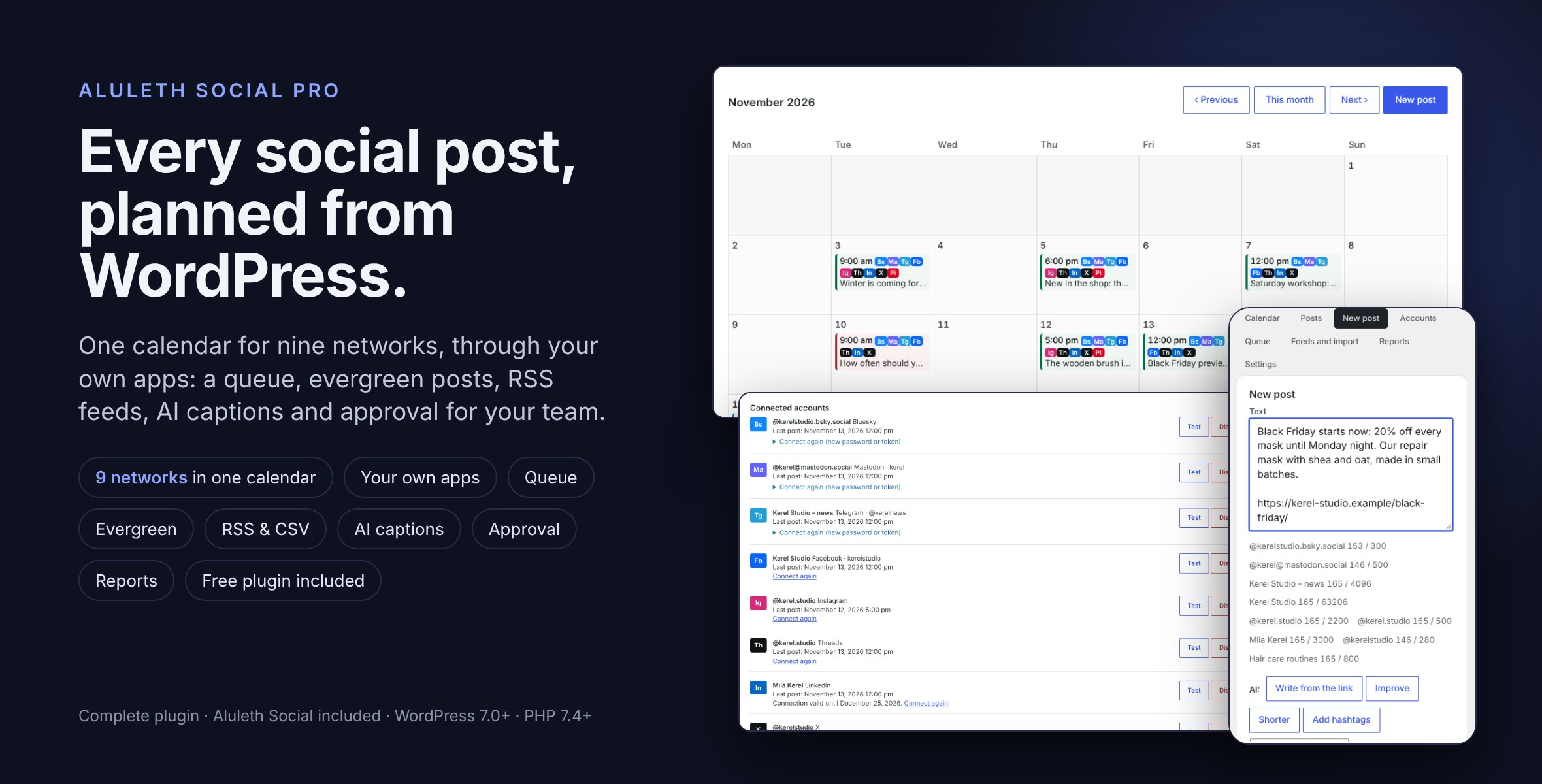
Aluleth Social Pro plans and publishes your social posts from your WordPress admin: Facebook Pages, Instagram, Threads, LinkedIn, X and Pinterest, plus Bluesky, Mastodon, Telegram, Discord and webhooks.
Before you buy – X costs: posting to X requires an X developer account with API access, and X bills that API usage separately, to your developer account, at X’s own prices (developer.x.com). The price of Aluleth Social Pro and the absence of per-post fees cover the plugin only: they do not include X’s charges or any other network’s charges.
Write a post once, give it its own text on any account, put it on the calendar or in the queue, and it goes out on time, with retries when a network is busy. New posts, pages and products can be shared as soon as they are published, older ones shared again, and RSS feeds turned into posts. Each network connects through a developer app of your own: your posts and tokens go straight from your site to the network, with nothing in between, and we add no fee per post or per account (network charges such as X’s API are separate, see above). It is a complete plugin: the free Aluleth Social is included, so nothing else is needed, and no licence key.
COSTS OF THE NETWORKS (READ BEFORE BUYING)
– X is billed by X, not by us: to post on X you need an X developer account with API access, and X bills the use of its API to that account, separately from this plugin and by X’s own prices (see developer.x.com). The price of Aluleth Social Pro and “no fee per post” cover the plugin only, never what a network charges.
– Facebook, Instagram, Threads, LinkedIn and Pinterest need a free developer app of your own (the account cards say how); check each network’s developer terms for their limits.
– Bluesky, Mastodon, Telegram, Discord and webhooks need no developer app.
INSTALLATION
1. In your WordPress admin, go to Plugins › Add New › Upload Plugin.
2. Choose the aluleth-social-pro-x.y.z-marketplace.zip file as you downloaded it (do not unzip it), click Install Now, then Activate.
3. In Aluleth › Social › Accounts, open a network: its card says how to make the app and gives the redirect address to paste in it. Bluesky, Mastodon, Telegram, Discord and webhooks need no app.
4. Paste the app ID and secret, save, click “Connect with …” and tick the Pages, profiles or boards to connect.
5. Write a post in New post, or plan it on the Calendar. To share new posts and products by themselves, choose them in Settings › Share on publish.
6. Updates: download the new version from WPBay and upload it the same way. WordPress replaces the current version and keeps your accounts, posts and settings.
COMPOSER AND CALENDAR
– One text for every account, or its own text on any of them, with a character counter per network and the network’s limit.
– An image with its alternative text, and a link card where the network makes one.
– Publish now, plan for a date in your site’s time zone, add to the queue or save a draft; a monthly calendar and a list of every post.
NETWORKS
– Facebook Pages, Instagram professional accounts, Threads, LinkedIn profiles, X and Pinterest boards, through your own developer apps; X, Threads and Pinterest logins are renewed by themselves.
– Bluesky (with links and hashtags that work), Mastodon, Telegram channels and groups, Discord and any webhook.
– As many accounts as you need on every network.
SENDING
– Posts go out on time with the WordPress scheduler; a busy network is tried again later; the reason of a refusal is shown for each account, with “Try again where it failed”.
– Links to your site get campaign tags (utm_source = the network), so your statistics show which network brought each visit.
QUEUE, EVERGREEN AND FEEDS
– A queue with your own time slots: “Add to the queue” takes the next free one.
– Evergreen posts: an older post or product shared again now and then, by your rules.
– New posts, pages and products shared on publish; RSS feeds that become posts each hour, one post per item even when checks overlap (an item that could not be posted is tried again, with the reason shown); a CSV import to plan many posts at once.
AI, TEAM AND REPORTS
– AI buttons in the composer: write from the link, improve, shorter, add hashtags, with Aluleth AI Writer or your own OpenAI key.
– Account groups and hashtag sets in one click.
– Approval: the posts of people without the approve access wait for an approver, who publishes them or sends them back with a note.
– Reports per account and per source, with a CSV file; visits and goals per network with Aluleth Insights.
PRIVACY
– Passwords and tokens are kept encrypted on your site and never shown again; deleted with the plugin when you choose so.
– No data about your visitors is collected; a suggested privacy policy text says what goes to the networks, and readme.txt lists each service.
Requirements
– WordPress 7.0+ and PHP 7.4+, with HTTPS to connect the networks that use an app.
– For Facebook, Instagram, Threads, LinkedIn, X and Pinterest: a developer app of your own on each (the account cards say how).
– For X: an X developer account with API access; X bills its API use to that account, separately.
– For the AI buttons: Aluleth AI Writer or an OpenAI key (optional).
Changelog:
Aluleth Social Pro 0.1.7 (includes Aluleth Social 0.1.4)
= 0.1.7 =
* X: the character count no longer calls mb_ord(), which WordPress 7.0 does not provide when the mbstring PHP extension is missing (a fatal error when composing, checking or scheduling an X post on such a server). Code points and graphemes are now read with PCRE (Aluleth Social 0.1.4), with the same rules as before (and the fix below): links 23, Latin and most European scripts 1, CJK and emoji 2. Checked on WordPress 7.0 with PHP 7.4 built without mbstring, ctype, intl and iconv.
* X: emoji written one after the other (🎉🎉🎉) were counted as one emoji (2) instead of 2 each, because of PCRE2 before 10.43 (PHP 7.4 and many PHP 8 builds): a post of 141 emoji was accepted, then refused by X. Each one now counts, as X counts them.
* Queue and CSV import: ctype_digit() (ctype extension, optional) is replaced by a check with PCRE.
* Needs Aluleth Social 0.1.4 or later; includes Aluleth Social 0.1.4.
Aluleth Social 0.1.4 (included as free/)
= 0.1.4 =
* Needs no mbstring, ctype or intl PHP extension beyond what WordPress itself provides (mb_substr and mb_strlen), on every supported version (7.0 and later). Cutting a text at a word called mb_strrpos(), which WordPress does not provide: on a server without mbstring the Calendar and Posts tabs stopped with a fatal error. Text helpers now use PCRE only: new Text::graphemes(), Text::code_points(), Text::ord() (the same number as mb_ord() for valid UTF-8) and Text::digits() (instead of ctype_digit()).
* Characters are counted by the Unicode rules on every server: PCRE2 before 10.43 (PHP 7.4 and many PHP 8 builds) kept emoji written one after the other (🎉🎉🎉) in one character and split a mark from a flag; both are corrected (checked against ICU on 150,000 random texts, with PHP 7.4 and 8.3). The length no longer depends on the intl extension, so a text has the same length on every server. A text with broken UTF-8 is counted with U+FFFD for each broken sequence.
* The read-only text of the share-on-publish box is written without an unescaped variable (Plugin Check).
= 0.1.6 =
* AI captions (includes/class-ai.php): Ai::source() reads the post row and checks it before any title or text is read: published, publicly viewable post type, no password, current_user_can( 'read_post' ) (shared check Posts::shareable). Otherwise nothing of the post is read and the person sees a message. With text typed by the person, a link to content that is not public is left out and only the typed text is sent. Limit of 30 AI requests per person in 10 minutes.
* Shared OAuth tokens (includes/class-apps.php, class-network-oauth.php, class-oauth.php): each shared connection has its own option row (aluleth_social_pro_conn_<md5>). Every write needs the renewal lock of that connection, checked again in the database before the write; without it nothing is written and a retryable error is returned. The row is read back and the real outcome goes to the renewal and to "Connect". A renewal that worked on the network but cannot be saved after three tries returns the error and marks the accounts "connect again". Connections of 0.1.5 are moved from the single option to their own rows (unused ones are not moved); a connection row is deleted when its last account is removed. Reconnecting an account holds the account renewal lock.
* Scheduling (free/includes/class-posts.php): see Aluleth Social 0.1.3 below. Errors are passed to every caller (composer, approval, share on publish, RSS, CSV import, evergreen) and shown.
* RSS recovery (includes/class-feeds.php): the social post of an item stores the key of its feed and item (dedupe column with a unique index, "rss:" + md5(feed|item)); recovery looks a post up by that key only. A claim is "p:<token>:<time>": only its holder settles or releases it, and a worker checks it still holds its claim right before creating the post. The feed lock is verified by a read-back and a run stops when it was taken over. Only http(s) item links are used.
* Queue slots (includes/class-queue.php, class-approval.php): a slot is reserved before the post is saved (INSERT IGNORE on alsocp_slot_YmdHi), completed with the post id or released when the save fails; a stale or unused reservation is free again. A queued approval draft reserves its slot at approval (the asked slot if free, else the next free one) and the approver sees the time kept. Approve and send back act only while the post still waits.
* CSV export (includes/class-reports.php, class-screen.php, readme): every matching delivery, read in batches of 1,000 by id below the newest id at the start, with no limit. A batch that cannot be read, or PHP stopping during the export, ends the file with an ERROR line. The screen and the readme describe it.
* Approval emails are sent once the post is saved, to all approvers in one email. While approval is on, only approvers and administrators manage accounts and apps (filter aluleth_social/can_manage_accounts).
* Evergreen: one run at a time (lock), noted only after success, failed run shown in the Queue tab, "Do not share it" respected, only public content.
* CSV import: same row imported again makes no second post (dedupe key); images need upload_files.
* Settings: read fresh before saving; items over their limit or incomplete are reported; app saves are checked.
* LinkedIn and Threads: a renewal failing for a moment (timeout, 429, 5xx) is retried later.
* OAuth state and account pick are used once each.
* Uninstall also removes the logins of Pro-network accounts, the connection rows, the queue reservations, the evergreen lock and error.
Aluleth Social 0.1.3 (included as free/)
= 0.1.3 =
* A post and its deliveries are saved together, in one database transaction (with a check of every write, and the rows put back by hand on tables without transactions): when a delivery or the post cannot be written, nothing is planned and the error is shown; a change that cannot be saved keeps the post and its deliveries as they were. Only deliveries that have not started are replaced, and a post is changed only if nobody changed it since it was read.
* "Publish now" no longer rewrites the deliveries: the waiting ones become due at once. A post with a delivery being sent cannot be deleted, cancel only stops what waits, and "Try again" shows the real result.
* The status of a post is checked again after it is written, so two deliveries that finish at the same moment leave the right status, and "post done" fires once.
* A send stopped by the server (time limit, crash) counts as a try: it waits like a failed try, says the post may already be on the network, and fails for good after the last try instead of being sent again every 15 minutes. A delivery whose result cannot be saved is written again.
* Shared content is checked again just before each network gets it: a post made private, a draft, given a password or deleted meanwhile is not sent. Images must be public too (an image of a draft page is refused with a message), and an image that cannot be prepared for a network stops that delivery with a message, instead of sending the text alone.
* Share on publish: one social post per content, even when two requests publish it (a unique key); content that is not public is never shared; why a content was not shared is shown in its box. The box text is compared once filled, so a text with placeholders is no longer rewritten after publishing.
* The composer form sent twice (double click, back button) makes one post.
* Disconnecting an account: a post being sent finishes, the posts left without accounts show as cancelled, and when share on publish used only this account it is turned off (an empty list would have meant every account). Connect again reports a failed save.
* Settings are read again before they are saved, and a save that did not go through is reported.
* New filters aluleth_social/shareable, aluleth_social/public_image and aluleth_social/can_manage_accounts, actions aluleth_social/post_saved, aluleth_social/save_failed and aluleth_social/account_removed.
* Database: a dedupe column (unique) on posts. The version of the tables is noted only once the column exists.
Aluleth Social Pro 0.1.5 (includes Aluleth Social 0.1.2)
= 0.1.5 =
* Token renewal (includes/class-network-oauth.php): Network_OAuth::token() holds an atomic lock per account, or per shared connection, before renewing: one INSERT IGNORE on a unique option name (alsocp_renew_a<account> / alsocp_renew_c<md5 of the connection>), the same on MySQL, MariaDB and SQLite. With the lock held, it reads the persisted credentials again (Accounts::get / Apps::tokens with a fresh read) and checks their expiry again; it renews only if they still need it. The lock is released in a finally block, only by its holder (random token match). A lock older than 120 s, left by a stopped request, is taken over with a compare-and-swap UPDATE.
* A request that finds the lock held waits up to 20 s (filter aluleth_social_pro/renew_wait), rereading the saved credentials, and posts with the new ones as soon as they are saved. If the renewal is still running after that, it returns a retryable error: the delivery stays queued and the account is not marked as needing a new login.
* Shared connections (several Pinterest boards on one login): Apps::keep_tokens() rereads and writes the option under a short lock, so two connections renewed at once keep both new tokens.
* Threads: its 7-day renewal rule is now the overridable needs_renewal() check (it no longer edits the account copy), so it uses the same lock and recheck.
* Uninstall also removes the renewal locks. The included free Aluleth Social is unchanged (0.1.2).
= 0.1.4 =
* RSS feeds: checks never overlap.
- The hourly check and "Check the feeds now" first take an atomic lock: one INSERT IGNORE on a unique option name, the same on MySQL, MariaDB and SQLite.
- Once the lock is held, the feeds are read afresh, so the state is never a copy read before the lock.
- The lock is released in a finally block, only by the request that holds it.
- A second check meanwhile is refused, with "The feeds are being checked right now".
- A lock left by a worker that stopped half-way is taken over after 15 minutes by a compare-and-swap UPDATE.
* RSS feeds, one post per feed and item:
- before its social post is created, each item gets a claim, a row with a unique name per feed and item;
- after the post is created, the claim stores the post id;
- a worker interrupted between the post and the feed state does not cause a second post: the next check finds the post through the claim and notes the item;
- an item whose post could not be made gives its claim back and is tried again.
* RSS feeds: each feed's state (items noted, tries, error) is saved right after that feed is checked, merged into the feeds as saved at that moment. A feed edited during a check keeps the edit.
* Uninstall also deletes the lock and the item claims.
* Listing: the description now states at the top that posting to X requires an X developer account with API access, that X bills that usage separately, and that the plugin's price and the absence of per-post fees do not include network charges.
= 0.1.3 =
* RSS feeds: the items already in a feed are noted on its first successful read only (a feed that did not answer is not counted as read). After that, an item is noted as handled only once its social post was created: items over the limit of a run (three per feed and hour), items waiting for an account that can post, and posts a network rule refused stay for the next checks. The reason is shown on the feed in Feeds and import; an item refused five times is left out, and the feed says so.
* RSS feeds: what was already handled is kept by the plugin when the feeds are saved, never taken from the form.
* Costs of the networks: the description, the X network and the FAQ now say plainly that X bills the use of its API separately, to your own X developer account (needed to post on X), and that the plugin's price and "no fee per post" do not cover what X charges.
= 0.1.2 =
* Approval can no longer be bypassed through Share on publish: while posts need approval, only approvers ("Social: approve posts") and administrators can save Aluleth › Social › Settings (the share on publish texts, contents, accounts and delay, which share on publish and evergreen use to publish by themselves). Anyone else gets "Only an approver can change these settings while posts need approval…" and nothing stored changes.
* Social › Settings is shown read-only to those users, with the reason and no Save button.
* The same rule for the editor box: while posts need approval, the own text of the "Aluleth Social" box is read-only for people who are not approvers, and a content they publish is shared with the text an approver set or the template an approver set. Turning the share off stays possible.
* Evergreen ("Share one older content now" and the timed runs) uses the template an approver set.
* Includes Aluleth Social 0.1.2, which adds the filters used for this (aluleth_social/settings_refused, aluleth_social/settings_locked, aluleth_social/box_locked).
= 0.1.1 =
* Shared Aluleth core 0.19.0: the parts of the core this social scheduler does not use are off. Aluleth › Contacts, Import, the contacts Dashboard and Aluleth › Connections are not shown, Settings › Security (form spam settings and captcha services) is not shown, and Aluleth › Settings opens on Access, then Data and privacy. The shared contact, consent, suppression and send-queue tables are not created, and the core's outside services cannot be reached. These parts come back only when another Aluleth plugin that uses them is active.
* External services: readme.txt lists every service the plugin can reach, the networks of the included Aluleth Social too (Bluesky, Mastodon, Telegram, Discord, webhooks), and says that the shared core contacts none.
* Installation: the included Aluleth Social file (free/aluleth-social.php) no longer has a plugin header, so WordPress sees one plugin in the folder and the Activate link after an upload activates aluleth-social-pro/aluleth-social-pro.php.
= 0.1.0 =
* First release on WPBay: one complete plugin, the free Aluleth Social 0.1.0 is included (nothing else to install, no licence key). If Aluleth Social is already installed as its own plugin, that one is used with its accounts and posts.
* Composer with a text for each account and character counters, a monthly calendar, posts sent on time with retries, posts, pages and products shared on publish, campaign tags on links, and Bluesky, Mastodon, Telegram, Discord and webhook accounts.
* Facebook Pages, Instagram, Threads, LinkedIn, X and Pinterest through the site owner's own developer apps, with logins renewed by themselves.
* Queue with time slots, evergreen posts, RSS feeds, CSV import, AI captions (Aluleth AI Writer or the owner's own OpenAI key), account groups, hashtag sets, approval for the team and reports per account.
Only logged in customers who have purchased this product may leave a review.
Loading...
WPBay support
 Support by Aluleth
Aluleth supports this product through WPBay
Questions are handled in WPBay's private ticket system, keeping your purchase details and support conversation together.
Go to My Downloads
After purchase, open this item in My Downloads and choose Get Support.
What support includes
- Answers to product-related questions
- Help with reported bugs and issues
- Guidance for included third-party assets
What support does not include
- Customizations or new features
- Installation or setup services
Plugin
Maintenance snapshot
See recent updates, compatibility, support, and developer activity.
- Updated today
- Developer active recently
- WPBay support available
- WordPress 7.1 tested
Snapshot updated 16 hours ago
View details Hide details
Maintenance details
This is maintenance data. It does not measure product quality or sales.
- Last update Updated today
- Compatibility WordPress 7.1 tested · PHP 8.3 tested, one version behind · WooCommerce 11 tested
- Releases 8 releases in the 6 days since listing
- Developer activity Developer active recently
- Support No recent support tickets to measure
- Docs and demo Documentation available · Changelog available · Demo available
Health remained stable during the last 90 days.
How this snapshot works
Plugin Health
The score is out of 100 and uses data WPBay can check. Ratings, popularity, and sales are not used.
- Last update 30 points
-
Plugins receive full recency points under 30 days, then step down at 90, 180, 365, and 545 days.
- Compatibility 20 points
-
WordPress, PHP, and WooCommerce (when relevant) are scored separately. The latest two PHP lines count as current. Nearby previous versions keep most of the points.
- Current version 100%
- One version behind 75%
- Two versions behind 50%
- Three versions behind 25%
- Older or not listed 0%
- Releases 15 points
-
One release earns 10, two or three earn 13, and four or more earn 15. Each accepted product ZIP counts once; reprocessing the same upload and listing-only edits do not count.
- Developer activity 15 points
-
Based on WPBay login and dashboard activity. Exact last-login dates are never shown.
- Support 15 points
-
There are no recent WPBay tickets to measure.
- Docs and demo 5 points
-
Documentation: 2. Changelog: 1. Working demo or preview: 2.
Score ranges
- 90–100 Excellent
- 75–89 Healthy
- 60–74 Fair
- 40–59 Needs attention
- 0–39 Limited
Long gaps
WPBay also checks for long gaps between updates, developer activity, support replies, and releases. Buyers do not see this score.
- Time since update 35 points
- Last developer activity 25 points
- WordPress compatibility 15 points
- Support replies 15 points
- Fewer releases 10 points
-
Quality verified by WPBay
WPBay review- Reviewed version
- 0.1.7
- Review completed
- Reviewer
- CodeRevolution
- Review type
- Initial
No unresolved approval blocker was identified during WPBay’s proportionate review of this release. This is not a security certification or a guarantee that the product contains no defects.
-
 Future updates
-
WPBay support from Aluleth
-
GPL code, proprietary assets
-
Covered by the WPBay refund policy
-
Plugin maintenance snapshot
Relevant picks
You may also like
Similar products selected by category, features, popularity and freshness.


From this seller
View seller store
More by Aluleth
Explore more bestselling products from this creator.
Reviews
There are no reviews yet.