


PosLite — Simple Point of Sale PHP Script

 Recently Updated
Well Documented
Overview
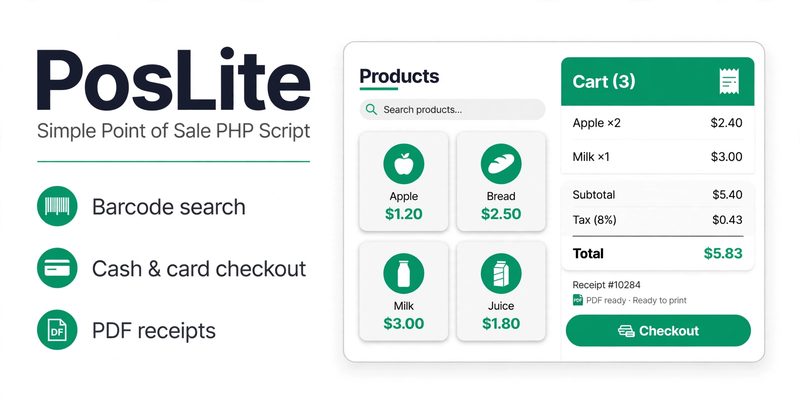
PosLite — Simple Point of Sale PHP Script is a self-hosted POS system in plain PHP with no framework and no monthly fee. Run a small shop, market stall or pop-up store: keep a product catalogue with categories, SKUs and barcodes, ring up sales in the POS terminal, take cash or card, and print or download a PDF receipt for every sale. Your products and sales stay on your own server. Money is exact — every amount is stored and calculated as integer cents, so a total is never off by a cent.
Features
- Product catalogue CRUD: create, view, edit (name, category, SKU, barcode, price, cost, stock) and delete
- Categories CRUD: create, rename and delete (deleting a category keeps its products — they become uncategorised); each delete is its own form with a category-specific label
- POS terminal: search by name, SKU or barcode, click product tiles to add to the cart — the cart is repriced from live product prices whenever the screen loads, so a price changed mid-sale is applied and the operator is told, instead of checkout failing on a stale total
- Cart with quantity controls, per-sale discount % and tax %, live totals — quantities validated against live stock at add, at quantity change and at checkout
- Atomic checkout by cash (with cash received and change due) or card: stock, sale and sale items commit together or roll back together; sale numbers unique even under concurrency; works in SQLite and MySQL. Checkout is bound to the cart revision and the total you confirmed, and carries an idempotency key — a retried checkout returns the original receipt instead of a second sale. Cash equal to the total is always accepted (exact-cent comparison, no rounding epsilon)
- Card payments are taken separately on your card terminal or reader first — PosLite only records the sale
- Receipt view with print button and real PDF download (built-in PDF generator with the bundled DejaVu Sans font, no external library) — item names print in full (wrapped, never cut off), accented / Greek / Cyrillic text and currency symbols (for example €) render as themselves; long receipts paginate
- Sales history by day with daily totals for the last 14 calendar days in your store’s reporting timezone (days with no sales show 0)
- Dashboard with today’s sales, all-time total, top sellers and low-stock alerts
- Low-stock alerts: products at 5 units or fewer are flagged; stock drops automatically on every sale
- Admin login with bcrypt-hashed passwords, CSRF protection, session rotation on login and login throttling (5 failed attempts = 15-minute lock); change the password any time under Settings — no default password ships; password change rejects common passwords and signs out other sessions
- SQLite database stored outside the document root by default, in a folder unique to this install, so it can never be downloaded from the web and two installs never share a database; in-docroot locations are accepted only when the installer PROVES the folder denies web access with a real HTTP request — it writes a probe file shaped like the database file into that folder and requires a 403/404 answer for it (a deny rule on paper is never enough; the verification is recorded and the app refuses to connect to an in-docroot database without it); the .htaccess guard is Apache-only (AllowOverride must be on); on Nginx add the deny rule first, including the dotfile rule (location ~ /\.(?!well-known) { deny all; }) so files such as .setup-token are denied too, and the PHP built-in server refuses in-docroot storage
- SQLite by default (zero setup) or MySQL via the installer (MySQL 5.7 / 8.0, MariaDB 10.4+)
- Web installer that requires a setup token only the deployment owner can read — the token (and the setup lock) live in the folder above the document root regardless of where the database is, so they can never be downloaded from the web — checks requirements, publishes config.php atomically last, creates the tables and seeds demo products; a failed install never deletes a pre-existing database. Older databases upgrade in place (install.php or admin/upgrade.php) without losing products, sales or the admin account; an outdated database shows a friendly ‘Database upgrade required’ page with a link to admin/upgrade.php instead of an error
Requirements
- PHP 8.1 or newer with PDO and pdo_sqlite (SQLite mode) or pdo_mysql (MySQL mode).
- Apache, Nginx, or the PHP built-in server. A writable app folder and a writable parent folder (for SQLite storage outside the web root).
Instructions
- Unzip main.zip and upload the files to your web hosting.
- Open http://your-domain/install.php in your browser.
- Read the setup token from the file the installer names on your server (file manager / FTP / SSH) and paste it into the form — anonymous setup is refused by design.
- Enter your store name, email, currency symbol and reporting timezone.
- Choose SQLite (recommended) or MySQL and enter your database details if needed.
- Set your admin username and choose a strong password (at least 8 characters; common passwords such as “admin123” are rejected). There is no default password.
- Click “Install PosLite”, then delete install.php for security.
- Log in at admin/login.php, add your products, and make your first sale in the POS terminal.
Changelog
v1.1.4 — 2026-11-21 — WPBay review fixes (wave 9): a retried checkout now returns the original receipt — the idempotency-key lookup runs against sales BEFORE the cart/revision/total guards, so resubmitting the same checkout POST (back/refresh or a second identical submit) shows the original receipt with the ‘sale already completed, no second sale’ notice, exactly one sales row and unchanged stock, instead of a stale-cart error (the guard messages also now state clearly that nothing was recorded); the setup token and lock now live OUTSIDE any web-reachable folder regardless of where the database is (in the folder above the document root that also holds the default SQLite file) — they no longer sit in the database folder, where a token could be downloaded on Nginx when SQLite storage is in a public folder; the documented Nginx rule is extended to cover dotfiles (location ~ /\.(?!well-known) { deny all; }), and the ‘lives outside the document root’ wording is corrected to the actual token location; an outdated database no longer yields an uncaught exception on the admin pages — a shared helper catches the upgrade exception and renders a friendly ‘Database upgrade required’ page with a link to admin/upgrade.php (the dashboard and settings upgrade banners, which could never render because db() threw first, are removed as dead code).
v1.1.3 — 2026-11-21 — WPBay review fixes (wave 8): login now works on a database that still needs its upgrade — the login check uses the version-independent connection and tolerates the session_version column not existing yet, so the admin can log in and reach admin/upgrade.php (a successful login on such a database sends the admin straight to the upgrade page); dashboard, POS, products, sales and receipt pages still refuse to run until the migration runs (“Database upgrade required”). The POS cart is repriced from live product prices before the totals render — a price changed after a product was added no longer leaves checkout failing forever on a stale total; the cart is refreshed on every render, the operator is told what changed, and the cart revision is bumped so the form posts the new total. In-docroot SQLite storage is now proven with a probe file: the installer writes a probe file shaped like the database file (poslite-probe-*.sqlite) into the folder and requires a 403/404 answer for it — the old check requested the database file itself, which does not exist yet on a fresh install, so a new location could never be verified; the verification is recorded (.protection-verified) and the database connection refuses an in-docroot location without it, re-probing once when the marker is missing; guard-file contents alone are never accepted as proof. Schema version stays 1.1.2 — no database change in this release.
v1.1.2 — 2026-11-20 — WPBay review fixes: MySQL installs are retry-safe — lookup indexes are created only when absent (information_schema check) and only after config.php is published, seed data is added only when missing (exactly 1 admin, 3 categories, 6 demo products after any retry), and a failed install now states exactly which artifacts remain; in-docroot SQLite storage is accepted only when the installer verifies by a real HTTP request that the database file is denied (403/404) — the .htaccess guard is Apache-only, Nginx needs the deny rule first, php -S refuses in-docroot storage, and deny files are never written into the document root itself; failed-login rows below the lock threshold are now pruned by age (older than 1 day, UTC), so the login_attempts table stays bounded.
v1.1.1 — 2026-11-20 — WPBay review fixes: money is now integer cents everywhere (no float rounding, no epsilon in the cash check); checkout bound to cart revision + confirmed total with an idempotency key (a retry returns the original receipt); login throttling (5 failed = 15-minute lock), session rotation, hardened cookies, fail-closed CSRF, CSRF-protected POST logout; password change rejects common passwords and signs out other sessions; setup-token installer, atomic config published last, DDL separated from transactional seeding, never deletes a pre-existing database; in-place database upgrades (install.php / admin/upgrade.php); instance-specific SQLite storage with verified deny guards; receipt PDFs embed DejaVu Sans — full item names, accented / Greek / Cyrillic text and € render as themselves; daily totals are the last 14 calendar days in the store’s reporting timezone (Settings, default UTC); category delete forms un-nested with category-specific labels; card payments taken separately before recording; no screenshots claimed (none ship in the package); no default login claimed. No live demo yet — a hosted PHP demo will be arranged at upload time.
v1.1.0 — 2026-11-18 — WPBay review fixes: SQLite database outside the document root by default (protected fallback); no default password — installer requires a strong password (min 8 chars) and a Settings page changes it; failed installs roll back and can be re-run; checkout is one transaction and MySQL-safe (SQLite-only MAX() replaced with portable SQL); sale numbers unique under concurrency; cart quantities validated against live stock; category/product CRUD completed; receipt PDFs transliterate non-ASCII and paginate; lists paginated; Troubleshooting section + WPBay support route added.
v1.0.0 — 2026-11-17 — Initial release.
Changelog:
v1.1.4 — 2026-11-21 — WPBay review fixes (wave 9): a retried checkout now returns the original receipt — the idempotency-key lookup runs against sales BEFORE the cart/revision/total guards, so resubmitting the same checkout POST (back/refresh or a second identical submit) shows the original receipt with the 'sale already completed, no second sale' notice, exactly one sales row and unchanged stock, instead of a stale-cart error (the guard messages also now state clearly that nothing was recorded); the setup token and lock now live OUTSIDE any web-reachable folder regardless of where the database is (in the folder above the document root that also holds the default SQLite file) — they no longer sit in the database folder, where a token could be downloaded on Nginx when SQLite storage is in a public folder; the documented Nginx rule is extended to cover dotfiles (location ~ /\.(?!well-known) { deny all; }), and the 'lives outside the document root' wording is corrected to the actual token location; an outdated database no longer yields an uncaught exception on the admin pages — a shared helper catches the upgrade exception and renders a friendly 'Database upgrade required' page with a link to admin/upgrade.php (the dashboard and settings upgrade banners, which could never render because db() threw first, are removed as dead code).
Only logged in customers who have purchased this product may leave a review.
Loading...
WPBay support
 Support by Digishop
Digishop supports this product through WPBay
Questions are handled in WPBay's private ticket system, keeping your purchase details and support conversation together.
Go to My Downloads
After purchase, open this item in My Downloads and choose Get Support.
What support includes
- Answers to product-related questions
- Help with reported bugs and issues
- Guidance for included third-party assets
What support does not include
- Customizations or new features
- Installation or setup services
Script
Maintenance snapshot
See recent updates, compatibility, support, and developer activity.
- Updated today
- Developer active recently
- WPBay support available
- Documentation available
Snapshot updated 21 hours ago
View details Hide details
Maintenance details
This is maintenance data. It does not measure product quality or sales.
- Last update Updated today
- Compatibility Not used for scripts
- Releases 6 releases in the 4 days since listing
- Developer activity Developer active recently
- Support No recent support tickets to measure
- Docs and demo Documentation available · Changelog available · No demo listed
How this snapshot works
Script Health
The score is out of 100 and uses data WPBay can check. Ratings, popularity, and sales are not used.
- Last update 35 points
-
Scripts receive full recency points under 45 days, then step down at 120, 240, 365, and 545 days.
- Compatibility Not scored
-
Scripts do not use WordPress or PHP, so compatibility is not scored.
- Releases 20 points
-
One release earns 14, two or three earn 18, and four or more earn 20. Each accepted product ZIP counts once; reprocessing the same upload and listing-only edits do not count.
- Developer activity 20 points
-
Based on WPBay login and dashboard activity. Exact last-login dates are never shown.
- Support 15 points
-
There are no recent WPBay tickets to measure.
- Docs and demo 10 points
-
Documentation: 3. Changelog: 1. Working demo or preview: 6.
Score ranges
- 90–100 Excellent
- 75–89 Healthy
- 60–74 Fair
- 40–59 Needs attention
- 0–39 Limited
Long gaps
WPBay also checks for long gaps between updates, developer activity, support replies, and releases. Buyers do not see this score.
- Time since update 45 points
- Last developer activity 30 points
- WordPress compatibility Not scored
- Support replies 15 points
- Fewer releases 10 points
-
Quality verified by WPBay
WPBay review- Reviewed version
- Current release
- Review completed
- Reviewer
- CodeRevolution
- Review type
- Initial
No unresolved approval blocker was identified during WPBay’s proportionate review of this release. This is not a security certification or a guarantee that the product contains no defects.
-
 Future updates
-
WPBay support from Digishop
-
GPL code, proprietary assets
-
Covered by the WPBay refund policy
-
Script maintenance snapshot
Relevant picks
You may also like
Similar products selected by category, features, popularity and freshness.

From this seller
View seller store
More by Digishop
Explore more bestselling products from this creator.



Reviews
There are no reviews yet.