



Aluleth Appointments Pro – Online Booking with Calendar Sync, Video and Deposits

 Recently Updated
Well Documented
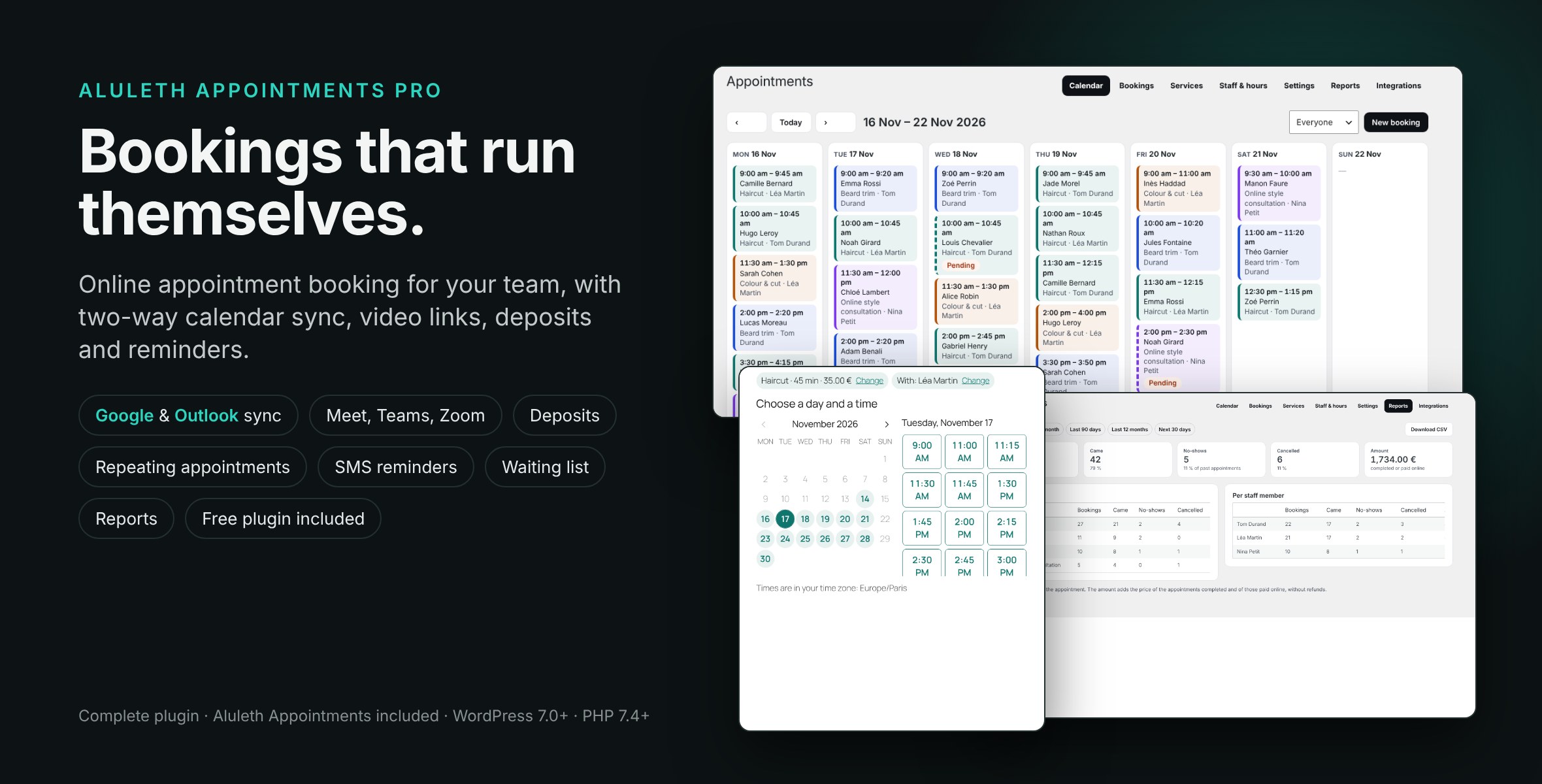
Online appointment booking for your team: Google Calendar and Outlook sync, Meet, Teams and Zoom links, deposits, SMS reminders. Complete plugin, no licence key.
Aluleth Appointments Pro lets your customers book a time with you from your site: a haircut, a consultation, a lesson, a call. They choose the service, the person (or anyone free), a day and a time in their own time zone, and get a confirmation with a calendar file and a private link to cancel or move. Your team sees everything in a weekly calendar, and each staff member’s own Google or Outlook calendar stays in sync both ways. Video links, deposits, appointments that repeat, text messages and a waiting list come with it. Everything runs on your own site with your own keys: no outside booking service, no fee per booking. It is a complete plugin: the free Aluleth Appointments is included, so nothing else is needed, and no licence key.
INSTALLATION
1. In your WordPress admin, go to Plugins › Add New › Upload Plugin.
2. Choose the aluleth-appointments-pro-x.y.z-marketplace.zip file as you downloaded it (do not unzip it), click Install Now, then Activate.
3. In Aluleth › Appointments › Staff & hours, add the people who give the appointments and their hours; then add your services under Services.
4. Add the “Book an appointment” block (or the [aluleth_appointments] shortcode) to a page and choose it in Settings.
5. For calendar sync, video and text messages, enter your own Google, Microsoft, Zoom or Twilio keys in Integrations (each box says where to find them).
6. Updates: download the new version from WPBay and upload it the same way. WordPress replaces the current version and keeps your services, staff, bookings and settings.
BOOKING FORM
– A block or a shortcode on any page, in four short steps that work on phones and with a keyboard: service, person (or anyone free), day and time, details.
– Times in the visitor’s own time zone; your admin keeps your site’s time zone.
– Phone not asked, optional or required; notes; a terms box; your accent colour.
SERVICES AND STAFF
– Length, price, free time before and after, start times every 5 to 90 minutes, how long in advance people can book; groups and classes.
– Each person has weekly hours with breaks and days off; closing days for the whole team; “Anyone free” balances the day.
– Bookings you confirm yourself, or confirmed at once.
EMAILS AND SELF-SERVICE
– Confirmation, change, cancellation and reminder emails in the customer’s language, with a calendar file and Google and Outlook links.
– A private link in every email to see, cancel or move the appointment, until the number of hours you choose.
– An email to the staff member and to your addresses for each booking.
PAID SERVICES AND DEPOSITS
– Payment at the appointment, or online when booking with WooCommerce, FluentCart or Aluleth Commerce and your shop’s payment methods.
– Deposits: a percentage or a fixed amount when booking, the rest at the appointment.
– The time is kept while the customer pays and given back if the payment does not come; a refund cancels the appointment.
CALENDAR SYNC AND VIDEO
– Each staff member connects their own Google Calendar or Microsoft Outlook: their events block the times, and appointments go into their calendar, moved or removed with it.
– Google Meet or Microsoft Teams links made with the event, Zoom meetings through your own Zoom app, or a fixed link.
MORE
– Appointments that repeat every week, two weeks or month, up to 12 times, every date checked first.
– SMS or WhatsApp confirmations and reminders through your own Twilio account.
– A waiting list when a month is full; a “My appointments” page for your customers.
– Reports per period, service and staff member, with a CSV file; WP-CLI commands.
PRIVACY
– Personal data export and erase with the WordPress tools, a suggested privacy policy text.
– Customer details go only to the services you turn on (the staff member’s calendar, Zoom, Twilio), listed in readme.txt.
Requirements
– WordPress 7.0+ and PHP 7.4+.
– For online payment: WooCommerce, FluentCart or Aluleth Commerce (optional).
– For calendar sync, video and text messages: your own Google Cloud, Microsoft Entra, Zoom or Twilio account.
DOCUMENTATION (External URL)
Aluleth Appointments documentationLIVE DEMO
Kerel Studio
Changelog:
Aluleth Appointments Pro 0.1.2 (includes Aluleth Appointments 0.1.1)
= 0.1.2 =
* Installation: the included Aluleth Appointments file (free/aluleth-appointments.php) no longer has a plugin header. WordPress now sees a single plugin in the folder, so the Activate link after Plugins > Add New > Upload Plugin activates aluleth-appointments-pro/aluleth-appointments-pro.php. Before, it pointed to the included file and failed with "The plugin does not have a valid header". The separate Aluleth Appointments plugin keeps its normal header.
= 0.1.1 =
* Uninstall: the included Aluleth Appointments now runs its own clean-up on every site. Services, staff, hours, bookings and settings are deleted only when the owner chose so in Aluleth › Settings › Data and privacy, and never while Aluleth Appointments is still installed as its own plugin.
* Loading: the copy to run is chosen once every plugin is loaded, so an Aluleth Appointments installed as its own plugin always runs instead of the included one; when it is deactivated, the included copy takes over with the same data. Activation and deactivation follow the same choice.
* French: the shared Aluleth screens (Dashboard, Contacts, Import, Connections, Access, Security, Data and privacy) are now fully translated.
* Readme and plugin description written for this complete package: one zip to upload, setup steps, the standalone case, troubleshooting and support.
* WhatsApp: messages go out with the templates approved by Meta (one Content SID each for the confirmation, the reminder and the cancellation). SMS are unchanged.
* Translations load from the plugin's own languages folder, also after a switch to the customer's language.
= 0.1.0 =
* First release on WPBay: one complete plugin, the free Aluleth Appointments 0.1.1 is included (nothing else to install, no licence key). If Aluleth Appointments is already installed as its own plugin, that one is used with its services, staff and bookings.
* Booking form (block and shortcode) in the visitor's time zone, services, staff hours and days off, groups and classes, confirmation and reminder emails with calendar files, a private link to cancel or move, weekly calendar and bookings in the admin.
* Paid services with WooCommerce, FluentCart or Aluleth Commerce, and deposits.
* Two-way Google Calendar and Outlook sync, Google Meet, Teams and Zoom links, appointments that repeat, SMS and WhatsApp through Twilio, a waiting list, My appointments and reports.
Only logged in customers who have purchased this product may leave a review.
Loading...
WPBay support
 Support by Aluleth
Aluleth supports this product through WPBay
Questions are handled in WPBay's private ticket system, keeping your purchase details and support conversation together.
Go to My Downloads
After purchase, open this item in My Downloads and choose Get Support.
What support includes
- Answers to product-related questions
- Help with reported bugs and issues
- Guidance for included third-party assets
What support does not include
- Customizations or new features
- Installation or setup services
Plugin
Maintenance snapshot
See recent updates, compatibility, support, and developer activity.
- Updated today
- Developer active recently
- WPBay support available
- WordPress 7.1 tested
Snapshot updated 4 hours ago
View details Hide details
Maintenance details
This is maintenance data. It does not measure product quality or sales.
- Last update Updated today
- Compatibility WordPress 7.1 tested · PHP 8.3 tested, one version behind · WooCommerce 11 tested
- Releases 3 releases in the 1 days since listing
- Developer activity Developer active recently
- Support No recent support tickets to measure
- Docs and demo Documentation available · Changelog available · Demo available
How this snapshot works
Plugin Health
The score is out of 100 and uses data WPBay can check. Ratings, popularity, and sales are not used.
- Last update 30 points
-
Plugins receive full recency points under 30 days, then step down at 90, 180, 365, and 545 days.
- Compatibility 20 points
-
WordPress, PHP, and WooCommerce (when relevant) are scored separately. The latest two PHP lines count as current. Nearby previous versions keep most of the points.
- Current version 100%
- One version behind 75%
- Two versions behind 50%
- Three versions behind 25%
- Older or not listed 0%
- Releases 15 points
-
One release earns 10, two or three earn 13, and four or more earn 15. Each accepted product ZIP counts once; reprocessing the same upload and listing-only edits do not count.
- Developer activity 15 points
-
Based on WPBay login and dashboard activity. Exact last-login dates are never shown.
- Support 15 points
-
There are no recent WPBay tickets to measure.
- Docs and demo 5 points
-
Documentation: 2. Changelog: 1. Working demo or preview: 2.
Score ranges
- 90–100 Excellent
- 75–89 Healthy
- 60–74 Fair
- 40–59 Needs attention
- 0–39 Limited
Long gaps
WPBay also checks for long gaps between updates, developer activity, support replies, and releases. Buyers do not see this score.
- Time since update 35 points
- Last developer activity 25 points
- WordPress compatibility 15 points
- Support replies 15 points
- Fewer releases 10 points
-
Quality verified by WPBay
WPBay review- Reviewed version
- 0.1.2
- Review completed
- Reviewer
- CodeRevolution
- Review type
- Initial
No unresolved approval blocker was identified during WPBay’s proportionate review of this release. This is not a security certification or a guarantee that the product contains no defects.
-
 Future updates
-
WPBay support from Aluleth
-
GPL code, proprietary assets
-
Covered by the WPBay refund policy
-
Plugin maintenance snapshot
Relevant picks
You may also like
Similar products selected by category, features, popularity and freshness.

From this seller
View seller store
More by Aluleth
Explore more bestselling products from this creator.
Reviews
There are no reviews yet.