


Aluleth Forms Pro – Order Forms, Quizzes & Surveys for WordPress

 Recently Updated
Well Documented
Recently Updated
Well Documented
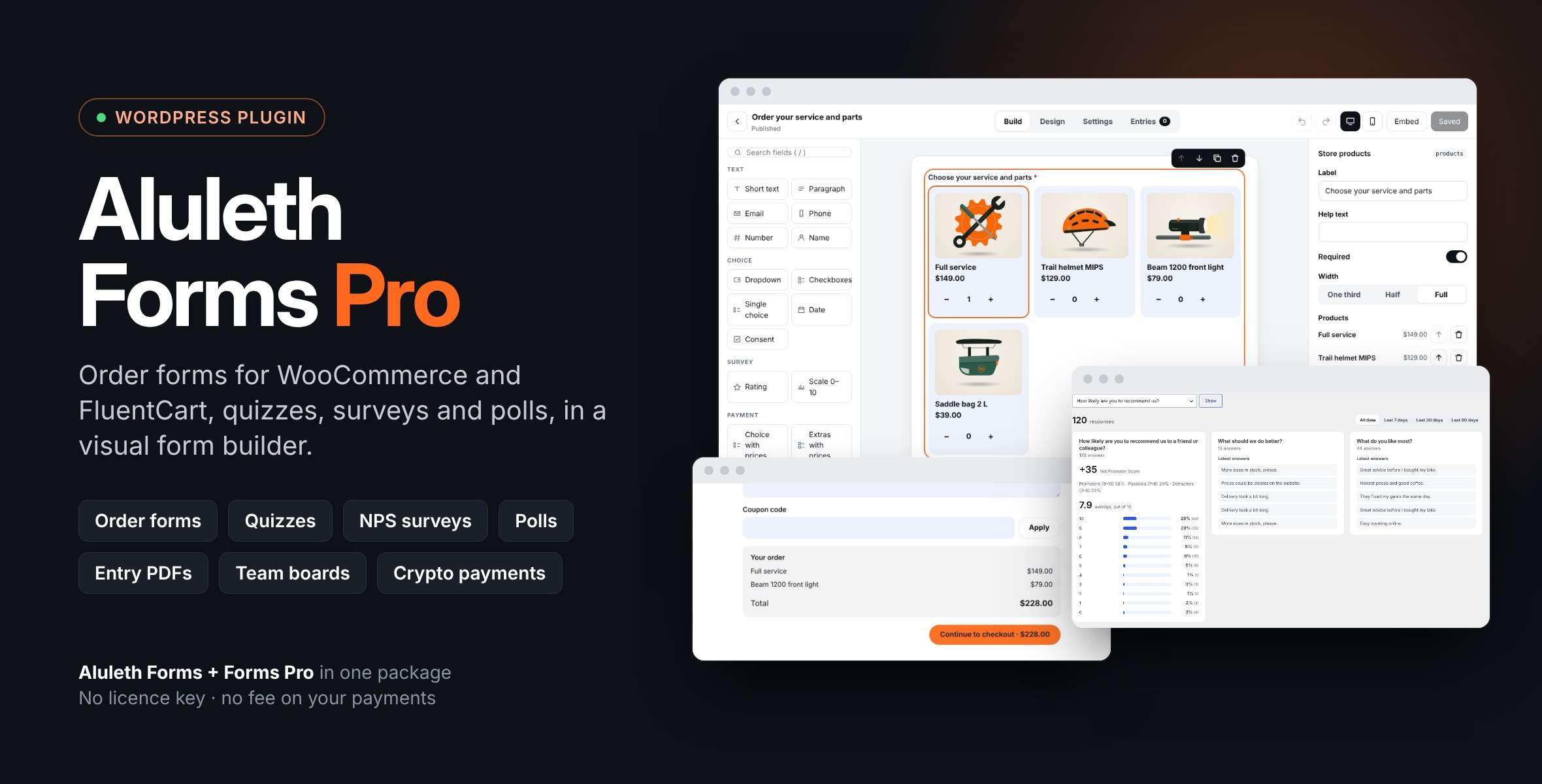
A complete form builder plugin with WooCommerce and FluentCart order forms, PayPal and crypto payments, quizzes, NPS surveys, polls, entry PDFs and team boards. One plugin, no licence key, no fee on your payments.
Aluleth Forms Pro is a complete plugin: it includes Aluleth Forms 0.19.5, the form builder, and adds the Pro features. There is nothing else to install and no licence key to enter: everything is on as soon as the plugin is active.
INSTALLATION 1. In your WordPress admin, go to Plugins › Add New › Upload Plugin. 2. Choose the aluleth-forms-pro-x.y.z.zip file as you downloaded it (do not unzip it), click Install Now, then Activate. 3. Open Aluleth › Forms: a first contact form is ready, and the Pro designs, fields and settings are there. 4. For order forms, install WooCommerce or FluentCart; for PayPal or crypto payments, add your keys in Aluleth › Settings › Payments.
Already using the separate Aluleth Forms plugin? Leave it active: Aluleth Forms Pro then uses it instead of its included copy, with your forms, entries and settings. It must be version 0.19.5 or newer. With an older version your forms keep working, but the Pro features stay off and a notice asks you to update Aluleth Forms; update it, or deactivate it and the included copy takes over with the same forms, entries and settings.
To update, upload the new zip the same way: WordPress offers to replace the current version, and your forms, entries and settings are kept.
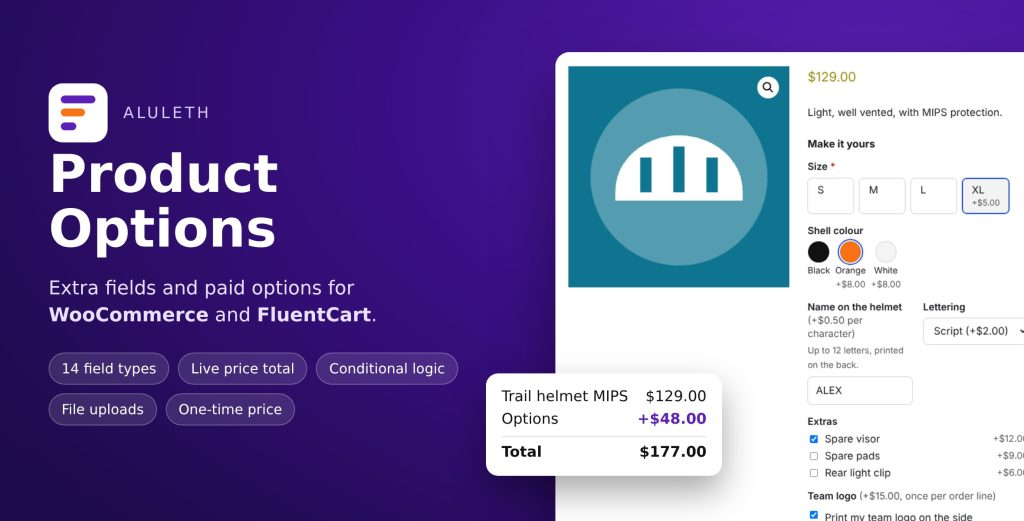
ORDER FORMS FOR WOOCOMMERCE AND FLUENTCART – Store products field: pick products by name, SKU or a whole category, shown as cards with photos, a list or a dropdown, with quantities. Sold-out products are hidden, stock limits are checked. – Order summary and Coupon fields: the subtotal, discount, tax and total come from your store itself. – Pay in the form with PayPal, Pay Later or card: a paid WooCommerce order is created with the same products, coupon and tax. – Or send the customer to your store checkout, with every online payment method of your store. Subscriptions (WooCommerce Subscriptions) always use the checkout. – Each entry links to its order and each order links back to its entry. Refunds show on the entry. – FluentCart: the same fields with your FluentCart products and variations, paid on the FluentCart checkout.
PAYMENTS WITH NO FEE FROM US – PayPal, Pay Later and card buttons with your own PayPal account, 24 currencies, sandbox and live mode. – Crypto with your own Heleket merchant: Bitcoin, Ethereum, USDT and more. – Amounts are always computed again on your site; the entry is saved once the payment is confirmed.
QUIZZES, SURVEYS AND POLLS – Quizzes: right answers and points per question, score computed on your site, pass mark, right answers and explanations after sending. – Rating (stars) and Scale (0–10) fields that can drive conditions. – Results view: answers counted with charts, averages, Net Promoter Score and the latest comments, by period. – Poll results shown to visitors after they vote.
ENTRIES AND TEAM WORK – Entries on a board with your own columns, list view, notes and CSV export. – Assign entries to a team member, by hand or automatically (one person or taking turns), with an email to the person. – PDF of each entry, optionally attached to the team email or to the visitor’s confirmation. – Show entries on your site with a shortcode: testimonials, a member directory, who signed up.
THE FORM BUILDER (INCLUDED) – Drag-and-drop builder that shows the form in its real style, multi-step forms, conditional logic. – 9 designed templates + 12 Pro designs: knowledge quiz, NPS survey, customer satisfaction, quick poll, testimonials wall, member directory, job application, sales lead, order form, table booking, RSVP, course evaluation. – Block, Elementor widget and shortcode. Button colour from your theme or Elementor global colours. – Light: one small stylesheet and script, only on pages with a form, no jQuery. – Built-in spam protection, plus Cloudflare Turnstile, hCaptcha, reCAPTCHA or CleanTalk. – Import forms and entries from Contact Form 7, WPForms, Elementor Forms and MetForm.
CONNECTIONS – Mailchimp, Brevo, MailerLite, Kit, Mautic, MailPoet, FluentCRM, webhooks (Zapier, Make, n8n). – ActiveCampaign, Klaviyo, HubSpot, GetResponse. – Team alerts in Slack, Discord and Telegram.
TRANSLATIONS Two text domains on purpose: aluleth-forms-pro (template languages/aluleth-forms-pro.pot) and aluleth-forms for the included form builder (template free/languages/aluleth-forms.pot), so translations made for the free Aluleth Forms work here too. Put the files in wp-content/languages/plugins/.
Requirements: WordPress 7.0+, PHP 7.4+. Order forms: WooCommerce or FluentCart. Documentation: https://market.alulethmarketing.com/docs/aluleth-forms-pro/
WordPress : 7.0 – 7.1 PHP : 7.4 – 8.3 WooCommerce : 11.x WooCommerce HPOS (High-Performance Order Storage) : yes FluentCart : 2.2 Elementor : yes Gutenberg : yes
Aluleth Forms Pro is a complete plugin: it includes Aluleth Forms 0.19.5, the form builder, and adds the Pro features. There is nothing else to install and no licence key to enter: everything is on as soon as the plugin is active.
INSTALLATION 1. In your WordPress admin, go to Plugins › Add New › Upload Plugin. 2. Choose the aluleth-forms-pro-x.y.z.zip file as you downloaded it (do not unzip it), click Install Now, then Activate. 3. Open Aluleth › Forms: a first contact form is ready, and the Pro designs, fields and settings are there. 4. For order forms, install WooCommerce or FluentCart; for PayPal or crypto payments, add your keys in Aluleth › Settings › Payments.
Already using the separate Aluleth Forms plugin? Leave it active: Aluleth Forms Pro then uses it instead of its included copy, with your forms, entries and settings. It must be version 0.19.5 or newer. With an older version your forms keep working, but the Pro features stay off and a notice asks you to update Aluleth Forms; update it, or deactivate it and the included copy takes over with the same forms, entries and settings.
To update, upload the new zip the same way: WordPress offers to replace the current version, and your forms, entries and settings are kept.
ORDER FORMS FOR WOOCOMMERCE AND FLUENTCART – Store products field: pick products by name, SKU or a whole category, shown as cards with photos, a list or a dropdown, with quantities. Sold-out products are hidden, stock limits are checked. – Order summary and Coupon fields: the subtotal, discount, tax and total come from your store itself. – Pay in the form with PayPal, Pay Later or card: a paid WooCommerce order is created with the same products, coupon and tax. – Or send the customer to your store checkout, with every online payment method of your store. Subscriptions (WooCommerce Subscriptions) always use the checkout. – Each entry links to its order and each order links back to its entry. Refunds show on the entry. – FluentCart: the same fields with your FluentCart products and variations, paid on the FluentCart checkout.
PAYMENTS WITH NO FEE FROM US – PayPal, Pay Later and card buttons with your own PayPal account, 24 currencies, sandbox and live mode. – Crypto with your own Heleket merchant: Bitcoin, Ethereum, USDT and more. – Amounts are always computed again on your site; the entry is saved once the payment is confirmed.
QUIZZES, SURVEYS AND POLLS – Quizzes: right answers and points per question, score computed on your site, pass mark, right answers and explanations after sending. – Rating (stars) and Scale (0–10) fields that can drive conditions. – Results view: answers counted with charts, averages, Net Promoter Score and the latest comments, by period. – Poll results shown to visitors after they vote.
ENTRIES AND TEAM WORK – Entries on a board with your own columns, list view, notes and CSV export. – Assign entries to a team member, by hand or automatically (one person or taking turns), with an email to the person. – PDF of each entry, optionally attached to the team email or to the visitor’s confirmation. – Show entries on your site with a shortcode: testimonials, a member directory, who signed up.
THE FORM BUILDER (INCLUDED) – Drag-and-drop builder that shows the form in its real style, multi-step forms, conditional logic. – 9 designed templates + 12 Pro designs: knowledge quiz, NPS survey, customer satisfaction, quick poll, testimonials wall, member directory, job application, sales lead, order form, table booking, RSVP, course evaluation. – Block, Elementor widget and shortcode. Button colour from your theme or Elementor global colours. – Light: one small stylesheet and script, only on pages with a form, no jQuery. – Built-in spam protection, plus Cloudflare Turnstile, hCaptcha, reCAPTCHA or CleanTalk. – Import forms and entries from Contact Form 7, WPForms, Elementor Forms and MetForm.
CONNECTIONS – Mailchimp, Brevo, MailerLite, Kit, Mautic, MailPoet, FluentCRM, webhooks (Zapier, Make, n8n). – ActiveCampaign, Klaviyo, HubSpot, GetResponse. – Team alerts in Slack, Discord and Telegram.
TRANSLATIONS Two text domains on purpose: aluleth-forms-pro (template languages/aluleth-forms-pro.pot) and aluleth-forms for the included form builder (template free/languages/aluleth-forms.pot), so translations made for the free Aluleth Forms work here too. Put the files in wp-content/languages/plugins/.
Requirements: WordPress 7.0+, PHP 7.4+. Order forms: WooCommerce or FluentCart. Documentation: https://market.alulethmarketing.com/docs/aluleth-forms-pro/
WordPress : 7.0 – 7.1 PHP : 7.4 – 8.3 WooCommerce : 11.x WooCommerce HPOS (High-Performance Order Storage) : yes FluentCart : 2.2 Elementor : yes Gutenberg : yes
Changelog:
Version 0.4.11
* Translations: in the complete copy, the included Aluleth Forms loads its own translations (text domain aluleth-forms) from wp-content/languages/plugins/ and from the plugin's free/languages/ folder, also for the form builder screens. Translation template updated. The two text domains and where translation files go are explained in the FAQ.
* Readme: installation of the complete copy, and what happens when the separate Aluleth Forms plugin is already active (it must be 0.19.5 or newer).
Version 0.4.10
* Complete plugin: Aluleth Forms 0.19.5 is included, nothing else to install. If the free Aluleth Forms plugin is already on the site, it is used as before and its forms and entries stay.
* Store checkout (WooCommerce, FluentCart) and crypto payments: the contact, the team email, the confirmation, the receipt, the connections and the "entry created" step are each recorded on the order (or the payment) once done, instead of one mark before they ran. A save interrupted at any point goes on at the first step not done, without sending again what was sent; an email the mail server refused is tried again with the save (5 min, 15 min, 1 h, 6 h), then noted on the entry.
* Needs Aluleth Forms 0.19.5 or newer.
Version 0.4.9
* Recovery of checkout entries (WooCommerce and FluentCart): the whole queue is gone through, 50 orders per run and per store, from where the last run stopped, then again from the start; orders waiting for their retry time, failing again or not paid yet no longer hold back the orders after them. After a full batch the next run follows a minute later; otherwise it runs at the soonest retry time. Orders that will not get an entry (cancelled, refunded, payment failed, form deleted) leave the queue with a note on the order; their answers are kept, and a payment received later still saves the entry. A FluentCart order cancelled after payment no longer gets an entry from the recovery; a partly refunded one still does.
Version 0.4.8
* Orders placed on the store checkout from a form (WooCommerce and FluentCart): the entry of a paid order is saved in steps that are recorded on the order, under a lock of the order. If saving fails or stops half-way (database error, timeout), it is taken up automatically (after 5 minutes, 15 minutes, 1 hour, then every 6 hours, and by the next payment callback), the entry already saved for the order is found again, and the order is linked to exactly one entry; the emails and connections run once and the answers stay on the order until then. An admin notice lists paid orders whose entry is not saved yet. Orders left by earlier versions in this state are taken up.
Version 0.4.7
* Contact import (shared Aluleth screens): the files being imported and the list of rows not imported can no longer be opened from their address on Nginx or any other server: each one is saved under a random .php name behind a line that stops PHP, and only the import screen reads it. Files of imports started with an earlier version are moved to this form automatically.
* Texts sent to PayPal, Slack, Discord and Telegram are shortened without the PHP mbstring extension.
Version 0.4.6
* Crypto (Heleket): a confirmed payment whose save failed or stopped half-way is saved again automatically, exactly once. The save goes in steps recorded in the pending payment (entry, then store order, then emails and connections), each found again on the next try: the entry by its Heleket invoice, the WooCommerce order by its entry (an order left half-built and still pending is moved to the trash and made again; one already paid is kept). A failed save keeps the payment with its error and is tried again after 5 minutes, 15 minutes, 1 hour, then every 6 hours, by the next notification (answered with an error so Heleket sends it again) or the recovery task; a confirmed payment is never dropped from the registry while it waits. An admin notice lists confirmed payments not saved yet. Payments left by 0.4.5 after a failed save are taken up.
* Crypto (Heleket): when two requests took over an expired lock at the same moment, both could hold it; only one gets it now.
* Fix: orders paid in the form no longer get an "is on hold, not marked paid" note on their entry when there is nothing to check.
Version 0.4.5
* Stock for orders paid in the form (WooCommerce): the quantities of every store field are added up and checked against the stock before a PayPal or crypto payment can start (stock held by checkouts in progress counts as taken, variations that share their parent's stock are counted together, products sold one at a time cannot be ordered twice, backorders are respected). They are checked again when the payment is confirmed: if the stock went down meanwhile, the order is put on hold with "Stock to check: … left in stock, … were paid", without completing the payment (no paid-order emails, stock untouched). A quantity above 99 is refused instead of being cut.
* Crypto (Heleket): pending payments are kept in a registry in the database instead of transients, so the recovery of payments whose notification was lost also works with a persistent object cache (Redis, Memcached). It runs 15 minutes after an invoice, then hourly while payments wait, and daily; it reads the registry in batches of 50 from where it stopped and removes each invoice once its payment is saved or cancelled. A notification and the recovery arriving at the same time save one entry and one order. Payments started with 0.4.4 are taken over.
Version 0.4.4
* Orders paid in the form (PayPal, crypto) are only marked paid when the payment matches: the amount and currency received are checked against the pricing the customer accepted, and the store's prices, stock and coupon against what they were at that moment. The order is built from the accepted pricing (lines, coupon, taxes). Anything to check (another amount, a crypto underpayment, a price or coupon that changed) puts the order on hold without completing the payment: no paid-order emails, no stock change, a note with what to check. Setting the order to Processing after the check completes it, and the entry notes it.
Version 0.4.3
* Copies sold on other marketplaces (WPBay, Codester…) work without an Aluleth Market licence: no licence screen, the Pro features are on as soon as Aluleth Forms is active. Google Sheets stays in the Aluleth Market version, because it connects through the Market with the licence key.
Version 0.4.2
* Shared Aluleth data (contacts, tags, lists, consents, blocked addresses, queue) now lives in tables with the "aluleth" prefix. They are renamed automatically on update; nothing is lost. Update all your Aluleth plugins at the same time.
Version 0.4.1
* Crypto (Heleket): "Save and check the keys" no longer refuses valid keys. The signature of requests without data now covers the exact body sent.
Version 0.4.0
* Quizzes: right answers and points per question, score computed on your site, result shown after sending (score, pass mark, right answers and explanations), score on the entry, the board, the emails, the CSV export and the connections.
* Rating (stars) and Scale (0–10) fields, which can drive conditions.
* Results view of the entries: answers counted with charts, averages, Net Promoter Score and the latest text answers, by period.
* Poll results shown to visitors after they answer.
* PDF of the entries: download button on each entry, optional attachment to the team email and to the visitor's confirmation.
* Assign entries to a team member, by hand or automatically (one person or taking turns), with an email to the person.
* Entries on your site: [aluleth_entries] shortcode, table or cards, chosen answers only, status filter, search and pages.
* 12 Pro designs on the "Create a form" screen.
* Needs Aluleth Forms 0.19.0 for these new features.
Version 0.3.0
* Order forms for FluentCart: products and variations in the Store products field, paid on the FluentCart checkout (cart filled with the products, coupon, email and name; online payment methods only). The entry is saved once the order is paid and follows refunds and cancellations.
* Store products field: choose the store (WooCommerce or FluentCart) when both are active.
* ActiveCampaign connection: contacts, lists, tags and custom fields.
* Klaviyo connection: profiles and email subscriptions to lists.
* HubSpot connection: contacts, properties and static lists.
* GetResponse connection: lists, tags and custom fields.
* Google Sheets connection: "Connect Google" button, a spreadsheet per form, one row per entry.
Version 0.2.0
* Crypto payments with Heleket: "Pay with crypto" under the PayPal buttons, entry and order saved once Heleket confirms, underpayments to check, daily check.
* Order forms for WooCommerce: Store products, Order summary and Coupon fields; pay in the form with PayPal (a paid order is created) or on the store checkout (the cart is filled; online payment methods only; the entry is saved once the order is paid); subscriptions go to the checkout.
* Form Settings › Payments: how customers pay, order status, customer account, store emails.
* The entry shows its WooCommerce order and follows refunds; the order links back to the entry.
* Needs Aluleth Forms 0.18.0. Aluleth Core 0.13.0.
Version 0.1.4
* Aluleth Core 0.12.0 (Mautic, Slack, Discord and Telegram connections of Aluleth Forms 0.17.0).
Version 0.1.3
* Aluleth Core 0.11.0 (PayPal payments of Aluleth Forms 0.16.0).
Version 0.1.2
* Aluleth Core 0.10.0 (Access settings and AI agents of Aluleth Forms 0.15.0).
Version 0.1.1
* Licences now have their own place in Aluleth › Settings › Licences, next to Security and Data and privacy.
* Aluleth Core 0.9.0.
Version 0.1.0
* First version: licence and one-click updates from the Aluleth Market (Aluleth › Settings › Licences).
Only logged in customers who have purchased this product may leave a review.
Loading...
WPBay support
 Support by Aluleth
Support by Aluleth
Aluleth supports this product through WPBay
Questions are handled in WPBay's private ticket system, keeping your purchase details and support conversation together.
Go to My Downloads
After purchase, open this item in My Downloads and choose Get Support.
What support includes
- Answers to product-related questions
- Help with reported bugs and issues
- Guidance for included third-party assets
What support does not include
- Customizations or new features
- Installation or setup services
Plugin
Maintenance snapshot
See recent updates, compatibility, support, and developer activity.
- Updated today
- Developer active recently
- WPBay support available
- WordPress 7.1 tested
Snapshot updated 1 hour ago
View details Hide details
Maintenance details
This is maintenance data. It does not measure product quality or sales.
- Last update Updated today
- Compatibility WordPress 7.1 tested · PHP 8.3 tested, one version behind · WooCommerce 11 tested
- Releases 9 releases in the 3 days since listing
- Developer activity Developer active recently
- Support No recent support tickets to measure
- Docs and demo Documentation available · Changelog available · No demo listed
Health reflects increased activity during the last 90 days.
How this snapshot works
Plugin Health
The score is out of 100 and uses data WPBay can check. Ratings, popularity, and sales are not used.
- Last update 30 points
-
Plugins receive full recency points under 30 days, then step down at 90, 180, 365, and 545 days.
- Compatibility 20 points
-
WordPress, PHP, and WooCommerce (when relevant) are scored separately. The latest two PHP lines count as current. Nearby previous versions keep most of the points.
- Current version 100%
- One version behind 75%
- Two versions behind 50%
- Three versions behind 25%
- Older or not listed 0%
- Releases 15 points
-
One release earns 10, two or three earn 13, and four or more earn 15. Each accepted product ZIP counts once; reprocessing the same upload and listing-only edits do not count.
- Developer activity 15 points
-
Based on WPBay login and dashboard activity. Exact last-login dates are never shown.
- Support 15 points
-
There are no recent WPBay tickets to measure.
- Docs and demo 5 points
-
Documentation: 2. Changelog: 1. Working demo or preview: 2.
Score ranges
- 90–100 Excellent
- 75–89 Healthy
- 60–74 Fair
- 40–59 Needs attention
- 0–39 Limited
Long gaps
WPBay also checks for long gaps between updates, developer activity, support replies, and releases. Buyers do not see this score.
- Time since update 35 points
- Last developer activity 25 points
- WordPress compatibility 15 points
- Support replies 15 points
- Fewer releases 10 points
-
Quality verified by WPBay
WPBay review- Reviewed version
- 0.4.11
- Review completed
- Reviewer
- CodeRevolution
- Review type
- Initial
No unresolved approval blocker was identified during WPBay’s proportionate review of this release. This is not a security certification or a guarantee that the product contains no defects.
-
 Future updates
-
WPBay support from Aluleth
-
GPL code, proprietary assets
-
Covered by the WPBay refund policy
-
Plugin maintenance snapshot
Relevant picks
You may also like
Similar products selected by category, features, popularity and freshness.


From this seller
View seller store
More by Aluleth
Explore more bestselling products from this creator.
Reviews
There are no reviews yet.