


Aluleth Product Options – Extra Fields and Paid Options for WooCommerce and FluentCart

 Recently Updated
Well Documented
Recently Updated
Well Documented
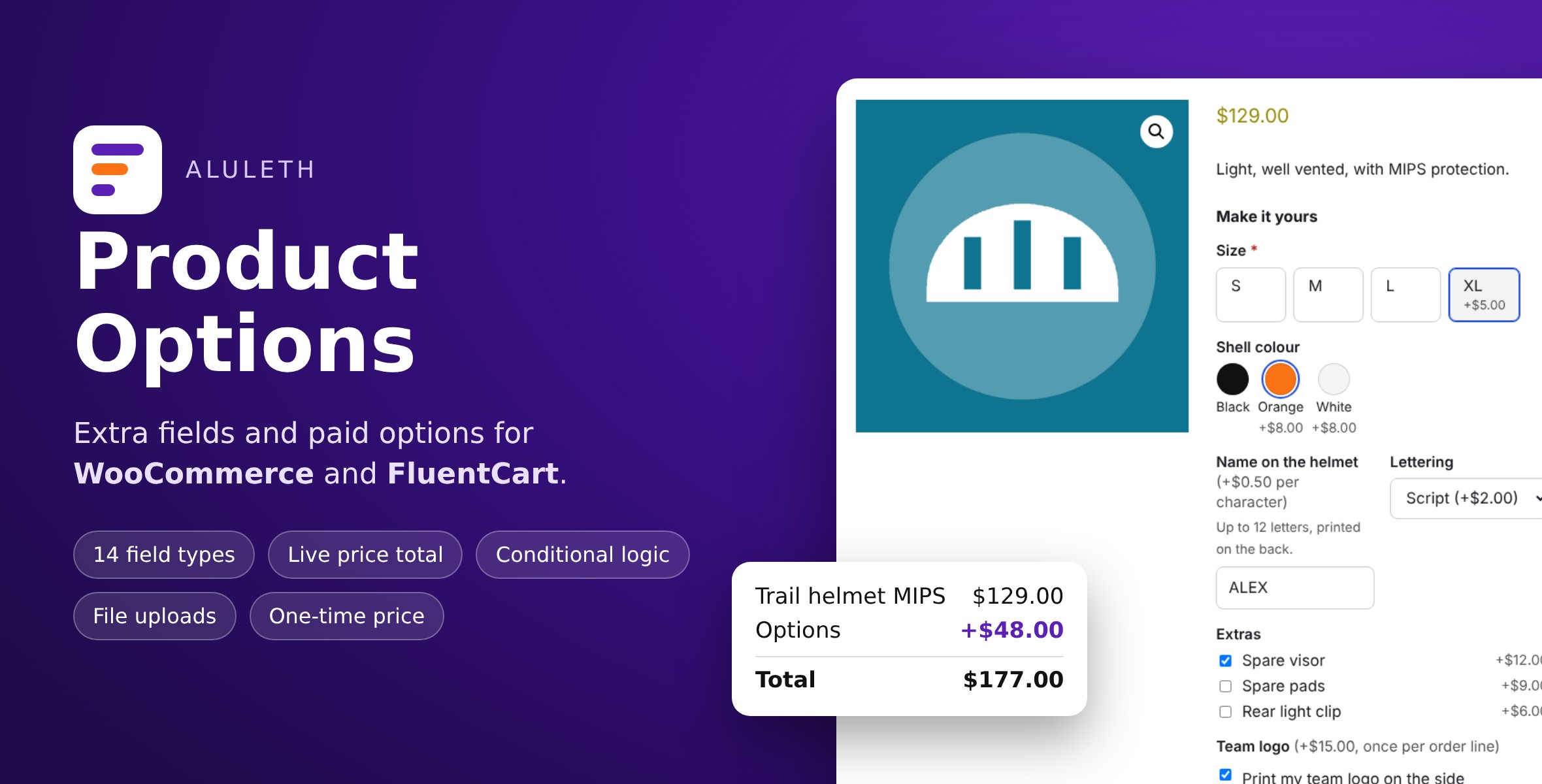
Add the choices your customers need on your product pages – engraving text, sizes, colour swatches, gift wrap, file uploads – with prices that update the total as they choose. For WooCommerce and FluentCart.
Aluleth Product Options adds extra fields and paid options to your products. Build a group of fields once, show it on all products, chosen products or categories, and every choice can add to the price. The total under the fields follows the options, the quantity and the chosen variation.
It works with WooCommerce and FluentCart, even on the same site.
Features
– Visual builder: add fields, drag them in order, open a field to set it up
– 14 field types: short text, long text, number, date, file upload, dropdown, one choice, several choices, buttons, colour swatches, image swatches, yes / no box, heading and text
– Prices: fixed amount, percentage of the product price, per character, per unit; a price for each choice; “for each item” or “once per order line” (set-up fees); negative prices for discounts
– Live price total on the product page
– Conditional logic: show a field only when earlier answers match (all or any rule), checked again on the server
– File uploads before add to cart, with accepted types and a size limit per field, kept in a protected folder and linked from the order
– Options and prices in the cart, the checkout (classic and blocks), the order, the emails and the customer account
– WooCommerce: simple and variable products, Cart and Checkout blocks, Store API, HPOS, “Order again” keeps the options, “Select options” button in product lists when a choice is required
– FluentCart: fields above Buy now / Add to cart, cart drawer, cart page, checkout, receipts and emails, Buy now with options, uploaded files linked in the order activity
– English, French, Spanish and Filipino included
Requirements
– WordPress 6.5+, PHP 7.4+
– WooCommerce 8.0+ or FluentCart 2.2+
Good to know
FluentCart keeps one cart line per product variation: the same product added again with other options replaces the options of that line.
Documentation: https://market.alulethmarketing.com/docs/aluleth-product-options/
Made by Aluleth.
Changelog:
= 1.0.9 =
* Fix: WooCommerce orders placed before 1.0.8 with fields sharing a label: when an order line is removed in the admin, each remaining line still shows its own answer and price, also when one answer is the start of another ("Ann" and "Anna"). Lines of these orders show their own saved value, escaped and exactly as typed, never another field's answer.
* Fix: new WooCommerce orders tie each line to its answer only when the line's saved value is exactly that answer with its price; a line that matches no answer, or two different ones, is shown as it was saved.
Version 1.0.8
* Fix: in WooCommerce orders, two fields with the same label (in one group, or in two groups made from the same copy) each show their own answer and price in the order details, the order emails and the admin order screen. Each order line is now tied to its own answer by the line's id, saved with the order, instead of by its label. Orders placed with earlier versions are read line by line in the order the answers were saved, so they show the right answers too. Answers stay escaped and shown exactly as typed.
* Fix: the plugin's own data on an order line is no longer listed under the answers in the WooCommerce admin order screen.
Version 1.0.7
* Fix: text answers are kept as the customer types them, the same on the product page and on the server: markup-like text (<b>, &), percent signs (%AB), repeated spaces, backslashes and any Unicode are no longer removed or changed after the page has worked out the conditions and the price. Only white space at both ends, control characters and line breaks in one-line fields are removed, by the page and the server alike, and the field shows the answer that will be ordered. Answers are escaped wherever they are shown (cart, checkout, order, emails, admin). Text that is not valid UTF-8 is refused with a message.
* Text lengths (at least / at most) are counted in Unicode characters on the page as on the server; condition values keep the text the admin typed, spaces included.
Version 1.0.6
* Fix: text conditions (is, is not, contains, does not contain) ignore upper and lower case the same way on the page and on the server, accented letters included (É and é), with or without the PHP mbstring extension. "More than" and "less than" accept the same numbers on both sides.
* Fix: deactivating the plugin removes both scheduled clean-up tasks, and deleting it removes them whatever the data setting; files and settings are kept when "Delete data" is off.
Version 1.0.5
* Fix: uploaded files can no longer be opened from their address on Nginx or any other server: each file is stored under a random .php name behind a line that stops PHP, and only the order's download link sends it. Files uploaded with earlier versions are moved to this form automatically.
* Fix: saving an option group with a paragraph no longer needs the PHP mbstring extension.
Version 1.0.4
* Fix: answers with backslashes (for example "C:\files" or "A\B") stay exactly as typed when the cart is priced again after a quantity change or a reload, and in the order: per-character prices and conditions stay the same.
* Fix: an uploaded file that was removed or expired after "Add to cart" now stops the order in the classic checkout, the checkout block (Store API) and the FluentCart checkout, with a message and an "Upload it again" link that fills in the other answers and replaces the cart line. "Order again" with the files of an earlier order still works.
* Fix: the option group editor no longer lets a move (drag or arrows) put a field above a field its condition uses; it explains which field has to stay above. Saving checks the same on the server. Groups saved earlier in such an order are marked, and a rule's field is never changed without you. On the page and on the server, a condition only uses the fields above it, so visibility, required fields and totals always agree.
Version 1.0.3
* Fix: a duplicated option group gets new field IDs, and its conditions point to its own fields, so the copy and the original can be on the same product with separate answers, conditions, files and prices. Groups that already share field IDs on a product are told apart automatically.
* Fix (FluentCart): a one-time discount (negative amount charged once per order line) is no longer offered on FluentCart products, because FluentCart cannot take it off exactly; the option group editor says so next to the setting.
* Fix (WooCommerce): the prices next to the choices and fields follow the tax class of the chosen variation (fixed, per character and per unit amounts), in dropdowns, swatches, buttons and field labels.
* New: limits on uploads made before an order (per visitor per hour, per visitor waiting for an order, and for the whole shop), with clear messages, safe with parallel uploads. "Remove" next to an uploaded file deletes it.
Version 1.0.2
* Fix (WooCommerce): the live total and the prices next to the choices now include or leave out tax exactly as the store shows prices, using WooCommerce's price display (product and variation tax class, prices entered with or without tax, shop and cart display settings). Prices next to the options in the cart follow the cart display setting.
* Fix (FluentCart): "once per order line" prices are added as an exact fee for the line (FluentCart 2.2 or later), so the line total no longer changes with the quantity because of rounding.
* Fix: an uploaded file is only accepted for the product and option it was uploaded for, with that option's file types and size limit, and only in one order. "Order again" reuses the files of the old order only.
* Fix: price per character counts Unicode characters the same way on the product page and in the cart (emoji and other characters outside the basic range count as one), with or without the mbstring extension; spaces are never counted.
* Fix: the daily upload clean-up task is removed when the plugin is turned off, and always when it is deleted.
Only logged in customers who have purchased this product may leave a review.
Loading...
WPBay support
 Support by Aluleth
Support by Aluleth
Aluleth supports this product through WPBay
Questions are handled in WPBay's private ticket system, keeping your purchase details and support conversation together.
Go to My Downloads
After purchase, open this item in My Downloads and choose Get Support.
What support includes
- Answers to product-related questions
- Help with reported bugs and issues
- Guidance for included third-party assets
What support does not include
- Customizations or new features
- Installation or setup services
Plugin
Maintenance snapshot
See recent updates, compatibility, support, and developer activity.
- Updated today
- Developer active recently
- WPBay support available
- WordPress 7.1 tested
Snapshot updated 16 seconds ago
View details Hide details
Maintenance details
This is maintenance data. It does not measure product quality or sales.
- Last update Updated today
- Compatibility WordPress 7.1 tested · PHP 8.3 tested, one version behind · WooCommerce 11 tested
- Releases 9 releases in the 3 days since listing
- Developer activity Developer active recently
- Support No recent support tickets to measure
- Docs and demo Documentation available · Changelog available · Demo available
Health reflects increased activity during the last 90 days.
How this snapshot works
Plugin Health
The score is out of 100 and uses data WPBay can check. Ratings, popularity, and sales are not used.
- Last update 30 points
-
Plugins receive full recency points under 30 days, then step down at 90, 180, 365, and 545 days.
- Compatibility 20 points
-
WordPress, PHP, and WooCommerce (when relevant) are scored separately. The latest two PHP lines count as current. Nearby previous versions keep most of the points.
- Current version 100%
- One version behind 75%
- Two versions behind 50%
- Three versions behind 25%
- Older or not listed 0%
- Releases 15 points
-
One release earns 10, two or three earn 13, and four or more earn 15. Each accepted product ZIP counts once; reprocessing the same upload and listing-only edits do not count.
- Developer activity 15 points
-
Based on WPBay login and dashboard activity. Exact last-login dates are never shown.
- Support 15 points
-
There are no recent WPBay tickets to measure.
- Docs and demo 5 points
-
Documentation: 2. Changelog: 1. Working demo or preview: 2.
Score ranges
- 90–100 Excellent
- 75–89 Healthy
- 60–74 Fair
- 40–59 Needs attention
- 0–39 Limited
Long gaps
WPBay also checks for long gaps between updates, developer activity, support replies, and releases. Buyers do not see this score.
- Time since update 35 points
- Last developer activity 25 points
- WordPress compatibility 15 points
- Support replies 15 points
- Fewer releases 10 points
-
Quality verified by WPBay
WPBay review- Reviewed version
- 1.0.9
- Review completed
- Reviewer
- CodeRevolution
- Review type
- Initial
No unresolved approval blocker was identified during WPBay’s proportionate review of this release. This is not a security certification or a guarantee that the product contains no defects.
-
 Future updates
-
WPBay support from Aluleth
-
GPL code, proprietary assets
-
Covered by the WPBay refund policy
-
Plugin maintenance snapshot
Relevant picks
You may also like
Similar products selected by category, features, popularity and freshness.

From this seller
View seller store
More by Aluleth
Explore more bestselling products from this creator.
Reviews
There are no reviews yet.