



Aluleth AI Writer Pro – AI Content Writer for Blocks, Elementor, WooCommerce and TranslatePress

 Recently Updated
Well Documented
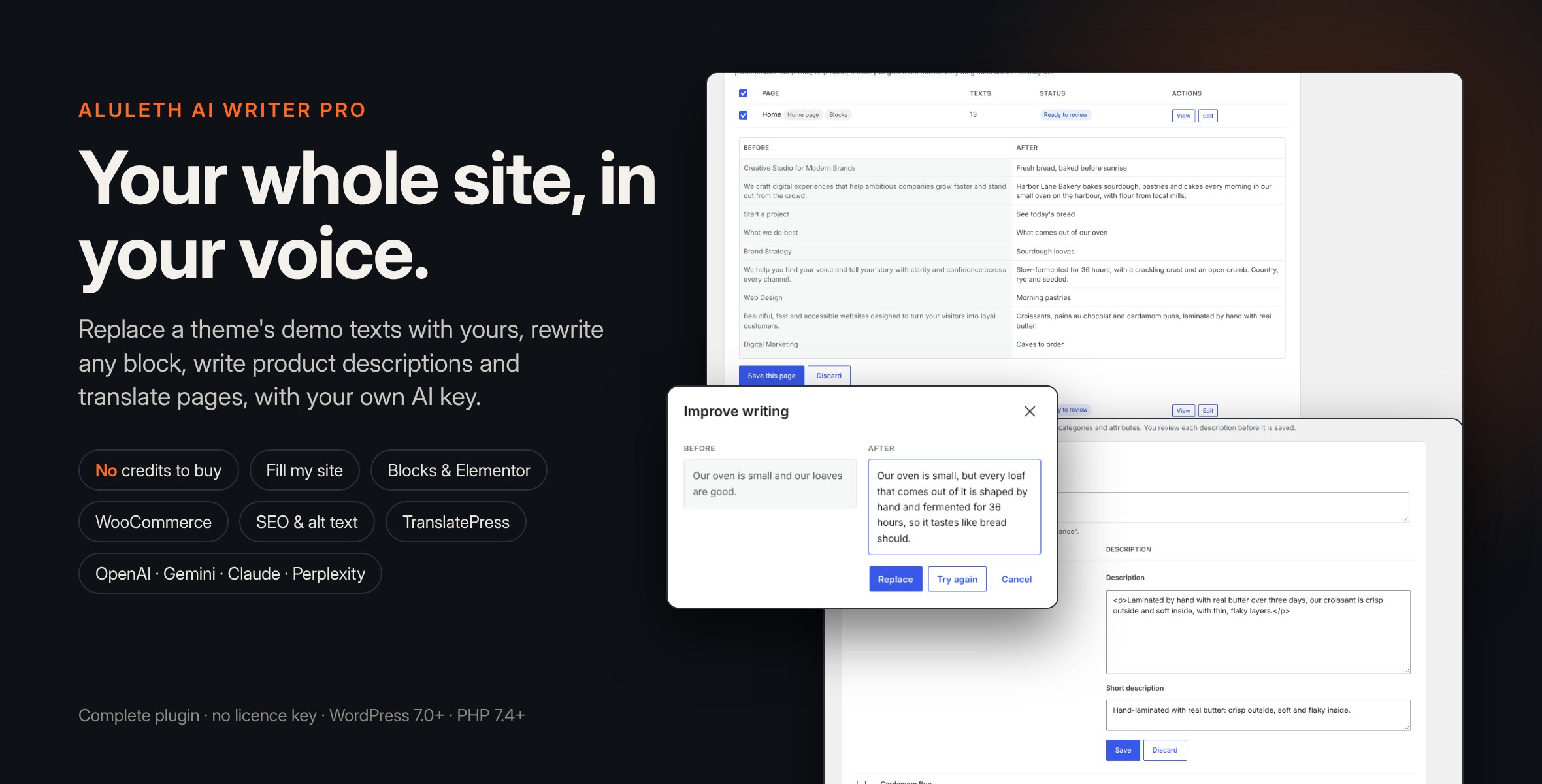
Write your whole site with AI in your brand voice, with your own AI key: rewrite blocks, page sections and full pages, fill a theme demo with your texts (Elementor and blocks), SEO and alt text, product descriptions in bulk, page translation.
Aluleth AI Writer Pro is a complete plugin: it includes Aluleth AI Writer 1.0.1 and adds the Pro features. There is nothing else to install and no licence key to enter. It uses the AI built into WordPress 7.0+: you connect your own key (OpenAI, Google Gemini, Anthropic Claude, or Perplexity with the connector included) in Settings › Connectors. No account, no credits to buy: your AI provider charges you for what you use, and your key stays in WordPress.
INSTALLATION
1. In your WordPress admin, go to Plugins › Add New › Upload Plugin.
2. Choose the aluleth-ai-writer-pro-x.y.z.zip file as you downloaded it (do not unzip it), click Install Now, then Activate.
3. Go to Settings › Connectors and add an API key.
4. Optional: describe your brand voice, and choose who can use AI Writer, in Settings › AI Writer.
5. Open AI Writer › Fill my site, or a page in the block editor (sparkle menu, AI Writer sidebar).
Already using the separate Aluleth AI Writer plugin? Leave it active: Aluleth AI Writer Pro then uses it instead of its included copy (version 1.0.1 or newer).
IN THE BLOCK EDITOR
– Rewrite any text block: improve, shorter, longer, fix, simpler, more persuasive, professional or friendly, or your own instruction; before and after shown, you choose.
– Write a page section (hero, features, about, FAQ, call to action, steps) as normal blocks; write a full page from a brief, section by section.
– SEO title, meta description and excerpt, saved where Yoast SEO, Rank Math, SEOPress or The SEO Framework read them.
– Image alt text from the block toolbar and the media library.
FILL MY SITE
– Replace the demo texts of your theme or template kit (Elementor pages and templates, block pages) with texts for your business, page by page, reviewed before saving, with Undo.
– Quotes, testimonials, price tables, forms and images are left as they are; prices and personal details become placeholders such as [Price] or [Phone].
– A text is saved only where the page still has the text it was written from.
PRODUCT DESCRIPTIONS AND TRANSLATION
– WooCommerce and FluentCart: long and short descriptions in bulk from name, categories and attributes, reviewed before saving, with Undo.
– TranslatePress: translate the texts of a page into your other languages in one click (marked as automatic translations to review; human translations never replaced).
BRAND VOICE AND CONTROL
– Your business, customers, tone, words to use or avoid: every text follows them.
– Choose who can use AI Writer (Authors and up by default); per-person limits of 20 requests a minute and 400 an hour; nothing is sent before someone clicks.
– WordPress Abilities API: rewrite, section, SEO and alt text tasks available to AI agents with the same permissions.
Requirements: WordPress 7.0+ (AI Client and Connectors), PHP 7.4+ (mbstring not needed), an API key from an AI provider. Optional: Elementor, WooCommerce or FluentCart, TranslatePress.
Documentation: https://market.alulethmarketing.com/docs/aluleth-ai-writer-pro/
Changelog:
= 1.0.6 =
* Listing: the 12 screenshots of this version (settings and AI connection, Fill my site, the review of each text, Save and Undo, product descriptions, block editor tools) are attached to the listing gallery again, with the same captions as the Screenshots section of this readme. No change in the plugin's code.
Aluleth AI Writer Pro 1.0.5
= 1.0.5 =
* Complete plugin: Aluleth AI Writer 1.0.1 is included (unchanged), nothing else to install.
* Listing: the 12 screenshots of the customer interface (settings, Fill my site, the review before and after, Save, Undo, product descriptions and the block editor tools) go with this version, and the Screenshots section of readme.txt lists the same 12 in the same order. No change in the code: the plugin works exactly like 1.0.3 and 1.0.4.
Aluleth AI Writer Pro 1.0.4
= 1.0.4 =
* Complete plugin: Aluleth AI Writer 1.0.1 is included (unchanged), nothing else to install.
* Listing and readme: 13 new screenshots of version 1.0.4 show the main workflows: settings, Fill my site, the review before and after, Save, Undo, product descriptions and the block editor tools. The readme has a matching Screenshots section. No change in the code: the plugin works exactly like 1.0.3.
Aluleth AI Writer Pro 1.0.3
= 1.0.3 =
* Complete plugin: Aluleth AI Writer 1.0.1 is included (unchanged), nothing else to install.
* Fill my site and Product descriptions: Undo now takes the same lock as Save for that page or product, from before it reads the copy until the copy is deleted. A Save and an Undo of the same page never run at the same time: the second one is told the page is being saved or undone and can be tried again a moment later. A page or product that holds saved AI texts always keeps the copy that Undo needs.
Aluleth AI Writer Pro 1.0.2
= 1.0.2 =
* Complete plugin: Aluleth AI Writer 1.0.1 is included (unchanged), nothing else to install.
* Fill my site and Product descriptions, Save and Undo: every write is checked by reading back what the database holds (the copy kept for Undo, the page content, the Elementor data, the descriptions). If the copy for Undo cannot be saved, the page is not changed. If the new texts cannot be saved, the page is left as it was, the review stays on screen and Save works again; a copy made by that save is removed only when the page still matches it. If Undo cannot put the page back, the copy is kept and Undo works again. Each case shows a clear message. A value that was already the same counts as written. The time of a save (used by Undo to warn about later changes by hand) is noted only once the page is saved.
* Fill my site: the business and customers typed on the screen are used for the pages written in that run, also by Editors. They are sent with each request and not saved: only administrators save them in the brand voice (Settings > AI Writer), and the screen says so to the others.
Aluleth AI Writer Pro 1.0.1
= 1.0.1 =
* Complete plugin: Aluleth AI Writer 1.0.1 is included, nothing else to install. If the free Aluleth AI Writer plugin is already on the site, it is used as before, with its settings.
* Fill my site: a text is saved only where the page still has the text it was written from; one save of a page at a time; Undo keeps the page from before the first AI change and asks first when the page was changed by hand since. Quotes, testimonials, reviews and price tables are left as they are; very long texts are no longer cut.
* Fill my site and Product descriptions list every page and product (read a few dozen at a time).
* Product descriptions: saving twice at once no longer replaces the Undo copy.
* Translation: only people who can use the TranslatePress editor can translate; a translation a person saved meanwhile is never replaced; one batch at a time per page and language; links the original text does not have are taken out; long texts are left for you; only the translated page's cache is cleared.
* Fill review: page texts are read without running any of their HTML.
* Perplexity: a setting to turn web search off; one key check at a time; the cached answer is named with a salted fingerprint of the key.
* Every REST route checks its fields; translations of the plugin load from its languages folder; works without the mbstring PHP extension.
* Uninstall: the licence and settings are removed; the Undo copies when you ask for it.
Aluleth AI Writer 1.0.1 (included)
* Who can use AI Writer: a setting (Authors and up by default), and a limit of AI requests per person and minute or hour, counted in one database statement so requests sent at once are all counted.
* The AI writes in the site language (it used the language of the editor's profile), worked out on the server without calling WordPress.org.
* The "Before" text of the rewrite window is shown as plain text.
* The SEO title saved by the plugin is escaped when printed.
* Abilities are marked as not read-only (each call is a paid request).
* Works without the mbstring PHP extension. Translations load from the plugin's languages folder.
* Uninstall: settings and brand voice are removed; SEO texts only when you ask for it.
Only logged in customers who have purchased this product may leave a review.
Loading...
WPBay support
 Support by Aluleth
Aluleth supports this product through WPBay
Questions are handled in WPBay's private ticket system, keeping your purchase details and support conversation together.
Go to My Downloads
After purchase, open this item in My Downloads and choose Get Support.
What support includes
- Answers to product-related questions
- Help with reported bugs and issues
- Guidance for included third-party assets
What support does not include
- Customizations or new features
- Installation or setup services
Plugin
Maintenance snapshot
See recent updates, compatibility, support, and developer activity.
- Updated 18 days ago
- Developer active recently
- WPBay support available
- WordPress 7.1 tested
Snapshot updated 52 minutes ago
View details Hide details
Maintenance details
This is maintenance data. It does not measure product quality or sales.
- Last update Updated 18 days ago
- Compatibility WordPress 7.1 tested · PHP 8.3 tested, one version behind · WooCommerce 11 tested
- Releases 6 releases in the 23 days since listing
- Developer activity Developer active recently
- Support No recent support tickets to measure
- Docs and demo Documentation available · Changelog available · No demo listed
Health remained stable during the last 90 days.
How this snapshot works
Plugin Health
The score is out of 100 and uses data WPBay can check. Ratings, popularity, and sales are not used.
- Last update 30 points
-
Plugins receive full recency points under 30 days, then step down at 90, 180, 365, and 545 days.
- Compatibility 20 points
-
WordPress, PHP, and WooCommerce (when relevant) are scored separately. The latest two PHP lines count as current. Nearby previous versions keep most of the points.
- Current version 100%
- One version behind 75%
- Two versions behind 50%
- Three versions behind 25%
- Older or not listed 0%
- Releases 15 points
-
One release earns 10, two or three earn 13, and four or more earn 15. Each accepted product ZIP counts once; reprocessing the same upload and listing-only edits do not count.
- Developer activity 15 points
-
Based on WPBay login and dashboard activity. Exact last-login dates are never shown.
- Support 15 points
-
There are no recent WPBay tickets to measure.
- Docs and demo 5 points
-
Documentation: 2. Changelog: 1. Working demo or preview: 2.
Score ranges
- 90–100 Excellent
- 75–89 Healthy
- 60–74 Fair
- 40–59 Needs attention
- 0–39 Limited
Long gaps
WPBay also checks for long gaps between updates, developer activity, support replies, and releases. Buyers do not see this score.
- Time since update 35 points
- Last developer activity 25 points
- WordPress compatibility 15 points
- Support replies 15 points
- Fewer releases 10 points
-
Quality verified by WPBay
WPBay review- Reviewed version
- 1.0.6
- Review completed
- Reviewer
- CodeRevolution
- Review type
- Initial
No unresolved approval blocker was identified during WPBay’s proportionate review of this release. This is not a security certification or a guarantee that the product contains no defects.
-
 Future updates
-
WPBay support from Aluleth
-
GPL code, proprietary assets
-
Covered by the WPBay refund policy
-
Plugin maintenance snapshot
Relevant picks
You may also like
Similar products selected by category, features, popularity and freshness.



From this seller
View seller store
More by Aluleth
Explore more bestselling products from this creator.



Reviews
There are no reviews yet.