


If your WordPress publishing workflow still involves Google Docs, email threads, Slack screenshots and copy-pasting final drafts into the editor, you already know the pain. You’re not alone. Most content teams run on a patchwork of tools that were never designed to work together and every handoff between them is a chance for something to fall through the cracks.
Two plugins aim to fix that from inside WordPress itself: DraftSync and Multicollab. Both promise to bring editorial collaboration into your WordPress admin, but they take meaningfully different approaches. One is built for teams that want full control over where their data lives and how their workflow is structured. The other is a polished, Gutenberg-native tool trusted by major media brands and built for real-time content production.
This is a long, honest comparison. We’ll go through features, pricing, ideal use cases and the finer details that actually matter when you’re choosing a collaboration tool your entire editorial team will live inside every day.
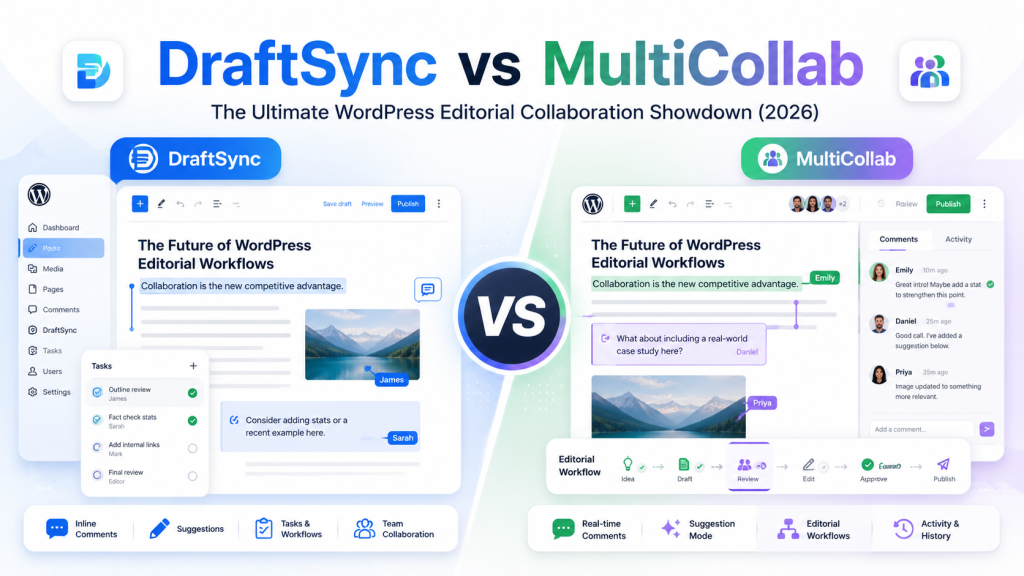
Quick Overview: What Are These Plugins?
Before diving into the details, here’s the short version.
DraftSync is a self-hosted collaborative writing and editorial workflow plugin available at WPBay. It gives WordPress teams a dedicated writing workspace that’s completely contained within their own installation with no external services, no third-party SaaS accounts, no data leaving your server. It’s built for teams that need full editorial control, granular permissions and a structured review process.
Multicollab is a WordPress collaboration plugin from Multidots, available with a free tier on the WordPress plugin directory and premium plans starting at $299/year. It’s built around Gutenberg’s block editor and focuses on Google Docs-style inline commenting and real-time collaboration. It’s trusted by editorial teams at SmartAssets, Gannett, Politico and other media brands.
Both sit in the same market. But they’re not the same product and the differences matter depending on what kind of team you are.
Why Teams Are Looking for WordPress-Native Collaboration Tools
Let’s spend a moment on the problem both plugins are trying to solve, because it’s worth understanding before we compare the solutions.
The standard WordPress publishing workflow for a team, not a solo blogger, it looks roughly like this:
A writer drafts the article in Google Docs. The editor leaves comments in Google Docs. The writer revises. The editor approves. Someone else might review it for legal, compliance or brand guidelines. Screenshots of the layout are attached to a Slack thread. Feedback is emailed back to the writer. Eventually, a final version gets copy-pasted into WordPress. Then someone has to manually re-check the slug, the featured image, the categories, the excerpt, the publish date, the visibility settings and every other WordPress-specific field because all of that context was lost the moment the article lived in Google Docs.
This process is broken. It produces delays, missed details, version confusion and a feedback trail scattered across four different apps. And it requires your team to maintain accounts in external tools that have no real relationship with your WordPress site.
WordPress-native collaboration tools close that gap. Instead of routing editorial work through outside platforms, they bring the collaboration directly into the WordPress admin, connected to the actual post.
DraftSync: A New Collaborative Writing Plugin
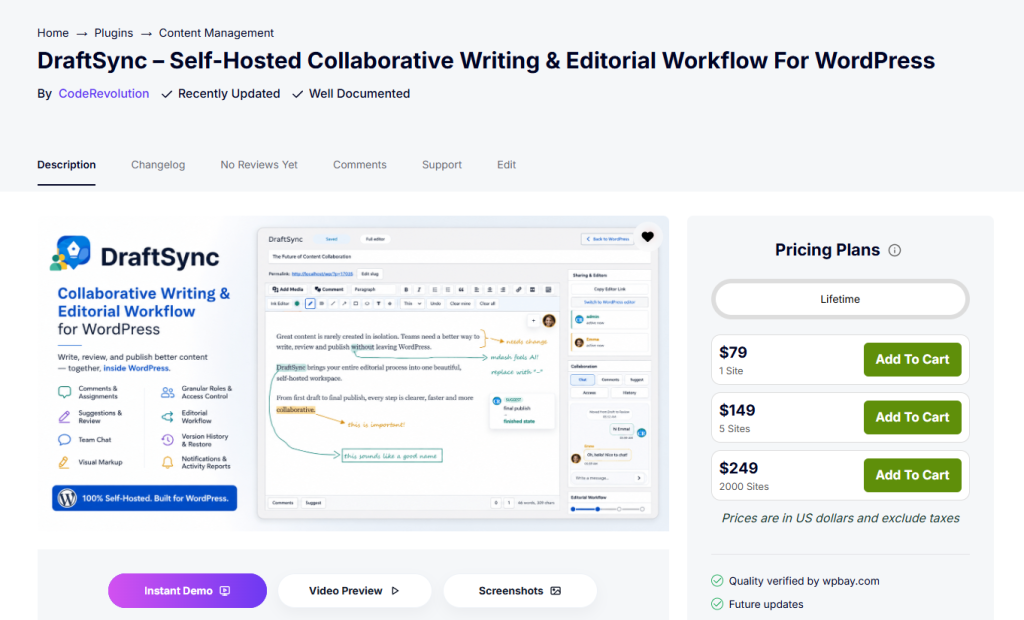
DraftSync is built around a clear philosophy: your editorial workflow should live inside your WordPress site, on your server, under your control. Every draft, comment, suggestion, chat message, version, workflow stage and notification is stored locally and not synced to an external service.
The Writing Environment
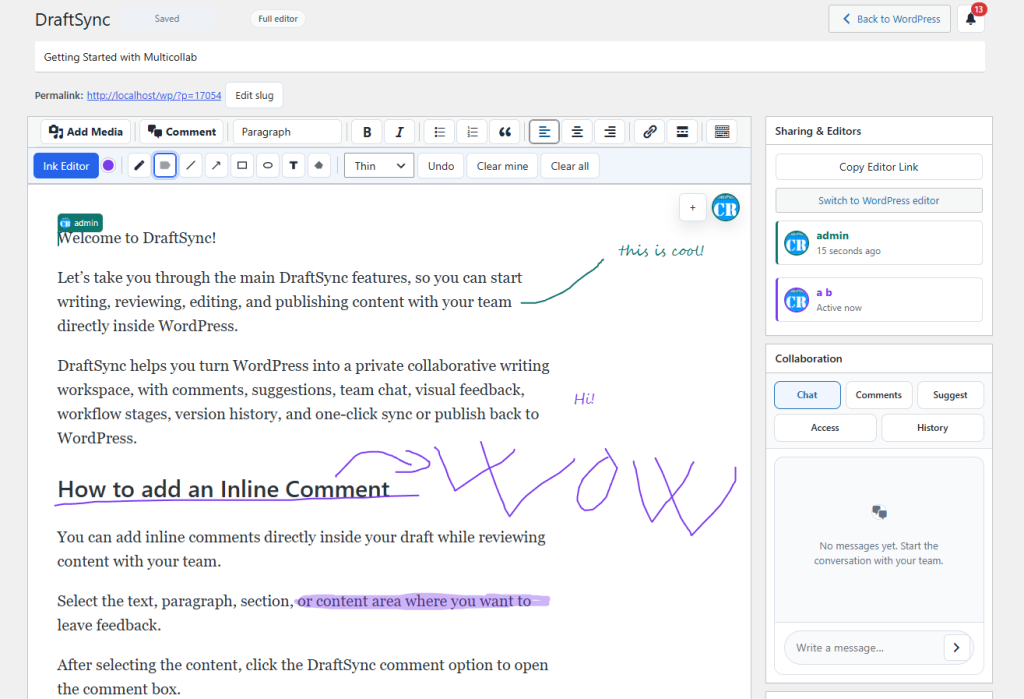
DraftSync gives authors a focused writing editor that feels familiar but adds the collaboration layer that WordPress has always been missing. You get a full formatting toolbar, media support, link insertion, blockquotes, horizontal rules, read-more tags, embed support, shortcodes and a distraction-free writing mode.
More importantly, DraftSync brings WordPress publishing controls directly into the collaboration editor. Authors can set the publish status, visibility, password protection, scheduling, sticky settings, featured image, categories (with create-new-category support), tags, excerpt, discussion settings, post format, page attributes, slug and permalink all without leaving the DraftSync workspace.
That means the entire publishing configuration stays connected to the editorial process, not separated from it.
(Screenshot placeholder: DraftSync writing editor with publishing sidebar)
Collaborative Comments and Feedback
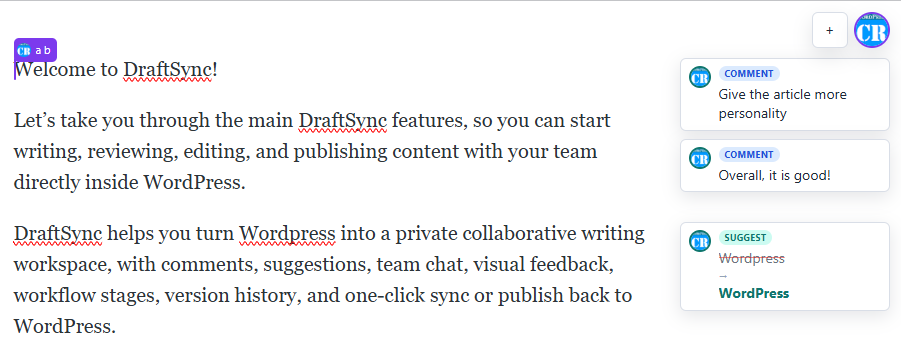
DraftSync includes a structured commenting system designed to keep editorial feedback attached to the draft. Collaborators can select text and leave a comment, reply to existing threads, assign a comment to another user, @mention teammates, upload file attachments, resolve threads and react with emoji responses.
This is cleaner than email feedback, more structured than chat and more connected to the actual content than a separate document. For agencies, it’s particularly useful when clients need to review drafts without receiving full editing access to the content.
Suggested Edits with Accept/Reject Workflow
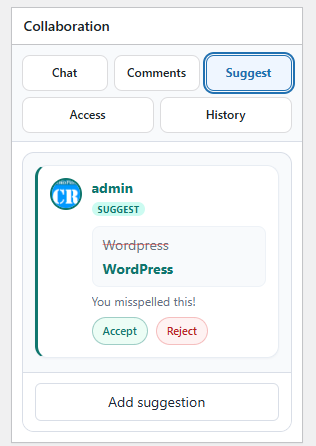
Not every reviewer should be able to directly rewrite an article. DraftSync handles this with a suggested edits feature. Reviewers can highlight text, propose a replacement and leave the final decision to an editor with the appropriate permission.
Editors can then accept or reject suggestions one at a time. The original text is preserved until the editor makes a decision, so the review process is transparent and reversible.
This is especially useful for:
- Client review workflows where clients can comment and suggest without editing
- Legal and compliance checks
- Guest author submissions where the editorial voice needs to be preserved
- Multi-author sites where contribution quality varies
- Documentation teams with strict style guidelines
Built-In Draft Chat
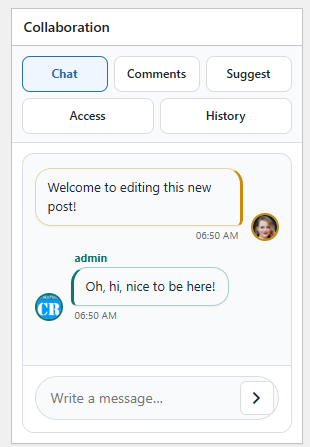
Each draft in DraftSync includes its own chat thread, local to that post. Writers, editors and reviewers can discuss the article without leaving the editor. System messages automatically log collaboration events like invites, workflow changes, access updates and review activity.
The chat history stays with the draft, so when your team returns to an article after a break, the context from previous discussions is still there.
(Screenshot placeholder: DraftSync draft chat panel)
Visual Markup Overlay
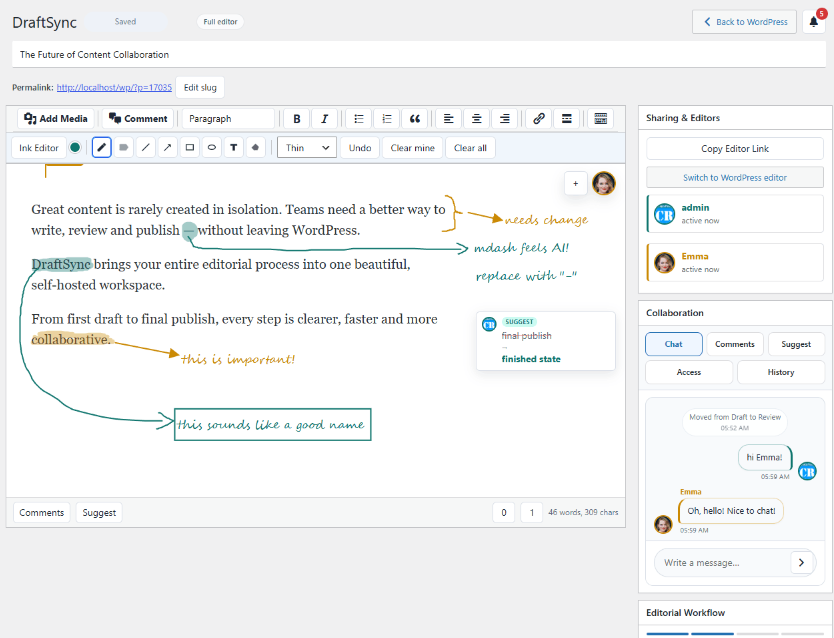
This is a feature that’s genuinely unusual in WordPress collaboration tools. DraftSync includes a visual markup overlay that lets collaborators draw feedback directly over the draft surface using tools like pen, highlighter, line, arrow, rectangle, ellipse, text annotation and eraser.
Each collaborator gets a distinct color. Permissions control who can add markup and who can clear it.
This is particularly valuable for layout feedback, image placement notes, design-related content discussions and screenshot-style reviews where text descriptions of visual issues are inherently imprecise.
Version History and Restore
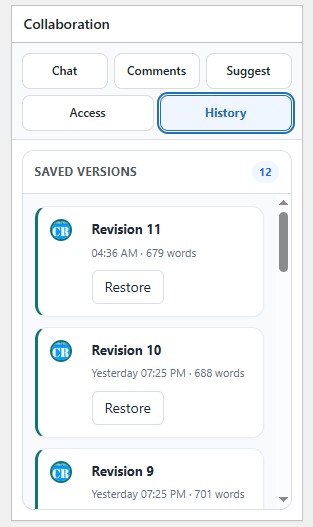
DraftSync maintains a local revision history for every draft, allowing editors to review and restore earlier versions when needed. Autosave includes revision conflict detection, which helps prevent one collaborator from accidentally overwriting changes made by another user.
Granular Roles and Per-Draft Access Control
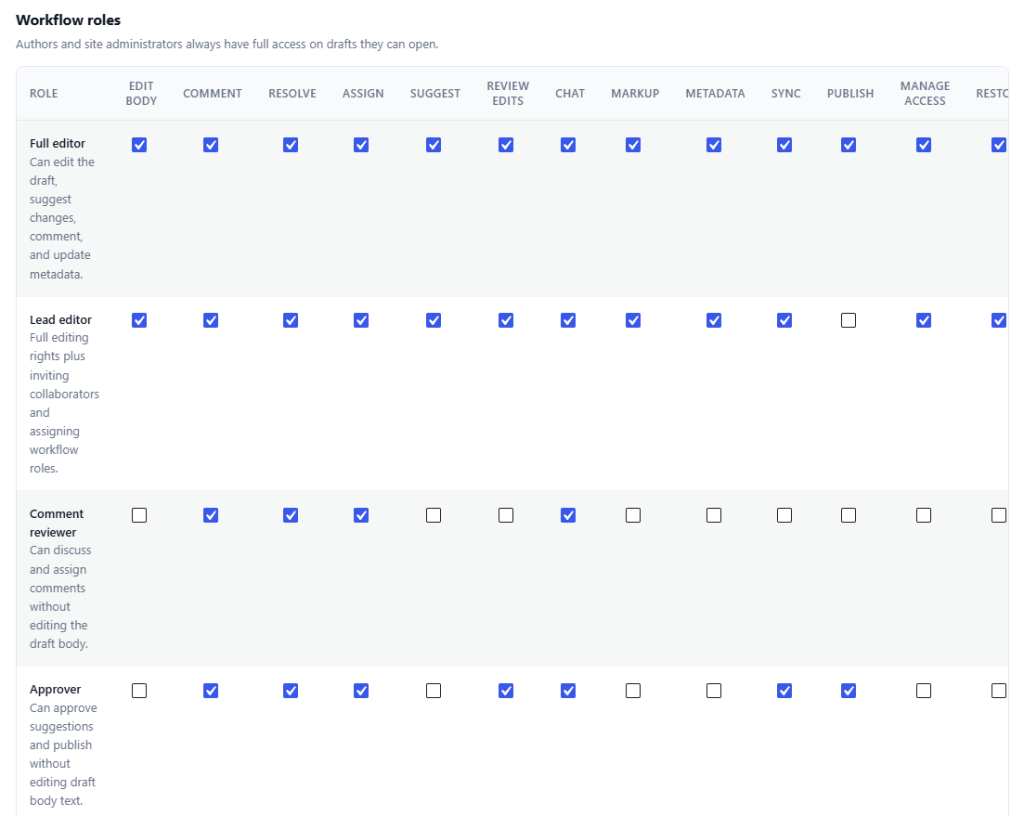
DraftSync’s permission system is one of its most powerful features. Rather than relying solely on WordPress user roles, DraftSync provides its own role layer with fine-grained capabilities.
The built-in role types are:
Full Editor – Can edit the draft body, comment, suggest, update metadata, sync to WordPress, restore versions and attach files.
Lead Editor – Everything a Full Editor can do, plus access management and workflow role assignment.
Comment Reviewer – Can discuss, reply, assign and resolve comments without touching the article body.
Approver – Can review suggestions and publish without directly editing the content.
Viewer – Read-only access to the draft and all collaboration activity.
Critically, access is managed per draft. One article can be shared with an external client while another stays visible only to your internal team. DraftSync also maps WordPress roles to its own role types, so administrators can keep permissions organized as teams scale.
(Screenshot placeholder: DraftSync roles and access management panel)
Optional Editorial Workflow Stages
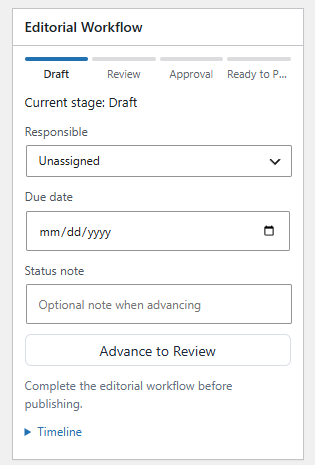
For teams that need a formal approval process, DraftSync includes configurable workflow stages. Administrators can enable workflow globally, choose which stages are active, rename stage labels, decide which roles can advance each stage, assign responsible collaborators, set due dates, add workflow notes and display the workflow timeline inside the editor.
A typical workflow might look like Draft → Review → Approval → Ready to Publish. DraftSync can also be configured to block publishing until the draft reaches the final ready stage, a hard gate that prevents accidental or premature publication.
If your team doesn’t need formal workflow, you can simply turn it off and use DraftSync as a collaborative writing and review workspace.
Notifications and Activity Reports
DraftSync handles notifications with in-app alerts inside the editor plus configurable email preferences. Users can control which events they’re notified about: draft invitations, comments, @mentions, assignments, replies, workflow updates, removed posts and revoked access.
Administrators can also enable optional Slack notifications through an Incoming Webhook URL, which routes collaboration events like invites, comments, mentions, assignments and workflow changes to a designated Slack channel.
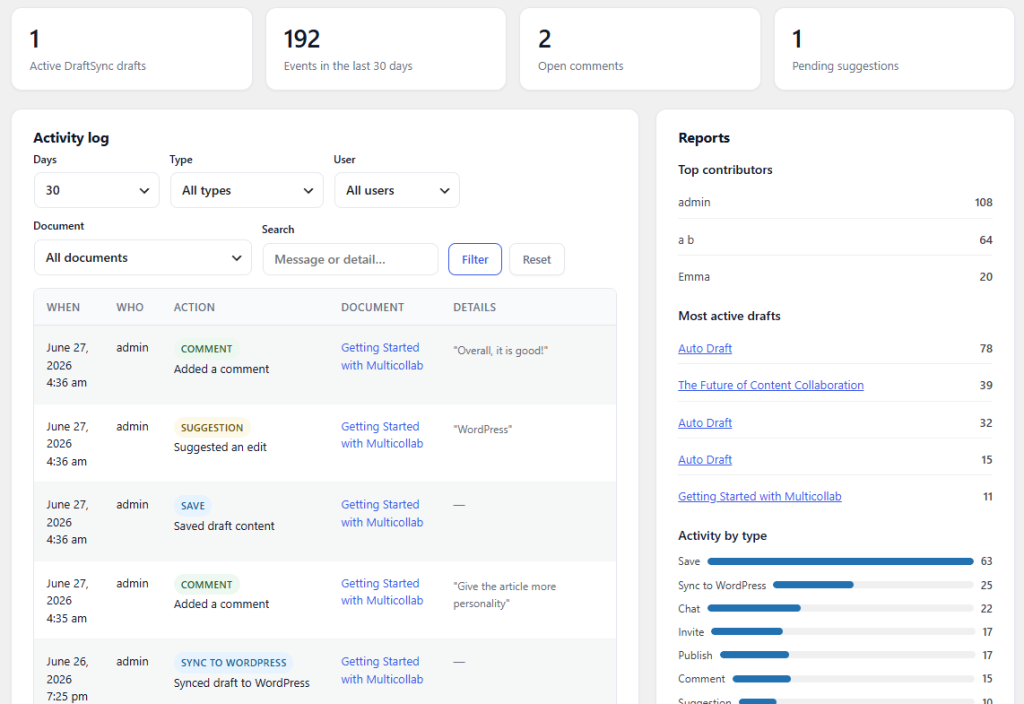
The Activity & Reports dashboard gives content managers a team-wide view of editorial activity. It includes an active draft count, recent event count, open comment count, pending suggestion count, a filterable activity log, top contributors, most active drafts and activity breakdowns by type.
(Screenshot placeholder: DraftSync activity reports dashboard)
WordPress Integration and Security
DraftSync adds a panel in Gutenberg’s document sidebar and a metabox in the Classic Editor, which means it integrates with both editing environments without forcing you to change your default workflow. Automatic DraftSync draft creation is off by default so you can choose to use it only for posts that genuinely need collaboration.
Security is built on the standard WordPress model. Editor access requires WordPress login. Draft routes check user access. Per-draft allowed user lists control who can collaborate. AJAX editor actions use per-post nonces. Actions are verified against WordPress capabilities and DraftSync role capabilities. Draft content is sanitized using WordPress post HTML rules before storage.
No external DraftSync service account is required. No data is sent to outside servers. The entire collaboration system runs on your WordPress installation.
DraftSync Pricing
DraftSync is available through WPBay with a one-time purchase model, with no annual renewals, no subscription. This is only for the first 100 customers, afterwards, the developer announced that the plugin will be changed to a yearly subscription model.
It also has a free alternative, which shows basic functionality of the plugin, check DraftSync Lite on WordPress.org.
| License | Price | Sites |
|---|---|---|
| Free | $0 | Unlimited sites |
| Single Site | $79 | 1 site |
| Multi-Site | $149 | 5 sites |
| Agency | $249 | 2,000 sites |
This is a significant pricing advantage compared to subscription-based alternatives, especially for agencies managing many client sites.
Multicollab: A Deep Dive
Multicollab, developed by Multidots, has positioned itself as the Google Docs experience for Gutenberg. It’s built specifically around WordPress’s block editor and focuses on the kind of inline commenting and real-time co-editing that writers and editors coming from Google Docs will recognize immediately.
It’s trusted by editorial teams at Gannett, Politico, SmartAssets, Jobscan and other organizations that publish at scale – which speaks well of its stability and performance in demanding environments.
Free Version
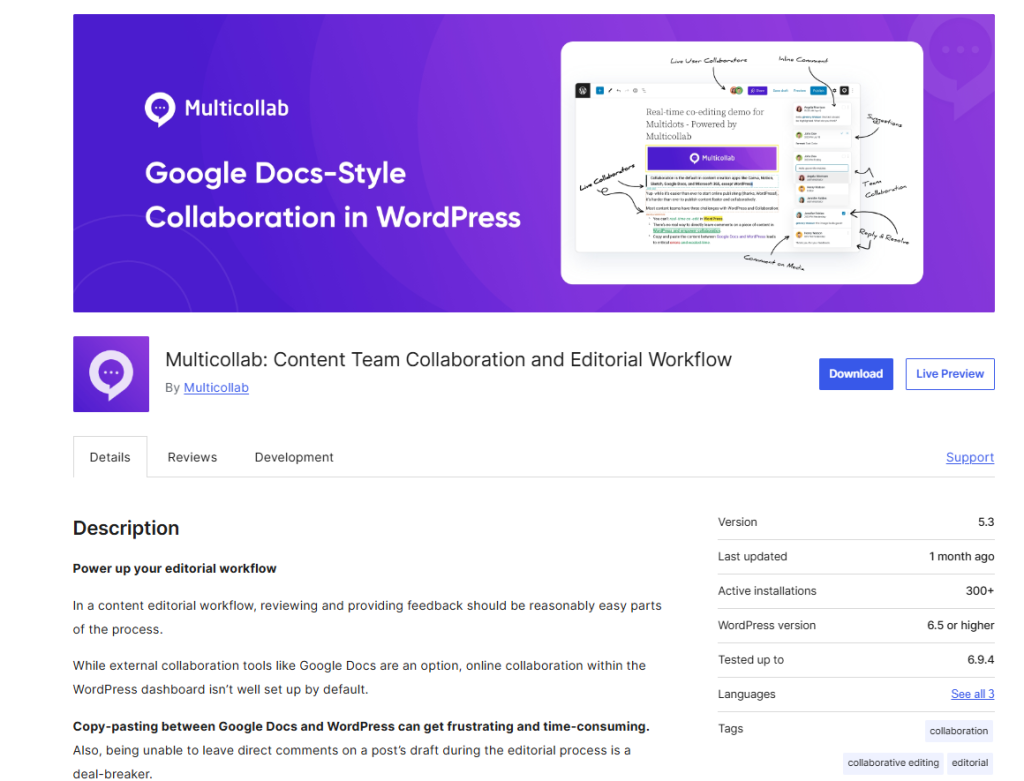
Multicollab is also available as a free plugin on WordPress.org. The free version provides entry-level inline commenting functionality, giving smaller teams a no-cost way to test the plugin before committing to a premium plan.
Inline Commenting Inside Gutenberg Blocks
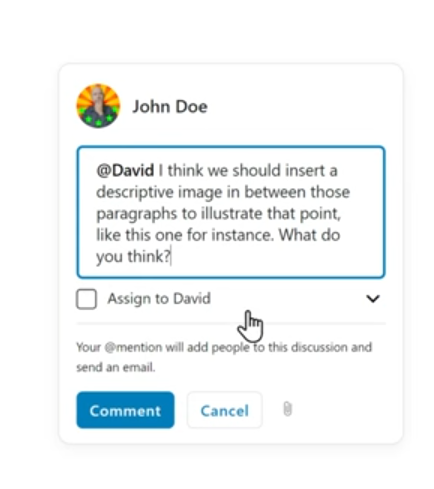
Multicollab’s core feature is inline commenting that works natively within Gutenberg’s block editor. Authors can select text inside a block and leave a comment, reply to threads and resolve discussions – all without leaving the WordPress editor.
The experience is intentionally similar to Google Docs, which reduces the learning curve for writers and editors already familiar with that workflow. Comments appear inline next to the content and notifications keep collaborators updated as threads evolve.
(Screenshot placeholder: Multicollab inline commenting in Gutenberg)
Guest Collaboration
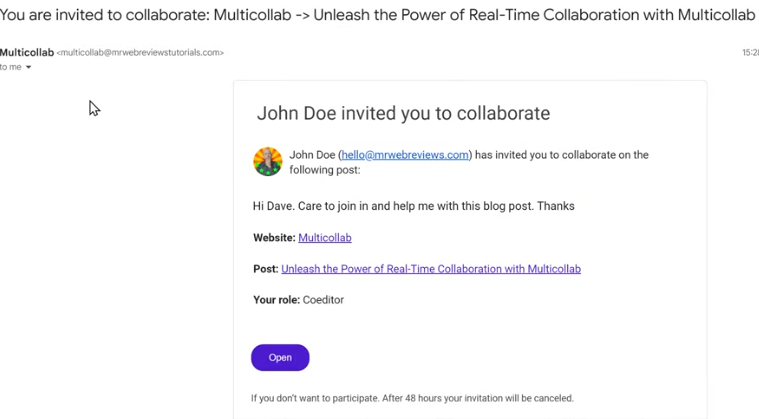
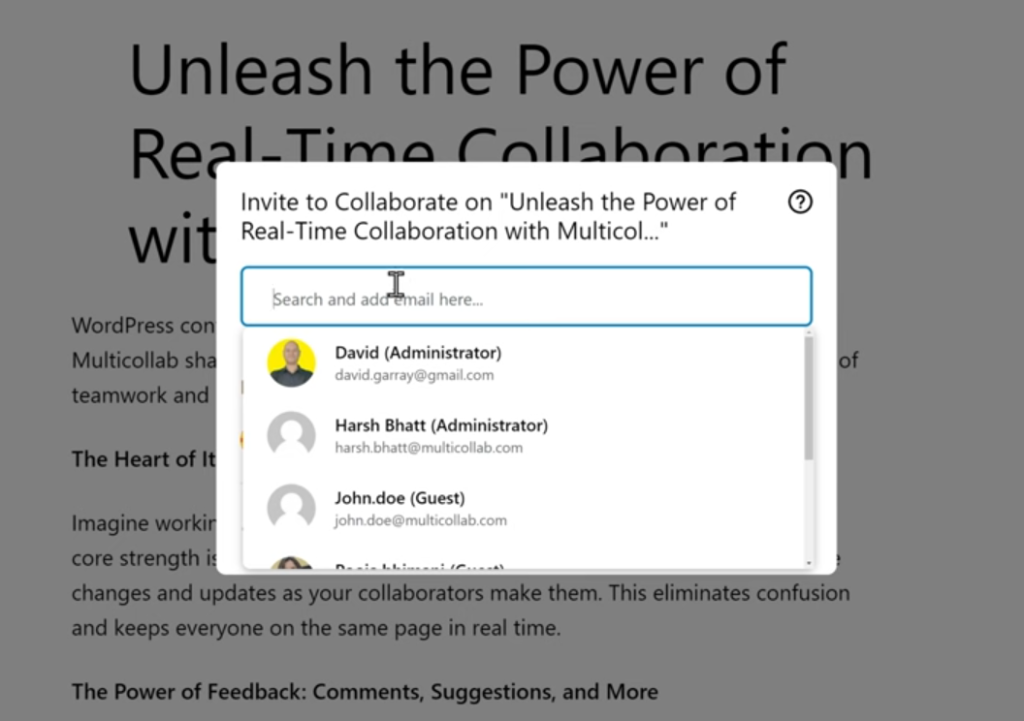
Multicollab supports guest collaboration, allowing external collaborators – clients, contractors, subject-matter experts, to review and comment on drafts without needing a full WordPress user account. This makes the review process more accessible for stakeholders who don’t normally work inside WordPress.
Real-Time Collaboration (Pro)
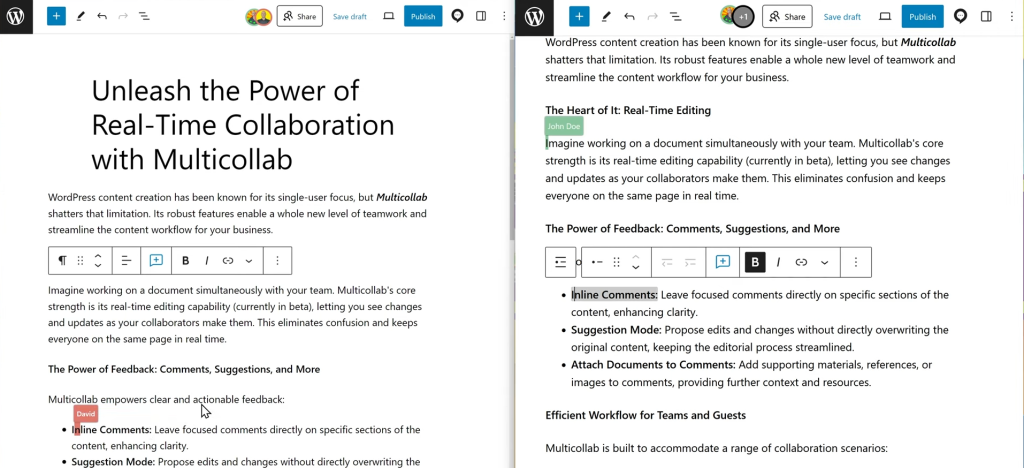
Multicollab Pro includes real-time collaboration, allowing multiple authors to work on a post simultaneously with live updates. This is Multicollab’s strongest differentiator and the feature most comparable to Google Docs’ simultaneous editing capability.
This is particularly valuable for newsrooms, live-coverage teams and editorial environments where speed of production is a genuine constraint.
Suggestion Mode (Pro)
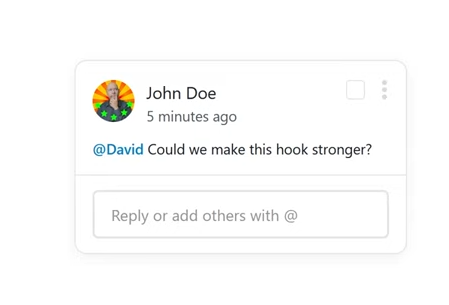
Similar to DraftSync’s suggested edits, Multicollab Pro includes a suggestion mode where collaborators can propose changes to content without directly editing the live draft. Editors can review and accept or reject suggestions.
Editorial Checklist
Multicollab includes an editorial checklist feature across both Lite and Pro plans. Teams can define standard pre-publication tasks, proofreading, SEO review, image checks, legal sign-off: and track completion status before a post is published.
Content Workflow (Pro)
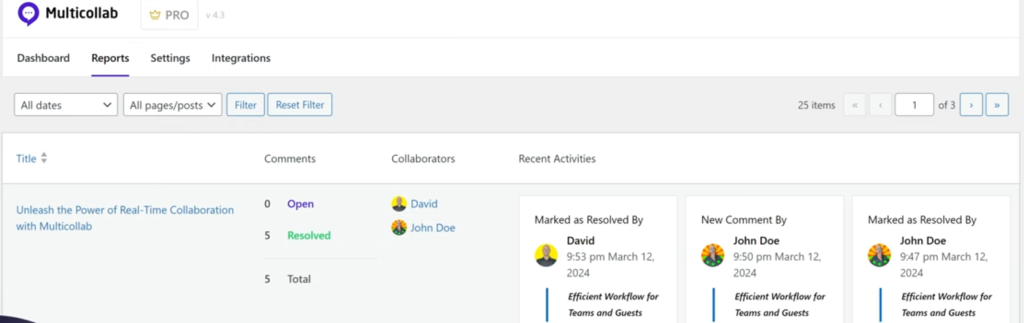
Multicollab Pro adds a content workflow system that allows teams to move articles through defined stages. This brings structure to the editorial process and creates a clearer path from first draft to publication.
(Screenshot placeholder: Multicollab content workflow stages)
Slack Notifications (Pro)
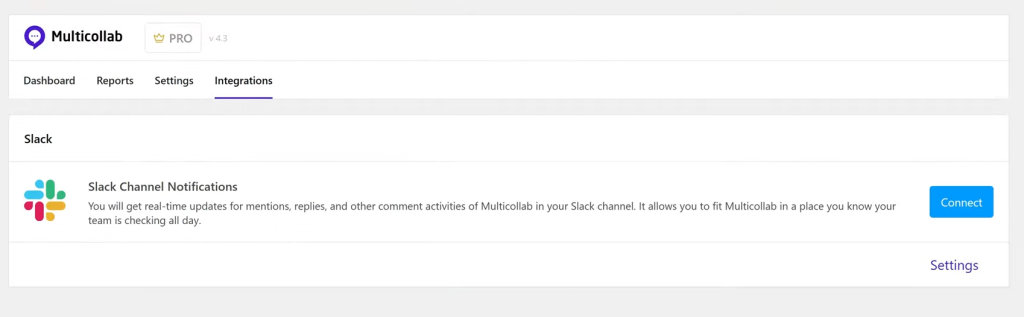
Like DraftSync, Multicollab Pro includes Slack integration for collaboration event notifications. This is a Pro-only feature however, it’s not available on the Lite plan.
Custom Permissions (Pro)
Role-based permissions are available in Multicollab Pro, giving administrators more control over what different team members can do within the collaborative editing environment.
Multilingual Support
Multicollab supports multilingual publishing environments, which is particularly relevant for teams using WPML or other translation plugins.
Plugin Compatibility
Multicollab is compatible with WooCommerce, Yoast SEO, WPML, Spectra, Rank Math, PublishPress, Genesis Framework, Advanced Custom Fields and Oxygen Builder covering a wide range of popular WordPress stacks.
Multicollab Pricing
Multicollab operates on an annual subscription model.
| Plan | Price | Sites |
|---|---|---|
| Free | $0 | 1 site |
| Lite | $299/year | 1 site + 2 staging |
| Pro | $599/year | 1 site + 4 staging |
| Enterprise | From $2,500/year | Custom |
Multicollab offers a 14-day money-back guarantee and a 24-hour support response commitment (48 hours on weekends).
Feature-by-Feature Comparison
Let’s put the two plugins side by side on the features that matter most to editorial teams.
| Feature | DraftSync | Multicollab Free | Multicollab Lite | Multicollab Pro |
|---|---|---|---|---|
| Inline / Text Comments | ✅ | ✅ | ✅ | ✅ |
| Comment Replies | ✅ | ✅ | ✅ | ✅ |
| @Mentions | ✅ | ❌ | ✅ | ✅ |
| Comment Assignments | ✅ | ❌ | ✅ | ✅ |
| Comment Reactions | ✅ | ❌ | ✅ | ✅ |
| File Attachments | ✅ | ❌ | ✅ | ✅ |
| Suggested Edits / Suggestion Mode | ✅ | ❌ | ❌ | ✅ |
| Accept / Reject Suggestions | ✅ | ❌ | ❌ | ✅ |
| Per-Draft Chat | ✅ | ❌ | ❌ | ❌ |
| Visual Markup Overlay | ✅ | ❌ | ❌ | ❌ |
| Editorial Workflow Stages | ✅ (optional) | ❌ | ❌ | ✅ |
| Editorial Checklist | ❌ | ❌ | ✅ | ✅ |
| Real-Time Co-Editing | ❌ (partially, presence + autosave) | ❌ | ❌ | ✅ |
| Active Collaborator Presence | ✅ | ❌ | ❌ | ✅ |
| Version History + Restore | ✅ | ❌ | ❌ | ❌ |
| Revision Conflict Detection | ✅ | ❌ | ❌ | ❌ |
| Granular Role Permissions | ✅ | ❌ | ✅ | ✅ |
| Per-Draft Access Lists | ✅ | ❌ | ✅ | ✅ |
| Guest Collaboration | ✅ (via invite) | ❌ | ✅ | ✅ |
| Email Notifications | ✅ | ❌ | ✅ | ✅ |
| Slack Notifications | ✅ (optional) | ❌ | ❌ | ✅ |
| In-App Notifications | ✅ | ❌ | ❌ | ✅ |
| Activity Reports Dashboard | ✅ | ❌ | ✅ | ✅ |
| Gutenberg Integration | ✅ | ✅ | ✅ | ✅ |
| Classic Editor Integration | ✅ | ❌ | ❌ | ❌ |
| Self-Hosted (No External Service) | ✅ | ✅ | ✅ | ✅ |
| Developer Filters / Hooks | ✅ | ❌ | ❌ | ✅ |
| Multilingual Support | ✅ | ❌ | ✅ | ✅ |
| Publishing Controls Inside Editor | ✅ | ❌ | ❌ | ❌ |
| Publish Block Until Workflow Complete | ✅ | ❌ | ❌ | ✅ |
Pricing Comparison: One-Time vs Annual Subscription
This is where the two plugins diverge most sharply and it’s worth thinking through carefully.
DraftSync uses a one-time purchase model. You pay once and you own the license indefinitely. There’s no annual renewal, no subscription that lapses if you miss a payment and no per-seat pricing that scales against you as your team grows.
- $79 for a single site
- $149 for 5 sites
- $249 for up to 2,000 sites
For an agency managing client sites, the $249 agency license is extraordinary value. Even for a single-site team, $79 for a complete editorial collaboration system is a low bar to clear.
Multicollab operates on an annual subscription model.
- Free tier available with basic inline commenting
- $299/year for Lite (1 site, limited features)
- $599/year for Pro (1 site, full features)
- $2,500+/year for Enterprise
Over three years, a Multicollab Pro license for a single site costs $1,797. A DraftSync single-site license costs $79 total. Over the same period, DraftSync’s agency license at $249 covers 2,000 sites for less than a single year of Multicollab Pro.
The pricing calculus is stark. If budget is a constraint and for most teams, it is DraftSync’s one-time pricing is an enormous advantage.
The counterpoint is that Multicollab’s subscription includes ongoing updates, new features and support as the product evolves. If Multicollab’s feature roadmap is important to you (particularly real-time co-editing), the subscription model makes sense. But for teams where the current feature set already covers their needs, DraftSync’s one-time pricing is difficult to argue against.
Data Privacy and Self-Hosting: A Deeper Look
For publishers, agencies and enterprises handling sensitive editorial content, where your data lives is not a minor consideration.
Both DraftSync and Multicollab store data on your WordPress installation. Neither requires an external SaaS account for core functionality. Your drafts, comments, suggestions and version history stay on your server.
However, DraftSync makes self-hosting the explicit center of its design philosophy. Every aspect of the plugin, from the writing environment to the activity reports, is built to run entirely within your WordPress admin without external dependencies. The only optional external integration is Slack notifications through a Webhook URL.
This matters for:
- Publishers with editorial confidentiality requirements (news organizations, investigative journalism teams)
- Agencies working with NDAs and confidential client content
- Healthcare, legal or financial content teams with compliance requirements
- International teams subject to data residency regulations
- Organizations with IT policies that restrict third-party data processing
DraftSync’s architecture gives you a clean compliance story: your editorial workflow runs on your infrastructure, under your data governance policies, with no exceptions.
Gutenberg vs Classic Editor Support
If your team has moved fully to Gutenberg, both plugins integrate with the block editor.
Multicollab is built specifically for Gutenberg and offers the deepest integration with the block editor experience. Its inline commenting works natively within blocks and the plugin’s real-time collaboration features are designed around how Gutenberg constructs content.
DraftSync also integrates with Gutenberg through a document panel, but it works through a separate dedicated editor rather than layering directly onto Gutenberg’s block interface. This gives DraftSync flexibility: it also supports the Classic Editor through a sidebar metabox and launch panel.
For teams still on Classic Editor or teams running sites where switching to Gutenberg isn’t feasible, DraftSync is the clear choice. Multicollab does not support Classic Editor.
Who Should Choose DraftSync?
DraftSync is the right choice if any of these describe your situation:
You’re an agency managing multiple WordPress sites. DraftSync’s $249 one-time agency license covers up to 2,000 sites. That’s a one-time cost for unlimited client projects. Multicollab would require separate annual subscriptions per site.
You need full data control. DraftSync’s self-hosted architecture means your editorial content never leaves your server. For publishers, law firms, healthcare content teams or anyone with compliance requirements, this matters.
You need structured editorial workflow. DraftSync’s optional workflow stages, per-stage role restrictions, assignable due dates and publish gates give editorial managers a proper approval system.
Your team uses the Classic Editor. DraftSync is the only option here. Multicollab is Gutenberg-only.
You want one-time pricing. If you’re tired of SaaS subscriptions, DraftSync’s lifetime license model is refreshing.
You want a per-draft chat. DraftSync’s built-in chat which is connected to the specific article and keeps discussions organized and accessible. Multicollab doesn’t include this.
You need visual markup feedback. DraftSync’s markup overlay is unique and genuinely useful for design-adjacent content discussions, layout feedback and screenshot-style reviews.
You need version history and restore. DraftSync stores a full local revision history and lets editors restore earlier versions. Multicollab Pro does not include this feature.
You’re a developer who needs to customize behavior. DraftSync exposes WordPress filters for editor configuration, payload data, permission roles, workflow behavior, user permission mapping, allowed statuses, presence timing and special characters.
Who Should Choose Multicollab?
Multicollab is the right choice if any of these describe your situation:
You need true real-time simultaneous editing. Multicollab Pro’s real-time collaboration is the clearest differentiator. If your team needs to co-write content live, like a newsroom handling a breaking story with multiple contributors adding real-time editing is essential and only Multicollab offers it.
Your entire team lives in Gutenberg. Multicollab’s integration with the block editor is native and deep. The inline commenting experience inside Gutenberg blocks is smooth and familiar.
You’re starting with a tight budget and want to try before you buy. Multicollab’s free tier offers basic inline commenting at no cost. It’s a genuine entry point for teams that want to test the concept before investing.
Your team is coming from Google Docs. Multicollab has explicitly modeled the editorial experience after Google Docs. Writers and editors who are used to that workflow will recognize the UI patterns and feel at home quickly.
You need WPML or multilingual support. Multicollab includes multilingual compatibility that DraftSync doesn’t currently offer.
You’re at a media brand with a significant budget. Organizations like Gannett and Politico don’t make technology decisions lightly. Multicollab’s track record with major publishers is a meaningful signal about its reliability and scalability.
You need an editorial checklist. Pre-publication task tracking is available in Multicollab Lite and Pro, but not in DraftSync.
Real-Time Collaboration: An Important Nuance
One important distinction to understand clearly: DraftSync and Multicollab handle concurrent editing differently.
Multicollab Pro offers real-time simultaneous editing, multiple authors can work on the same post at the same time and see each other’s changes live, Google Docs-style.
DraftSync offers active collaborator presence (you can see who is in the draft) and autosave with revision conflict detection (which warns you if someone else has saved changes since you last loaded the draft), but it does not offer live simultaneous editing in the same sense. The DraftSync documentation is explicit about this: it shouldn’t be described as true live multi-cursor editing.
For teams where multiple authors might ever need to write in the same document at the same time, Multicollab Pro’s real-time capability is a genuine, meaningful advantage.
For teams where collaboration is sequential, one person drafts, another reviews, another approves: the lack of real-time co-editing in DraftSync is not a meaningful limitation. Most editorial workflows are sequential, not simultaneous.
Installation and Getting Started
DraftSync installation is standard WordPress:
- Upload the plugin folder to
/wp-content/plugins/ - Activate DraftSync from the WordPress Plugins screen
- Go to DraftSync > Settings and confirm local collaboration is active
- Open a post in Gutenberg or Classic Editor
- Use the DraftSync panel or sidebar metabox to create or open a collaborative draft
- Invite collaborators, assign roles, write, review, suggest and publish
Multicollab installation is equally straightforward since it’s available on WordPress.org. The Pro version installation includes 1:1 installation setup support on Pro and Enterprise plans.
Both plugins work with standard WordPress login credentials: no separate editor accounts required for either.
Support and Documentation
DraftSync is distributed through WPBay. Support information is available through the WPBay product listing. The plugin includes developer filters and documentation for customization.
Multicollab offers email support on all paid plans, with a stated 24-hour response guarantee (48 hours on weekends). Pro and Enterprise plans include 1:1 installation setup support. Enterprise plans include SLA-based support and dedicated onboarding.
Multicollab also has a publicly available help center, changelog, FAQs and a feature request channel – a sign of a more mature support infrastructure at the moment.
For teams where support response time is a hard requirement, Multicollab’s explicit support guarantees are an advantage.
The Verdict: Which Plugin is Right for Your Team?
After going through everything side by side, here’s how to think about the decision.
Choose DraftSync if:
- You’re an agency that needs a single license to cover multiple client sites
- Budget is a meaningful constraint and one-time pricing matters to you
- You need Classic Editor support
- Data privacy and self-hosting are non-negotiable requirements
- You want per-draft chat, visual markup and version history features that Multicollab doesn’t offer
- Your workflow is structured and sequential, with formal review and approval stages
- You want a complete editorial workspace with publishing controls inside the collaboration environment
Choose Multicollab if:
- Your team needs genuine real-time simultaneous co-editing
- You’re all-in on Gutenberg and want the deepest block editor integration
- You’re starting with a free plan and want to grow into paid features
- Your team has a Google Docs background and values a familiar UX
- You’re at a media organization that needs proven scalability at scale
- Multilingual content production is a requirement
There’s no wrong answer here… only the wrong answer for your specific situation.
DraftSync is the more comprehensive editorial collaboration system, with a feature set that goes broader than Multicollab in several important areas (per-draft chat, visual markup, version restore, Classic Editor support, one-time pricing). If you’re evaluating purely on feature breadth per dollar, DraftSync wins significantly, especially for agencies.
Multicollab has the real-time editing advantage, deeper Gutenberg integration, a free entry tier and a track record with major media brands that DraftSync doesn’t yet have publicly documented. If real-time co-editing matters to your workflow, Multicollab Pro is the only option on this list that delivers it.
Frequently Asked Questions
Is DraftSync a SaaS platform? No. DraftSync is a self-hosted WordPress plugin. Everything runs on your WordPress installation. No external service accounts are required.
Can I use DraftSync with the Classic Editor? Yes. DraftSync adds a sidebar metabox and launch panel to the Classic Editor. Multicollab does not support the Classic Editor.
Does Multicollab work with the free version of WordPress? Yes. A free version of Multicollab is available on WordPress.org. It includes basic inline commenting.
What happens to my DraftSync license if my needs grow? DraftSync licenses are per-site-count. If you need more sites, you can purchase the appropriate tier. The $249 agency license covers up to 2,000 sites, which is enough for virtually any agency.
Can DraftSync block publishing until a workflow stage is complete? Yes. DraftSync can be configured to block publishing until the draft reaches the final ready stage in the editorial workflow.
Does Multicollab store data externally? No. Multicollab stores data on your WordPress installation. Both plugins keep data local.
Which plugin is better for client review workflows? Both support external reviewers. DraftSync’s per-draft access lists and Comment Reviewer role give granular control over what clients can do. Multicollab’s guest collaboration allows comment access without a WordPress account. For agencies, DraftSync’s role system is more configurable overall.
Is real-time editing available in DraftSync? DraftSync supports active collaborator presence and autosave with conflict detection, but it is not a true real-time simultaneous editor. If live co-editing is essential to your workflow, Multicollab Pro is the better choice.
Which plugin is better for a small budget? DraftSync’s $79 single-site lifetime license is significantly more affordable than Multicollab Lite at $299/year. Over two years, DraftSync costs $79 total; Multicollab Lite costs $598.
Can I try Multicollab before paying? Yes. Multicollab has a free version on WordPress.org and offers a 14-day money-back guarantee on paid plans.
Final Thoughts
The WordPress ecosystem has needed a serious answer to editorial collaboration for a long time. Both DraftSync and Multicollab represent genuine progress on that problem and the fact that you’re comparing them rather than defaulting to Google Docs is already a win for your workflow.
For most teams, especially agencies, publishers with compliance requirements and teams that want comprehensive editorial tooling without an ongoing subscription: DraftSync is the stronger overall package. The one-time pricing alone makes it worth serious consideration and the feature set around version history, visual markup, per-draft chat and Classic Editor support goes beyond what Multicollab offers.
For teams where simultaneous real-time editing is a genuine workflow requirement, Multicollab Pro is the answer. Its Gutenberg-native design and track record with major publishers make it a credible choice for high-volume editorial environments.
Either way, both plugins will make your WordPress publishing workflow meaningfully better than the Google Docs-email-Slack-copy-paste loop you’re probably running today. That alone is worth making the switch.
Get DraftSync from WPBay – available from $79 one-time for a single site. DraftSync Lite is also available on wordpress.org.
Get Multicollab from the WordPress plugin directory (free) or Multicollab.com (paid plans from $299/year).



)