


Toc Toc Pro – Support Chat for WhatsApp® on WordPress and WooCommerce

 Recently Updated
Well Documented
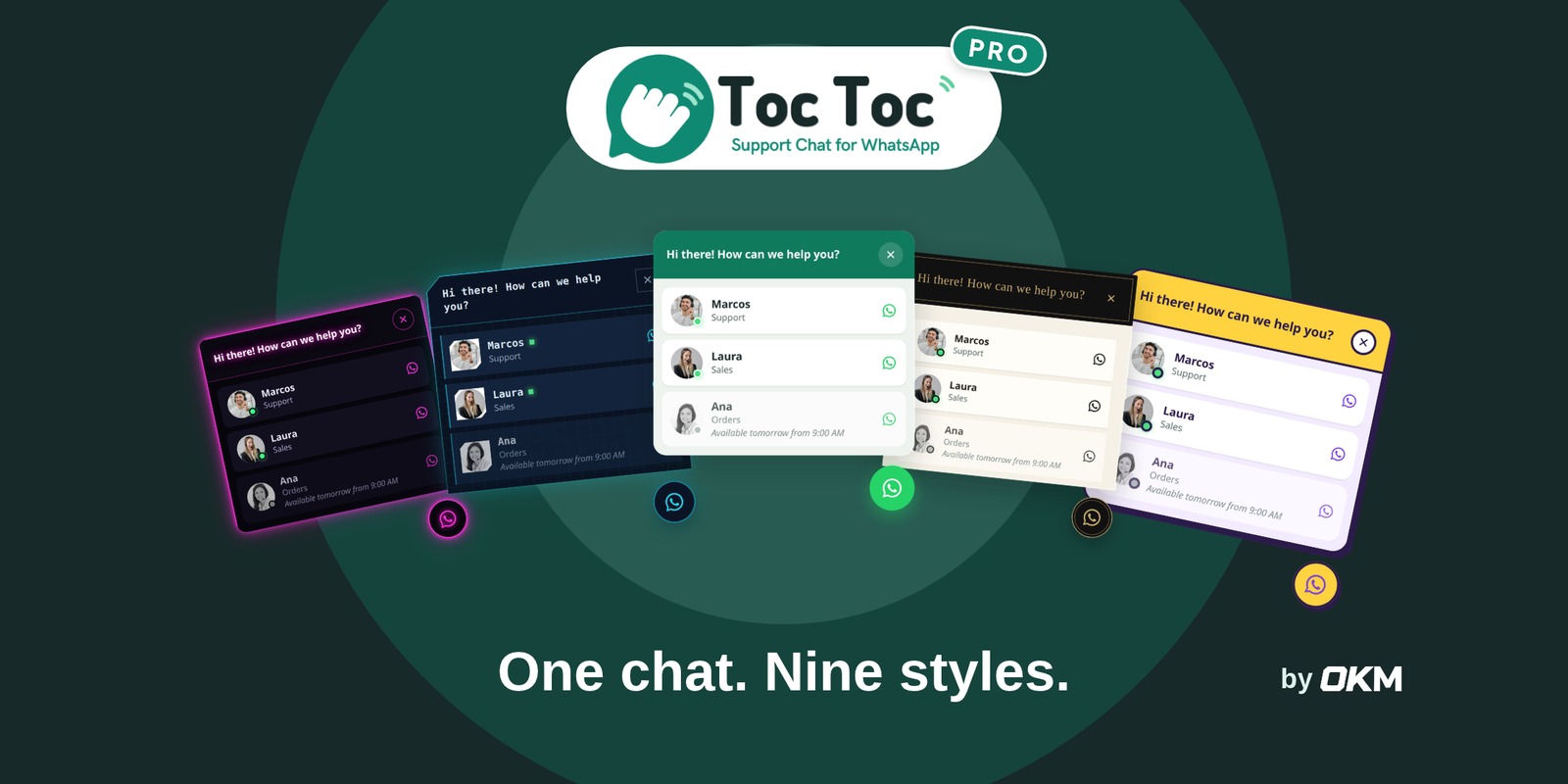
A support chat for WordPress and WooCommerce that opens a WhatsApp conversation with your team. Several agents with schedules and nine styles. Visitors click the button, choose who they want to talk to and land in WhatsApp with a ready-written message, so you answer from the phone you already use.
Live demo: See Toc Toc Pro in action
Features
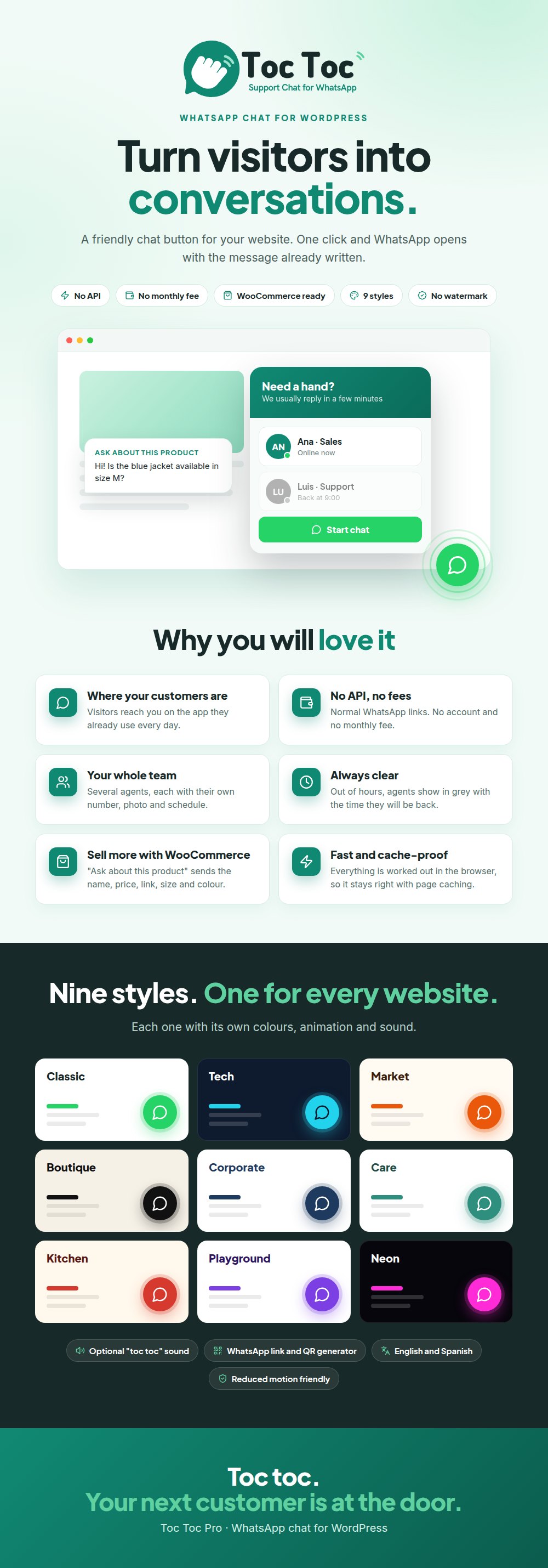
- Several agents, each one with their own WhatsApp number, photo and schedule
- Out of hours, the agent shows in grey with the time they will be available again, or is hidden if you prefer
- Days off and a one-click offline switch in the admin bar
- Nine styles: Classic, Tech, Market, Boutique, Corporate, Care, Kitchen, Playground and Neon
- WooCommerce: an “Ask about this product” button with the chosen size and colour
- Notice for out of stock products and a button to ask about an order
- Rules to choose on which pages it appears and which agent answers on each one
- Link and QR code generator, and a button for any page
- In English and Spanish
- No watermark
Requirements
- WordPress 6.5 or higher
- PHP 7.4 or higher
- WooCommerce optional
- A WhatsApp or WhatsApp Business number. No API, account or key needed.
What is included
- The installable plugin ZIP
- English documentation inside the plugin (documentation/index.html), with a troubleshooting and FAQ section
- Spanish translations (Spain and Mexico) and a .pot template to translate it into other languages
- Licence files in the licensing folder
Installation
- In WordPress, go to Plugins, Add New, Upload Plugin.
- Choose the plugin ZIP and click Install Now, then Activate.
- Open Toc Toc in the side menu, add an agent with a WhatsApp number and turn on the chat button.
Support and updates
Support through WPBay’s support system for one year from your purchase: questions about using the plugin, help with its features and bug fixes. New versions are published here on WPBay.
WhatsApp is a trademark of WhatsApp LLC. Toc Toc Pro is not affiliated with or endorsed by WhatsApp.
Changelog:
1.1.2: Accessibility: the floating chat button now keeps its accessible name (the Button label, "Chat with us" by default) on every screen width. On screens 480px wide and below it still shows the icon only.
1.1.1: Fixed: the WhatsApp buttons on product pages, on orders (My account and order received) and from the [toctoc_button] shortcode now show the agent's availability ("Available tomorrow from 09:00"), turn grey out of hours and update every minute without reloading. With "Out of hours: Hide" they are hidden while the agent is away and come back when the shift starts.
1.1.0: Fixed: with "Out of hours: Hide", the chat now appears by itself when an agent starts their working hours and hides when nobody is available, without reloading the page. Improved: agent availability is checked every minute.
1.0.1: Text domain renamed to toc-toc-pro to match the plugin folder; translations load from the languages folder. Licence files included in licensing/. Documentation: package contents, troubleshooting and FAQ.
Only logged in customers who have purchased this product may leave a review.
Loading...
WPBay support
 Support by OK Multimedia
OK Multimedia supports this product through WPBay
Questions are handled in WPBay's private ticket system, keeping your purchase details and support conversation together.
Go to My Downloads
After purchase, open this item in My Downloads and choose Get Support.
What support includes
- Answers to product-related questions
- Help with reported bugs and issues
- Guidance for included third-party assets
What support does not include
- Customizations or new features
- Installation or setup services
Plugin
Maintenance snapshot
See recent updates, compatibility, support, and developer activity.
- Updated today
- Developer active recently
- WPBay support available
- WordPress 7.1 tested
Snapshot updated 51 minutes ago
View details Hide details
Maintenance details
This is maintenance data. It does not measure product quality or sales.
- Last update Updated today
- Compatibility WordPress 7.1 tested · PHP 8.3 tested, one version behind · WooCommerce 11 tested
- Releases 5 releases in the 4 days since listing
- Developer activity Developer active recently
- Support No recent support tickets to measure
- Docs and demo Documentation available · Changelog available · Demo available
Health reflects increased activity during the last 90 days.
How this snapshot works
Plugin Health
The score is out of 100 and uses data WPBay can check. Ratings, popularity, and sales are not used.
- Last update 30 points
-
Plugins receive full recency points under 30 days, then step down at 90, 180, 365, and 545 days.
- Compatibility 20 points
-
WordPress, PHP, and WooCommerce (when relevant) are scored separately. The latest two PHP lines count as current. Nearby previous versions keep most of the points.
- Current version 100%
- One version behind 75%
- Two versions behind 50%
- Three versions behind 25%
- Older or not listed 0%
- Releases 15 points
-
One release earns 10, two or three earn 13, and four or more earn 15. Each accepted product ZIP counts once; reprocessing the same upload and listing-only edits do not count.
- Developer activity 15 points
-
Based on WPBay login and dashboard activity. Exact last-login dates are never shown.
- Support 15 points
-
There are no recent WPBay tickets to measure.
- Docs and demo 5 points
-
Documentation: 2. Changelog: 1. Working demo or preview: 2.
Score ranges
- 90–100 Excellent
- 75–89 Healthy
- 60–74 Fair
- 40–59 Needs attention
- 0–39 Limited
Long gaps
WPBay also checks for long gaps between updates, developer activity, support replies, and releases. Buyers do not see this score.
- Time since update 35 points
- Last developer activity 25 points
- WordPress compatibility 15 points
- Support replies 15 points
- Fewer releases 10 points
-
Quality verified by WPBay
WPBay review- Reviewed version
- 1.1.2
- Review completed
- Reviewer
- CodeRevolution
- Review type
- Initial
No unresolved approval blocker was identified during WPBay’s proportionate review of this release. This is not a security certification or a guarantee that the product contains no defects.
-
 Future updates
-
WPBay support from OK Multimedia
-
GPL code, proprietary assets
-
Covered by the WPBay refund policy
-
Plugin maintenance snapshot
Relevant picks
You may also like
Similar products selected by category, features, popularity and freshness.


Reviews
There are no reviews yet.