


QuickView & Wishlist

 Recently Updated
Well Documented
Overview
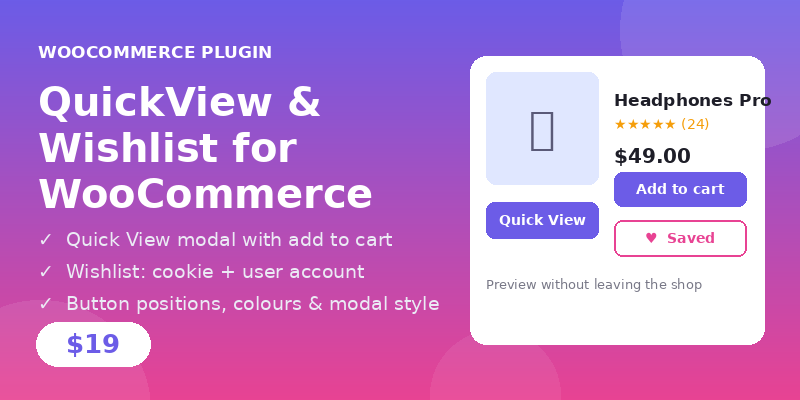
QuickView & Wishlist for WooCommerce adds two buttons to your product loops. Quick View opens a modal with the product image, price, short description, rating and an add-to-cart form, so customers can preview a product without leaving the shop page. The Wishlist button saves products for later, and the [woo_wishlist] shortcode shows the saved products on any page.
Features
- Quick View button on WooCommerce product loops; opens a modal with product image, price, short description, rating (optional), SKU (optional) and an add-to-cart form with quantity; variable products show option dropdowns that resolve to a variation (price updates) and add the chosen variation to the cart; external products show their own button and URL, grouped products show a “View options” link
- Quick View only serves published, publicly visible products — unpublished and password-protected products are refused with an honest message, never rendered
- Wishlist button (heart) on product loops; toggles saved state instantly without a page reload; wishlist removal only removes the item after the server confirms it, and is idempotent (double-clicking Remove can never re-add the item)
- Wishlist storage: 30-day cookie for guests + user meta for logged-in customers, so saved items follow the account across devices; capped at 100 IDs
- Wishlist page via shortcode [woo_wishlist]: product image, name, price, add-to-cart link and remove button per item; only published, publicly visible products are shown — a draft, private or password-protected product never appears
- Settings page: Quick View and Wishlist button positions (before/after add to cart, after title, after price) — “Before Add to Cart” only moves the button just before the add-to-cart button in the loop, never removes it; “After Product Title” and “After Price” hook outside the loop product link so the buttons are never nested inside an anchor; button colours, wishlist colour, modal style (centered, side panel, full width), modal width, show rating/SKU
- WooCommerce HPOS (custom order tables) compatibility declared
- Accessible modal: role=”dialog”, aria-modal, focus trapped inside the open modal, Escape closes it, focus returns to the opener
- All user-facing strings translatable (text domain “quickview-wishlist-woo”), including JavaScript messages
- Graceful degradation: if WooCommerce is not active the plugin shows an admin notice and the buttons simply do not appear — nothing breaks, and the wishlist shortcode shows a clear message
- AJAX loading with nonce checks, all output escaped, uninstall removes the plugin options
Requirements
- WordPress 6.x
- PHP 8.1 or higher
- WooCommerce 7.0 or higher (required)
Instructions
- Install and activate WooCommerce first (Plugins > Add New, search “WooCommerce”).
- Unzip main.zip and upload the `quickview-wishlist-woo` folder to /wp-content/plugins/ (or install the zip from Plugins > Add New > Upload Plugin).
- Activate “QuickView & Wishlist for WooCommerce” from Plugins in the WordPress admin.
- Go to Settings > QuickView & Wishlist and choose button positions, colours and modal style, then click Save Changes.
- Create a page (e.g. “My Wishlist”) and add the shortcode [woo_wishlist], then Publish. Link to it from your menu.
Changelog
v1.1.3 — 2026-11-20 — Fixed: “After Product Title” and “After Price” now land in their advertised spots — After Price renders after the product link closes and before the add-to-cart button; After Product Title renders between the title and the price by closing and reopening the product link around the button, so no button is ever nested inside the link. Verified for all four positions for both buttons. Fixed: the wishlist no longer shows “Add to cart” for every product — a simple purchasable in-stock product gets the direct add-to-cart link, variable/grouped/external products link to the product page with WooCommerce’s own button text (“Select options” / “View products”), and out-of-stock or unpurchasable products get a “View product” details link instead of any Add to Cart action.
v1.1.2 — 2026-11-18 — Fixed: wishlist shortcode only renders published, publicly visible products (draft/private/password-protected IDs in a guest cookie are skipped); adding such an ID is refused. Fixed: wishlist removal is now a dedicated idempotent action — double-clicking Remove or removing in two tabs can never re-add the item. Fixed: Quick View handles product types — external products show their own button text and URL, grouped products show a “View options” link, out-of-stock message only for products really out of stock. Fixed: “After Product Title”/”After Price” positions hook outside the loop product link, so buttons are never nested in an anchor and Wishlist clicks never navigate away. Added: WooCommerce HPOS compatibility declaration. Wishlist capped at 100 IDs.
v1.1.0 — 2026-11-18 — Quick View now only serves published, publicly visible products (unpublished products refused; password-protected products refused with an honest message, data never rendered); variable products can now be purchased from Quick View (option dropdowns resolve to a variation with price updates, chosen variation added to the cart, server re-validates the variation); fixed “Before Add to Cart” removing buttons from the shop loop (it now only controls position — button placed just before the add-to-cart button in the loop); wishlist removal now only removes the item after the server confirms, and a server error shows the actual error while the item stays in the list; added keyboard focus trap to the Quick View modal with Escape to close and focus restored to the opener; all user-facing JavaScript strings now use wp.i18n __() with the quickview-wishlist-woo text domain; added Troubleshooting and the WPBay support route.
v1.1.1 — 2026-11-18 — Replaced placeholder Plugin/Theme URI and Author URI with the real Digishop store URL (WPBay review fix).
v1.0.0 — 2026-11-17 — Initial release.
Changelog:
v1.1.3 — 2026-11-20 — Fixed: "After Product Title" and "After Price" now land in their advertised spots — After Price renders after the product link closes and before the add-to-cart button; After Product Title renders between the title and the price by closing and reopening the product link around the button, so no button is ever nested inside the link. Verified for all four positions for both buttons. Fixed: the wishlist no longer shows "Add to cart" for every product — a simple purchasable in-stock product gets the direct add-to-cart link, variable/grouped/external products link to the product page with WooCommerce's own button text ("Select options" / "View products"), and out-of-stock or unpurchasable products get a "View product" details link instead of any Add to Cart action.
Only logged in customers who have purchased this product may leave a review.
Loading...
WPBay support
 Support by Digishop
Digishop supports this product through WPBay
Questions are handled in WPBay's private ticket system, keeping your purchase details and support conversation together.
Go to My Downloads
After purchase, open this item in My Downloads and choose Get Support.
What support includes
- Answers to product-related questions
- Help with reported bugs and issues
- Guidance for included third-party assets
What support does not include
- Customizations or new features
- Installation or setup services
Plugin
Maintenance snapshot
See recent updates, compatibility, support, and developer activity.
- Updated today
- Developer active recently
- WPBay support available
- WordPress 6.9 tested
Snapshot updated 17 hours ago
View details Hide details
Maintenance details
This is maintenance data. It does not measure product quality or sales.
- Last update Updated today
- Compatibility WordPress 6.9 tested, two versions behind · PHP 8.1 tested, three versions behind
- Releases 4 releases in the 3 days since listing
- Developer activity Developer active recently
- Support No recent support tickets to measure
- Docs and demo Documentation available · Changelog available · No demo listed
Health reflects increased activity during the last 90 days.
How this snapshot works
Plugin Health
The score is out of 100 and uses data WPBay can check. Ratings, popularity, and sales are not used.
- Last update 30 points
-
Plugins receive full recency points under 30 days, then step down at 90, 180, 365, and 545 days.
- Compatibility 20 points
-
WordPress, PHP, and WooCommerce (when relevant) are scored separately. The latest two PHP lines count as current. Nearby previous versions keep most of the points.
- Current version 100%
- One version behind 75%
- Two versions behind 50%
- Three versions behind 25%
- Older or not listed 0%
- Releases 15 points
-
One release earns 10, two or three earn 13, and four or more earn 15. Each accepted product ZIP counts once; reprocessing the same upload and listing-only edits do not count.
- Developer activity 15 points
-
Based on WPBay login and dashboard activity. Exact last-login dates are never shown.
- Support 15 points
-
There are no recent WPBay tickets to measure.
- Docs and demo 5 points
-
Documentation: 2. Changelog: 1. Working demo or preview: 2.
Score ranges
- 90–100 Excellent
- 75–89 Healthy
- 60–74 Fair
- 40–59 Needs attention
- 0–39 Limited
Long gaps
WPBay also checks for long gaps between updates, developer activity, support replies, and releases. Buyers do not see this score.
- Time since update 35 points
- Last developer activity 25 points
- WordPress compatibility 15 points
- Support replies 15 points
- Fewer releases 10 points
-
Quality verified by WPBay
WPBay review- Reviewed version
- 1.1.3
- Review completed
- Reviewer
- CodeRevolution
- Review type
- Initial
No unresolved approval blocker was identified during WPBay’s proportionate review of this release. This is not a security certification or a guarantee that the product contains no defects.
-
 Future updates
-
WPBay support from Digishop
-
GPL code, proprietary assets
-
Covered by the WPBay refund policy
-
Plugin maintenance snapshot
Relevant picks
You may also like
Similar products selected by category, features, popularity and freshness.


From this seller
View seller store
More by Digishop
Explore more bestselling products from this creator.



Reviews
There are no reviews yet.