


WhatsApp Chat Button

 Recently Updated
Well Documented
Overview
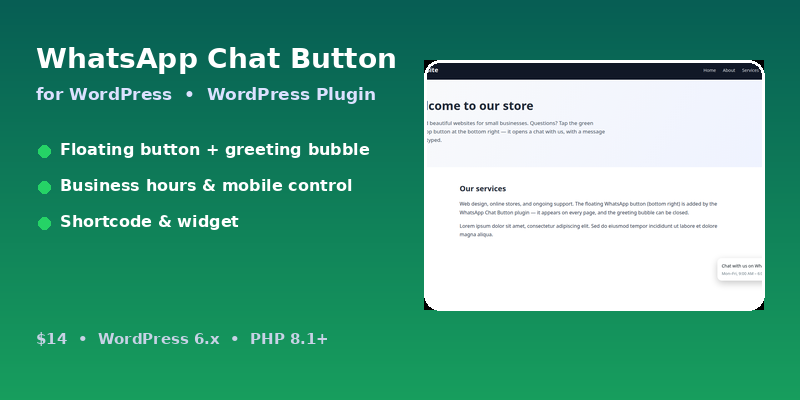
WhatsApp Chat Button for WordPress adds a floating WhatsApp button to every page of your site. Visitors tap it and open a chat with your number in WhatsApp, with your pre-filled message already typed. No account, API key or third-party service is needed — the button is a simple wa.me link.
Features
- Floating WhatsApp button on all pages, bottom-left or bottom-right
- Settings page: phone number, pre-filled message, position, button colour, greeting tooltip/bubble, business hours, show/hide on mobile
- Greeting tooltip bubble with a close button, remembered for the session
- Shortcode [whatsapp_chat] with phone, message and label attributes
- Sidebar widget using the same settings
- Mobile-friendly, responsive and touch-friendly
- All inputs sanitised on save and escaped on output; uninstall cleanup included
Requirements
- WordPress 6.x
- PHP 8.1 or higher
- A WhatsApp number (personal or business)
Instructions
- Unzip main.zip and upload the `whatsapp-chat-button` folder to /wp-content/plugins/.
- Activate the plugin in WordPress (Plugins > Activate).
- Go to Settings > WhatsApp Chat and enter your WhatsApp number with country code, no + sign (for example 923001234567).
- Type your pre-filled message, choose the position and colour, and set the greeting tooltip and business hours.
- Click Save Changes — the button appears on every page.
- Optionally use [whatsapp_chat] in any page or post, or add the widget in Appearance > Widgets.
Changelog
v1.1.3 — 2026-11-21 — Corrected: the documentation version heading and support references now say 1.1.3 (they still said 1.1.1, although the submitted version was 1.1.2); the two troubleshooting lines that said “update to version 1.1.1” now say “update to the latest version”. No code change in this release. Version identifiers unified at 1.1.3.
v1.1.2 — 2026-11-20 — Fixed: package rebuilt and verified directly installable — Plugins > Add New > Upload Plugin installs and activates it with no manual extraction (single top-level whatsapp-chat-button/ folder carrying the plugin file with its WordPress header at the folder root).
v1.1.0 — 2026-11-18 — Fixed: shortcode/widget now always load the front-end stylesheet even when the floating button is disabled; every settings field now has an accessible <label> linked to its control; support route updated to WPBay; Troubleshooting section added to the documentation.
v1.1.1 — 2026-11-18 — Replaced placeholder example.com Plugin/Theme URI and Author URI with the real Digishop store URL (WPBay review fix).
v1.0.0 — 2026-11-17 — Initial release.
Changelog:
v1.1.3 — 2026-11-21 — Corrected: the documentation version heading and support references now say 1.1.3 (they still said 1.1.1, although the submitted version was 1.1.2); the two troubleshooting lines that said "update to version 1.1.1" now say "update to the latest version". No code change in this release. Version identifiers unified at 1.1.3.
Only logged in customers who have purchased this product may leave a review.
Loading...
WPBay support
 Support by Digishop
Digishop supports this product through WPBay
Questions are handled in WPBay's private ticket system, keeping your purchase details and support conversation together.
Go to My Downloads
After purchase, open this item in My Downloads and choose Get Support.
What support includes
- Answers to product-related questions
- Help with reported bugs and issues
- Guidance for included third-party assets
What support does not include
- Customizations or new features
- Installation or setup services
Plugin
Maintenance snapshot
See recent updates, compatibility, support, and developer activity.
- Updated today
- Developer active recently
- WPBay support available
- WordPress 6.9 tested
Snapshot updated 2 hours ago
View details Hide details
Maintenance details
This is maintenance data. It does not measure product quality or sales.
- Last update Updated today
- Compatibility WordPress 6.9 tested, two versions behind · PHP 8.1 tested, three versions behind
- Releases 6 releases in the 4 days since listing
- Developer activity Developer active recently
- Support No recent support tickets to measure
- Docs and demo Documentation available · Changelog available · No demo listed
Health reflects increased activity during the last 90 days.
How this snapshot works
Plugin Health
The score is out of 100 and uses data WPBay can check. Ratings, popularity, and sales are not used.
- Last update 30 points
-
Plugins receive full recency points under 30 days, then step down at 90, 180, 365, and 545 days.
- Compatibility 20 points
-
WordPress, PHP, and WooCommerce (when relevant) are scored separately. The latest two PHP lines count as current. Nearby previous versions keep most of the points.
- Current version 100%
- One version behind 75%
- Two versions behind 50%
- Three versions behind 25%
- Older or not listed 0%
- Releases 15 points
-
One release earns 10, two or three earn 13, and four or more earn 15. Each accepted product ZIP counts once; reprocessing the same upload and listing-only edits do not count.
- Developer activity 15 points
-
Based on WPBay login and dashboard activity. Exact last-login dates are never shown.
- Support 15 points
-
There are no recent WPBay tickets to measure.
- Docs and demo 5 points
-
Documentation: 2. Changelog: 1. Working demo or preview: 2.
Score ranges
- 90–100 Excellent
- 75–89 Healthy
- 60–74 Fair
- 40–59 Needs attention
- 0–39 Limited
Long gaps
WPBay also checks for long gaps between updates, developer activity, support replies, and releases. Buyers do not see this score.
- Time since update 35 points
- Last developer activity 25 points
- WordPress compatibility 15 points
- Support replies 15 points
- Fewer releases 10 points
-
Quality verified by WPBay
WPBay review- Reviewed version
- 1.1.3
- Review completed
- Reviewer
- CodeRevolution
- Review type
- Initial
No unresolved approval blocker was identified during WPBay’s proportionate review of this release. This is not a security certification or a guarantee that the product contains no defects.
-
 Future updates
-
WPBay support from Digishop
-
GPL code, proprietary assets
-
Covered by the WPBay refund policy
-
Plugin maintenance snapshot
Relevant picks
You may also like
Similar products selected by category, features, popularity and freshness.

From this seller
View seller store
More by Digishop
Explore more bestselling products from this creator.



Reviews
There are no reviews yet.