



TaskFlow — Project Management PHP Script

 Recently Updated
Well Documented
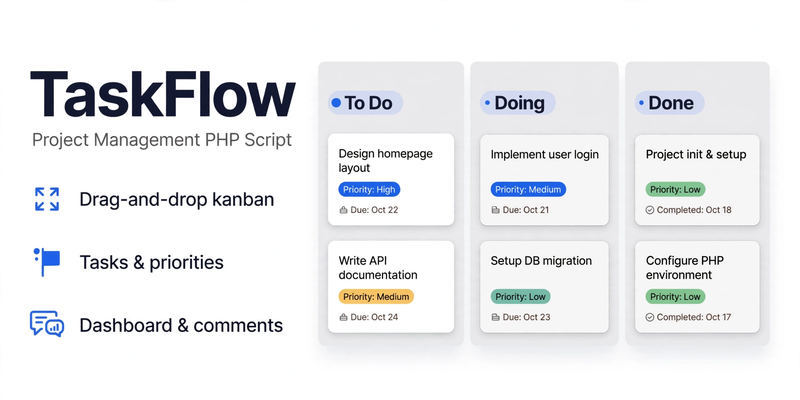
Title: TaskFlow — Project Management PHP Script
Price: $29
Short description: Self-hosted project manager in PHP: Kanban board, team accounts, time tracking, calendar, comments and tasks.
Tags: task-manager, project-management, kanban, php-script, time-tracking, team-collaboration, calendar, todo, tasks, projects, productivity, self-hosted, sqlite, mysql
Live demo: http://31-taskflow-pm.mangoraya.xo.je/
Overview
TaskFlow — Project Management PHP Script is a self-hosted project manager in plain PHP with no framework and no monthly fee. Create projects, add tasks with priorities, assignees and due dates, drag tasks across a kanban board, and discuss each task in comments. Team accounts with admin/member roles mean tasks go to real people with their own logins and avatars; every task has time tracking with per-task timers, and a calendar shows all due dates for the month. Your projects and tasks stay on your own server.
Features
- Projects CRUD: create, view, edit (name, description, status, colour) and delete — deleting a project also deletes its tasks and their comments, atomically
- Tasks CRUD: title, description, status, priority (low / medium / high), assignee and due date, with one shared server-side validator (text limits, blank-or-valid-calendar due dates, field-specific errors) so a task can never disappear from the board or hold an impossible date. The assignee is a real team account chosen from a dropdown — never free text — with an avatar (initials in a per-person colour) on every board card
- Kanban board with drag-and-drop between To Do, Doing and Done — moves save instantly via AJAX; every card shows the assignee avatar, a priority icon (▲ high, ◆ medium, ▼ low), the due date (overdue in red), the time logged and its comment count, and the “Add a task” form is collapsed by default so the board fills the page; each column shows the newest 100 tasks with its total labelled, and the searchable, paginated “All tasks” list below finds every task, including the oldest
- Comments on every task, with author and timestamp (paginated)
- Team accounts and roles: an admin adds members under Team (username, display name, password, role admin or member); every member logs in with their own password, works on projects and tasks, starts timers and comments. Only admins manage the team; the last admin can never be deleted or demoted, and deleting a member unassigns their tasks (the tasks stay)
- Time tracking: per-task timers on the task page (one running timer per person — starting a new one stops the old one) plus manual logs (1–1440 minutes with a note); totals on the task page, board cards, dashboard and a Time log page with totals per member and per task
- Calendar: a month grid of every task due date with previous/next navigation, project-coloured task chips, priority icons, overdue tasks in red and done tasks faded, plus a due-this-month list
- Dashboard with project and task counts, completion percentage, overdue count, total time logged and team size, and a progress bar per project — counts come from one grouped query per page, with no per-project queries
- Login for admins and team members with bcrypt-hashed passwords, login throttling (5 failed attempts from the same network address lock that source for 15 minutes, with a slower global back-off of 20 failures for the username — a correct login from another network still works, and when the global back-off is tripped a network you have signed in from successfully in the last 30 days still gets through, so distributed guessing cannot lock the administrator out; one successful login clears the recorded failures), session ID rotation on login, and CSRF protection on every admin change including kanban moves; logout is a CSRF-protected POST
- Password change under Settings rejects common passwords (including the former published default ‘admin123’) and signs out your other sessions
- SQLite database stored outside the web root by default (an instance-specific folder next to the web root), so project data and password hashes are never web-reachable; a database inside the web root is accepted only when its protection is proven over HTTP against the real deployment (the probe first proves it reached this app, then the real database file and its sidecars must answer 403/404 at the full site address, path preserved), with the verification marker bound to the version, site address, database path and verified public paths, and the Nginx deny rule is a checklist item on the installer’s requirements list (see documentation.txt, “Database location”)
- Foreign keys enforce task-to-project and comment-to-task integrity on both SQLite and MySQL; the upgrade migration removes orphaned rows explicitly and clears invalid due dates
- SQLite by default (zero setup) or MySQL via the installer (MySQL 5.7 / 8.0, MariaDB 10.4+)
- Web installer: installing, upgrading the database and resetting a broken install all need an operator-provided setup key (taskflow-setup.key outside the document root, pasted into the installer), checked before the installer creates anything, so an anonymous visitor who reaches install.php first cannot claim the install. It verifies storage and the database schema, seeds one demo project, and publishes config.php atomically last — a failed install leaves nothing behind and can simply be re-run. After a successful install it writes install.lock and refuses to run again while the app is installed; delete install.php for security
Requirements
- PHP 8.1 or newer with PDO and pdo_sqlite (SQLite mode) or pdo_mysql (MySQL mode).
- Apache, Nginx, or the PHP built-in server. A writable app folder (for config.php) and a writable folder for the SQLite file (outside the web root by default).
Instructions
- Unzip main.zip and upload the files to your web hosting.
- Create the setup key first: put a random string in a file named taskflow-setup.key in the folder ABOVE the document root (or in the folder above the app folder), then open http://your-domain/install.php in your browser and paste that same string into the “Setup key” field. Without a matching key the installer refuses to run.
- Choose SQLite (recommended — the database is created outside the web root by default) or MySQL and enter your database details if needed. On shared hosting that jails PHP to the web root, use data/app.sqlite inside the app folder instead and set the site address (base_url) so the installer can prove the folder’s protection over HTTP against the real deployment — the real database file and its sidecars must answer 403/404.
- Set your admin username and choose a strong password (at least 8 characters). There is no default password; common passwords including ‘admin123’ are rejected.
- Click “Install TaskFlow”, then delete install.php for security.
- Log in at admin/login.php, create a project, and add your first tasks to the kanban board. Add team members under Team (admin only), then assign them tasks and track time from any task page; open Calendar to see the month’s due dates.
Changelog
v1.2.5 — 2026-11-27 — WPBay review fix (wave 22): the setup-key HTTP probe is GONE — installing, upgrading the database and resetting a broken install now need a taskflow-setup.key file physically outside the document root, verified by filesystem path comparison only; a key inside the web root (or one whose location cannot be determined) is refused outright, and the in-app setup.key fallback is removed, so no HTTP self-test can be bypassed with a manipulated probe response. The installer page no longer offers the in-app fallback. The SQLite database protection check is unchanged. No schema change (schema version stays 1.2.0). Verified by harness: see the documentation changelog. v1.2.4 — 2026-11-26 — Fixes: (1) installing, upgrading the database and resetting a broken install now need an operator-provided setup key (a random secret in a taskflow-setup.key file outside the document root, pasted into the installer) instead of the allow-install.txt marker file — the marker let any visitor install while it existed, because the file itself proved nothing, so the v1.2.3 allow-install.txt mechanism is gone; an in-app fallback key (setup.key) is accepted only when an HTTP self-test proves it cannot be downloaded (exactly 403 from the real deployment — a 404 from another virtual host, an error page and a redirect all refuse the key); the key is checked FIRST, before any lock, filesystem change, HTTP probe or database work, on the fresh-install, upgrade and reset paths alike, and is deleted after a successful fresh install and after a successful upgrade (a reset leaves it in place, so the same key authorizes the fresh install that follows). (2) The SQLite protection probe now proves it reached the real deployment first (the app’s own homepage or install.php must answer 200 with the TaskFlow mark), so a 404 from another virtual host can no longer count as ‘protected’; the probe URL is built from the full site address (including the application path) plus the file’s path relative to the app folder, so an app behind a reverse proxy or a rewritten subdirectory is probed at its real public location, and probe files use the real database filename (app.sqlite and its -wal/-shm/-journal sidecars) — only a 403/404 for every file counts, and an inconclusive answer refuses the location. (3) The .protection-verified marker is now bound to the version, the full site address, the resolved database path and the verified public paths (exact comparisons) — a v1.2.3 marker (which named only the origin) never matches and is re-probed, so any config change re-proves the location. (4) The documentation and listing now describe v1.2.4, the setup key and the outside-the-root default throughout. No schema change (schema version stays 1.2.0).
v1.2.3 — 2026-11-25 — Fixes: (1) the SQLite database is outside the document root by default again (an instance-specific folder next to the web root), so project data and password hashes are never web-reachable; a database inside the web root is accepted only when its protection is proven over HTTP (403/404), and the connection refuses an unproven or exposed location. The Nginx deny rule is now a checklist item on the installer’s requirements list. (2) A fresh install needs the operator-created marker file allow-install.txt in the app folder, so an anonymous visitor who reaches install.php first cannot claim the install; the marker is deleted after a successful install. (3) Kanban avatars no longer fatal on hosts without the mbstring extension — initials and avatar colours now fall back to UTF-8-safe plain-PHP helpers (mbstring is recommended but not required). (4) A stale install.lock left by a failed install no longer blocks a fresh install. (5) Support now routes through WPBay. No schema change (schema version stays 1.2.0).
v1.2.2 — 2026-11-24 — Fixes: the schema-version check now runs on every admin request, including when the database connection is already open — an out-of-date database now shows the ‘database upgrade required’ message with a link to install.php instead of a lockout message, and the same message appears when the login-attempts table is missing the column the current schema needs. The documentation now names version 1.2.2 throughout (header and support line), matching the package.
v1.2.1 — 2026-11-23 — Installer now works on shared hosting: no outside-web-root token, SQLite inside the app folder. No schema change (schema version stays 1.2.0).
v1.2.0 — 2026-11-23 — Team accounts, time tracking and calendar (marketplace rebuild): (1) Multi-user team accounts with roles — an admin adds members under Team (username, display name, password, role admin/member); every member logs in with their own password, and tasks are assigned to a real team account from a dropdown, not free text. The upgrade links free-text assignees that exactly match a team username to that account and keeps unmatched text visible; deleting a member unassigns their tasks and stops their running timer, and the last admin can never be deleted or demoted. (2) Time tracking — per-task timers on the task page (one running timer per person; starting a new one stops the old one and finalises its minutes) plus manual logs (1–1440 minutes with a note), with totals on the task page, board cards, dashboard and a new Time log page (totals per member and per task, filter by member/task). (3) Calendar — a month grid of all due dates with previous/next navigation, project-coloured task chips, priority icons, overdue tasks in red and done tasks faded, plus a due-this-month list. (4) Board polish — assignee avatars (initials in a per-person colour), priority icons (high/medium/low) with a coloured card edge, logged time and comment counts on every card, and the “Add a task” form collapsed by default so the board fills the page. (5) Support route moved — all other-marketplace wording removed; support is through the marketplace where you bought the script. (6) Listing restored with Title, Price $24, short description and tags. Schema version 1.2.0 (new: users.role/display_name, tasks.assignee_id, time_entries table).
v1.1.7 — 2026-11-23 — Review fixes: (1) the login trusted-network bypass is no longer nullified by the 15-minute prune — taskflow_record_login_attempt() now prunes only FAILED rows on the short lockout window, and successful rows are kept for TASKFLOW_LOGIN_TRUSTED_DAYS (30 days), so a network that signed in successfully still gets through the global back-off after 15 minutes and 20 failures from other addresses; one successful login still clears the recorded failures. (2) Invalid UTF-8 in validated fields no longer causes a fatal TypeError when mbstring is absent — taskflow_strlen() now guards the preg_match_all() result (and mb_strlen’s false return) and always returns an int, and taskflow_field() rejects non-UTF-8 input with a normal field error, so posting a task title containing an invalid UTF-8 byte renders the form with a field error and stores no task. (3) Reset backups in an in-docroot storage folder are now covered by the documented deny rule and verified before anything is deleted — the reset backup is now written as app.backup-<stamp>.sqlite (an extension the documented Nginx deny rule covers), its URL is requested over HTTP and must return 403/404 before the original is deleted (a downloadable or unverifiable backup refuses the reset with nothing deleted), and old backups are pruned to the newest 3; recovery copies use the same covered extensions (app.recovery-<stamp>.sqlite / .sqlite-wal / .sqlite-shm / .sqlite-journal). (4) The listing description no longer contains internal production notes or the placeholder demo note — the Title/Price/Category/Development hours block, the Tags line and the ‘Demo: Needs a PHP/MySQL server demo …’ sentence are gone, and no demo is claimed (the live preview URL is an optional field); the Overview, Features, Requirements, Instructions and Changelog sections are unchanged. No schema change (schema version stays 1.1.4).
v1.1.6 — 2026-11-22 — Review fixes: the installer reset backup is now SQLite-safe — VACUUM INTO writes one consistent snapshot that includes committed WAL data (a plain file copy could omit it), and the backup is verified (opens, passes integrity_check, same row counts and schema version) before anything is deleted; a failed backup still refuses the reset with nothing deleted, and a database too corrupt for a backup is preserved as .recovery-<stamp> copies instead of being deleted; the SQLite migration rebuild (tasks, comments) now runs inside one transaction with the foreign-key check before the commit, so an interrupted migration leaves the original tables and all their rows untouched and a retry completes it; MySQL recovery now detects an existing installation — the admin account(s) already in the database stay valid, the credentials entered on the install form are NOT applied, and the success screen names the accounts that remain valid; the global login back-off no longer hard-locks the account for everybody — when 20 failures for the username trip it, a network that has signed in successfully in the last 30 days still gets through, and one successful login clears the recorded failures. No schema change (schema version stays 1.1.4).
v1.1.5 — 2026-11-22 — Review fixes: the installer reset now verifies the backup before deleting anything — the copy must succeed and the backup file must exist, be non-empty and readable and be the same size as the original SQLite file; only then are the database and its sidecars removed. On any backup failure the reset is aborted with a visible error, config.php and the database are left in place, and the outcome is logged; the backup name now carries a random suffix as well as a timestamp, so a second reset within the same minute never overwrites the earlier backup, and the backup path is logged on success. No schema change (schema version stays 1.1.4).
v1.1.4 — 2026-11-21 — Review fixes: a failed installer POST can no longer delete a pre-existing SQLite database at the default location — the cleanup is gated on a flag set only after the SQLite file is confirmed not to exist AND this run’s PDO connection has opened it, plus an explicit is_file() check on the exact chosen path, so a failed setup-token, setup-lock or password check (which throws before the file exists) deletes nothing, and the cleanup decision is logged; config.php is removed on failure only when this run published it; the pre-existing-database refusal is kept; the login page no longer echoes raw database exception text (filesystem path disclosure) to unauthenticated visitors — the full cause goes to the PHP error log and the page shows a fixed message (‘The database is unavailable. Check the installation or contact support (see documentation.txt, Troubleshooting).’); login throttling is scoped per username + source IP (5 failures from one network address lock that source for 15 minutes, with a slower global back-off of 20 failures for the username from any source in the same window) so an unauthenticated attacker can no longer keep the sole admin locked out — a correct login from another source still succeeds and the lockout expires after the window — and login_attempts rows older than the lockout window are pruned while recording, with a (username, ip, attempted_at) index; schema version 1.1.4 (the migration adds the ip column and the index to existing databases).
v1.1.3 — 2026-11-21 — Review fixes: the setup token NEVER lives in a served directory — the old data/.setup-token fallback is gone; when no writable folder outside the document root exists, setup stops with a clear message until the operator creates the token file by hand outside the web root (the installer says exactly where) or sets the TASKFLOW_SETUP_TOKEN environment variable; a token path that resolves inside the document root is never created or read, on any server. In-docroot SQLite storage is now proven with an HTTP probe, not trusted on deny-file text — probe files shaped like the database file and its -wal/-shm/-journal sidecars must return 403/404 for the location to be accepted; the verification is recorded (.protection-verified) and the database connection refuses an in-docroot location without it, re-probing once when the marker is missing; guard files stay as a secondary layer; .htaccess denial is Apache-only (Nginx rule documented, php -S refuses in-docroot storage outright).
v1.1.2 — 2026-11-20 — Review fixes: MySQL installs now work end-to-end — no more CREATE INDEX IF NOT EXISTS (invalid in MySQL); indexes are declared inline (KEY …) in CREATE TABLE on MySQL and the meta `key` column is backtick-quoted everywhere (reserved word); the migration runs DDL outside any transaction (MySQL’s implicit commit), DML in its own transaction, foreign keys only after orphan rows are gone, and stamps the schema version last. Login throttling now actually works in MySQL mode — attempts recorded with PHP-generated UTC timestamps bound as parameters, one driver-neutral lockout query, failures logged instead of swallowed, and a failed attempt-log read refuses the login. MySQL 5.7/8.0 and MariaDB 10.4+ support stands (verified by code inspection; no live MySQL server was available here, so a live install on each named engine is recommended on first use).
v1.1.1 — 2026-11-20 — DOCUMENT_ROOT-derived instance-specific SQLite storage with verified guards; setup-token-gated installer with atomic config published last, serialised setup, backup-first reset, idempotent seeding; MySQL TEXT defaults removed, versions declared; fail-closed CSRF (missing/empty tokens rejected, including kanban moves); session rotation + login throttling + CSRF-protected POST logout; ‘admin123’ and other common passwords rejected; password change revokes other sessions; shared validator for task/project/comment writes (text limits, canonical due dates, field errors); foreign keys + atomic deletion + orphan-cleaning migration; bounded board columns with labelled totals + searchable paginated task list; batched project counts with indexes.
v1.1.0 — 2026-11-18 — Review fixes: SQLite database outside the document root by default (protected fallback); no default password — installer requires a strong password (min 8 chars) and a Settings page changes it; failed installs roll back and can be re-run; real project editing added; deleting a project deletes its tasks’ comments too; task status/priority validated server-side; dashboard/lists paginated; Troubleshooting section + Codester support route added.
v1.0.0 — 2026-11-17 — Initial release.
Changelog:
v1.2.5 — 2026-11-27 — WPBay review fix (wave 22): the setup-key HTTP probe is GONE — installing, upgrading the database and resetting a broken install now need a taskflow-setup.key file physically outside the document root, verified by filesystem path comparison only; a key inside the web root (or one whose location cannot be determined) is refused outright, and the in-app setup.key fallback is removed, so no HTTP self-test can be bypassed with a manipulated probe response. The installer page no longer offers the in-app fallback. The SQLite database protection check is unchanged. No schema change (schema version stays 1.2.0). Verified by harness: see the documentation changelog.
Only logged in customers who have purchased this product may leave a review.
Loading...
WPBay support
 Support by Digishop
Digishop supports this product through WPBay
Questions are handled in WPBay's private ticket system, keeping your purchase details and support conversation together.
Go to My Downloads
After purchase, open this item in My Downloads and choose Get Support.
What support includes
- Answers to product-related questions
- Help with reported bugs and issues
- Guidance for included third-party assets
What support does not include
- Customizations or new features
- Installation or setup services
Script
Maintenance snapshot
See recent updates, compatibility, support, and developer activity.
- Updated today
- Developer active recently
- WPBay support available
- Documentation available
Snapshot updated 59 minutes ago
View details Hide details
Maintenance details
This is maintenance data. It does not measure product quality or sales.
- Last update Updated today
- Compatibility Not used for scripts
- Releases 14 releases in the 10 days since listing
- Developer activity Developer active recently
- Support No recent support tickets to measure
- Docs and demo Documentation available · Changelog available · No demo listed
Health remained stable during the last 90 days.
How this snapshot works
Script Health
The score is out of 100 and uses data WPBay can check. Ratings, popularity, and sales are not used.
- Last update 35 points
-
Scripts receive full recency points under 45 days, then step down at 120, 240, 365, and 545 days.
- Compatibility Not scored
-
Scripts do not use WordPress or PHP, so compatibility is not scored.
- Releases 20 points
-
One release earns 14, two or three earn 18, and four or more earn 20. Each accepted product ZIP counts once; reprocessing the same upload and listing-only edits do not count.
- Developer activity 20 points
-
Based on WPBay login and dashboard activity. Exact last-login dates are never shown.
- Support 15 points
-
There are no recent WPBay tickets to measure.
- Docs and demo 10 points
-
Documentation: 3. Changelog: 1. Working demo or preview: 6.
Score ranges
- 90–100 Excellent
- 75–89 Healthy
- 60–74 Fair
- 40–59 Needs attention
- 0–39 Limited
Long gaps
WPBay also checks for long gaps between updates, developer activity, support replies, and releases. Buyers do not see this score.
- Time since update 45 points
- Last developer activity 30 points
- WordPress compatibility Not scored
- Support replies 15 points
- Fewer releases 10 points
-
Quality verified by WPBay
WPBay review- Reviewed version
- Current release
- Review completed
- Reviewer
- CodeRevolution
- Review type
- Initial
No unresolved approval blocker was identified during WPBay’s proportionate review of this release. This is not a security certification or a guarantee that the product contains no defects.
-
 Future updates
-
WPBay support from Digishop
-
GPL code, proprietary assets
-
Covered by the WPBay refund policy
-
Script maintenance snapshot
Relevant picks
You may also like
Similar products selected by category, features, popularity and freshness.

From this seller
View seller store
More by Digishop
Explore more bestselling products from this creator.




Reviews
There are no reviews yet.