


 -40%
InvoiceGen — Invoice Generator PHP Script

 Recently Updated
Well Documented
Overview
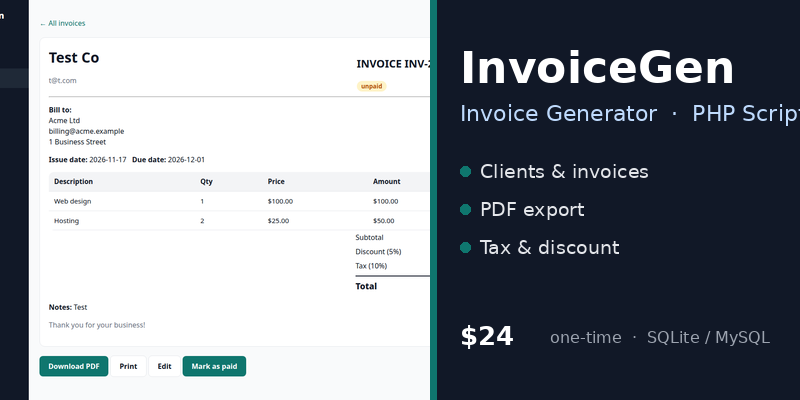
InvoiceGen — Simple Invoice Generator PHP Script is a self-hosted invoicing tool in plain PHP with no framework and no monthly fee. Add clients, create professional invoices with line items, tax and discount, track paid, unpaid and overdue invoices, and download any invoice as a real PDF or print it from the browser. Send a quote first and convert it to an invoice in one click when the client accepts, email invoices as PDF attachments, send overdue reminders, and bill each invoice in its own currency. Your clients and invoices stay on your own server.
Live demo: http://23-invoicegen.mangoraya.xo.je/
Features
- Clients CRUD: name, email, phone and address
- Quotes / estimates CRUD: line items, tax, discount, valid-until date, draft / sent / accepted / declined status — convert any quote to an invoice in one click, with the items, prices and currency carried over exactly
- Email invoices as PDF attachments (SMTP, PHPMailer vendored — no Composer step) and send overdue reminders from Admin > Settings; email is optional and never blocks the rest of the app
- Multi-currency: each invoice and quote has its own currency (USD, EUR, GBP, JPY, INR, PKR, AUD, CAD, CHF, CNY, AED, SAR), shown on the document and in its PDF
- Invoices CRUD: line items, quantities, tax rate, discount, notes, issue and due dates
- Status tracking: paid, unpaid and overdue, with automatic overdue detection
- Dashboard with paid total, outstanding total, overdue count and client count
- PDF export — every invoice downloads as a real, valid PDF (original built-in PDF generator, no external library; multi-page, embedded DejaVu Sans font — Latin, Greek, Cyrillic, accented and currency characters render and extract as themselves; Chinese/Japanese/Korean characters are not covered by the bundled font and show as “?”)
- Print view with a clean, print-friendly layout
- Live total preview while you type line items
- Deleting a client keeps their invoices, with the billing name and address recorded on each invoice — the snapshot is the source of truth, so editing a client afterwards never rewrites a previously issued invoice or its PDF; the dashboard, invoice list, invoice detail page and PDF all show the billing name stored on the invoice. Editing an invoice whose client was deleted keeps the stored client and billing details unless you explicitly pick a replacement client — including when a save fails validation and the form is shown again with the error
- Invoice numbers never collide after deletions
- Admin login with bcrypt-hashed passwords, CSRF protection, session ID regeneration on login and throttling (5 failed attempts lock the login for 15 minutes)
- Change the admin password anytime in Admin > Settings (no default password — you choose a strong one at install time)
- SQLite by default (zero setup, database stored in a folder outside the document root by default — the installer shows the path and refuses an in-web-root location unless the server really blocks downloads of it, proven over HTTP) or MySQL via the installer. For production, the outside-the-document-root location is strongly recommended: on Nginx .htaccess is ignored entirely and the PHP built-in server serves every static file, so a database inside the web root is downloadable there unless a server-level deny rule is in place and proven over HTTP (see the documentation’s “DATABASE LOCATION” section)
- Web installer that checks requirements, writes config.php and creates the tables
Requirements
- PHP 8.1 or newer with PDO and pdo_sqlite (SQLite mode) or pdo_mysql (MySQL mode).
- Apache, Nginx, or the PHP built-in server. A writable app folder and a writable folder for the SQLite database (outside the document root by default).
Instructions
- Unzip main.zip and upload the files to your web hosting.
- Open http://your-domain/install.php in your browser.
- Enter your company name, email and currency symbol.
- Choose SQLite (recommended) or MySQL and enter your database details if needed. For SQLite, check the database location on the install form: the default is a folder outside the document root — for production, keep that default (strongly recommended; on Nginx and the PHP built-in server a database inside the web root can be downloaded over HTTP). A location inside the web root is accepted only when the installer proves over HTTP that the server answers 403 for the database file and its sidecars.
- Set your admin username and a strong password (at least 8 characters — there is no default password).
- Click “Install InvoiceGen”, then delete install.php for security.
- Log in at admin/login.php, add a client, and create your first invoice.
Changelog
v1.2.4 — 2026-11-26 — Fixes: the documentation now warns explicitly, server by server, about SQLite security — on Apache a .htaccess deny rule is honoured but is only defence in depth (if the file is deleted or ignored, the database is downloadable); on Nginx .htaccess is ignored entirely, so a database inside the web root is downloadable unless a server-level deny rule is added and proven over HTTP; and on the PHP built-in server (php -S) every static file is served and .htaccess is ignored, so an in-web-root location can never be protected there and is refused outright. The default folder outside the document root is now strongly recommended for production, on every server type. No code change in this release: the outside-root default, the 403-only HTTP probe and the marker-written-only-after-probe from v1.2.3 are unchanged.
v1.2.3 — 2026-11-25 — Fixes: (1) the SQLite database defaults to a folder outside the document root again (invoicegen-data-<hash> beside the web root, shown on the install form and editable); a location inside the web root is accepted only when a real HTTP probe proves the server answers 403 for the database file and its -wal/-shm/-journal sidecars (404, redirects and the PHP built-in server count as unverified), and the protection marker is written only after that probe succeeds — it is never written unconditionally any more, so a hand-edited config pointing inside the web root without verified protection is still refused by db(). (2) A missing config.php now counts as “not installed” even when install.lock is still on disk — a stale lock is removed and the fresh-install form is offered; the reset error, the installer page text and the documentation name install.lock explicitly and give the complete manual route (delete config.php, install.lock and the SQLite file named in config.php). (3) Support is now through WPBay (product page “Contact Seller”, or WPBay > My Orders) instead of another marketplace. No schema change; existing databases need no upgrade.
v1.2.2 — 2026-11-24 — Description and changelog cleaned up: both now describe only user-facing changes. No code change in this release beyond the version number.
v1.2.1 — 2026-11-23 — Installer now works on shared hosting: no outside-web-root token, SQLite inside the app folder (data/app.sqlite, protected by the shipped .htaccess deny rule + guard file). No HTTP probe and no DOCUMENT_ROOT check — shared hosts answer the probe with a 302 redirect, not a 403. The recovery file outside the web root is gone too: a broken-install reset now needs a logged-in admin session (otherwise delete config.php and data/app.sqlite by hand). A successful install writes install.lock and install.php refuses to re-run while installed (delete install.php after installing). Strong-password enforcement unchanged. No schema change.
v1.2.0 — 2026-11-23 — Quotes, email and multi-currency: (1) quotes / estimates — create, edit and list quotes with line items, tax, discount, valid-until date and draft/sent/accepted/declined status, download a quote PDF, and convert any quote to an invoice in one click (same client snapshot, items, prices, tax, discount and currency; the quote is marked converted with a link to the invoice). Quote numbers are collision-proof (QUOTE-YEAR-NNNN, highest sequence ever used, never reused after deletion) and saves run in a transaction with failed-save re-render, like invoices. (2) Email — send any invoice as a PDF attachment to its billing email from the invoice page, and send overdue reminders from Admin > Settings; SMTP settings page (host, port, TLS/SSL/none, username, password, sender email/name) with a test-email button; PHPMailer 6.9.3 is vendored in includes/vendor/phpmailer (no Composer step). Email is optional — with no SMTP settings saved, every email action reports that email is not configured and the rest of the app works as before. Reminders only go to unpaid invoices past their due date, at most once per the interval you set (default 7 days), and a reminder is only marked sent after the email succeeds. (3) Multi-currency — each invoice and quote stores its own currency (USD, EUR, GBP, JPY, INR, PKR, AUD, CAD, CHF, CNY, AED, SAR); the invoice/quote page, list and PDF all show that currency, and the live total preview follows the selected currency. Dashboard paid/outstanding totals are still shown in the default currency at face value (no exchange-rate conversion). (4) UI polish — a real logo mark (teal receipt) and inline SVG navigation icons on every admin page, a shared sidebar, accent-topped stat cards with icons, quote status badges, and hover states; no dead controls.
v1.1.8 — 2026-11-23 — Fixes: the troubleshooting guide now describes the two real installer states and how to recover access; a failed invoice save no longer shows a false success message — the original invoice is left unchanged and only the error is shown.
v1.1.7 — 2026-11-22 — Fixes: resetting a broken install now needs a logged-in admin session, and it first writes a verified backup of the database — a failed backup or authorisation leaves everything untouched. The dashboard now shows the billing name stored on each invoice, so renaming a client never changes previously issued invoices.
v1.1.6 — 2026-11-22 — Fixes: editing an invoice keeps its stored client even when a save fails validation — a failed save no longer silently reassigns the invoice to another client.
v1.1.5 — 2026-11-21 — Fixes: editing an invoice whose client was deleted keeps the stored client and billing details unless you explicitly pick a replacement. PDF export notes: Latin, Greek, Cyrillic, accented and currency characters render correctly; Chinese/Japanese/Korean characters show as “?” (use the browser print view for those).
v1.1.4 — 2026-11-21 — Fixes: invoices always bill from the snapshot stored on the invoice — editing or deleting a client can no longer rewrite a previously issued invoice or its PDF. PDF export now embeds the DejaVu Sans font, so Latin, Greek, Cyrillic, accented and currency characters render and extract correctly. The in-app database folder is only used when the server actually blocks direct downloads of it.
v1.1.3 — 2026-11-20 — Fixes: installer forms are now CSRF-protected (a missing or wrong token is refused before anything changes). Admin login regenerates the session ID, cookies are HttpOnly + SameSite=Lax (Secure on HTTPS), and 5 failed logins lock the login for 15 minutes. A failed invoice save now re-shows the form with everything you typed, instead of losing it.
v1.1.2 — 2026-11-20 — Fixes: no longer needs the mbstring extension — installs and invoice editing work with it disabled, and long field values now report a clear per-field error instead of failing.
v1.1.1 — 2026-11-19 — Fixes: the database defaults to a folder above the web root; MySQL installs work on MySQL 5.7/8.0 and MariaDB. A failed invoice save now reports the real cause instead of always claiming a duplicate number, and field lengths are validated before saving.
v1.1.0 — 2026-11-18 — Fixes: database outside the web root by default (protected fallback); no default password — a strong password is required at install, changeable in Admin > Settings; failed installs roll back and can be re-run or reset; invoice save/delete run in transactions; deleting a client keeps invoices with billing details snapshotted; PDF export is Unicode-safe and multi-page; invoice numbers come from the highest sequence used; dashboard and lists use one grouped query with 25-per-page pagination; troubleshooting and support details in the documentation.
v1.0.0 — 2026-11-17 — Initial release.
Changelog:
v1.2.4 — 2026-11-26 — Fixes: the documentation now warns explicitly, server by server, about SQLite security — on Apache a .htaccess deny rule is honoured but is only defence in depth (if the file is deleted or ignored, the database is downloadable); on Nginx .htaccess is ignored entirely, so a database inside the web root is downloadable unless a server-level deny rule is added and proven over HTTP; and on the PHP built-in server (php -S) every static file is served and .htaccess is ignored, so an in-web-root location can never be protected there and is refused outright. The default folder outside the document root is now strongly recommended for production, on every server type. No code change in this release: the outside-root default, the 403-only HTTP probe and the marker-written-only-after-probe from v1.2.3 are unchanged.
Only logged in customers who have purchased this product may leave a review.
Loading...
WPBay support
 Support by Digishop
Digishop supports this product through WPBay
Questions are handled in WPBay's private ticket system, keeping your purchase details and support conversation together.
Go to My Downloads
After purchase, open this item in My Downloads and choose Get Support.
What support includes
- Answers to product-related questions
- Help with reported bugs and issues
- Guidance for included third-party assets
What support does not include
- Customizations or new features
- Installation or setup services
Script
Maintenance snapshot
See recent updates, compatibility, support, and developer activity.
- Updated today
- Developer active recently
- WPBay support available
- Documentation available
Snapshot updated 6 hours ago
View details Hide details
Maintenance details
This is maintenance data. It does not measure product quality or sales.
- Last update Updated today
- Compatibility Not used for scripts
- Releases 13 releases in the 10 days since listing
- Developer activity Developer active recently
- Support No recent support tickets to measure
- Docs and demo Documentation available · Changelog available · Demo available
Health reflects increased activity during the last 90 days.
How this snapshot works
Script Health
The score is out of 100 and uses data WPBay can check. Ratings, popularity, and sales are not used.
- Last update 35 points
-
Scripts receive full recency points under 45 days, then step down at 120, 240, 365, and 545 days.
- Compatibility Not scored
-
Scripts do not use WordPress or PHP, so compatibility is not scored.
- Releases 20 points
-
One release earns 14, two or three earn 18, and four or more earn 20. Each accepted product ZIP counts once; reprocessing the same upload and listing-only edits do not count.
- Developer activity 20 points
-
Based on WPBay login and dashboard activity. Exact last-login dates are never shown.
- Support 15 points
-
There are no recent WPBay tickets to measure.
- Docs and demo 10 points
-
Documentation: 3. Changelog: 1. Working demo or preview: 6.
Score ranges
- 90–100 Excellent
- 75–89 Healthy
- 60–74 Fair
- 40–59 Needs attention
- 0–39 Limited
Long gaps
WPBay also checks for long gaps between updates, developer activity, support replies, and releases. Buyers do not see this score.
- Time since update 45 points
- Last developer activity 30 points
- WordPress compatibility Not scored
- Support replies 15 points
- Fewer releases 10 points
-
Quality verified by WPBay
WPBay review- Reviewed version
- Current release
- Review completed
- Reviewer
- CodeRevolution
- Review type
- Initial
No unresolved approval blocker was identified during WPBay’s proportionate review of this release. This is not a security certification or a guarantee that the product contains no defects.
-
 Future updates
-
WPBay support from Digishop
-
GPL code, proprietary assets
-
Covered by the WPBay refund policy
-
Script maintenance snapshot
Relevant picks
You may also like
Similar products selected by category, features, popularity and freshness.

From this seller
View seller store
More by Digishop
Explore more bestselling products from this creator.




Reviews
There are no reviews yet.