


ImgConvert — Image Converter PHP Script

 Recently Updated
Well Documented
Short description:
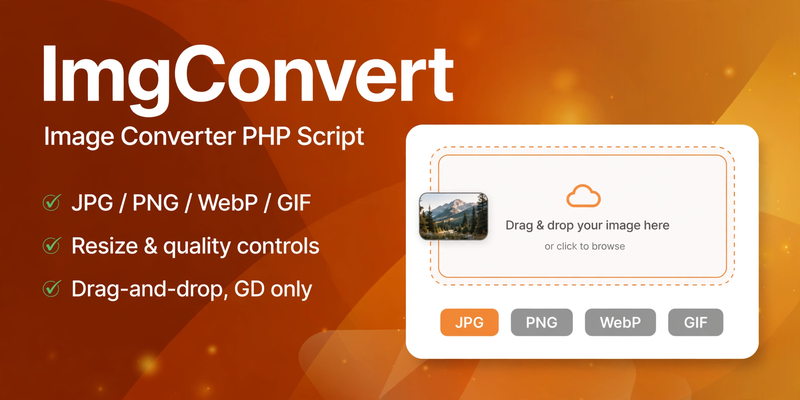
Batch image converter in PHP — JPG/PNG/WebP/GIF/AVIF/SVG, crop, rotate, resize, quality, drag-drop, GD only.
Full description:
Overview
ImgConvert — Image Converter PHP Script is a self-hosted image converter in plain PHP with no framework and no monthly fee. Visitors drag up to 10 images onto the page at once, pick an output format, size, quality, crop and rotation, and download the converted files in seconds — each with its own private link, or all together as one .zip. It runs entirely on PHP GD with no external services, so it works offline and your images never leave your server. Every conversion is logged in a history you can review in the admin panel.
Features
- Batch conversion: up to 10 images in one submit, each converted on its own (one bad file never blocks the rest), each with its own private download link, plus a “Download all as .zip” link (needs the PHP Zip extension)
- Convert JPG, PNG, GIF, WebP and AVIF to JPG, PNG, WebP, GIF, AVIF or SVG (AVIF needs a GD build with AVIF support; SVG output embeds the converted raster image in an SVG wrapper — SVG cannot be used as an input)
- Crop (drag the box on the preview, or type left/top/width/height) and rotate 90°, 180° or 270° — applied to every file in the batch, before the resize
- Before/after comparison on every result: original vs converted dimensions and file size with the % smaller/larger, plus a visual before/after slider (the original preview comes from the file on the visitor’s own computer — originals are never stored on the server)
- Resize by max width / max height and set output quality (JPG / WebP / AVIF)
- Drag-and-drop upload UI with a keyboard-operable button (Tab + Enter to choose files) and a thumbnail list showing each file’s dimensions and size
- One-click download of each converted file through a PRIVATE download link (unguessable per-file token) — converted files are stored in the app’s protected data/ folder and there is no public file list
- Full conversion history in the admin panel, paginated through every conversion (no record cap)
- Decoding is resource-bounded (max 10 MB per file, 8000 px per side, 25 megapixels, memory budget checked before decoding) and resize can never produce a zero-sized canvas
- Public limits: 10 conversions per hour per IP (atomic, fail-closed), at most 3 conversions at once (config ‘max_concurrent_conversions’ in config.php, default 3), storage quota 200 files / 500 MB enforced with the final output size (all configurable); files deleted automatically after 7 days, on the next visit after they expire
- Admin panel: totals, per-format stats and full history with delete
- Works fully offline with PHP GD only — no external services or API keys
- Admin login with bcrypt-hashed passwords, CSRF protection, session regeneration and login throttling (5 failures = 15 minutes) — no default password; the installer requires a strong password
- Converted files are stored outside the document root by default; a folder inside the web root is accepted only when the installer proves over HTTP that the server denies access (403). The SQLite database lives in the same storage folder (imgconvert-data-<hash> beside the web root, shown on the install form and editable); the installer proves 403 for the database file, its sidecars and a converted-file probe before accepting an in-web-root folder
- SQLite by default (zero setup) or MySQL via the installer (MySQL 5.7 / 8.0, MariaDB 10.4+)
- Web installer that checks requirements (including GD and the formats your GD build supports) and writes config.php only after every step succeeds — a setup key is required (see Instructions); a failed install can simply be run again
Requirements
- PHP 8.1 or newer with PDO and pdo_sqlite (SQLite mode) or pdo_mysql (MySQL mode).
- PHP GD extension (required for image conversion). WebP and AVIF need a GD build with WebP / AVIF support — the installer detects the formats your server supports.
- PHP Zip extension (optional, recommended) for the batch “Download all as .zip” link — without it each file is downloaded separately.
- Apache, Nginx, or the PHP built-in server. A writable app folder and a writable folder for the storage (the database and converted files live in a folder outside the document root by default).
Compatibility
- PHP 8.1+ with PDO SQLite or PDO MySQL and GD; Apache, Nginx, or the PHP built-in server.
- Any modern browser (Chrome, Firefox, Safari, Edge). The upload zone is a real button, fully usable by keyboard.
Instructions
- Unzip main.zip and upload the files to your web hosting.
- Create the setup key first: a file named imgconvert-setup.key in the folder ABOVE your document root with one random string (for example, run: openssl rand -hex 16). Then open http://your-domain/install.php in your browser, paste that string into the “Setup key” field, and check the server requirements (setup is blocked without the key, without GD, or without writable output storage).
- Choose SQLite (recommended) or MySQL and enter your database details if needed.
- Choose your admin username and a strong password (at least 8 characters — there is no default password).
- Click “Install ImgConvert”, then delete install.php for security. The installer writes install.lock on success and will not run again while config.php exists.
- Log in at admin/login.php, then convert your first image on the homepage.
Changelog
v1.2.4 — 2026-11-26 — Fixes: (1) the FEATURES storage bullet now says exactly what STORAGE & SECURITY says: ‘Converted files are stored outside the document root by default; a folder inside the web root is accepted only when the installer proves over HTTP that the server denies access (403).’ (2) The v1.2.0 changelog entry now names the current support route — WPBay — instead of the old marketplace. No code change in this release.
v1.2.3 — 2026-11-25 — Fixes: (1) the installer requires a setup key again (the same imgconvert-setup.key file recover.php uses, outside the document root) — the v1.2.1 key-free installer let any visitor who reached install.php first create the admin account; a POST without a matching key is refused and nothing is created, and the key is deleted after a successful install. (2) The SQLite database and converted files default to a folder outside the document root again (imgconvert-data-<hash> beside the web root, shown on the install form and editable); a storage folder inside the web root is accepted only when a real HTTP probe proves the server answers 403 for the database file, its sidecars and a converted-file probe (404, redirects and the PHP built-in server count as unverified), and db() refuses to CREATE a new database in an unverified in-docroot folder — existing databases are grandfathered. (3) Support is now through WPBay (product page “Contact Seller”, or WPBay > My Orders) instead of another marketplace. (4) The attached documentation is regenerated from the shipped documentation.txt (v1.2.3). No schema change; existing databases need no upgrade.
v1.2.2 — 2026-11-24 — Fixes: the documentation now names version 1.2.2 throughout (header and support line), matching the package. database/schema.sql is regenerated from the current schema (schema version 3) and is now documented as a reference/backup copy — install.php (fresh installs) or Admin > Schema upgrade creates and migrates the real schema for SQLite and MySQL; the installer never adapts the file.
v1.2.1 — 2026-11-23 — Installer now works on shared hosting: no outside-web-root token, SQLite inside the app folder. The installer no longer needs a setup key (no key file outside the document root, no DOCUMENT_ROOT check, no HTTP exposure probe); the SQLite database and converted files are stored in the app’s data/ folder (data/app.sqlite, data/converted/), protected by the shipped data/.htaccess deny rule + guard index.php, and a successful install writes install.lock. No feature changes, no schema change.
v1.2.0 — 2026-11-23 — Market rebuild: (1) Batch conversion — up to 10 files in one submit, each converted on its own, each with its own private download link, plus a “Download all as .zip” link when the PHP Zip extension is available. (2) AVIF input/output (detected from the GD build) and SVG output (converted raster embedded in an SVG wrapper); SVG input is refused because GD cannot rasterize SVG. (3) Crop (draggable box on the preview, or numbers) and rotate 90°/180°/270°, applied to every file in the batch before the resize. (4) Before/after comparison on every result: original vs converted dimensions and file size with the % smaller/larger, plus a visual before/after slider. (5) UI polish: inline SVG logo mark, feature chips, batch thumbnail list, styled result rows. (6) Support route is now WPBay. No schema change (schema version stays 3).
v1.1.7 — 2026-11-23 — Review fixes: (1) the setup-key exposure probe can no longer be steered at an arbitrary host by a spoofed Host header — the probe URL now comes only from the configured base_url or from a fixed loopback address (127.0.0.1 with the server’s own port); the request Host header is never used as the probe target, so a request with Host: 169.254.169.254 causes no outbound request to it, and a key outside the document root still installs and recovers with no probe at all. (2) The sample configuration fails closed when DOCUMENT_ROOT cannot be determined — storage_dir and sqlite_path are empty until the operator sets an explicit path outside the web root, and the database connection refuses an empty SQLite path instead of silently placing the database in a served folder; the documentation now states the real code-level fallback (a hand-written config.php with no storage_dir or sqlite_path uses the guarded data/ folder inside the app, whose .htaccess + guard index.php deny direct access) instead of claiming there is no in-app fallback. (3) Rate-limit and login-attempt rows are now pruned by img_cleanup(): rate_limits rows older than one hour and login_attempts rows older than one day (and never carrying a live lock) are deleted, so IP data is no longer retained indefinitely — the privacy documentation now states the same retention periods. (4) An unwritable converted-files folder is now reported as a storage error, not ‘server busy’ — index.php checks the folder exists and is writable before acquiring a conversion slot, so a storage failure shows ‘Converted files cannot be saved right now — the storage folder is not writable. Please contact the site owner.’ while genuine contention still shows the server-busy message. (5) The GD source resource no longer leaks when a transparent PNG/GIF/WebP is flattened to JPEG without resizing — the flatten branch now destroys the source resource before replacing it with the flattened canvas, so a large transparent PNG converts to JPEG without a memory fatal. No schema change (schema version stays 3).
v1.1.6 — 2026-11-22 — Review fixes: (1) the listing description no longer contains the internal demo-authoring note and no longer claims a screenshots/ folder — the package ships no screenshots/ folder (the screenshots live only in the listing gallery), so the Screenshots line now says plainly that interface screenshots are shown in the listing gallery and that no live demo is offered, and a Files included section now lists exactly what main.zip contains. (2) The 3-conversion concurrency cap is now a real documented config key: ‘max_concurrent_conversions’ in config.php (default 3, clamped to 1–20), read by img_acquire_conversion_slot() — setting it to 1 serialises conversions and setting it to 5 lets a fifth concurrent conversion through instead of the ‘server is busy’ message; the installer writes the key into new config.php files, and documentation.txt and the listing now name the key instead of claiming the cap was configurable while the code hard-coded 3.
v1.1.5 — 2026-11-22 — Review fixes: the setup key is no longer trusted without an exposure probe when the document root cannot be determined — the guard in img_setup_key_matches() and img_setup_key_exposed_exists() is now `img_path_inside_docroot($p) !== false` (was `=== true`), so a key in an indeterminable location is accepted only when the HTTP probe returns exactly false (denied); an exposed or unverifiable key is still refused, and a key proven outside the document root still needs no probe. The outside-root key is also derived from the configured storage folder (its parent) when config.php exists, so the documented imgconvert-setup.key location still works on hosts that do not pass DOCUMENT_ROOT.
v1.1.4 — 2026-11-21 — Review fixes: the admin-login lockout is now timezone-proof — locked_until is written in UTC (gmdate) but was parsed with strtotime() in the server’s local timezone, so on non-UTC hosts (e.g. Europe/Berlin, America/New_York) the advertised throttling never engaged; both helpers now parse the stored value explicitly as UTC (strtotime($until . ‘ UTC’)), so the stored value and the comparison share one timezone — five wrong passwords lock the login for 15 minutes on any host, one wrong password after the lock expires no longer re-locks immediately, and the correct password then succeeds.
v1.1.3 — 2026-11-21 — Review fixes: the setup-key HTTP probe now fails closed — an app-folder setup.key is accepted only when the probe returns exactly false (denied); an UNVERIFIABLE probe is treated as exposed and the key is refused on both install.php and recover.php, so a downloadable key can never lead to a completed install or an admin password reset (the probe URL comes from the configured base URL, or from a fixed local path with a validated host). Password recovery documentation corrected: recovery uses imgconvert-setup.key ABOVE the document root, recover.php must be kept (or re-uploaded from the package if deleted) because recovery needs it — only install.php is deleted after install — and no instruction tells buyers to create the key inside the app folder. The upload form no longer blocks an empty submission silently: the hidden file input lost its required attribute (server-side validation covers it) and is now visually hidden but focusable, the “Please choose an image file to upload” error shows inline under the drop zone, and the selected filename is announced through an aria-live region.
v1.1.2 — 2026-11-20 — Review fixes: setup key moved out of the web root (imgconvert-setup.key outside the document root; an app-folder setup.key is accepted only when it cannot be downloaded over HTTP — installer/recover.php self-test it; shipped app-root .htaccess denies *.key/*.lock/*.tmp-* on Apache, Nginx rule documented). Retention cleanup keeps the conversion record when its file cannot be deleted. Public rate limit is atomic and fails closed on storage failure. Setup lock file is never deleted on release. Storage quota enforced with the final output size under a quota lock. Upgrades move converted files from the old app-folder locations into the current storage folder, so existing downloads keep working. Retention wording corrected: cleanup runs on the next visit after expiry (no background scheduler). Schema version 3.
v1.1.1 — 2026-11-20 — Review fixes: storage is now private by default — the SQLite database and converted files live in a folder above the document root (installer proves the path and refuses an in-docroot location; no in-app fallback), served only through download.php with an unguessable per-file token; no public conversion list, no published filenames, no static URL for converted files. Setup authorization — the installer and recover.php only run with a setup key (setup.key file); setup is serialized, config.php is published atomically, and a failed attempt never deletes an existing database. MySQL setup fixed — DDL runs outside any transaction, seeding in its own transaction (MySQL 5.7 / 8.0, MariaDB 10.4+). GD preflight — setup is blocked without GD, without any output format, or without writable output storage; supported formats are detected from the GD build (WebP missing on some hosts). Public bounds — memory budget checked before decoding, GD operations checked at every step, 10 conversions per hour per IP, at most 3 at once, storage quota 200 files / 500 MB with automatic deletion after 7 days. Conversion publishing is atomic (temp file, validated, renamed, database row last) so failures leave no broken links or orphan files. Password recovery that works — recover.php (setup-key protected) resets the admin password and keeps the database and history. Admin login — session ID regenerated on login, secure cookie defaults, login throttling (5 failures = 15 minutes), HTTP warning; migrations run once from install.php or Admin > Schema upgrade.
v1.1.0 — 2026-11-18 — Review fixes: database stored outside the web root; no default admin password (installer requires a strong password + working Change password page); failed installs no longer lock the app; image decoding resource-bounded (8000 px / 25 MP); resize clamped to min 1 px; full history paginated (200-record cap removed); upload zone is a real keyboard-operable button; Troubleshooting + support route added.
v1.0.0 — 2026-11-17 — Initial release.
Tags: image converter, convert image, php script, jpg to png, png to webp, avif converter, batch image converter, image resize, crop image, gd, drag and drop, sqlite, mysql, self-hosted, webp converter
Screenshots: interface screenshots are shown in the listing gallery (homepage with the batch converter and before/after comparison, installer, login, dashboard, history). Live demo: http://36-imgconvert.mangoraya.xo.je/
Support: for help installing or customising the script, contact the seller through WPBay: open the product page on WPBay while logged in to your WPBay account and use the “Contact Seller” / message option there, or go to WPBay > My Orders, find your order and message the seller from the order. Please include your PHP version, the script version (1.2.4) and a screenshot of the issue. Free support covers installation and bug fixes. Custom design changes and new features are available as paid customisation.
Files included:
- index.php — public converter page (batch drag-and-drop upload, crop/rotate, resize, quality, before/after comparison)
- download.php — private per-file download links (unguessable token) and the batch .zip download
- install.php — web installer (setup key required); recover.php — setup-key protected password recovery
- admin/ — admin panel (login, dashboard, conversion history, password change, schema upgrade, logout)
- includes/ — shared helpers, database connection + migration, image conversion (GD, with AVIF + SVG output)
- assets/css/style.css and assets/js/app.js — styling and JavaScript
- database/schema.sql — database schema (SQLite reference copy — install.php or Admin > Schema upgrade creates and migrates the real schema for SQLite and MySQL)
- data/.htaccess + data/index.php — guards for the storage folder
- converted/.gitkeep + uploads/.gitkeep — placeholder files for the legacy app-folder storage locations (kept for upgrades from v1.1.0)
- config.sample.php — sample configuration (never ship a live config.php)
- documentation.txt — full documentation for this package
Changelog:
v1.2.4 — 2026-11-26 — Fixes: (1) the FEATURES storage bullet now says exactly what STORAGE & SECURITY says: 'Converted files are stored outside the document root by default; a folder inside the web root is accepted only when the installer proves over HTTP that the server denies access (403).' (2) The v1.2.0 changelog entry now names the current support route — WPBay — instead of the old marketplace. No code change in this release.
Only logged in customers who have purchased this product may leave a review.
Loading...
WPBay support
 Support by Digishop
Digishop supports this product through WPBay
Questions are handled in WPBay's private ticket system, keeping your purchase details and support conversation together.
Go to My Downloads
After purchase, open this item in My Downloads and choose Get Support.
What support includes
- Answers to product-related questions
- Help with reported bugs and issues
- Guidance for included third-party assets
What support does not include
- Customizations or new features
- Installation or setup services
Script
Maintenance snapshot
See recent updates, compatibility, support, and developer activity.
- Updated today
- Developer active recently
- WPBay support available
- Documentation available
Snapshot updated 6 hours ago
View details Hide details
Maintenance details
This is maintenance data. It does not measure product quality or sales.
- Last update Updated today
- Compatibility Not used for scripts
- Releases 12 releases in the 10 days since listing
- Developer activity Developer active recently
- Support No recent support tickets to measure
- Docs and demo Documentation available · Changelog available · No demo listed
Health remained stable during the last 90 days.
How this snapshot works
Script Health
The score is out of 100 and uses data WPBay can check. Ratings, popularity, and sales are not used.
- Last update 35 points
-
Scripts receive full recency points under 45 days, then step down at 120, 240, 365, and 545 days.
- Compatibility Not scored
-
Scripts do not use WordPress or PHP, so compatibility is not scored.
- Releases 20 points
-
One release earns 14, two or three earn 18, and four or more earn 20. Each accepted product ZIP counts once; reprocessing the same upload and listing-only edits do not count.
- Developer activity 20 points
-
Based on WPBay login and dashboard activity. Exact last-login dates are never shown.
- Support 15 points
-
There are no recent WPBay tickets to measure.
- Docs and demo 10 points
-
Documentation: 3. Changelog: 1. Working demo or preview: 6.
Score ranges
- 90–100 Excellent
- 75–89 Healthy
- 60–74 Fair
- 40–59 Needs attention
- 0–39 Limited
Long gaps
WPBay also checks for long gaps between updates, developer activity, support replies, and releases. Buyers do not see this score.
- Time since update 45 points
- Last developer activity 30 points
- WordPress compatibility Not scored
- Support replies 15 points
- Fewer releases 10 points
-
Quality verified by WPBay
WPBay review- Reviewed version
- Current release
- Review completed
- Reviewer
- CodeRevolution
- Review type
- Initial
No unresolved approval blocker was identified during WPBay’s proportionate review of this release. This is not a security certification or a guarantee that the product contains no defects.
-
 Future updates
-
WPBay support from Digishop
-
GPL code, proprietary assets
-
Covered by the WPBay refund policy
-
Script maintenance snapshot
Relevant picks
You may also like
Similar products selected by category, features, popularity and freshness.

From this seller
View seller store
More by Digishop
Explore more bestselling products from this creator.



Reviews
There are no reviews yet.