



BioLink — Link-in-Bio PHP Script

 Recently Updated
Well Documented
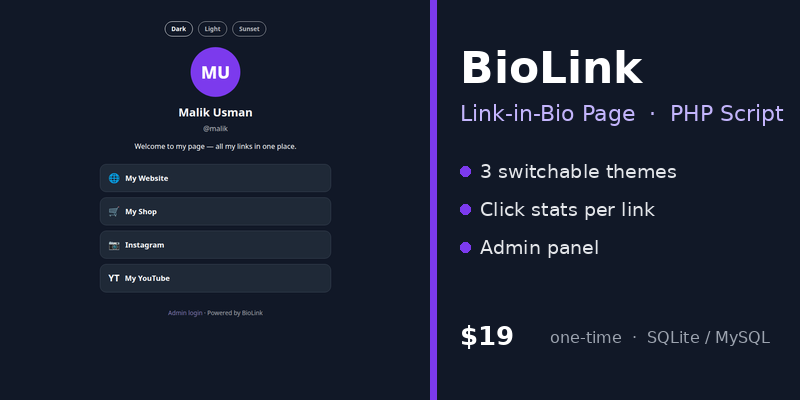
Title: BioLink — Link-in-Bio PHP Script Price: $13 Category: PHP Scripts Development hours: 22 Short description: Link-in-bio page in PHP — avatar upload, 6 themes, drag-&-drop links, video embeds, social icons, click stats, admin panel. Live demo: http://24-biolink.mangoraya.xo.je/ Full description:
Overview
BioLink — Link-in-Bio PHP Script is a self-hosted link-in-bio page in plain PHP with no framework and no monthly fee. It is the “one link for your bio” for Instagram, TikTok and X: visitors see your avatar, name, bio and all your links on one clean page, and can switch between six themes. You manage everything from a small admin panel, and every link click is counted.
Features
- Public profile page: avatar (uploaded photo, image URL or initials circle), display name, @handle, bio, social icons, video embeds and link buttons
- 6 switchable themes: Dark, Light, Sunset, Ocean, Forest and Rose — visitors can switch and their choice is remembered
- Links manager: add, edit, delete, hide/show and reorder links with drag-&-drop (up/down arrows as a fallback)
- Per-link button style (Default / Outline / Solid / Soft) and accent colour (Violet, Blue, Green, Pink, Orange)
- Social-icon links (YouTube, Instagram, TikTok, X, Facebook, LinkedIn, GitHub) and inline YouTube video embeds
- Click stats per link on the dashboard: total clicks, clicks today and each link’s share of clicks
- Click tracking: every click is counted and logged (date, referrer, user-agent) before redirecting; click history kept 90 days, then pruned
- Link icons sanitised — emoji or numeric HTML entities only, so a stored icon can never inject a script
- Admin login with bcrypt-hashed passwords and CSRF protection; 5 failed attempts lock the login for 15 minutes, and the session ID is regenerated on a successful login; the session cookie is HttpOnly and SameSite=Lax (Secure on HTTPS) and the CSRF token is issued at login time
- Change the admin password anytime in Admin > Profile settings (no default password — you choose a strong one at install time)
- SQLite by default (zero setup, database stored in a folder outside the document root — the installer shows the default path and refuses a location inside the web root, where the database could be downloaded) or MySQL via the installer
- Web installer that enforces its requirements before installing anything (PHP 8.1+, PDO + the selected driver, mbstring, SQLite 3.9.0 or newer in SQLite mode (checked with SELECT sqlite_version() and reported on the installer page), writable folders, and a working MySQL connection in MySQL mode — a failed check is a clear blocking error and installs nothing), writes config.php atomically, creates the tables and seeds a starter profile; the install form itself is CSRF-protected (a missing, empty or wrong security token terminates the request immediately with HTTP 403, before any validation or database work, and installs nothing). No setup token is needed — install right after upload, then delete install.php
Requirements
- PHP 8.1 or newer with PDO and pdo_sqlite (SQLite mode) or pdo_mysql (MySQL mode), plus the mbstring extension (required). SQLite mode needs SQLite 3.9.0 or newer (checked by the installer).
- Apache, Nginx, or the PHP built-in server. A writable app folder (for config.php) and a writable folder outside the document root (for the SQLite database — the installer shows the default path and refuses a location inside the web root).
Instructions
- Unzip main.zip and upload the files to your web hosting.
- Open http://your-domain/install.php in your browser.
- Enter your display name and handle, and choose SQLite (recommended) or MySQL. For SQLite, check the database location on the form: the default is a folder outside the document root (you can change the path, but the installer refuses any location inside the web root).
- Set your admin username and a strong password (at least 8 characters — there is no default password).
- Click “Install BioLink”, then delete install.php for security.
- Log in at admin/login.php, edit your profile and links, and share your page URL in your social bios. If an install ever breaks (config.php exists but the database cannot be opened), Reset is owner-only: it needs a logged-in admin session or your recovery token (shown once on the install success screen) — an anonymous reset request deletes nothing. The login page shows an actionable message pointing to install.php instead of failing. Full procedure in documentation.txt.
Changelog
v1.2.4 — 2026-11-26 — WPBay re-review (wave 21): no code change was needed — the four items in this re-review were all verified already implemented correctly: (1) a fresh-install POST with an invalid or missing CSRF token gets an immediate HTTP 403 and installs nothing (verified live: a POST with no token and one with a wrong token both answer 403, and no config.php, install.lock or database file is created); (2) the SQLite location policy refuses any in-document-root path with a clear BLOCKED message and installs outside the root (verified live: an in-docroot path is blocked, an outside-root path installs completely, config.php is written 0600 and the database folder gains .htaccess + guard index.php); (3) avatar uploads are verified by real image content with getimagesize(), capped at 2 MB, saved under a random name, and the uploads/ folder refuses code execution (verified live: a PHP file is refused as “not a photo”, a 3 MB PNG is refused as over 2 MB, a valid PNG saves as uploads/avatar-<random>.png, and uploads/evil.php answers 403); (4) the session cookie carries HttpOnly and SameSite=Lax, and Secure on HTTPS (verified live on the admin login page and the login POST). Version identifiers unified at 1.2.4. Verified live and by harness: 19/19 harness checks pass (PHP-CLI) and the live php -S install proves all four reviewer items — a POST with no token and one with a wrong token both answer HTTP 403 and create nothing; an in-document-root SQLite path is BLOCKED and an outside-root path installs completely; a PHP file is refused as “not a photo”, a 3 MB PNG is refused as over 2 MB, a valid PNG saves as uploads/avatar-<random>.png and uploads/evil.php answers 403; the session cookie carries HttpOnly and SameSite=Lax (Secure on HTTPS). The rebuilt packages also pass php -l, testzip and the docs-sync checks. v1.2.3 — 2026-11-25 — Fixes: (1) the owner-only recovery token is back, stored in config.php (not a server-shell command): the installer generates a 32-hex-character token at install time, writes it into config.php and shows it once on the success screen, and a broken-install reset accepts a logged-in admin session OR the pasted token (plus the installer-session security token), so a broken database no longer locks the owner out. The token dies with config.php on reset; a fresh install generates a new one. Installs created before v1.2.3 have no token — their reset needs a logged-in admin, or a token added to config.php by hand. (2) The admin login page no longer fatals on a broken database — it shows an actionable message pointing to install.php instead. (3) A stale install.lock left by a failed install no longer blocks a fresh install. (4) Support now routes through WPBay. No schema change (schema version stays 5).
v1.2.2 — 2026-11-24 — Marketplace review fixes: (1) SQLite must live OUTSIDE the document root now — in-document-root storage is no longer supported at all: the installer form has a SQLite path field (default: a folder above the document root) and refuses any in-docroot path outright, proven with realpath() (an undeterminable document root also refuses, rather than guessing). No HTTP probe gates anything any more — a dotfile probe answers 403 on servers that block hidden files while the real database still downloads, shared hosts answer probes with a 302, and the probe origin cannot come from the request Host header — so the installer no longer verifies in-root locations, it refuses them, which is the reviewer’s own recommendation. Existing v1.2.1 installs that already use data/app.sqlite keep working (the app only refuses to CREATE a new database inside the web root). The probe helper itself (biolink_probe_sqlite_protection, kept for test harnesses and manual verification) is fixed too: non-hidden probe names shaped like the real database and its -wal/-shm sidecars, and a trusted origin only (a configured site address — never the HTTP Host header). (2) A fresh-install POST with a missing, empty or wrong CSRF token now terminates IMMEDIATELY with HTTP 403 — the v1.1.8 code only added an error and kept going into validation and the prerequisite checker, which opens database connections (MySQL pre-flight) and touches the filesystem; nothing after the check runs for an invalid token. (Correction: the v1.1.8 entry said the token was validated FIRST, before any validation or database work — the check ran first but execution continued into the checker. v1.2.2 makes the claim true.) (3) The atomic config publish no longer stages credentials in a config.php.tmp.<random> file in the app folder (served as plaintext by most servers): the staging file is now a hidden .php file (executed, not served — it outputs nothing) with 0600 permissions, cleaned up in a finally block plus a shutdown backstop, so an interrupted install leaves nothing behind; the rename stays atomic because the staging file is in the same directory as config.php. No schema change (schema version stays 5); existing databases need no upgrade.
v1.2.1 — 2026-11-23 — Installer now works on shared hosting: no outside-web-root token, SQLite inside the app folder (data/app.sqlite, protected by the shipped .htaccess deny rule + guard file). No HTTP probe and no DOCUMENT_ROOT check — shared hosts answer the probe with a 302 redirect, not a 403. The one-time recovery token is gone too: a broken-install reset now needs a logged-in admin session (otherwise delete config.php and data/app.sqlite by hand). A successful install writes install.lock and install.php refuses to re-run while installed (delete install.php after installing). Strong-password enforcement unchanged. No schema change (schema version stays 5).
v1.2.0 — 2026-11-23 — New features: drag-&-drop link reorder (arrows kept as fallback); avatar photo upload (JPG/PNG/GIF/WebP, max 2 MB, stored in uploads/); 6 themes (Dark, Light, Sunset, Ocean, Forest, Rose); per-link button style + accent colour; social-icon links (YouTube, Instagram, TikTok, X, Facebook, LinkedIn, GitHub); inline YouTube video embeds (watch, shorts, live, embed, youtu.be). Schema version 5 — older databases upgrade from Admin > Schema upgrade. Verified live (php -S harness, 52/52 checks pass).
v1.1.8 — 2026-11-23 — Marketplace review fixes: (1) The Apache shortcut for the SQLite location check is GONE — an Apache server with mod_authz_core loaded and a deny-all .htaccess in the folder used to be accepted WITHOUT a probe, but that proves nothing when AllowOverride is None (the .htaccess is then silently ignored and the database file downloads). Every in-document-root location now needs the live probe (biolink_probe_sqlite_protection) to answer ‘protected’ (the running server answers 403/404 for a SQLite file in that folder); ‘unprotected’ and ‘unverifiable’ are both BLOCKED, and a deny rule that is actually honoured passes the probe while an ignored .htaccess does not. The outside-the-document-root default is unchanged. (Correction: the v1.1.5 entry said Apache with mod_authz_core honouring the deny-all .htaccess was accepted — that acceptance is removed in v1.1.8.) (2) The fresh-install POST is now CSRF-protected — the installer-session token is issued when the install form is rendered (not only for the broken-install reset) and the form carries it as a hidden field; the POST handler validates it FIRST, before any validation or database work, and a missing, empty or wrong token is refused with HTTP 403 and nothing is created (no config.php, no database, no admin user). The token is single-use for the install — it is cleared after a successful install. The reset flow is unchanged (one-time server-minted recovery token + CSRF). Verified live (php -S harness, 24/24 checks pass) and by function tests (8/8): a fresh-install POST with no token or a wrong token returns 403 and creates nothing; a valid token installs with the database outside the document root (one admin user seeded, token cleared from the session); an in-document-root install without a router is BLOCKED by the location check and creates nothing; with the shipped router.php the live probe answers ‘protected’ (and the router answers 403 for a direct download of data/app.sqlite); a reset without the recovery token is refused and deletes nothing, and a reset with a server-minted token succeeds. Caveat: the live probe is a loopback HTTP request, so on the single-threaded PHP built-in server it cannot be answered while the install POST itself is in flight — the installer fail-closes (BLOCKED, probe inconclusive) there. On a real multi-worker server (Apache/Nginx/php-fpm) the probe is answered by another worker and an in-document-root install with a honoured deny rule succeeds. No schema change (schema version stays 4); existing databases need no upgrade.
v1.1.7 — 2026-11-22 — Marketplace review fix: the admin CSRF token is now REALLY issued at login time — admin/login.php calls csrf_token() right after the session is established (session_regenerate_id(true), then $_SESSION[’biolink_admin’]), so $_SESSION[’biolink_csrf’] is present immediately after login, before any admin page is opened. (Correction: v1.1.6 claimed this in its changelog, documentation and the login.php comment, but the call itself was missing — the token was only created when an admin page first rendered a form. The claim is now true in code.) Verified live (php -S harness, 55/55 checks pass): after a valid login the session store holds biolink_csrf; logged-in POSTs to admin/links.php (add and delete), admin/settings.php (save_profile) and admin/upgrade.php with no csrf field, or an empty csrf value, are still refused with 403 and change nothing; the same actions with a valid token succeed. No schema change (schema version stays 4); existing databases need no upgrade.
v1.1.6 — 2026-11-22 — Marketplace review fixes: (1) Description aligned with what ships — the description, tags and screenshots now list ONLY the features in the package: three switchable themes (Dark, Light, Sunset); link add / edit / delete / hide / reorder with up/down arrows (25 per page); click totals, clicks today (UTC day) and each link’s share of clicks on the dashboard (top 5 links); click logging (date, referrer, user-agent) with click history kept 90 days then pruned; avatar by image URL or initials circle; bcrypt admin login with CSRF protection, 5-failed-attempts lockout (15 minutes) and session ID regenerated on login. The package does NOT include six themes, per-link click limits, link scheduling, confirm-before-redirect links, bot filtering, a 14-day chart, a recent-click list, a failed-login panel, an avatar upload, or a 100-link cap — none of those are claimed in the description, tags, screenshots or the v1.1.1/v1.1.2 changelog entries, and no code for them exists in the package (verified by a sweep of the shipped tree). (2) Installer behaviour aligned with install.php — the installer now REALLY checks the SQLite library version (biolink_sqlite_version() runs SELECT sqlite_version(); the hard gate blocks SQLite older than 3.9.0 or an undetectable version, and the detected version is shown in the on-page requirements table). The description now states accurately that the installer hard-blocks a SQLite database inside the document root unless its protection is verified, and that the outside-the-root location is the default; it claims no re-install confirmation step (re-running install.php after deleting config.php goes straight to the install form), no “tries MySQL, then refuses” fallback (the database type is chosen on the form; MySQL mode pre-flights the connection), and no redirect to the admin login after a reset (a successful reset returns to install.php so the app can be installed again). The session hardening the description mentions is now implemented, not just claimed: session cookies are HttpOnly and SameSite=Lax (Secure on HTTPS). (3) CSRF guard fixed (includes/functions.php) — csrf_check() now rejects unless BOTH the session token and the submitted token are present before hash_equals(); the old check passed when both were empty, so a POST with a valid session cookie but no token at all could add or delete links. The admin CSRF token is now also issued at login time (Correction in v1.1.7: the v1.1.6 code did not actually call csrf_token() at login — the token was only created when an admin page first rendered a form. Fixed in v1.1.7.), and all session starts go through biolink_session_start(), which sets the hardened cookie flags above (the installer session uses the same helper). Verified live (php -S harness, 32/32): logged-in POSTs to admin/links.php (add and delete), admin/settings.php (save_profile) and admin/upgrade.php with no csrf field, or an empty csrf value, are all refused with 403 and change nothing; the same actions with a valid token succeed; the session cookie carries HttpOnly + SameSite=Lax. No schema change (schema version stays 4); existing databases need no upgrade.
v1.1.5 — 2026-11-21 — Marketplace review fixes: (1) unauthenticated install reset closed — resetting a broken install now needs BOTH a one-time recovery token generated by the owner from the server shell (php install.php –generate-recovery-token; shown once, hash stored only, single-use, 24-hour expiry) AND a CSRF token bound to the installer session; an anonymous reset request is refused and deletes nothing; (2) unsafe SQLite fallback closed — the installer BLOCKS a SQLite database inside the document root unless its protection is verified (Apache with mod_authz_core honouring the deny-all .htaccess, or a live probe proving the server answers 403/404 for a SQLite file there); a bare .htaccess is never accepted as proof on Nginx or the PHP built-in server; the outside-the-document-root default is unchanged, with defence in depth (403 guard in the public entry points, shipped router.php for php -S, deny guard in data/index.php) and db() refusing to create a new in-document-root database unless the installer recorded it as verified; (3) installer prerequisites are now a hard gate — PHP 8.1+, PDO, the PDO driver for the selected database, mbstring, writable folders, the SQLite location check and a MySQL pre-flight connection are validated with clear BLOCKING errors before any database work or config write, and config.php is written atomically (temp file, verify, rename) so it can never be half-written. No schema change (schema version stays 4); existing databases need no upgrade.
v1.1.4 — 2026-11-21 — Marketplace review fixes: a malformed theme value can no longer crash the public page — every request value is coerced with bio_str() before it reaches valid_theme() (index.php: ?theme= and the biolink_theme cookie; admin/settings.php: the profile theme), and valid_theme() itself now accepts mixed input and returns ‘dark’ for anything that is not a theme name, so /index.php?theme[]=dark renders the profile in the default theme with HTTP 200; “clicks today” now uses one explicit time basis on MySQL — the connection forces the session time zone to ‘+00:00’, so TIMESTAMP click times read back as the UTC values they were stored as, and the dashboard day window and the 90-day prune share that UTC basis on MySQL 5.7/8.0/MariaDB whatever the server’s SYSTEM zone is (SQLite unchanged). Schema version 4 (no DDL change — the basis is enforced per-connection; existing databases gain the version stamp from Admin > Schema upgrade).
v1.1.2 — 2026-11-20 — Marketplace review fixes: migrations run exactly once now — the schema version is stored in the meta table and biolink_migrate() runs only from install.php (fresh installs) or the explicit Admin > Schema upgrade step (admin/upgrade.php); ordinary requests never issue ALTER TABLE or CREATE INDEX again, while the migration still applies once on a v1.0.0-style database (icon column 20 wide, no login_attempts table, no clicks indexes). Admin-login lockout window fixed — one wrong password after the 15-minute lock expires no longer re-locks for another 15 minutes, and stale lockout rows are pruned. The listing changelog now names v1.1.2 as the current version, matching BIOLINK_VERSION, the documentation changelog and the admin dashboard.
v1.1.1 — 2026-11-19 — Marketplace review fixes: SQLite database now defaults to a folder above the document root (installer proves the path with realpath and refuses an in-docroot location; deny guards in the database folder and data/); MySQL install fixed — literal defaults removed from all TEXT columns (MySQL 5.7/8.0/MariaDB); link icon column widened to 40 characters (a 3-entity icon now saves); admin login throttling — 5 failed attempts lock the login for 15 minutes, session ID regenerated on login; failed installs are idempotent (exactly one user, one profile, three links on re-run) and Reset now drops the MySQL tables; click logging can never block the redirect; “clicks today” now counted in UTC, matching the UTC-stored click times.
v1.1.0 — 2026-11-18 — Marketplace review fixes: SQLite database outside the document root (installer choice, data/ fallback protected); link icons sanitised on save + escaped on output (stored script injection closed); no default password — strong password required at install + password change in Admin > Profile settings; failed installs roll back and can be re-run/reset; mbstring declared + checked by installer; portable MySQL/SQLite “clicks today” query; links paginated (25/page); click history kept 90 days then pruned; Troubleshooting + marketplace support route in docs.
v1.0.0 — 2026-11-17 — Initial release. Tags: link in bio, bio link, linktree alternative, php script, profile page, social links, instagram bio, tiktok bio, click stats, themes, sqlite, mysql, creator, drag and drop, youtube embed
Changelog:
v1.2.4 — 2026-11-26 — WPBay re-review (wave 21): no code change was needed — the four items in this re-review were all verified already implemented correctly: (1) a fresh-install POST with an invalid or missing CSRF token gets an immediate HTTP 403 and installs nothing (verified live: a POST with no token and one with a wrong token both answer 403, and no config.php, install.lock or database file is created); (2) the SQLite location policy refuses any in-document-root path with a clear BLOCKED message and installs outside the root (verified live: an in-docroot path is blocked, an outside-root path installs completely, config.php is written 0600 and the database folder gains .htaccess + guard index.php); (3) avatar uploads are verified by real image content with getimagesize(), capped at 2 MB, saved under a random name, and the uploads/ folder refuses code execution (verified live: a PHP file is refused as "not a photo", a 3 MB PNG is refused as over 2 MB, a valid PNG saves as uploads/avatar-<random>.png, and uploads/evil.php answers 403); (4) the session cookie carries HttpOnly and SameSite=Lax, and Secure on HTTPS (verified live on the admin login page and the login POST). Version identifiers unified at 1.2.4. Verified live and by harness: 19/19 harness checks pass (PHP-CLI) and the live php -S install proves all four reviewer items — a POST with no token and one with a wrong token both answer HTTP 403 and create nothing; an in-document-root SQLite path is BLOCKED and an outside-root path installs completely; a PHP file is refused as "not a photo", a 3 MB PNG is refused as over 2 MB, a valid PNG saves as uploads/avatar-<random>.png and uploads/evil.php answers 403; the session cookie carries HttpOnly and SameSite=Lax (Secure on HTTPS). The rebuilt packages also pass php -l, testzip and the docs-sync checks.
Only logged in customers who have purchased this product may leave a review.
Loading...
WPBay support
 Support by Digishop
Digishop supports this product through WPBay
Questions are handled in WPBay's private ticket system, keeping your purchase details and support conversation together.
Go to My Downloads
After purchase, open this item in My Downloads and choose Get Support.
What support includes
- Answers to product-related questions
- Help with reported bugs and issues
- Guidance for included third-party assets
What support does not include
- Customizations or new features
- Installation or setup services
Script
Maintenance snapshot
See recent updates, compatibility, support, and developer activity.
- Updated today
- Developer active recently
- WPBay support available
- Documentation available
Snapshot updated 6 hours ago
View details Hide details
Maintenance details
This is maintenance data. It does not measure product quality or sales.
- Last update Updated today
- Compatibility Not used for scripts
- Releases 13 releases in the 10 days since listing
- Developer activity Developer active recently
- Support No recent support tickets to measure
- Docs and demo Documentation available · Changelog available · Demo available
Health reflects increased activity during the last 90 days.
How this snapshot works
Script Health
The score is out of 100 and uses data WPBay can check. Ratings, popularity, and sales are not used.
- Last update 35 points
-
Scripts receive full recency points under 45 days, then step down at 120, 240, 365, and 545 days.
- Compatibility Not scored
-
Scripts do not use WordPress or PHP, so compatibility is not scored.
- Releases 20 points
-
One release earns 14, two or three earn 18, and four or more earn 20. Each accepted product ZIP counts once; reprocessing the same upload and listing-only edits do not count.
- Developer activity 20 points
-
Based on WPBay login and dashboard activity. Exact last-login dates are never shown.
- Support 15 points
-
There are no recent WPBay tickets to measure.
- Docs and demo 10 points
-
Documentation: 3. Changelog: 1. Working demo or preview: 6.
Score ranges
- 90–100 Excellent
- 75–89 Healthy
- 60–74 Fair
- 40–59 Needs attention
- 0–39 Limited
Long gaps
WPBay also checks for long gaps between updates, developer activity, support replies, and releases. Buyers do not see this score.
- Time since update 45 points
- Last developer activity 30 points
- WordPress compatibility Not scored
- Support replies 15 points
- Fewer releases 10 points
-
Quality verified by WPBay
WPBay review- Reviewed version
- Current release
- Review completed
- Reviewer
- CodeRevolution
- Review type
- Initial
No unresolved approval blocker was identified during WPBay’s proportionate review of this release. This is not a security certification or a guarantee that the product contains no defects.
-
 Future updates
-
WPBay support from Digishop
-
GPL code, proprietary assets
-
Covered by the WPBay refund policy
-
Script maintenance snapshot
Relevant picks
You may also like
Similar products selected by category, features, popularity and freshness.

From this seller
View seller store
More by Digishop
Explore more bestselling products from this creator.



Reviews
There are no reviews yet.