


SaleCraft – Sale Scheduler & Campaign Manager for WooCommerce

 Recently Updated
Well Documented
Live demo · Try the admin (one click) · Video tour
Plugin updates from WPBay are delivered only to sites with a registered, valid purchase code.
Email notifications are sent by your own site’s mail setup (
Sell what isn’t selling. Run every sale from one calendar.
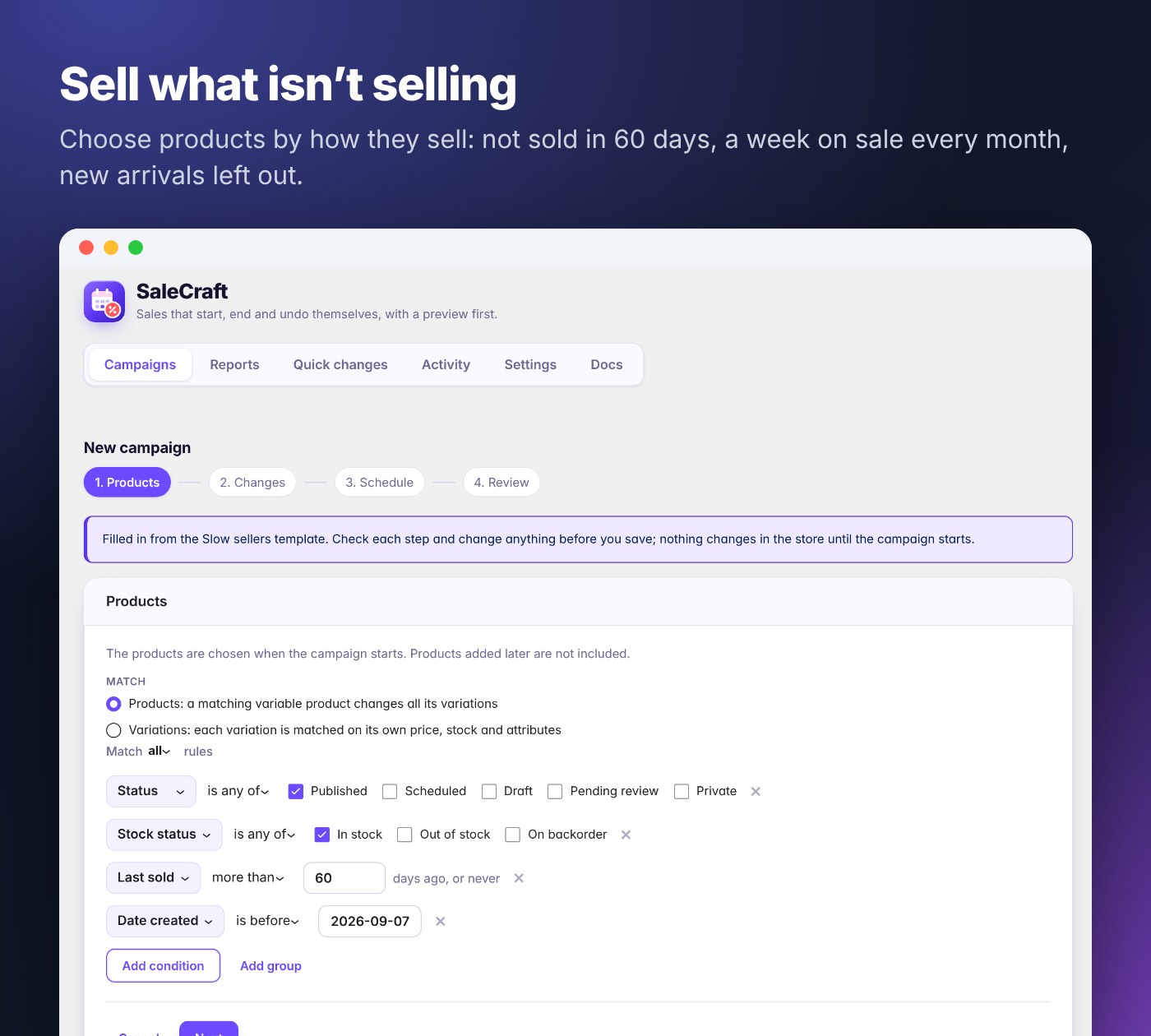
Every store has products that sit on the shelf, and every store has sales that someone has to start at midnight and remember to end. SaleCraft does both for you.- Slow stock moves on its own. Tell SaleCraft what “slow” means (“not sold in 60 days”) and it puts those products on sale for a week every month, then puts the prices back. Each run picks what is slow at that moment, so a product that starts selling again drops out by itself.
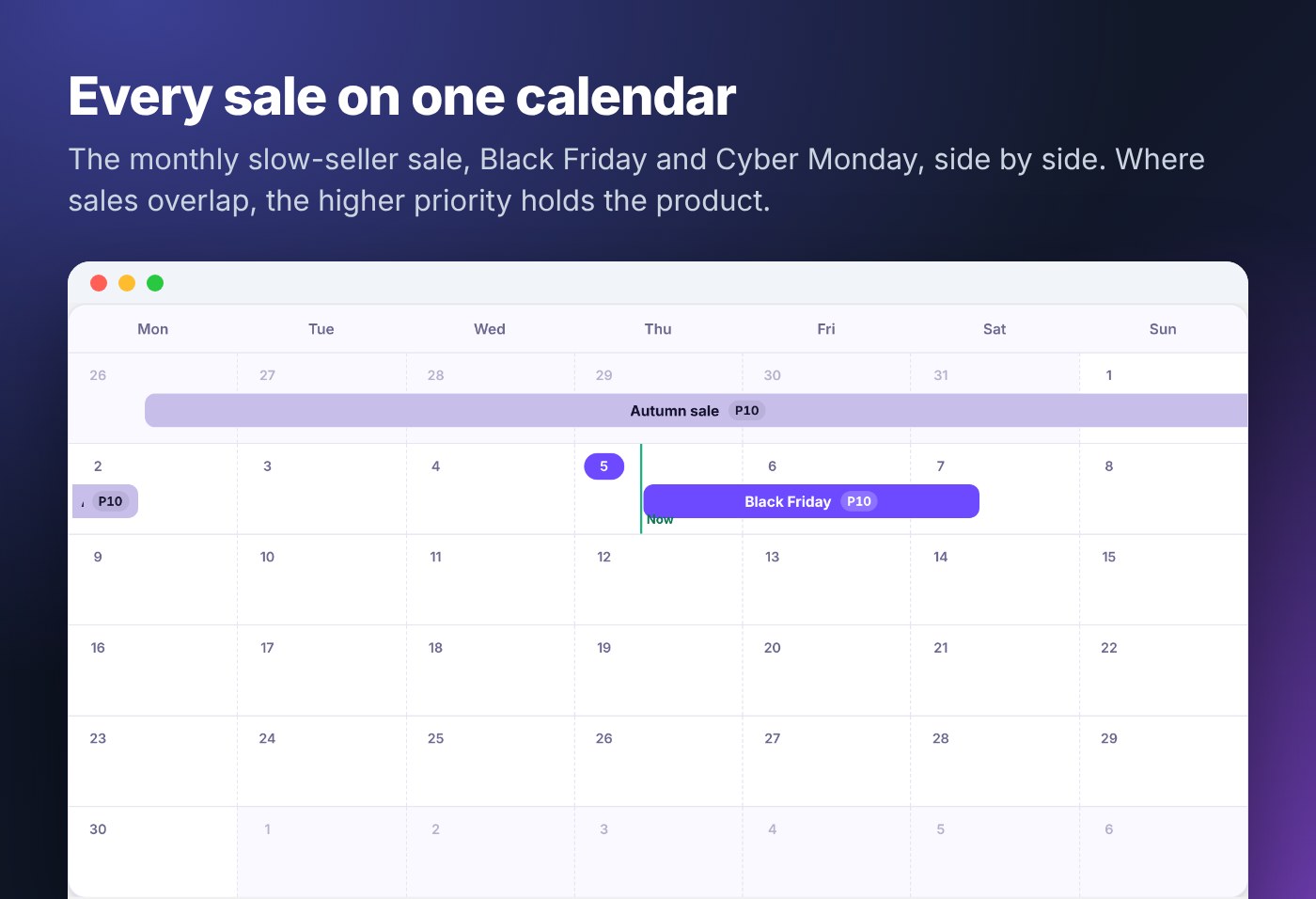
- Every sale is planned in a few clicks and runs itself. Pick a template (Black Friday, Cyber Monday, a weekend flash sale, clearance), check the preview, schedule it. Prices change at the start and go back at the end, on a calendar that shows every sale at once.
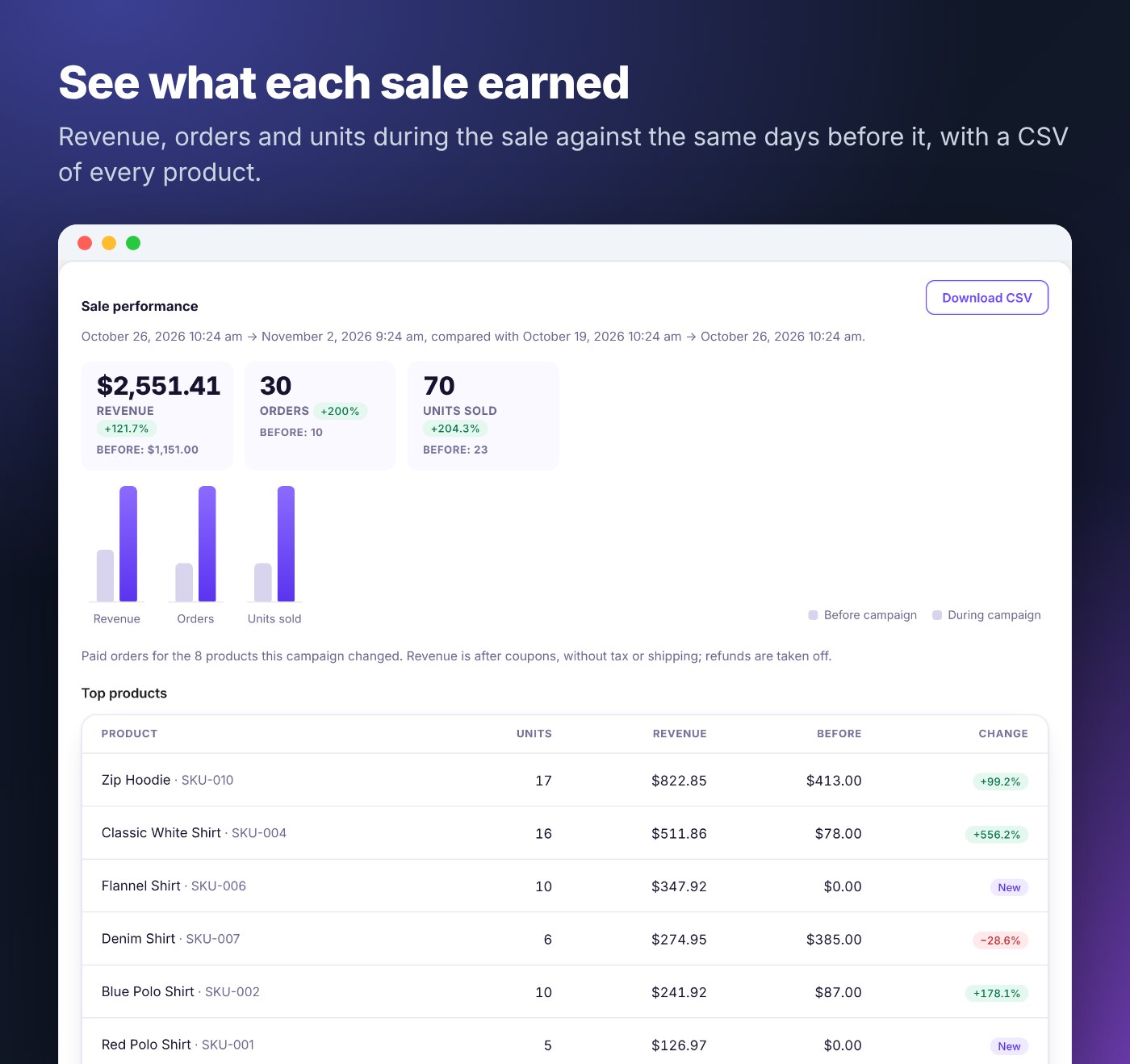
- You see what each sale earned. Revenue, orders and units during the sale against the same days before it, so you know whether the discount paid off.
Good to know before you buy
- Purchase code required. SaleCraft Pro is activated with your WPBay purchase code. Without a valid code the Pro features (slow-seller rules, repeating campaigns, Reports, email and Slack notifications, storefront extras, Dokan features, export and import) are locked; scheduled sales, the calendar, other rules, quick changes with undo and the EU lowest price label keep working. Details under Licence and activation below.
- It connects to WPBay (wpbay.com) to register and check the purchase code and to deliver updates, sending the code, your site address and the installed version (and the admin email address when you register or deactivate the code). Nothing is sent to WPBay before you enter a code.
- Slack is optional. Notifications go to Slack only if you add a Slack webhook URL. There is no tracking or usage statistics, and no customer or order data leaves your site. Details under Connections to other servers below.
Sell what isn’t selling
Most discount tools make you find the slow products yourself. SaleCraft chooses them by how they sell:- Last sold: “not sold in the last 90 days”, “sold in the last 7 days” or “never sold”
- Units sold: “at most 2 units in the last 30 days”, or “at least 50”, to leave your bestsellers alone
- Combine them with any other rule: category, price, stock level, stock status, age, tags, attributes
- The Slow sellers template sets it all up: 30% off what has not sold in 60 days, one week every month, new arrivals left out. Change any number before you save.
- Preview every product before anything changes, and read the campaign’s report afterwards to see what the sale actually sold
Campaigns that manage themselves
- Start from a template or from scratch.
- Choose products with rules, such as “Category is Tents” and “Last sold more than 60 days ago”.
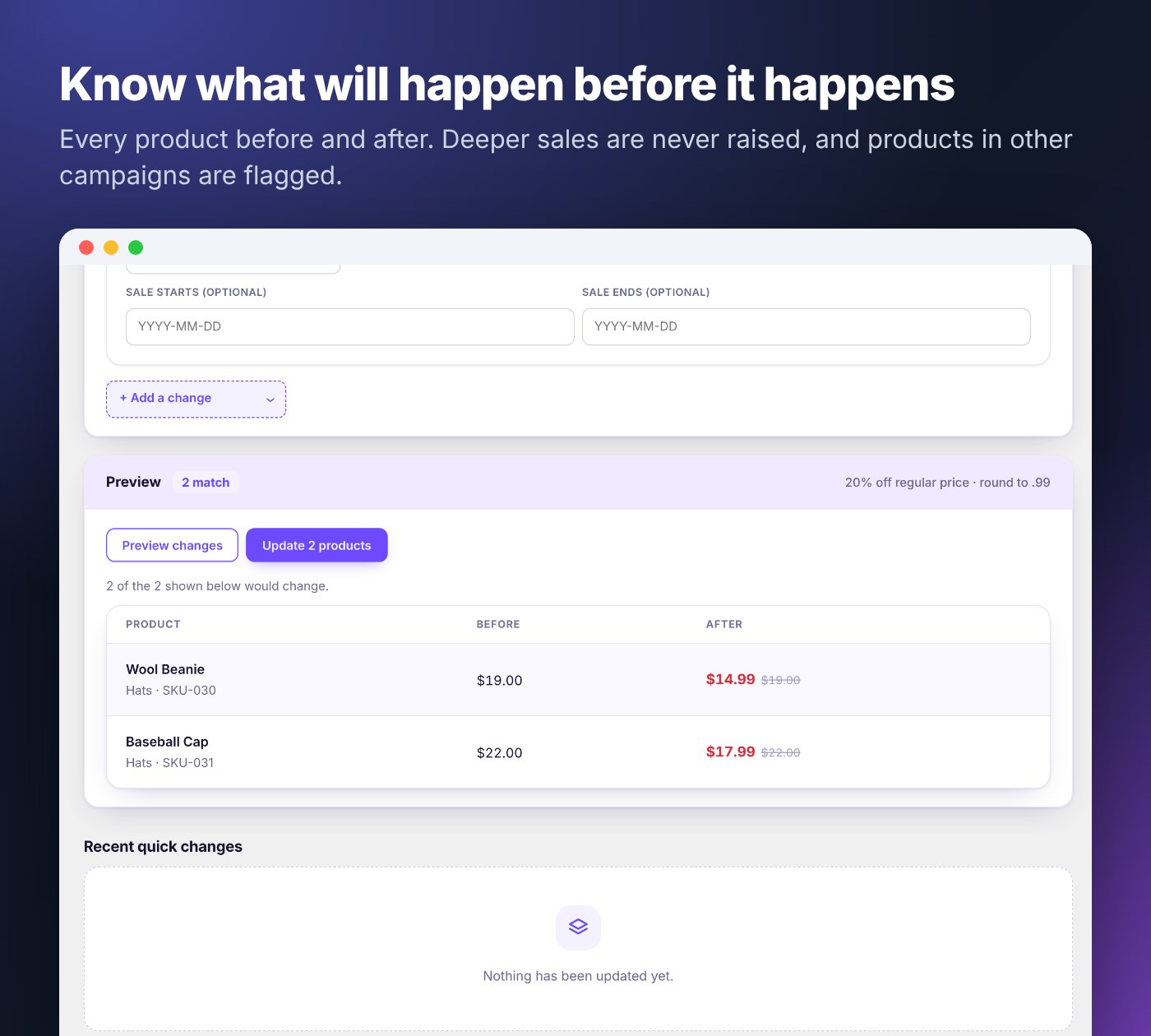
- Set the discount and preview it. Every product before and after, and anything that will be skipped and why.
- Schedule it, once or repeating (every weekend, every two weeks, every month). It starts and ends on its own; end it early with one click.
- See how it went in the campaign’s report.
- Prices go back on their own, and hand edits stay. When a sale ends, SaleCraft restores only the prices it set. If someone changed a price by hand in the meantime, that edit is kept, and the campaign says so.
- Overlapping sales are settled for you. Give each campaign a priority. When two want the same product, the higher one holds it; when it ends, the other takes over from the original price. You see overlaps on the calendar and before you schedule.
- Deeper sales are never raised. A 20% campaign does not replace a product that is already 40% off.
- Recovers from interruptions. If a background batch is cut off (a PHP time-out, a server restart), a watchdog picks the work up where it stopped, and a product write that fails halfway stays on record so it can still be undone and restored.
- You know it ran. Email or Slack when a sale starts, ends or could not run, and a health card that warns when WordPress’s scheduled tasks have stopped.
See what every sale earned
Each campaign has its own report: revenue, orders and units during the sale against the same number of days before it, the top products and a CSV export. The Reports tab compares all your sales side by side.
On your storefront
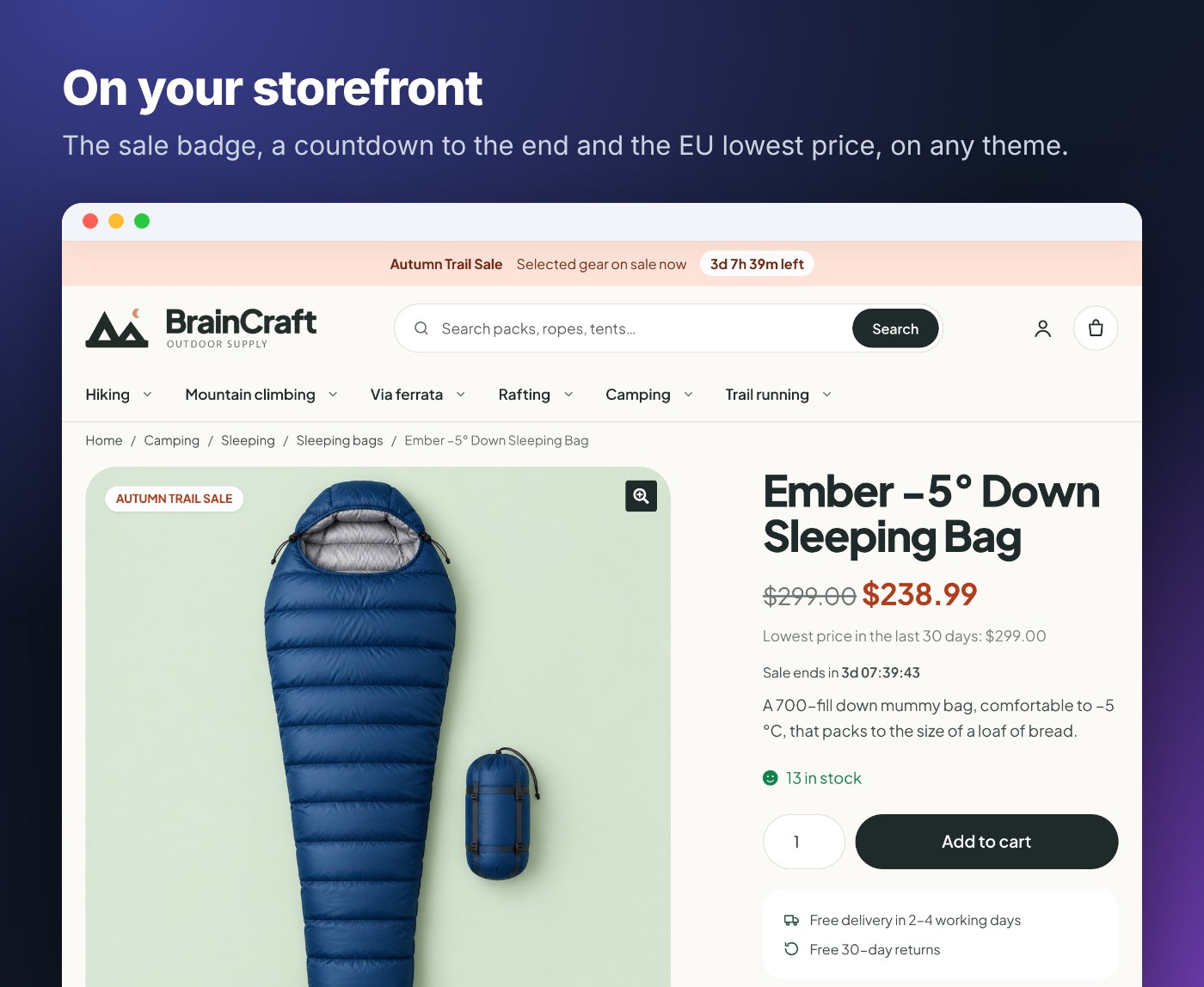
- A sale badge with the campaign’s name on product and shop pages
- A countdown to the end of the sale
- A Campaign products block and shortcode to list a sale’s products on any page
- The EU “lowest price in the last 30 days” label under sale prices, on any theme and in the block cart
Features
Campaigns
- Month and week calendar of every sale, with priorities and a “now” line
- Templates, recurring campaigns (weekly, every few weeks, monthly) and Duplicate campaign
- Start and end in your store’s timezone, safe across daylight-saving changes
- Products are chosen when the campaign starts and changed in the background, with live progress
- A campaign that could not run (for example, scheduled tasks were off) is marked “Did not run” and changes nothing, instead of being half-applied
- Email and Slack notifications when a sale starts, ends, is reverted or did not run
- A health card that shows the next and last scheduled run, and warns when WP-Cron has stopped
- Export and import campaigns as JSON, repeat rules included, with a dry run that says what will come in and why anything is skipped
- A dashboard widget with active and upcoming sales and revenue so far
Product rules
- Category (with subcategories), tag, attribute, price, stock, stock status, product status, on sale, date created or modified, custom fields and product IDs, grouped with “all” or “any”
- Slow sellers: units sold in the last N days, or last sold more than N days ago
- Variable products: match whole products, or each variation on its own price, stock and attributes (“size L only”)
- Safe defaults: new rules include published products only, and an empty filter matches nothing
Discounts
- Percentage or amount off, or a set price, from the regular price
- Rounding to a step (0.05, 1) or a price ending such as .99, up, down or to the nearest
Quick changes (bulk edit)
The same rules power one-off changes that run at once and can be undone: prices, stock, status and visibility, shipping, tax, categories, tags, brands, attributes, text find and replace, SKUs, upsells and cross-sells. Every change is previewed first, and Undo restores exactly what it changed.EU lowest price (Omnibus)
- “Lowest price in the last 30 days: €X” under the price of products on sale
- Worked out from every price change: hand edits, quick and bulk edit, imports, the REST API, WooCommerce’s own scheduled sales and SaleCraft campaigns
- On automatically for EU stores, or on or off by hand; product pages only or everywhere; your own wording
Dokan marketplaces
- A Vendor rule to include or leave out stores, and an optional vendor opt-out
- Optional vendor campaigns and quick changes in the Dokan dashboard, limited to the vendor’s own products, always below your store-wide sales
Everything in one place
- One screen under WooCommerce › SaleCraft with six tabs: Campaigns (opens on the calendar), Reports, Quick changes, Activity, Settings and Docs (the full documentation, built in)
- A first-run screen that explains how a campaign works and offers the templates, so the first sale takes a minute
- An activity log of who created, started, ended or reverted what, and when
Licence and activation
SaleCraft Pro is activated with your WPBay purchase code. After activating the plugin, open WooCommerce › SaleCraft, paste the code from your WPBay purchase (your WPBay account under Purchases, or the order email) into Purchase Code and click Register. The plugin sends the code to WPBay to register it for this site. The code is registered to the site you activate it on. To move it to another site, open WooCommerce › SaleCraft › Settings, click Manage licence in the Licence card, click Deactivate on this site, then register the same code on the new site.What the purchase code unlocks
| Needs a valid purchase code (Pro) | Works without a code |
|---|---|
| Slow-seller rules (Units sold, Last sold) and the Slow sellers template | Campaigns, templates and the calendar |
| Repeating campaigns (setting up or changing a repeat) | Every other product rule and every discount and rounding option |
| Reports, per-campaign sale performance and the dashboard widget | Preview before anything changes |
| Email and Slack notifications | Quick changes (bulk edit) with undo |
| Storefront extras: campaign sale badge, countdown, Campaign products block and shortcode | The activity log and the health card |
| Dokan store rules and vendor features | The EU lowest price label and its price history |
| Campaign export and import | Settings, and deactivating or uninstalling |
Without a valid purchase code
- No code entered yet: Pro features are locked and a notice asks for the code. Nothing is changed on your products, and the plugin makes no connection to WPBay.
- Code no longer valid (for example a refunded purchase, or deactivated for this site): WPBay’s daily check removes it and Pro features lock until a valid code is entered.
- WPBay temporarily unreachable or returning an error: nothing changes; the code and the last answer are kept, and WPBay’s daily check tries again the next day. A temporary outage never locks features. Updates cannot be checked until WPBay is reachable again.
- Running sales are always finished: a campaign that is already running ends on time and puts every product back, keeping hand edits, and Revert now and Undo keep working, whatever the licence state.
- Repeating campaigns you already set up keep running until you unschedule or delete their next run. Setting up a new or different repeat needs the code.
- Scheduled campaigns that use a slow-seller or Dokan store rule cannot choose their products without the code, so at their start they are marked Failed and change nothing.
- Notifications stop, and Reports, export and import and the storefront extras are unavailable. Your campaigns, their results and your settings are kept and come back with a valid code.
Connections to other servers
SaleCraft is not a fully offline plugin: the Pro package includes the WPBay SDK for the purchase code and updates. It has no tracking or usage statistics (WPBay’s analytics are turned off), and loads no scripts, fonts or images from other sites. These are the only connections it makes:| What | Server | When | What is sent |
|---|---|---|---|
| Purchase code | wpbay.com | When you register or deactivate the code, then once a day while a code is registered | The purchase code, your site address, the product’s WPBay ID and API key; when you register or deactivate, also your site’s admin email address |
| Updates | wpbay.com | When WordPress checks for plugin updates, and when you click Check for updates; only while a code is registered | The same, plus the installed version; the update zip is downloaded from WPBay |
| Deactivation feedback | wpbay.com | Only if you fill in and send the optional form shown when you deactivate the plugin | The reason you choose, your comment, your site address and purchase code; nothing is sent if you skip it |
| Slack notifications (optional) | hooks.slack.com, or the webhook address you enter | Only if you add a Slack incoming webhook URL under Settings › Notifications and an event you ticked happens, or you click Send test notification | The campaign name, what happened (started, ended, reverted, did not run), product counts, times, a link to the campaign in your admin and your site name |
wp_mail, so any SMTP plugin you use). Notifications are off until you turn them on. No customer or order data is sent anywhere. Your host must allow outgoing HTTPS to wpbay.com for the purchase code and updates.
Performance and compatibility
- Choosing and previewing products takes well under a second on a catalog of 12,500 products and variations
- Prices are saved through WooCommerce itself, so lookup tables, caches and other plugins stay in sync
- WordPress 6.4 to 7.1, WooCommerce 8.0 to 11.2 (HPOS on and off), PHP 7.4 to 8.4, tested on every change in CI
- Storefront, Astra and Twenty Twenty-Five themes; Dokan Lite 5.3
- Translation-ready; you choose whether deleting the plugin removes its data
Requirements
- WordPress 6.4 or later, WooCommerce 8.0 or later, PHP 7.4 or later
- Scheduled tasks running (WP-Cron, or a server cron job; the documentation explains both, and the health card tells you if they stop)
- Outgoing HTTPS to wpbay.com for the purchase code and updates
- Optional: Dokan Lite 5.3 or later for the marketplace features
Documentation and support
The download is the plugin zip itself. The illustrated user guide (every Docs page with screenshots, the FAQ, changelog and licensing) ships inside it asdocumentation/index.html and opens offline in any browser; the same guide is in WordPress under WooCommerce › SaleCraft › Docs. It covers installing, registering the purchase code, scheduled tasks, every feature and troubleshooting.
Support: sign in at WPBay with the account you bought SaleCraft Pro with and open a support ticket from your account, or write to us through the contact form on the BrainCraft.rs seller profile on WPBay. Include your order number; never post your purchase code in public.
Changelog:
SaleCraft – Changelog
1.1.30 (2026-11-10)
- Faster Campaign products lists on large campaigns: the Campaign products block, shortcode and Elementor widget, and the storefront sale badge and countdown, now pick their candidates in the database from each product’s current sale price, regular price and sale dates, and only then check the products that still have the campaign’s sale price. A large campaign whose sale prices were mostly changed or removed no longer makes a small grid or a paginated list load every product in the campaign. What counts as a campaign sale is unchanged, and the lists still show every product that qualifies.
1.1.29 (2026-11-10)
- The storefront shows only real campaign sales: the sale badge, the countdown and the Campaign products list (block, shortcode and Elementor widget) now share one rule for what counts as a campaign sale: the campaign set the product's sale price, the product still has that sale price, and WooCommerce has it on sale.
1.1.28 (2026-11-09)
- SaleCraft Pro’s text domain matches its folder: SaleCraft Pro installs in the bcrs-salecraft-pro folder, and now also uses bcrs-salecraft-pro as its text domain, with languages/bcrs-salecraft-pro.pot as its translation template, as WordPress expects. Translations made for SaleCraft Pro need the new text domain. SaleCraft Lite is unchanged.
1.1.27 (2026-11-09)
- Products’ own sale dates keep their exact time of day: a product’s WooCommerce sale can start or end at any time, not only at midnight (the REST and CRUD APIs save exact times). Campaigns now read, compare, record and put back those dates to the second, instead of as whole days. A product sale starting at 18:00 no longer counts as covering a campaign that runs 09:00 to 17:00 the same day, so the campaign discount applies at 09:00 (or, for a deeper sale of the product’s own that starts during the campaign, the product is skipped with the time in the reason). A sale ending partway through the campaign’s last day is paused the same way. When the campaign ends, paused dates come back with their original timestamps, for products and variations alike, and any date the merchant changed in the meantime is kept. Comparisons use the site’s timezone, including on daylight saving changes. Sale dates typed in the action editor are still whole days, from 00:00:00 to 23:59:59. Campaigns started on an earlier version restore as before. Preview, results and history show the time when it is not the start or end of a day.
1.1.26 (2026-11-09)
- Campaign products widget for Elementor: the Campaign products list is now also an Elementor widget, in the WooCommerce section of the panel with Elementor Pro and in General otherwise. It has the block’s options (campaign, products, columns, order and Show pagination) and draws the same WooCommerce product list, so the Elementor editor shows it as shoppers will see it; while no campaign has products on sale, the editor shows a note in its place and shoppers see nothing. Elementor’s element cache is skipped for it, since the list changes as campaigns start and end.
1.1.25 (2026-11-09)
- Pagination for the Campaign products block and shortcode: a new Show pagination option (paginate="true" in the shortcode) lists every product the campaign has on sale, up to 100, split into pages with WooCommerce’s own page links under the products; Products becomes the number per page. The links show in the block editor preview too. WooCommerce’s result count and sorting dropdown stay hidden, since the block sets the order. Off by default, so existing blocks and shortcodes are unchanged.
1.1.24 (2026-11-09)
- Campaign products block shows its grid in the block editor: the block draws WooCommerce’s own product list, whose grid comes from the shop’s styles, and those load on the storefront only, so the editor preview showed a plain bulleted column instead. The block now brings an editor-only stylesheet that lays the list out in the chosen number of columns, with images at card width and the sale badge over the image, and loads the storefront styles for the badge, countdown and lowest price label there too. The preview’s links and Add to cart buttons no longer react to clicks in the editor. The storefront is unchanged.
1.1.23 (2026-11-09)
- Campaign discounts take effect over a product's own sale dates.
1.1.22 (2026-11-09)
- The readme lists a single Stable tag again.
1.1.21 (2026-11-08)
- The installation guide and Docs tab no longer mention a licence screen before you start: SaleCraft opens on the Campaigns tab, and the purchase code is entered under Settings › Licence.
1.1.20 (2026-11-08)
- Undoing a cancelled quick change also restores a product that was changed just as the background work stopped, and keeps edits made by hand since
1.1.19 (2026-11-08)
- The free features work without a purchase code; the code is entered under Settings › Licence to unlock Pro.
1.1.18 (2026-11-08)
- This listing says correctly that the licence is checked once a day, and links the video tour.
1.1.17 (2026-11-08)
- Failed attempts by a higher-priority campaign to take over a product no longer use up the automatic restore retries, so a product that cannot be restored when a campaign ends is still retried automatically.
1.1.16 (2026-11-08)
- When a campaign ends while restoring one of its products is failing, a campaign waiting for that product (or one starting later) now waits until the restore succeeds instead of applying on top of the old sale price. The original price comes back when both campaigns end.
1.1.15 (2026-11-08)
- This listing now says up front that a WPBay purchase code is needed, what it unlocks and what happens without one, and lists every connection to WPBay and Slack with what is sent.
1.1.14 (2026-11-08)
- When a higher-priority campaign takes over a product and restoring the other campaign’s price fails (for example a database error), that campaign keeps its record of the original price and the takeover waits and is tried again every few minutes. The original price comes back when both campaigns end.
1.1.13 (2026-11-08)
- A product that could not be restored when a campaign ended or a quick change was undone (a lock, a time-out) is tried again automatically a few minutes later, up to three times, and then with a Retry restore button. Prices edited by hand in the meantime are kept.
1.1.12 (2026-11-07)
- Recovery of interrupted work reaches every campaign, oldest first, not only the newest 100.
- A product write that fails halfway (for example on a brand change) stays eligible for undo and campaign restoration; manual edits made since are kept.
- Campaign import keeps each campaign’s repeat rule and says why when it cannot.
- Licence, updates and every outside connection described in the listing, readme and Docs.
- Documentation, installation and support steps for WPBay buyers; the illustrated guide ships in the zip.
- The purchase code is kept when WPBay has a server error or rate limit.
- Repeating campaigns keep running through a licence lapse until you stop them.
- Move your purchase code to another site yourself from Settings › Licence.
1.1.12 (2026-11-07)
- The readme and Licence page say that registering or deactivating a WPBay purchase code also sends the site’s admin email address.
1.1.11 (2026-11-07)
- A repeating campaign you already set up keeps running without a valid licence, until you stop it. Setting up or changing a repeat still needs the licence.
1.1.10 (2026-11-07)
- Move your purchase code to another site yourself with “Deactivate on this site” under WooCommerce › SaleCraft › Settings › Licence. No support ticket needed.
1.1.9 (2026-11-07)
- The WPBay package’s licence page, readme and changelog describe only the WPBay purchase code. The Author URI points to braincraft.rs.
1.1.8 (2026-11-07)
- Repeating campaigns keep their repeat rule and next run through a licence lapse, and carry on by themselves once the licence is valid again.
- Campaigns with slow-seller rules stay editable without the licence, and say that the rule needs a licence instead of “Unknown field”.
1.1.7 (2026-11-07)
- A WPBay server error or rate limit no longer removes your purchase code or locks Pro. Only a definite “not valid” answer from WPBay does; otherwise the check is tried again in an hour.
1.1.6 (2026-11-07)
- Documentation, installation and support steps match the store the plugin came from. The Pro zips include the illustrated guide in documentation/.
1.1.5 (2026-11-07)
- New Docs page “Licence, updates and connections”: purchase-code activation, what the licence unlocks, what happens when it lapses or cannot be checked, and every connection to WPBay and Slack.
- Readme and FAQ describe the licence and the optional Slack notifications accurately.
1.1.4 (2026-11-07)
- Campaign import keeps each campaign’s repeat rule (weekly, every few weeks, monthly) and says why when it cannot.
1.1.3 (2026-11-07)
- Recovery of stalled background work now reaches every campaign, not only the newest 100. The watchdog looks only at campaigns with work left, oldest first, and carries on from where its last run stopped.
1.1.2 (2026-11-07)
- Changes saved before a later part of the same product write failed (for example a brand change) stay eligible for undo and campaign restoration. Manual edits made since are kept, and brand changes are checked before the product is saved.
1.1.1 (2026-11-06)
- First release on WPBay.
Only logged in customers who have purchased this product may leave a review.
Loading...
WPBay support
 Support by BrainCraft.rs
BrainCraft.rs supports this product through WPBay
Questions are handled in WPBay's private ticket system, keeping your purchase details and support conversation together.
Go to My Downloads
After purchase, open this item in My Downloads and choose Get Support.
What support includes
- Answers to product-related questions
- Help with reported bugs and issues
- Guidance for included third-party assets
What support does not include
- Customizations or new features
- Installation or setup services
Plugin
Maintenance snapshot
See recent updates, compatibility, support, and developer activity.
- Updated today
- Developer active recently
- WPBay support available
- WordPress 7.1 tested
Snapshot updated 3 hours ago
View details Hide details
Maintenance details
This is maintenance data. It does not measure product quality or sales.
- Last update Updated today
- Compatibility WordPress 7.1 tested · PHP 8.4 tested · WooCommerce 11 tested
- Releases 11 releases in the 4 days since listing
- Developer activity Developer active recently
- Support No recent support tickets to measure
- Docs and demo Documentation available · Changelog available · Demo available
How this snapshot works
Plugin Health
The score is out of 100 and uses data WPBay can check. Ratings, popularity, and sales are not used.
- Last update 30 points
-
Plugins receive full recency points under 30 days, then step down at 90, 180, 365, and 545 days.
- Compatibility 20 points
-
WordPress, PHP, and WooCommerce (when relevant) are scored separately. The latest two PHP lines count as current. Nearby previous versions keep most of the points.
- Current version 100%
- One version behind 75%
- Two versions behind 50%
- Three versions behind 25%
- Older or not listed 0%
- Releases 15 points
-
One release earns 10, two or three earn 13, and four or more earn 15. Each accepted product ZIP counts once; reprocessing the same upload and listing-only edits do not count.
- Developer activity 15 points
-
Based on WPBay login and dashboard activity. Exact last-login dates are never shown.
- Support 15 points
-
There are no recent WPBay tickets to measure.
- Docs and demo 5 points
-
Documentation: 2. Changelog: 1. Working demo or preview: 2.
Score ranges
- 90–100 Excellent
- 75–89 Healthy
- 60–74 Fair
- 40–59 Needs attention
- 0–39 Limited
Long gaps
WPBay also checks for long gaps between updates, developer activity, support replies, and releases. Buyers do not see this score.
- Time since update 35 points
- Last developer activity 25 points
- WordPress compatibility 15 points
- Support replies 15 points
- Fewer releases 10 points
-
Quality verified by WPBay
WPBay review- Reviewed version
- 1.1.30
- Review completed
- Reviewer
- CodeRevolution
- Review type
- Initial
No unresolved approval blocker was identified during WPBay’s proportionate review of this release. This is not a security certification or a guarantee that the product contains no defects.
-
 Future updates
-
WPBay support from BrainCraft.rs
-
GPL code, proprietary assets
-
Covered by the WPBay refund policy
-
Plugin maintenance snapshot
Relevant picks
You may also like
Similar products selected by category, features, popularity and freshness.


Reviews
There are no reviews yet.