



Responsive Mockup Generator & Client Portfolio Gallery

 Recently Updated
Well Documented
Recently Updated
Well Documented
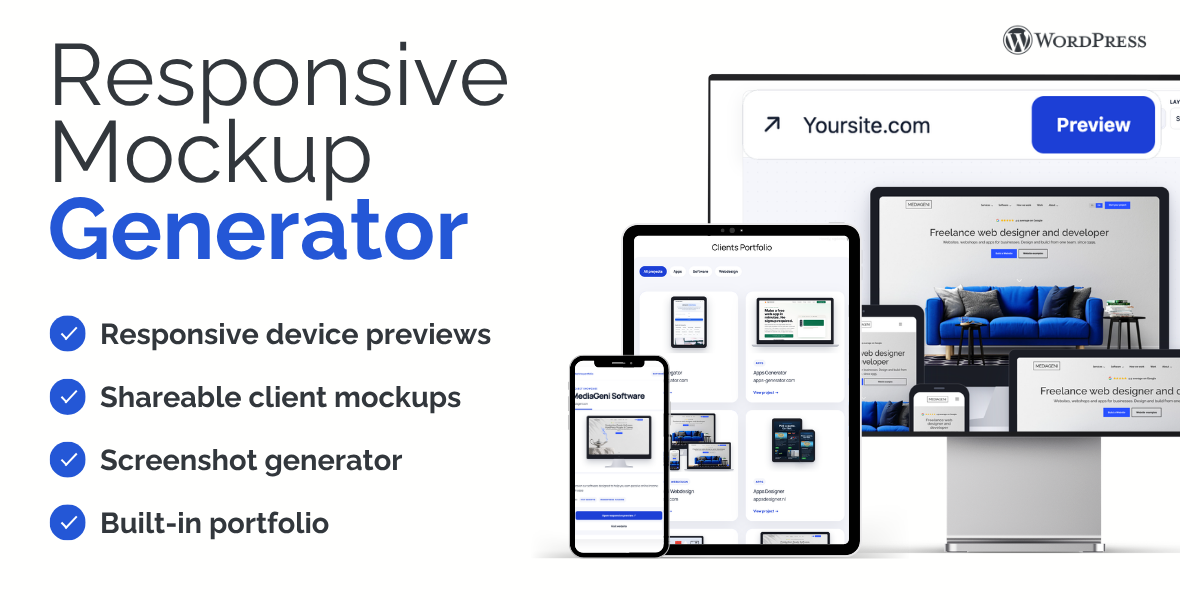
Responsive Mockup Generator & Client Portfolio Gallery turns any public, embeddable website into a polished multi-device presentation inside WordPress.
Present websites in desktop, laptop, tablet, and mobile frames. Choose responsive presets, arrange devices into your own composition, create clean client share links, generate screenshots, and publish projects through a theme-compatible portfolio.
It is built for freelancers, agencies, designers, and developers who want to present work professionally without relying on a page builder. The included local demo importer configures the generator and portfolio pages and imports six example projects with bundled screenshots, presets, categories, and tags.
KEY FEATURES
• Desktop, laptop, tablet, and mobile device frames
• Ready-made responsive layout presets
• Drag-and-drop custom device compositions
• Unlisted client preview links without the internal client name
• Database-free shareable layout snapshots
• Optional website thumbnails through WordPress.com mShots
• Built-in portfolio custom post type
• Four complete portfolio gallery designs
• Five project detail layouts
• Categories, tags, filters, descriptions, and website links
• Configurable columns, spacing, colors, shadows, and corners
• Local demo importer with six complete example projects
• Repeatable demo import without duplicate content
• Works with any page slug and permalink structure
• English source text and complete Dutch translation
INSTALLATION
1. Upload wp-responsive.zip through Plugins > Add New > Upload Plugin.
2. Activate Responsive Mockup Generator & Client Portfolio Gallery.
3. Create or publish a generator page with the [wp_responsive] shortcode.
4. Create or publish a portfolio page with the [wp_responsive_clients] shortcode.
5. Select both pages under Responsive Mockup Settings, or use the bundled demo importer to configure everything automatically.
6. Add portfolio projects and use Open preview, View portfolio page, or Copy share link from each project.
REQUIREMENTS
• WordPress 6.4 or newer
• PHP 7.4 or newer
• A public HTTP or HTTPS website that permits iframe embedding
Important: a remote website can only appear inside a device when it permits iframe embedding. The plugin includes a compatibility check but cannot override X-Frame-Options or Content-Security-Policy headers controlled by another website.
Changelog:
Version 1.0
• Initial marketplace release
• Responsive mockup generator with four device types
• Client project workflow and unlisted share links
• Portfolio gallery and detail layouts
• Local demo content importer
• English and Dutch translations
Only logged in customers who have purchased this product may leave a review.
Loading...
WPBay support
 Support by MediaGeni Software
Support by MediaGeni Software
MediaGeni Software supports this product through WPBay
Questions are handled in WPBay's private ticket system, keeping your purchase details and support conversation together.
Go to My Downloads
After purchase, open this item in My Downloads and choose Get Support.
What support includes
- Answers to product-related questions
- Help with reported bugs and issues
- Guidance for included third-party assets
What support does not include
- Customizations or new features
- Installation or setup services
Plugin
Maintenance snapshot
See recent updates, compatibility, support, and developer activity.
- Updated 47 days ago
- Developer active
- WPBay support available
- WordPress 7.1 tested
Snapshot updated 8 hours ago
View details Hide details
Maintenance details
This is maintenance data. It does not measure product quality or sales.
- Last update Updated 47 days ago
- Compatibility WordPress 7.1 tested · PHP 8.5 tested
- Releases 2 releases in the 48 days since listing
- Developer activity Developer active
- Support No recent support tickets to measure
- Docs and demo Documentation available · Changelog available · Demo available
Health reflects recent activity during the last 90 days.
How this snapshot works
Plugin Health
The score is out of 100 and uses data WPBay can check. Ratings, popularity, and sales are not used.
- Last update 30 points
-
Plugins receive full recency points under 30 days, then step down at 90, 180, 365, and 545 days.
- Compatibility 20 points
-
WordPress, PHP, and WooCommerce (when relevant) are scored separately. The latest two PHP lines count as current. Nearby previous versions keep most of the points.
- Current version 100%
- One version behind 75%
- Two versions behind 50%
- Three versions behind 25%
- Older or not listed 0%
- Releases 15 points
-
One release earns 10, two or three earn 13, and four or more earn 15. Each accepted product ZIP counts once; reprocessing the same upload and listing-only edits do not count.
- Developer activity 15 points
-
Based on WPBay login and dashboard activity. Exact last-login dates are never shown.
- Support 15 points
-
There are no recent WPBay tickets to measure.
- Docs and demo 5 points
-
Documentation: 2. Changelog: 1. Working demo or preview: 2.
Score ranges
- 90–100 Excellent
- 75–89 Healthy
- 60–74 Fair
- 40–59 Needs attention
- 0–39 Limited
Long gaps
WPBay also checks for long gaps between updates, developer activity, support replies, and releases. Buyers do not see this score.
- Time since update 35 points
- Last developer activity 25 points
- WordPress compatibility 15 points
- Support replies 15 points
- Fewer releases 10 points
-
Quality verified by WPBay
WPBay review- Reviewed version
- 1.0
- Review completed
- Reviewer
- CodeRevolution
- Review type
- Initial
No unresolved approval blocker was identified during WPBay’s proportionate review of this release. This is not a security certification or a guarantee that the product contains no defects.
-
 Future updates
-
WPBay support from MediaGeni Software
-
GPL code, proprietary assets
-
Covered by the WPBay refund policy
-
Plugin maintenance snapshot
Relevant picks
You may also like
Similar products selected by category, features, popularity and freshness.

 1 month free
Reviews
There are no reviews yet.