



CTC Gallery

 Recently Updated
Well Documented
Recently Updated
Well Documented
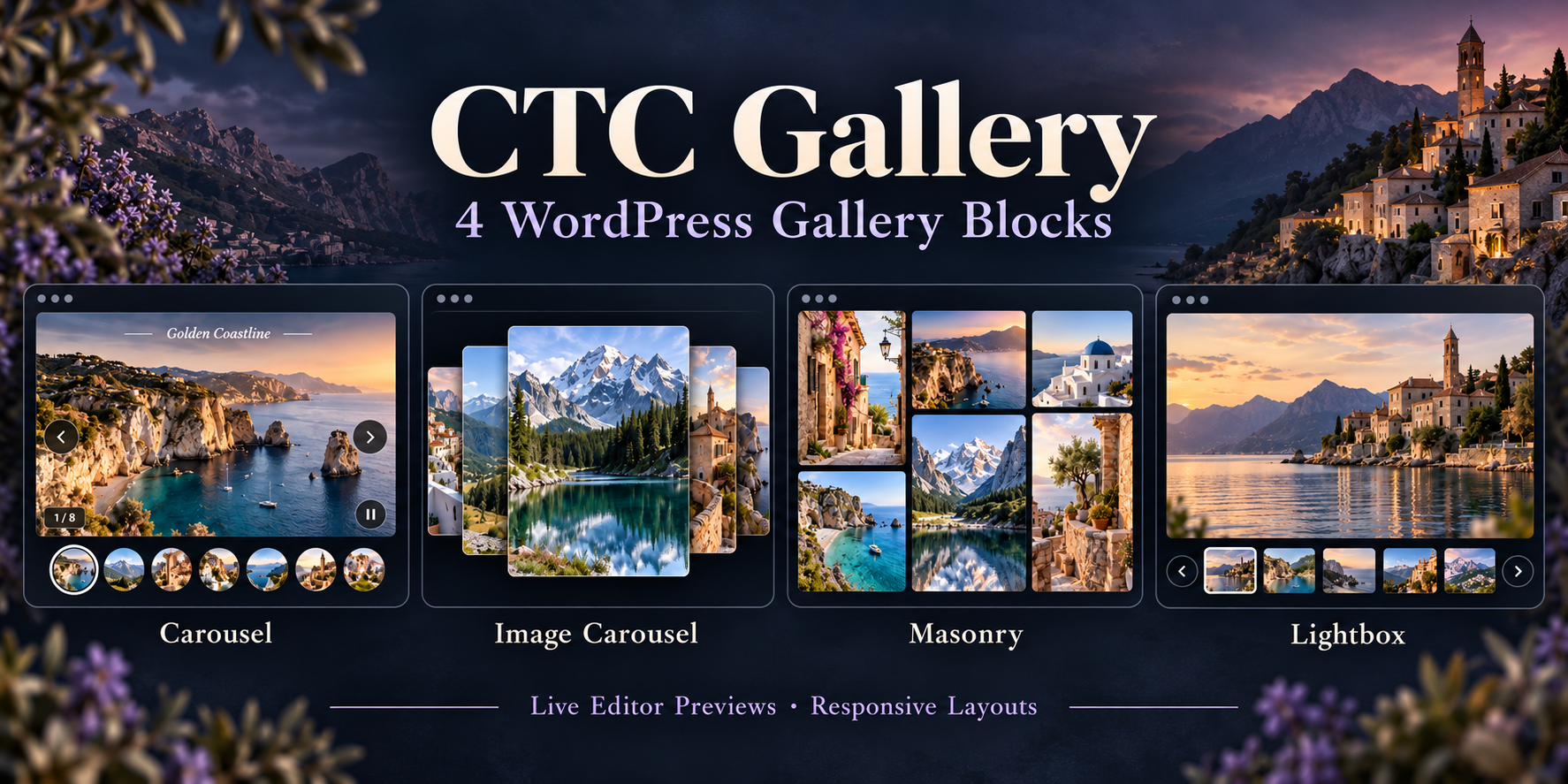
CTC Gallery Plugin
Turn your images into polished galleries with four customizable WordPress blocks. Built for portfolios, photography, product showcases, and image collections, CTC Gallery combines refined styling with interactive previews directly in the block editor.
Four gallery styles
- Carousel Gallery: Full-frame slides with navigation arrows, optional autoplay, and compact circular thumbnails.
- Image Carousel: A layered carousel with clickable image cards and keyboard navigation.
- Masonry Gallery: Responsive image columns with adjustable spacing, shadows, optional hover zoom, and a centered fullscreen viewer.
- Lightbox Gallery: A large main image with selectable thumbnails and navigation buttons at both ends of the preview strip.
Refined details
Centered captions appear in a slim, full-width dark translucent overlay on hover or keyboard focus. On touch devices, captions remain visible. A small translucent image-count badge sits at the bottom left, while empty captions automatically hide their panel.
The masonry fullscreen viewer includes 100–300% zoom, reset-to-fit, drag-to-pan, touch swipe navigation, a thumbnail dock, and an optional slideshow.
Customize inside WordPress
Select, reorder, and remove images without leaving the block editor. Adjust captions, alternative text, gallery dimensions, image fit, corner radius, and visual surfaces. Interactive editor previews use the same gallery markup, styles, and libraries as the frontend.
Built with accessibility in mind
Keyboard navigation, focus restoration, reduced-motion support, and autoplay pause controls help make galleries easier to use. Autoplay pauses on hover, keyboard focus, in hidden tabs, and when the gallery leaves the viewport.
What’s included
- Installable CTC Gallery plugin ZIP
- All four gallery blocks
- Production assets and editable source files
- Documentation and regression tests
- All five original gallery libraries, bundled locally without an external CDN
Compatibility
Version 0.2.10 requires WordPress 6.6+ and PHP 7.4+. Tested up to WordPress 7.1.3, with nine JavaScript regression tests and PHP checks on versions 7.4 and 8.3. Theme styling may affect the final appearance.
Easy installation
Upload the ZIP through Plugins → Add New Plugin → Upload Plugin, activate it, and choose a block from the CTC Gallery category
Only logged in customers who have purchased this product may leave a review.
Loading...
Email support
 Support by Usoft
Support by Usoft
Usoft provides support by email
Contact the seller directly by email for product questions and issue reports.
Email support
Opens your default email app.
What support includes
- Answers to product-related questions
- Help with reported bugs and issues
- Guidance for included third-party assets
What support does not include
- Customizations or new features
- Installation or setup services
Plugin
Maintenance snapshot
See recent updates, compatibility, support, and developer activity.
- Updated 9 days ago
- Developer active recently
- Email support available
- WordPress 7.1 tested
Snapshot updated 16 hours ago
View details Hide details
Maintenance details
This is maintenance data. It does not measure product quality or sales.
- Last update Updated 9 days ago
- Compatibility WordPress 7.1 tested · PHP 8.5 not marked as tested
- Releases 1 release in the last 12 months
- Developer activity Developer active recently
- Support Support is offered by email, not through WPBay tickets
- Docs and demo Documentation available · Changelog missing · Demo available
Health reflects increased activity during the last 90 days.
How this snapshot works
Plugin Health
The score is out of 100 and uses data WPBay can check. Ratings, popularity, and sales are not used.
- Last update 30 points
-
Plugins receive full recency points under 30 days, then step down at 90, 180, 365, and 545 days.
- Compatibility 20 points
-
WordPress, PHP, and WooCommerce (when relevant) are scored separately. The latest two PHP lines count as current. Nearby previous versions keep most of the points.
- Current version 100%
- One version behind 75%
- Two versions behind 50%
- Three versions behind 25%
- Older or not listed 0%
- Releases 15 points
-
One release earns 10, two or three earn 13, and four or more earn 15. Each accepted product ZIP counts once; reprocessing the same upload and listing-only edits do not count.
- Developer activity 15 points
-
Based on WPBay login and dashboard activity. Exact last-login dates are never shown.
- Support Not scored
-
WPBay cannot measure response times for email or support on another site, so support is not scored.
- Docs and demo 5 points
-
Documentation: 2. Changelog: 1. Working demo or preview: 2.
Score ranges
- 90–100 Excellent
- 75–89 Healthy
- 60–74 Fair
- 40–59 Needs attention
- 0–39 Limited
Long gaps
WPBay also checks for long gaps between updates, developer activity, support replies, and releases. Buyers do not see this score.
- Time since update 35 points
- Last developer activity 25 points
- WordPress compatibility 15 points
- Support replies Not scored
- Fewer releases 10 points
-
Quality verified by WPBay
WPBay review- Reviewed version
- 0.1.0
- Review completed
- Reviewer
- CodeRevolution
- Review type
- Initial
Version note: The current release is 0.2.12. The last recorded WPBay review applies to version 0.1.0.
No unresolved approval blocker was identified during WPBay’s proportionate review of this release. This is not a security certification or a guarantee that the product contains no defects.
-
 Future updates
-
Email support from Usoft
-
GPL code, proprietary assets
-
Covered by the WPBay refund policy
-
Plugin maintenance snapshot
Relevant picks
You may also like
Similar products selected by category, features, popularity and freshness.



 1 month free
From this seller
View seller store
More by Usoft
Explore more bestselling products from this creator.


Reviews
There are no reviews yet.