



Pipeline Forms – Multi Step Forms, Payments & Lead Popups

 Recently Updated
Well Documented
Recently Updated
Well Documented
SPECIAL LIMITED-TIME PRICE

007AJ
Pipeline Forms Suite
Multi-Step Forms, Payments and Lead Popups
Build contact, quote, signup and quiz forms with drag and drop. Add steps, conditional logic, calculations and file uploads, then collect payments, sync to your email list and capture leads with popups.
Fully licensed version — use on your own sites

Fully licensed
use on your own sites
Drag-and-drop builder
steps, logic, calculations
Block + shortcode
drop a form on any page
WordPress 6.2+
PHP 7.4+
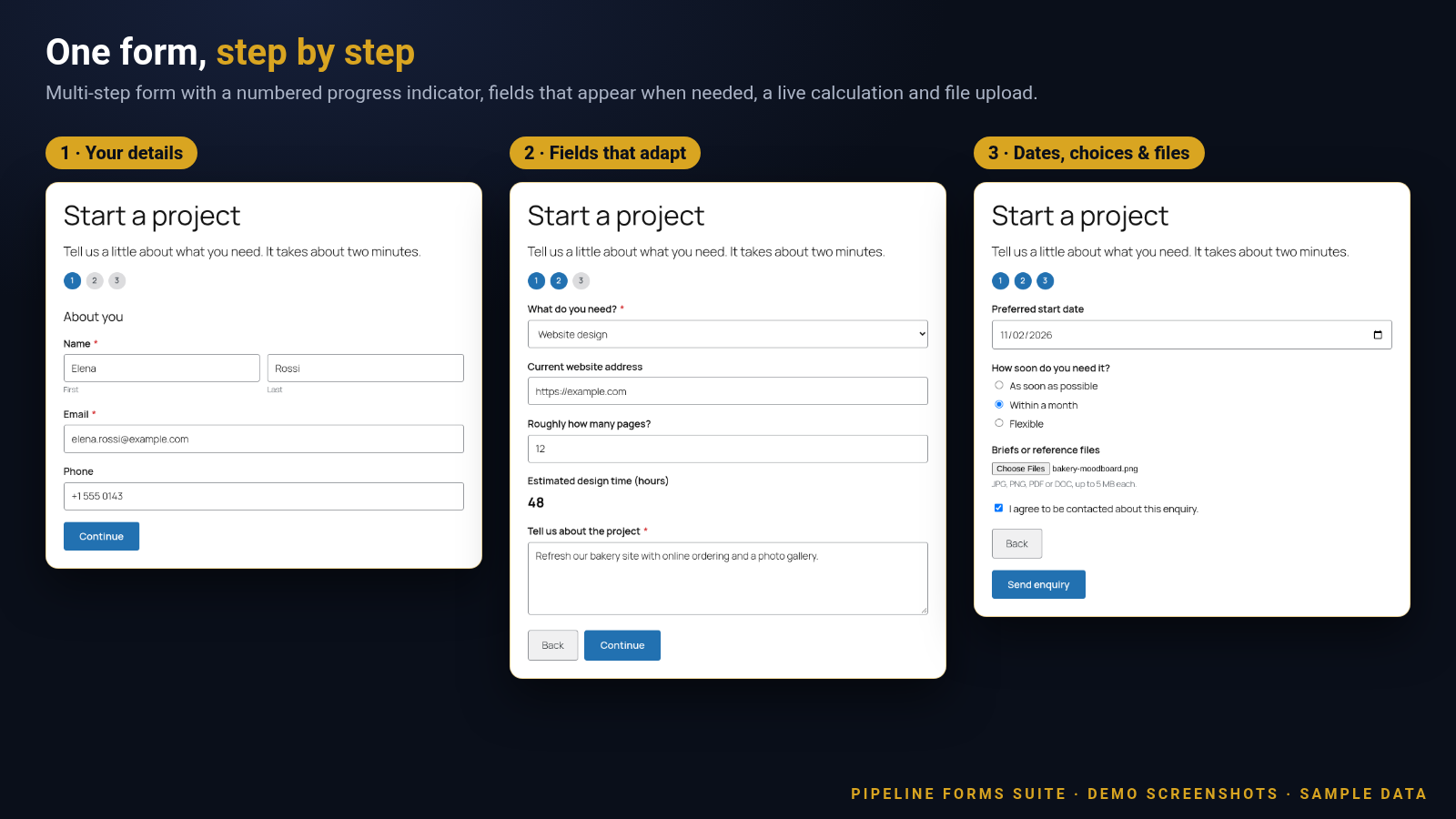
Forms that look good on your own page
A multi-step project enquiry, with a progress bar, clear fields and a friendly thank-you.
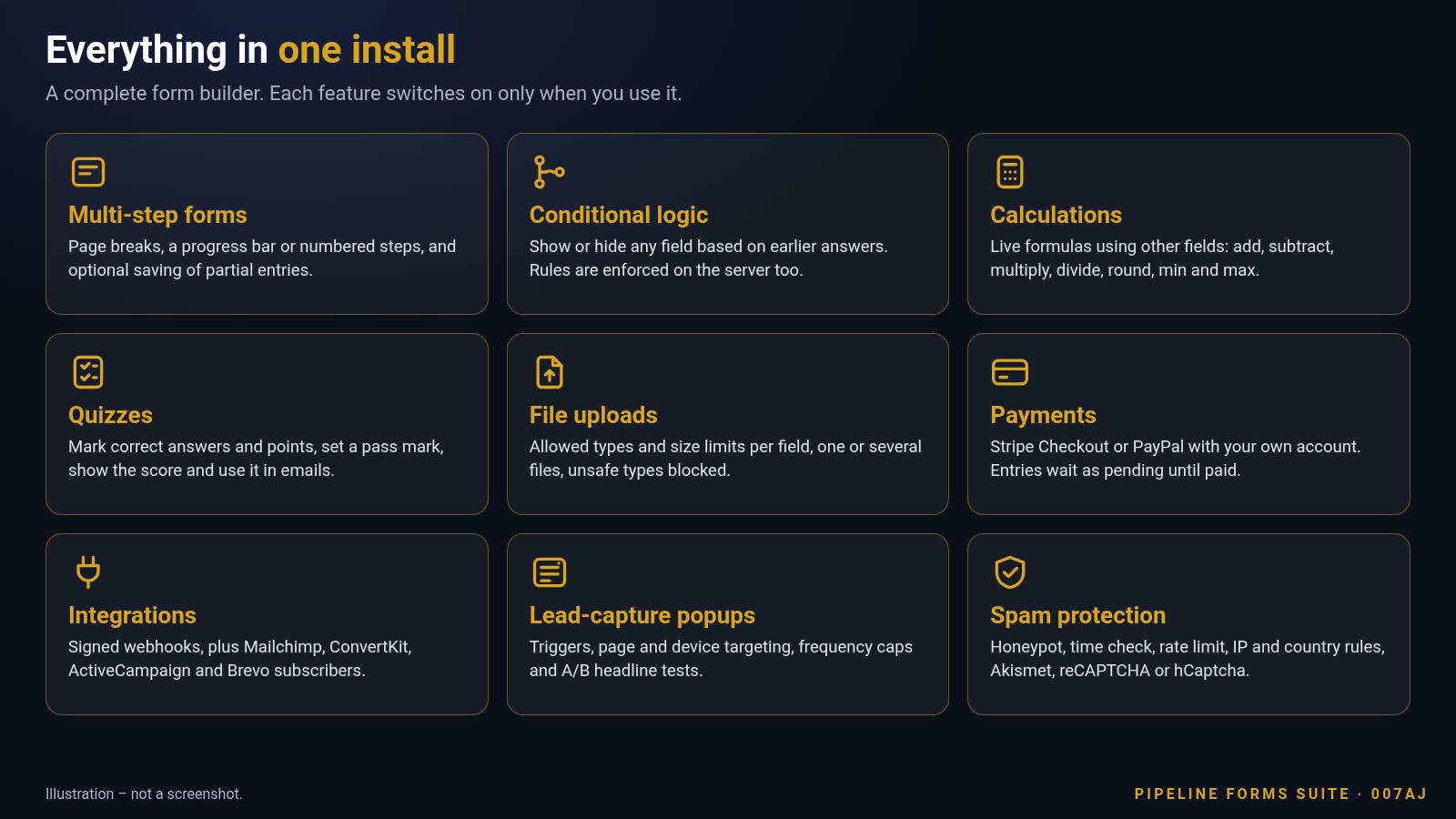
Everything you need to build and manage forms
The builder, the fields, the emails and the entries are all in one plugin.
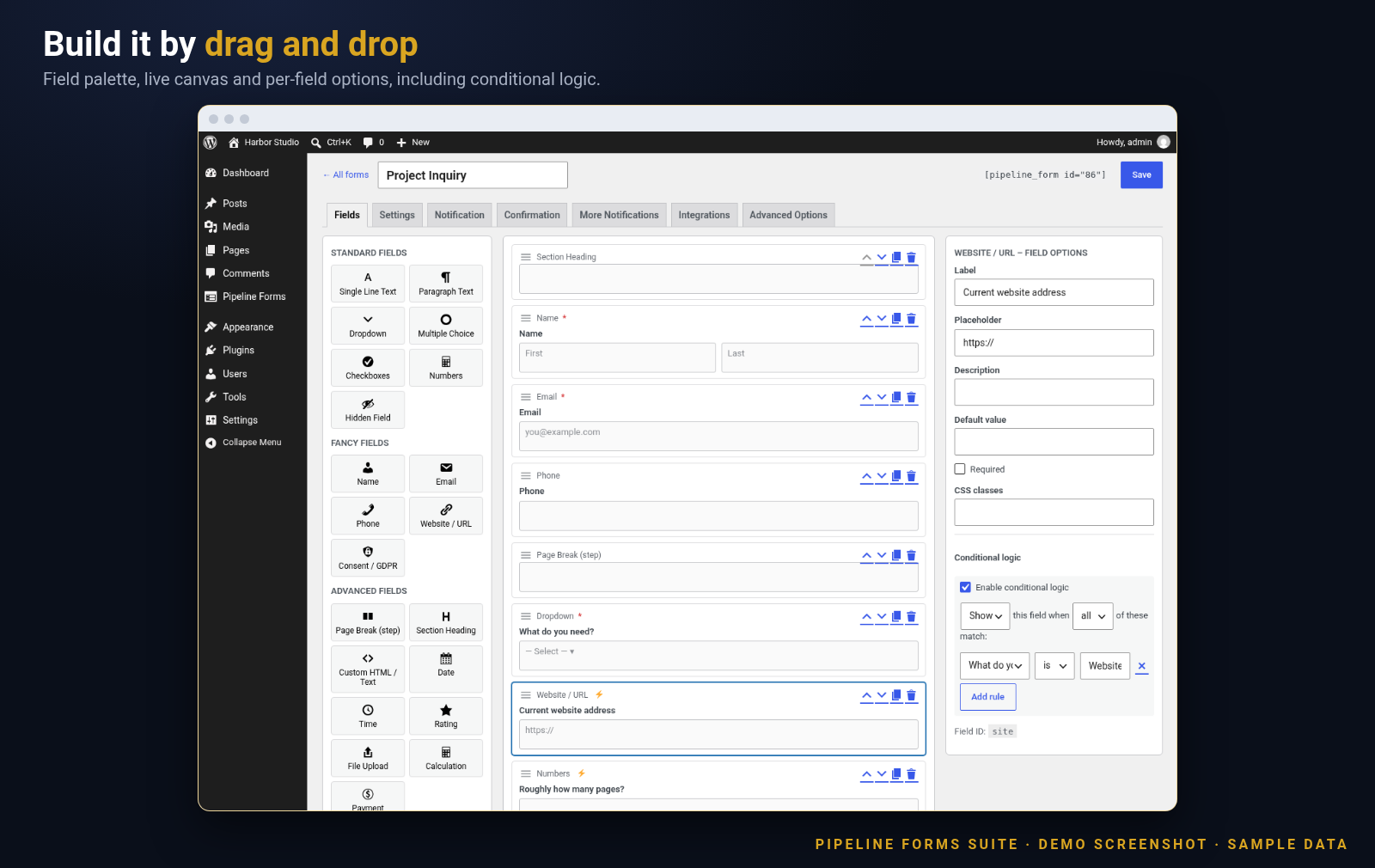
Drag-and-drop form builder
Pick fields from a palette, reorder them, duplicate or remove them, and edit label, placeholder, description, default value, CSS classes and required state in a side panel.
Starter templates
Begin with a blank form or a ready-made Simple Contact, Newsletter Signup or Quote Request form, then change anything you like.
A full set of field types
Single-line text, paragraph, dropdown, multiple choice, checkboxes, number, hidden, name, email, phone, website, consent checkbox, date, time, star rating, file upload, calculation and payment.
Multi-step forms
Add page breaks to split a long form into steps. Show a progress bar or numbered steps, and write your own Next and Back button labels.
Conditional logic
Show or hide any field based on earlier answers. Match all or any rules, with “is”, “is not”, “contains”, “greater than”, “less than”, “is empty” and “is not empty”. Hidden fields are skipped when the form is checked on the server.
Live calculations
Total up prices, quantities or scores as people type. Use field values with add, subtract, multiply, divide, remainder, brackets, round, floor, ceil, abs, min and max.
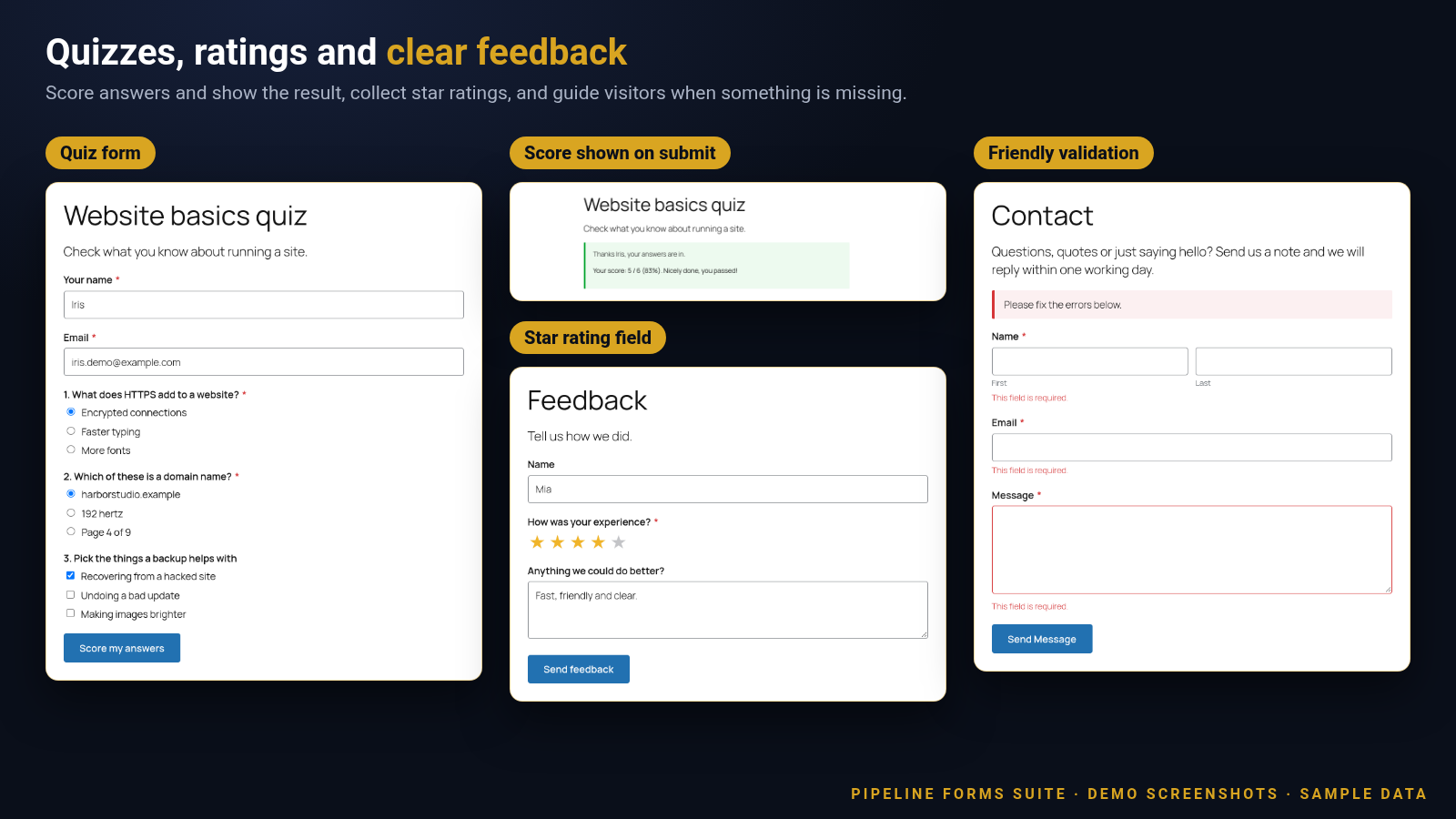
Quizzes with scoring
Mark correct answers and set points on dropdown, multiple choice and checkbox fields, or match a typed, numeric or rating answer. Set a pass mark and show the score and a pass or fail message.
File uploads
Choose the allowed file types and a size limit (1 to 64 MB) for each upload field, accept one file or several (up to 10), and keep unsafe file types out. Uploaded files are stored in a protected folder.
Email notifications
Send a message to you, with the full submission in it or only the fields you choose. Reply straight to the visitor, and add more notifications with their own recipients and conditions.
Routing and confirmations
Send an extra email to a different person depending on an answer. Thank visitors with an on-page message or send them to another page, and include their own answers using merge tags.
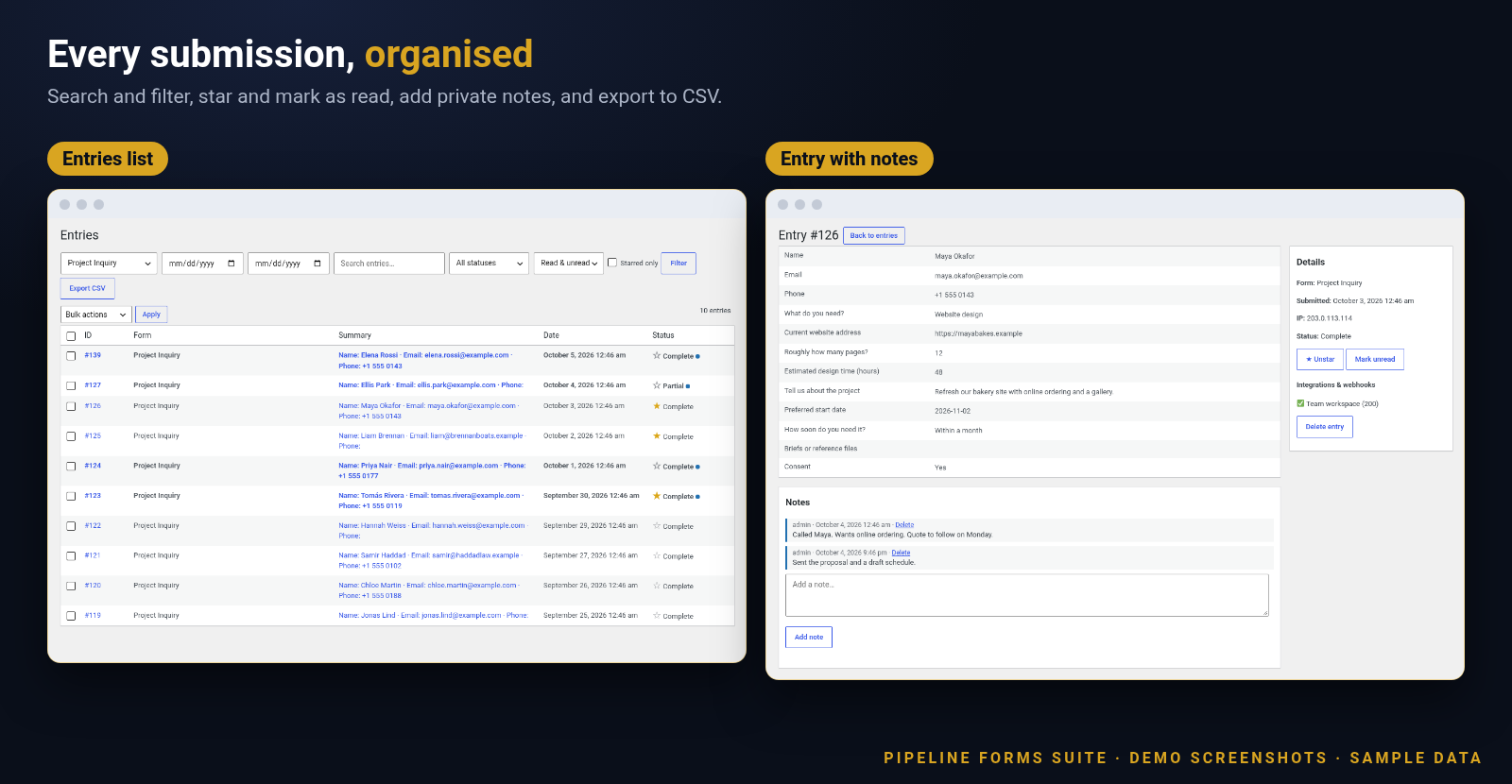
Entries in your dashboard
Every submission can be saved as an entry. Search, filter by form, date, status, read or starred, add private notes, star the important ones and use bulk actions.
CSV export
Export entries to a CSV file for your spreadsheet. Cells that could be misread as formulas are made safe.
Plus payments, integrations, popups and protection
All included. Each part stays out of the way until you switch it on for a form.
Payments with your own account
Add a payment field and let visitors pay with Stripe Checkout or PayPal using your own Stripe or PayPal account. Charge a fixed amount or an amount taken from another field, in the currency you choose.
Webhooks and email-list sync
Send each submission to another service with a signed webhook (JSON or form-encoded). Add subscribers to a Mailchimp, ConvertKit, ActiveCampaign or Brevo list with your own account for that service.
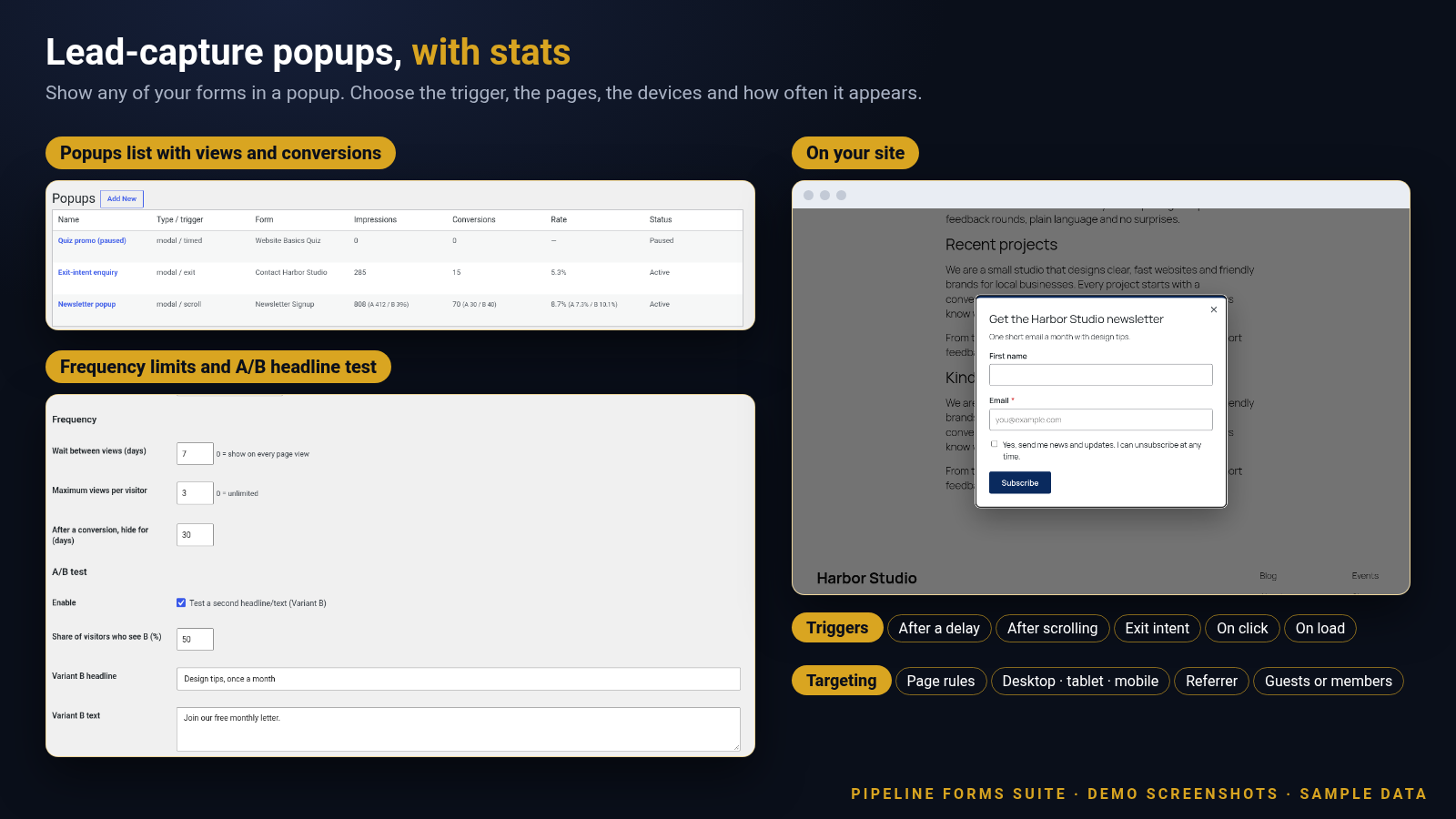
Lead-capture popups
Show any form in a modal popup. Trigger it after a delay, after scrolling, on exit intent, on click or on page load. Limit by page, device, referrer and visitor type.
Popup limits and A/B test
Wait a number of days between views, cap the number of views and hide the popup after someone converts. Try a second headline and text on a share of visitors, and see views, conversions and rate.
Layers of spam protection
Hidden honeypot field, minimum-time check, rate limit per visitor and a security token on every form. Optionally add reCAPTCHA or hCaptcha, an IP block list, country rules and Akismet.
Partial entries
Optionally save a partly finished form as soon as the visitor has typed a valid email address, so you can follow up on abandoned forms.
Smooth submissions
Forms submit without reloading the page, with a clear message beside any field that needs attention and a thank-you shown in place.
Block, shortcode and popup link
Add a form with the “Pipeline Form” block or the [pipeline_form] shortcode, and open a popup from any link or button with the [pipeline_popup_link] shortcode.
Pending-payment handling
Entries for paid forms are held as “pending payment”. Emails and webhooks are sent once the payment is confirmed.
How it works
From install to your first entry in four steps.
1
Choose a starting point
Open Add New and pick a blank form or one of the three templates: Simple Contact, Newsletter Signup or Quote Request.
2
Build the form
Drag in fields, add page breaks for steps, set conditional rules, add calculations or a quiz, and set up your notification and confirmation.
3
Put it on a page
Add the “Pipeline Form” block, or paste [pipeline_form id=”1″] using your form’s number. Or open it from a popup.
4
Review your entries
Watch entries arrive in your dashboard, add notes, star the important ones and export to CSV when you need to.
Run it from your WordPress dashboard
Forms, entries, popups and settings sit together under one “Pipeline Forms” menu.
Lead-capture popups, with numbers
Show a form in a popup, choose when and where it appears, and see how it performs.
Quizzes, ratings and clear feedback
Score answers, collect star ratings and guide visitors when something is missing.
Made for any site that collects information
One plugin for all of these, and more.
Contact formsNewsletter signupsQuote and estimate requestsProject enquiriesOrder and booking requestsSurveys and feedbackQuizzes and assessmentsEvent sign-upsJob application formsDonation and payment formsLead-capture popups
Fully licensed version
Fully licensed version — use on your own sites. You get the complete plugin, with every feature described on this page.
Requirements
- WordPress 6.2 or newer (shown working on a current WordPress 7.1 install)
- PHP 7.4 or newer
- Stripe, PayPal, Mailchimp, ConvertKit, ActiveCampaign, Brevo, reCAPTCHA or hCaptcha features use your own account with that service, and are only needed if you choose to use them
- Country rules use the visitor country that your host or CDN provides, such as Cloudflare
- The Akismet check needs the Akismet plugin to be set up on your site
- Add a form to any page with the “Pipeline Form” block or the [pipeline_form id=”1″] shortcode
Frequently asked questions
What licence do I get?
Each purchase is a fully licensed copy of the plugin for use on your own sites.
How do I put a form on a page?
Add the “Pipeline Form” block and choose a form, or paste the [pipeline_form id=”1″] shortcode using the number shown in your forms list.
Can I make a long form easier to fill in?
Yes. Add page breaks to split the form into steps, choose a progress bar or numbered steps, and show only the questions that apply with conditional logic.
Can I take payments?
Yes. Add a payment field and choose Stripe Checkout or PayPal. Payments go through your own Stripe or PayPal account, and visitors are sent to the hosted payment page to pay.
What happens to entries on a paid form?
The entry is saved as “pending payment”. Notification emails and webhooks are sent once the payment is confirmed.
Can I send submissions to my email list?
Yes. Mailchimp, ConvertKit, ActiveCampaign and Brevo are supported. When someone submits, their email, name and any tags you set are added to the list you choose, using your own account. You can also require a consent checkbox first. Changes you make in those services are not sent back to the plugin.
Does it work with other tools?
Yes. Webhooks send each submission as JSON or form-encoded data to any address you choose, with an optional signature so the receiver can check it came from your site.
Can I show a form in a popup?
Yes. Create a popup, choose the form, set when it appears and where, and decide how often a visitor sees it. You can also add a link or button anywhere with the [pipeline_popup_link] shortcode that opens a popup when clicked.
How does spam protection work?
Every form has a hidden honeypot field, a minimum-time check, a per-visitor rate limit and a security token. You can add reCAPTCHA or hCaptcha, block IP addresses or ranges, allow or block countries, and check submissions with Akismet.
Can I limit uploads?
Yes. For each upload field you choose the allowed file types and the maximum size, and whether visitors can send one file or several.
Can I stop saving visitor IP addresses?
Yes. Each form has a setting to store or not store the IP address with its entries. You can also turn off entry storage entirely for a form.
Can I remove all data when I delete the plugin?
Yes. A setting lets you choose to delete forms, entries, popups and settings when the plugin is deleted. It is off by default.
Can I change how the form looks?
Yes. Add your own CSS classes to a form or field, or turn off the built-in form stylesheet and style it with your theme.
Is it translation-ready?
Yes. Text is prepared for translation and a translation template is included.
SPECIAL LIMITED-TIME PRICE
Build better forms with Pipeline Forms Suite
Give your visitors forms that are easy to finish, and give yourself entries, emails and leads in one place. Fully licensed version — use on your own sites.
007AJ
Pipeline Forms Suite by 007AJ. Screenshots are from a demo install with sample data; the graphic labelled “Illustration” is not a screenshot. Stripe, PayPal, Mailchimp, ConvertKit, ActiveCampaign, Brevo, Google reCAPTCHA, hCaptcha and Akismet are trademarks of their respective owners; this plugin is not affiliated with them.
Only logged in customers who have purchased this product may leave a review.
Loading...
Email support
 Support by 007AJ.com
Support by 007AJ.com
007AJ.com provides support by email
Contact the seller directly by email for product questions and issue reports.
Email support
Opens your default email app.
What support includes
- Answers to product-related questions
- Help with reported bugs and issues
- Guidance for included third-party assets
What support does not include
- Customizations or new features
- Installation or setup services
Plugin
Maintenance snapshot
See recent updates, compatibility, support, and developer activity.
- Updated 1 day ago
- Developer active recently
- Email support available
- WordPress 7.0 tested
Snapshot updated 1 hour ago
View details Hide details
Maintenance details
This is maintenance data. It does not measure product quality or sales.
- Last update Updated 1 day ago
- Compatibility WordPress 7.0 tested, one version behind · PHP 8.5 not marked as tested
- Releases 2 releases in the 1 days since listing
- Developer activity Developer active recently
- Support Support is offered by email, not through WPBay tickets
- Docs and demo Documentation available · Changelog missing · No demo listed
How this snapshot works
Plugin Health
The score is out of 100 and uses data WPBay can check. Ratings, popularity, and sales are not used.
- Last update 30 points
-
Plugins receive full recency points under 30 days, then step down at 90, 180, 365, and 545 days.
- Compatibility 20 points
-
WordPress, PHP, and WooCommerce (when relevant) are scored separately. The latest two PHP lines count as current. Nearby previous versions keep most of the points.
- Current version 100%
- One version behind 75%
- Two versions behind 50%
- Three versions behind 25%
- Older or not listed 0%
- Releases 15 points
-
One release earns 10, two or three earn 13, and four or more earn 15. Each accepted product ZIP counts once; reprocessing the same upload and listing-only edits do not count.
- Developer activity 15 points
-
Based on WPBay login and dashboard activity. Exact last-login dates are never shown.
- Support Not scored
-
WPBay cannot measure response times for email or support on another site, so support is not scored.
- Docs and demo 5 points
-
Documentation: 2. Changelog: 1. Working demo or preview: 2.
Score ranges
- 90–100 Excellent
- 75–89 Healthy
- 60–74 Fair
- 40–59 Needs attention
- 0–39 Limited
Long gaps
WPBay also checks for long gaps between updates, developer activity, support replies, and releases. Buyers do not see this score.
- Time since update 35 points
- Last developer activity 25 points
- WordPress compatibility 15 points
- Support replies Not scored
- Fewer releases 10 points
-
Quality verified by WPBay
WPBay review- Reviewed version
- 1.0.3
- Review completed
- Reviewer
- CodeRevolution
- Review type
- Initial
No unresolved approval blocker was identified during WPBay’s proportionate review of this release. This is not a security certification or a guarantee that the product contains no defects.
-
 Future updates
-
Email support from 007AJ.com
-
GPL code, proprietary assets
-
Covered by the WPBay refund policy
-
Plugin maintenance snapshot
Relevant picks
You may also like
Similar products selected by category, features, popularity and freshness.



Reviews
There are no reviews yet.