



Oval Carousel WordPress & WooCommerce Plugin

 Well Documented
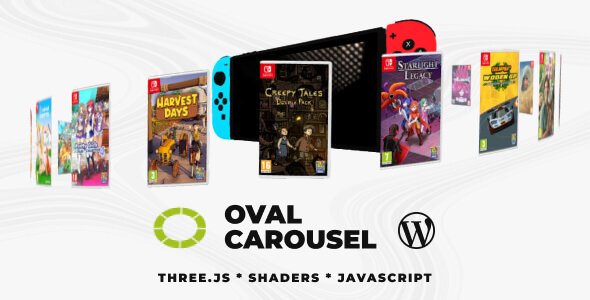
About Oval Carousel
An advanced 3D carousel featuring customizable item bending during rotation, customizable individual radius x and radius z, optional image or real 3D model in the center of the carousel with realistic HDRI lighting, real-time caption rendering using DOM-to-canvas conversion, optional Revolution Lightbox support, smooth user-responsive camera interaction. Mouse movement dynamically influences the carousel’s orientation, with adjustable sensitivity for fine-tuned control and much more!.Main features
Responsive Layout – Fully responsive and adaptable regardless of which device or screen size is used.Desktop & Mobile Optimized – Adapts to any screen size and device, whether on iOS/iPhone, Android, or desktop browsers.
Lazy Scrolling/Loading – Option to initialize Oval Carousel only when it becomes visible on scroll, improving load performance when it starts off-screen.
Customizable Size – Set the carousel width and height to match your layout; add it anywhere inside your page content.
Preloader – Optional animated preloader while assets are loading.
Caption – Optional captions for carousel items and lightbox items.
Customizable Geometry – Configure the radius on the X and Z axes independently to create a true oval shape.
Customizable Item Bend Strength – Control how much each item bends while rotating to get the exact look you want.
Mouse Rotation – Subtle camera rotation that follows the mouse, with adjustable strength for fine-tuned interaction.
Scroll Speed Strength – Adjustable drag/scroll speed for smooth, responsive carousel control.
Optional Center Image Or 3D Model – Optional Center Image Or 3D Model means you can place an extra element in the middle of the oval carousel—either a static image (like a logo) or a real 3D model. It stays centered while the carousel items rotate around it, acting as a visual focal point. This lets you highlight branding or a featured object, and the 3D option can be lit realistically to match the scene.
Mouse Ripple Post-Processing Effect – Mouse Ripple Post-Processing effect adds an interactive “water ripple” distortion that reacts to your mouse movement, example here.
Buldge Post-Processing Effect – Applies a lens-like distortion that “pushes” or “pulls” the image in a circular area, like looking through a magnifying glass, example here.
Grid And Afterimage Post-Processing – Grid And Afterimage Post-Processing adds two stylized effects to the scene: a grid overlay and an “afterimage” trail. The grid effect gives a subtle structured/tech look (like a digital screen pattern), while the afterimage effect leaves a smooth motion trail behind moving elements, making rotations and transitions feel more dynamic and cinematic, example here.
Lightbox Video/Audio – Support for various video or audio formats like .mp3, .mp4, Shoutcast, Icecast, Youtube, Vimeo and Vimeo Pro, HLS/.m3u8, DASH MPEG/.mpd live streaming, Google Drive, Dropbox and other cloud platforms, Iframe, PDF, Google Maps in the ligtbox.
Video Autoplay – Supports video autoplay inside the lightbox (where allowed by browser policies).
Private Video & Audio – Protected password video and audio inside the lightbox.
Chromecast Support – Cast supported video/audio streams to a TV and control playback from the browser player UI.
Video Thumbnails Live Preview – Thumbnails preview from a .vtt file or auto-generated previews inside the lightbox.
Video Subtitle Support – Support for subtitle inside the lightbox.
Automatic Content Detection – Revolution Lightbox will set the appropriate type (video, audio, image, etc) based on the media URL to the media items without any extra requirements.
Slideshow Support – Slideshow with autoplay for carousel thumbnails and the lightbox.
Drag & Swipe Support – Drag and swipe navigation for carousel items and lightbox items.
Maximize & Minimize For Images – Maximize/minimize button plus double click/tap zoom for images, with configurable max zoom factor.
Share Button And Share Window – Share button with a configurable share window and multiple social platforms.
Awesome Support – Direct support from the developer (Tibi @ FWD).
Detailed Documentation – Online documentation available for all features and options, JavaScript Documenation, WordPress Documenation.
Only logged in customers who have purchased this product may leave a review.
Loading...
WPBay support
 Support by FWDesign
Support by FWDesign
FWDesign supports this product through WPBay
Questions are handled in WPBay's private ticket system, keeping your purchase details and support conversation together.
Go to My Downloads
After purchase, open this item in My Downloads and choose Get Support.
What support includes
- Answers to product-related questions
- Help with reported bugs and issues
- Guidance for included third-party assets
What support does not include
- Customizations or new features
- Installation or setup services
Plugin
Maintenance snapshot
See recent updates, compatibility, support, and developer activity.
- Updated 273 days ago
- Developer active recently
- WPBay support available
- WordPress 6.9 tested
Snapshot updated 5 hours ago
View details Hide details
Maintenance details
This is maintenance data. It does not measure product quality or sales.
- Last update Updated 273 days ago
- Compatibility WordPress 6.9 tested, two versions behind · PHP 8.5 not marked as tested · WooCommerce 8 tested, three versions behind
- Releases 1 release in the 275 days since listing
- Developer activity Developer active recently
- Support No recent support tickets to measure
- Docs and demo Documentation available · Changelog missing · Demo available
Health reflects recent activity during the last 90 days.
How this snapshot works
Plugin Health
The score is out of 100 and uses data WPBay can check. Ratings, popularity, and sales are not used.
- Last update 30 points
-
Plugins receive full recency points under 30 days, then step down at 90, 180, 365, and 545 days.
- Compatibility 20 points
-
WordPress, PHP, and WooCommerce (when relevant) are scored separately. The latest two PHP lines count as current. Nearby previous versions keep most of the points.
- Current version 100%
- One version behind 75%
- Two versions behind 50%
- Three versions behind 25%
- Older or not listed 0%
- Releases 15 points
-
One release earns 10, two or three earn 13, and four or more earn 15. Each accepted product ZIP counts once; reprocessing the same upload and listing-only edits do not count.
- Developer activity 15 points
-
Based on WPBay login and dashboard activity. Exact last-login dates are never shown.
- Support 15 points
-
There are no recent WPBay tickets to measure.
- Docs and demo 5 points
-
Documentation: 2. Changelog: 1. Working demo or preview: 2.
Score ranges
- 90–100 Excellent
- 75–89 Healthy
- 60–74 Fair
- 40–59 Needs attention
- 0–39 Limited
Long gaps
WPBay also checks for long gaps between updates, developer activity, support replies, and releases. Buyers do not see this score.
- Time since update 35 points
- Last developer activity 25 points
- WordPress compatibility 15 points
- Support replies 15 points
- Fewer releases 10 points
-
Quality verified by WPBay
WPBay review- Reviewed version
- 1.0
- Review completed
- Reviewer
- CodeRevolution
- Review type
- Initial
No unresolved approval blocker was identified during WPBay’s proportionate review of this release. This is not a security certification or a guarantee that the product contains no defects.
-
 Future updates
-
WPBay support from FWDesign
-
GPL code, proprietary assets
-
Covered by the WPBay refund policy
-
Plugin maintenance snapshot
Relevant picks
You may also like
Similar products selected by category, features, popularity and freshness.



 1 month free
From this seller
View seller store
More by FWDesign
Explore more bestselling products from this creator.



Reviews
There are no reviews yet.