



LiveBlog – Real-Time Live Blogging for WordPress

 Recently Updated
Well Documented
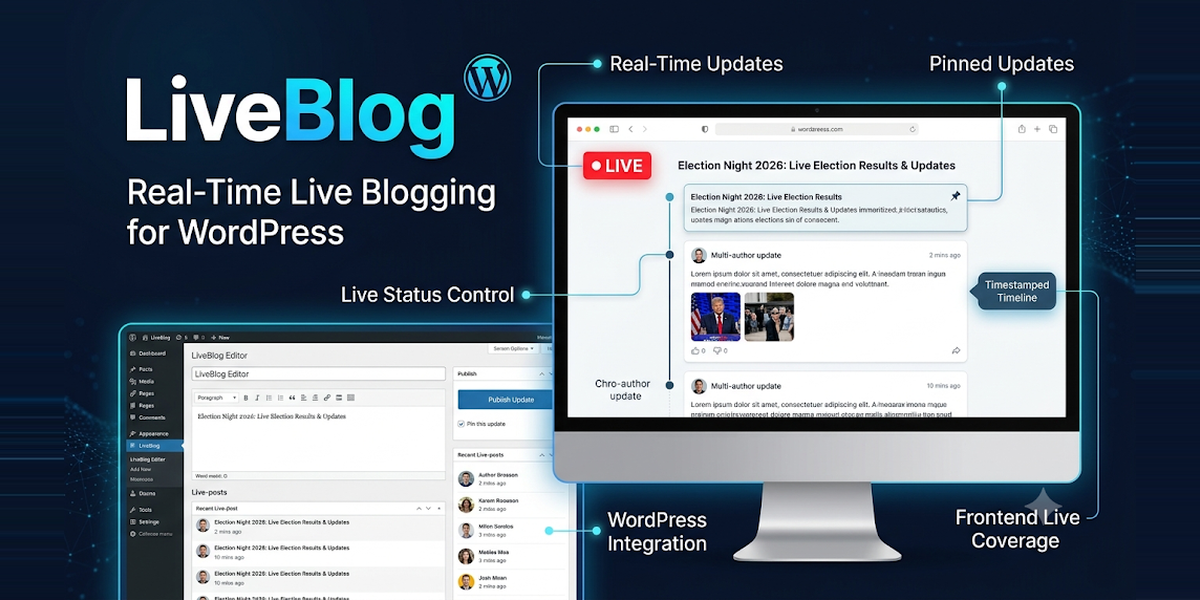
LiveBlog — Real-Time Live Blogging for WordPress LiveBlog turns any WordPress article into a real-time live blog. Publish timestamped updates as a story unfolds — election night, a match, a breaking news event — and your readers see them appear live, without refreshing the page. LiveBlog does one thing, and does it well: live blogging only, nothing else to configure, nothing you don’t need. What your readers see – Live timeline — updates appear in a clean, timestamped timeline that refreshes automatically (configurable interval, default 10 seconds). – Animated LIVE badge — a pulsing red dot on the article title and on the featured image in lists, search results and archives, so live coverage stands out everywhere on your site. – Pinned updates — pin the key moment to the top so late arrivals catch up instantly. – Live status control — Draft, Live, Developing or Ended. End a blog and the badge disappears automatically. – LiveBlogPosting JSON-LD — structured data for live coverage, helping search engines understand your live article. What you get in the admin – LiveBlog dashboard — live articles, updates published, and a 7-day activity chart at a glance. – Setup wizard — guided first-run setup with a progress bar; resume where you left off, or skip it. – Gutenberg sidebar + classic metabox — manage the live blog from the post editor you already use. – Live Articles screen — every live blog in one place with its status and update count. – Shortcode, block and Elementor widget — place a live timeline anywhere with [liveblog], the Live Blog block, or the Elementor widget. – Import / export — move live blogs between sites as JSON, or import your live blogs from NewsPulse in one click. Built for publishers – Developers welcome — 5 action/filter hooks, a 4-route REST API (liveblog/v1), an in-admin API reference, and a sample extension in the box. – Caching-friendly — optional fragment caching with a configurable duration; the poll only runs while the timeline is visible, so idle readers cost you nothing. – Clean and safe — all database queries prepared, all output escaped, every admin action nonce-protected, REST writes capability-gated. No external services, no tracking. – Accessible — live regions announce new updates to screen readers. Requirements – WordPress 6.5 or higher (tested up to 7.1) – PHP 8.1 or higher – No other plugin required. Works with any theme; the featured-image badge appears wherever your theme shows post thumbnails in the main loop. What’s included – LiveBlog plugin (ZIP) — install and activate – Full documentation inside the plugin (documentation/documentation.md) + in-admin API reference – Sample extension (examples/sample-extension.php) – Free updates for the purchased version
Changelog:
= 1.0.9 =
* Fix: the installation instructions in the documentation and readme no longer name a versioned ZIP file — they previously still named the previous release's ZIP file. The instructions are now version-neutral, so they stay correct for every future release.
* Change: the documentation no longer lists MySQL 8.0+ / MariaDB 10.11+ as a requirement — the plugin uses only basic SQL (standard tables and queries) and runs on any database WordPress itself supports. Requirements are WordPress 6.5+ and PHP 8.1+, matching the plugin header.
= 1.0.8 =
* Change: the text domain is now `liveblog-live-updates`, matching the folder slug — the old `liveblog` domain collided with Automattic's Liveblog, so on a non-English site the two plugins could show each other's strings. Every translatable string, the Text Domain header, the textdomain loader, the JS translation setup and the translation template (now `liveblog-live-updates.pot`) use the new domain. Nothing else changes: the shortcode, hooks, options and REST routes keep their names.
* Fix: the liveblog_live_update_content filter now also applies to public REST reads (frontend polling and Load-older fetches) — before, an extension's badges or notes vanished from updates as soon as polling refreshed them. Editor reads (Gutenberg sidebar, create/update responses) still return the raw stored content, so filtered markup never lands in the edit form.
* Fix: LiveBlogPosting JSON-LD now includes articleBody on every liveBlogUpdate, a non-empty headline (falls back to the update's opening words, then the article title), dateModified, per-update URLs (#update-N), and coverageEndTime once the live blog has ended. Updates with an unparseable published date are skipped instead of emitting invalid dates.
* Fix: zero dates (0000-00-00 00:00:00) are now treated as missing dates — previously they formatted as "-0001-11-30" in the datetime helper and could render a garbage datetime attribute in the timeline.
* Fix: two foreach ( glob( ... ) ) loops (import staging cleanup, uninstall cleanup) now guard against glob() returning false on unreadable directories — a fatal TypeError on PHP 8+.
* Fix: the liveblog/live-blog block now declares uses_context for postId, so Query Loop and Full Site Editing templates pass the correct post ID to the render callback.
* Improvement: the Default placement setting and the Live Articles status dropdown now show translated labels (After article content, Draft, Live, Developing, Ended) instead of raw values, and the dashboard activity log and Active Live Articles "Last update" column show times in the site timezone instead of raw UTC timestamps.
* Improvement: the sidebar "Showing X of Y updates" line is now a single translatable string, so it translates correctly into languages with different word order.
* i18n: the translation template (liveblog-live-updates.pot) is regenerated for 1.0.8 with all current strings.
= 1.0.7 =
* Change: the plugin now ships under the unique folder `liveblog-live-updates/` with main file `liveblog-live-updates.php`, so it installs and activates alongside Automattic's Liveblog (verified on a test site with Liveblog 1.13.0 active — no shared classes, functions, constants, tables, options, shortcodes, menus or REST routes). The wordpress.org update-blocking workaround is removed — it is no longer needed. Upgrading from 1.0.6 or older: deactivate and delete the old copy first (your data is kept), then install 1.0.7.
* Docs: installation references updated to the new folder and liveblog-live-updates-1.0.7.zip; the coexistence note now names Automattic's Liveblog explicitly, with upgrade instructions.
= 1.0.6 =
* Fix: the metabox in-place updates now keep the hidden edit row in sync — publishing a draft also flips its status dropdown to Published (otherwise the next edit-save would silently revert it to a draft), and editing a row to draft gives it a working Publish link.
= 1.0.5 =
* Fix: the classic metabox now updates the row in place after pin/publish/delete/edit instead of reloading the page — a reload can be blocked by the block editor's unsaved-changes prompt, which left a deleted row on screen even though the delete had succeeded.
= 1.0.4 =
* Fix: Setup Wizard now autosaves the current step's values as you change them, so leaving mid-step without clicking Continue still resumes with the same article and options. (1.0.3 only saved on step submit.)
* Fix: the Gutenberg sidebar list now uses one consistent ordering on every page — "Load more" no longer repeats rows, and a newly pinned update stays visible instead of vanishing from the list.
* Fix: delete confirmation in both editors is now a two-step inline confirm instead of a native browser dialog, which some browser automation auto-dismisses and made Delete look dead.
* Docs: wizard resume section notes the autosave behaviour.
= 1.0.3 =
* Feature: full update management in both editors — Gutenberg sidebar and classic metabox now create drafts, edit existing updates, publish drafts, pin/unpin and delete. The sidebar lists drafts and pages (20 per page, Load more); the metabox pages at 50 per page. REST GET /updates accepts an editor-only status filter (draft/any) so drafts are visible to editors.
* Fix: Setup Wizard resume now restores the selected article and display options (per-user user-meta state, validated; cleared on completion or dismissal). Previously only the step number was stored, so reopening lost the article and options.
* Feature: resumable JSON imports — files over 500 updates (up to 10,000 updates, up to 10 MB or the server upload limit) are staged and imported in batches of 100 via AJAX with a progress bar on Tools; an interrupted import resumes from the last completed batch. Dedupe still prevents duplicates on repeat imports.
* Fix: JS timeline renderer now emits the pinned and breaking labels (translated, same conditions as the PHP renderer), so polling, archive loading and revision reconciliation no longer drop them.
* Docs: installation filename and version references updated to 1.0.3; editor and import sections rewritten to match actual behaviour; Support section added.
1.0.2
Search results now show the LIVE badge on featured images; uninstall removes all plugin data; import dedupe hardened; PHP 8 type guards; docs corrected.
1.0.1
WordPress.org update collision fixed: this plugin will never be overwritten by a same-slug plugin from wordpress.org.
1.0.0
First release: live timeline with auto-refresh, animated LIVE badge (title + featured image), setup wizard, Gutenberg sidebar + metabox, shortcode/block/Elementor widget, JSON import/export + NewsPulse importer, dashboard with 7-day chart, LiveBlogPosting JSON-LD, 5 hooks, REST API.
Only logged in customers who have purchased this product may leave a review.
Loading...
WPBay support
 Support by DigiLink
DigiLink supports this product through WPBay
Questions are handled in WPBay's private ticket system, keeping your purchase details and support conversation together.
Go to My Downloads
After purchase, open this item in My Downloads and choose Get Support.
What support includes
- Answers to product-related questions
- Help with reported bugs and issues
- Guidance for included third-party assets
What support does not include
- Customizations or new features
- Installation or setup services
Plugin
Maintenance snapshot
See recent updates, compatibility, support, and developer activity.
- Updated 1 day ago
- Developer active recently
- WPBay support available
- WordPress 7.1 tested
Snapshot updated 4 hours ago
View details Hide details
Maintenance details
This is maintenance data. It does not measure product quality or sales.
- Last update Updated 1 day ago
- Compatibility WordPress 7.1 tested · PHP 8.5 tested
- Releases 5 releases in the 2 days since listing
- Developer activity Developer active recently
- Support No recent support tickets to measure
- Docs and demo Documentation available · Changelog available · Demo available
How this snapshot works
Plugin Health
The score is out of 100 and uses data WPBay can check. Ratings, popularity, and sales are not used.
- Last update 30 points
-
Plugins receive full recency points under 30 days, then step down at 90, 180, 365, and 545 days.
- Compatibility 20 points
-
WordPress, PHP, and WooCommerce (when relevant) are scored separately. The latest two PHP lines count as current. Nearby previous versions keep most of the points.
- Current version 100%
- One version behind 75%
- Two versions behind 50%
- Three versions behind 25%
- Older or not listed 0%
- Releases 15 points
-
One release earns 10, two or three earn 13, and four or more earn 15. Each accepted product ZIP counts once; reprocessing the same upload and listing-only edits do not count.
- Developer activity 15 points
-
Based on WPBay login and dashboard activity. Exact last-login dates are never shown.
- Support 15 points
-
There are no recent WPBay tickets to measure.
- Docs and demo 5 points
-
Documentation: 2. Changelog: 1. Working demo or preview: 2.
Score ranges
- 90–100 Excellent
- 75–89 Healthy
- 60–74 Fair
- 40–59 Needs attention
- 0–39 Limited
Long gaps
WPBay also checks for long gaps between updates, developer activity, support replies, and releases. Buyers do not see this score.
- Time since update 35 points
- Last developer activity 25 points
- WordPress compatibility 15 points
- Support replies 15 points
- Fewer releases 10 points
-
Quality verified by WPBay
WPBay review- Reviewed version
- 1.0.9
- Review completed
- Reviewer
- CodeRevolution
- Review type
- Initial
No unresolved approval blocker was identified during WPBay’s proportionate review of this release. This is not a security certification or a guarantee that the product contains no defects.
-
 Future updates
-
WPBay support from DigiLink
-
GPL code, proprietary assets
-
Covered by the WPBay refund policy
-
Plugin maintenance snapshot
Relevant picks
You may also like
Similar products selected by category, features, popularity and freshness.

From this seller
View seller store
More by DigiLink
Explore more bestselling products from this creator.

Reviews
There are no reviews yet.