



 15 days free

 Recently Updated
Well Documented
Recently Updated
Well Documented
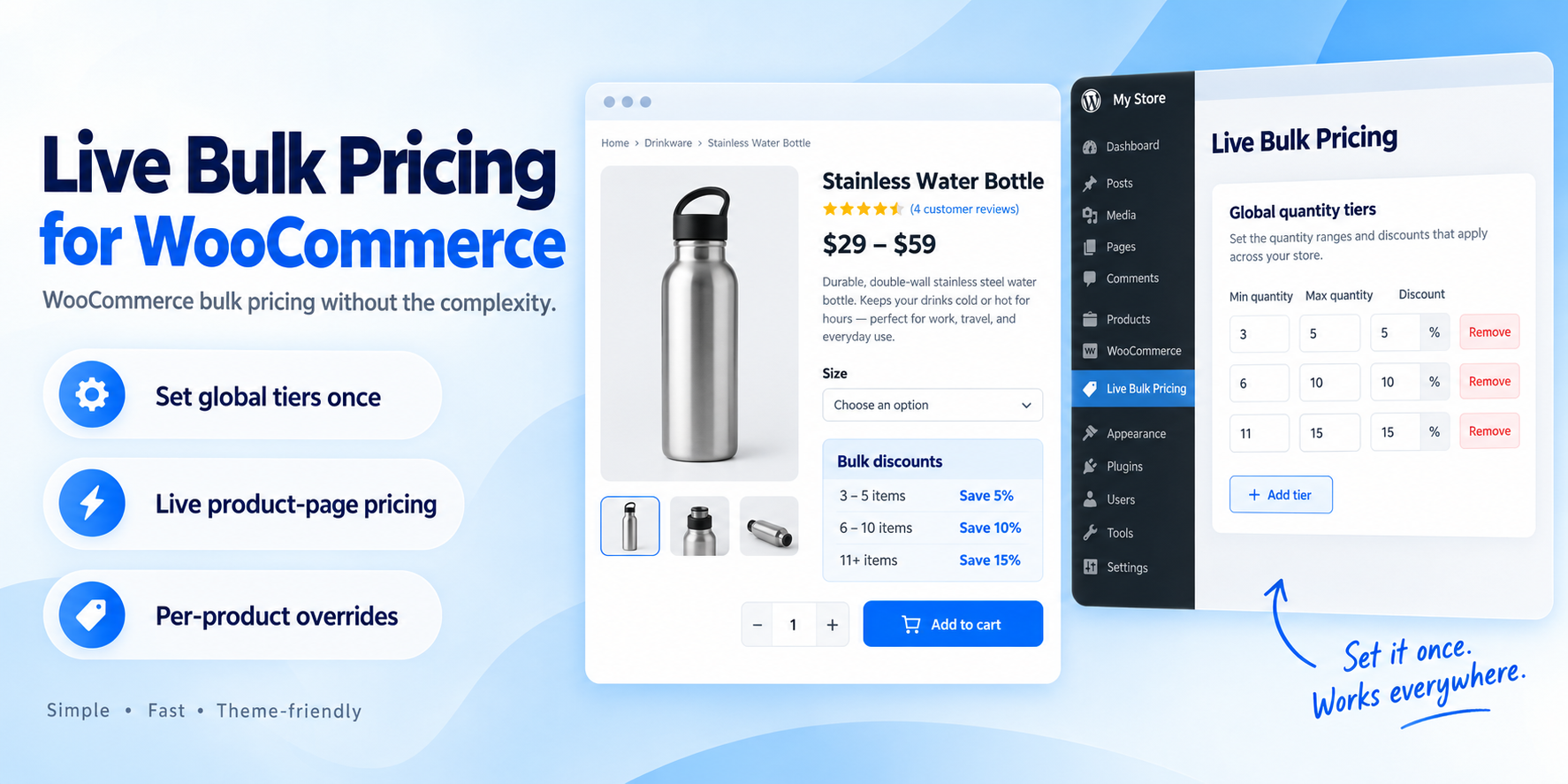
Live Bulk Pricing for WooCommerce is built for store owners who want straightforward quantity discounts without having to configure complex campaigns, conditions, customer groups or dynamic pricing rules.
Set your store-wide quantity tiers once, and the plugin automatically applies them across eligible products.
For example:
Customers see the discount directly on the product page, the price updates live when they change the quantity, and the discounted price continues correctly through the cart and checkout.
Many WooCommerce pricing plugins are designed to handle dozens of different discount scenarios. That is useful if you need complex pricing rules — but unnecessarily complicated if all you want is clean quantity-based pricing.
Live Bulk Pricing focuses on doing one job well:
Simple, attractive quantity discounts that are quick to configure and easy for customers to understand.
Most stores can simply create one set of quantity tiers and use them everywhere.
If a particular product needs different pricing, you can:
You do not need to build separate pricing rules for every product.
When a customer reaches a discount tier, the product page automatically displays:
The price changes as the customer changes the quantity.
Choose where the bulk pricing table appears on the WooCommerce product page:
For custom WooCommerce templates and page builders, manual placement is also available with:
[live_bulk_pricing]
Live Bulk Pricing does not try to be a complete promotional campaign system.
There are no complicated condition builders, role rules, BOGO campaigns or lengthy setup screens.
If you simply want customers to receive better pricing when they buy more, this plugin is designed for exactly that.
Version 1.0 supports standard WooCommerce:
Complex third-party product types such as subscriptions, bundles and composite products are not currently officially supported.
Changelog:
Version 1.0.0 – Initial Release
Only logged in customers who have purchased this product may leave a review.
 Support by Simple WP Tools
Questions are handled in WPBay's private ticket system, keeping your purchase details and support conversation together.
After purchase, open this item in My Downloads and choose Get Support.
See recent updates, compatibility, support, and developer activity.
Snapshot updated 13 hours ago
This is maintenance data. It does not measure product quality or sales.
Health reflects recent activity during the last 90 days.
The score is out of 100 and uses data WPBay can check. Ratings, popularity, and sales are not used.
Plugins receive full recency points under 30 days, then step down at 90, 180, 365, and 545 days.
WordPress, PHP, and WooCommerce (when relevant) are scored separately. The latest two PHP lines count as current. Nearby previous versions keep most of the points.
One release earns 10, two or three earn 13, and four or more earn 15. Each accepted product ZIP counts once; reprocessing the same upload and listing-only edits do not count.
Based on WPBay login and dashboard activity. Exact last-login dates are never shown.
There are no recent WPBay tickets to measure.
Documentation: 2. Changelog: 1. Working demo or preview: 2.
Score ranges
WPBay also checks for long gaps between updates, developer activity, support replies, and releases. Buyers do not see this score.
No unresolved approval blocker was identified during WPBay’s proportionate review of this release. This is not a security certification or a guarantee that the product contains no defects.
 Future updates
WPBay support from Simple WP Tools
Fully GPL licensed
Covered by the WPBay refund policy
Plugin maintenance snapshot
Future updates
WPBay support from Simple WP Tools
Fully GPL licensed
Covered by the WPBay refund policy
Plugin maintenance snapshot
Similar products selected by category, features, popularity and freshness.


Reviews
There are no reviews yet.