


Country and State Restrictions for WooCommerce

 Recently Updated
Well Documented
Recently Updated
Well Documented
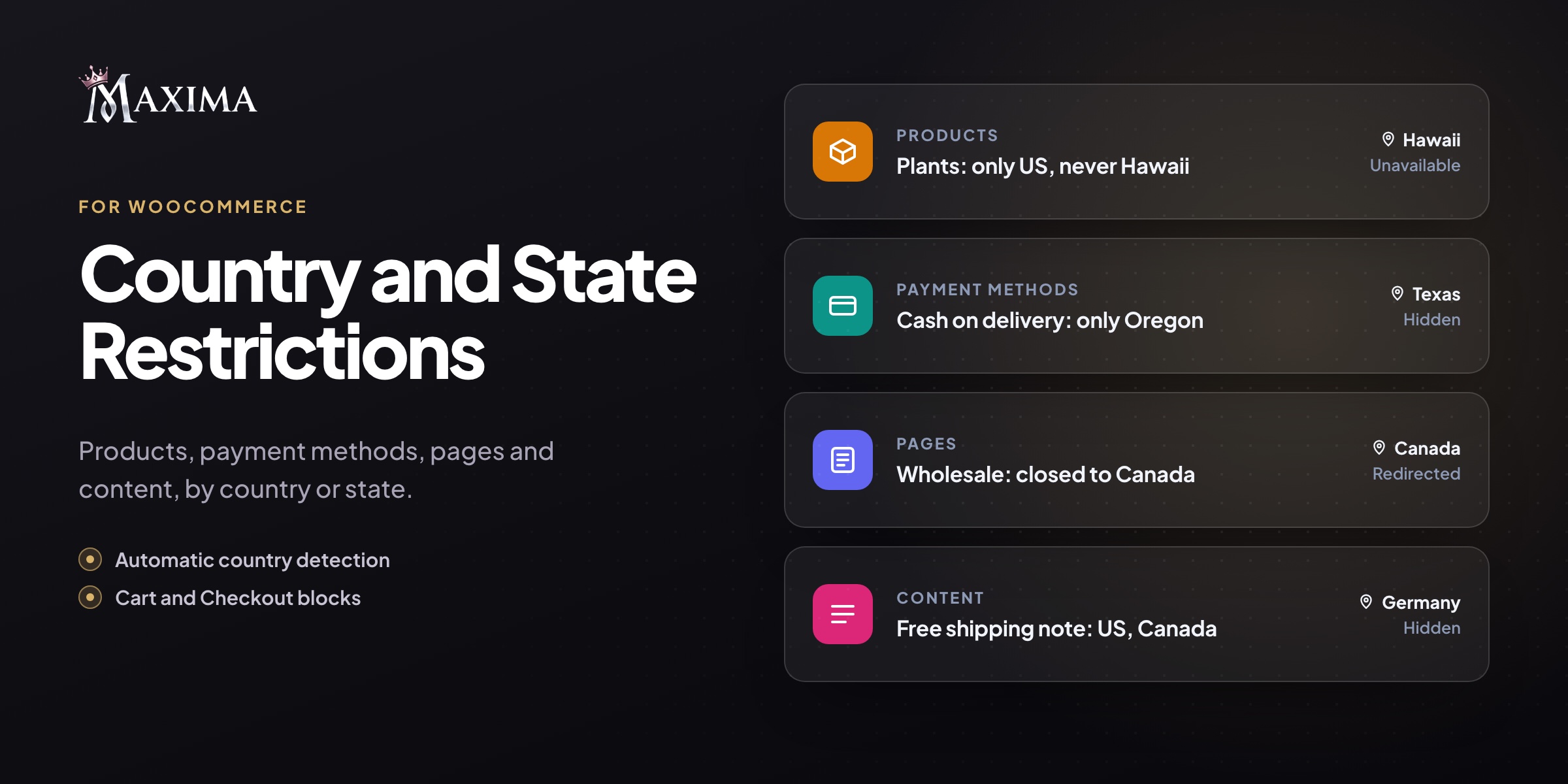
Decide exactly where every product, payment method, and page is available, down to the state level.
WooCommerce only lets you set selling locations for your entire store. Real catalogs are messier than that: some items can’t legally ship to certain regions, some are too heavy to send overseas, and some payment options only make sense where you deliver yourself. This plugin lets you set location rules per product, per category, or store-wide, plus rules for payment gateways, pages, and content.
Product availability by location
- Allow-list or block-list countries and states for any product, right from its Shipping tab
- Variation-level rules: limit a specific size or option further than its parent product
- Store-wide rules for categories (subcategories included), tags, or a hand-picked set of products
- Toggle rules on or off anytime, and let individual products opt out of global rules
A clear experience for shoppers
- Restricted items show a custom notice (e.g. “Not available in your region”) in place of the Add to Cart button
- Optionally hide the price on restricted items
- Unavailable variations appear greyed out
- Choose to label restricted products in the shop or hide them from the shop, search, product blocks, and related products
- Optional “Delivering to” bar so customers can switch their destination country in one click
Payment gateways by region
- Show a payment method only in certain countries or states, or exclude it from some
- Base the rule on the billing or shipping address
- Works on classic checkout, the Checkout block, and the Pay for Order page
Geo-restrict pages or the entire site
- Block specific pages, or the whole storefront, for chosen locations
- Redirect those visitors to another URL (such as your regional store) or show a short message
- Shortcode to display content only to visitors from selected locations
- Store managers who are logged in are never locked out
Orders are always protected
Whatever the storefront displays, checkout refuses orders containing items that can’t be delivered to the customer’s address, and tells them which item is the problem.
Smart location detection
Uses the customer’s shipping or billing address. Before an address is entered, the country is detected via WooCommerce geolocation or the country header from Cloudflare or your host. No third-party services are contacted.
Example use cases
- Sell live plants within the US, excluding Alaska and Hawaii
- Keep oversized furniture domestic-only
- Offer cash on delivery only in states you deliver to yourself
- Send Canadian visitors to your Canadian storefront
- Show a free-shipping banner only to US and Canadian shoppers
Documentation
Step-by-step setup, every setting explained, and examples: read the documentation.Only logged in customers who have purchased this product may leave a review.
Loading...
Seller support site
 Support by maximaplugins
Support by maximaplugins
maximaplugins provides support on their own website
The seller uses an external help center for product questions, bug reports, and support requests.
Visit support site
Opens the seller's support website in a new tab.
What support includes
- Answers to product-related questions
- Help with reported bugs and issues
- Guidance for included third-party assets
What support does not include
- Customizations or new features
- Installation or setup services
Plugin
Maintenance snapshot
See recent updates, compatibility, support, and developer activity.
- Updated today
- Developer active recently
- Developer-site support available
- WordPress 7.1 tested
Snapshot updated 3 hours ago
View details Hide details
Maintenance details
This is maintenance data. It does not measure product quality or sales.
- Last update Updated today
- Compatibility WordPress 7.1 tested · PHP 8.5 tested · WooCommerce 11 tested
- Releases 2 releases in the 1 days since listing
- Developer activity Developer active recently
- Support Support is offered on the developer's site, not through WPBay tickets
- Docs and demo Documentation available · Changelog missing · Demo available
How this snapshot works
Plugin Health
The score is out of 100 and uses data WPBay can check. Ratings, popularity, and sales are not used.
- Last update 30 points
-
Plugins receive full recency points under 30 days, then step down at 90, 180, 365, and 545 days.
- Compatibility 20 points
-
WordPress, PHP, and WooCommerce (when relevant) are scored separately. The latest two PHP lines count as current. Nearby previous versions keep most of the points.
- Current version 100%
- One version behind 75%
- Two versions behind 50%
- Three versions behind 25%
- Older or not listed 0%
- Releases 15 points
-
One release earns 10, two or three earn 13, and four or more earn 15. Each accepted product ZIP counts once; reprocessing the same upload and listing-only edits do not count.
- Developer activity 15 points
-
Based on WPBay login and dashboard activity. Exact last-login dates are never shown.
- Support Not scored
-
WPBay cannot measure response times for email or support on another site, so support is not scored.
- Docs and demo 5 points
-
Documentation: 2. Changelog: 1. Working demo or preview: 2.
Score ranges
- 90–100 Excellent
- 75–89 Healthy
- 60–74 Fair
- 40–59 Needs attention
- 0–39 Limited
Long gaps
WPBay also checks for long gaps between updates, developer activity, support replies, and releases. Buyers do not see this score.
- Time since update 35 points
- Last developer activity 25 points
- WordPress compatibility 15 points
- Support replies Not scored
- Fewer releases 10 points
-
Quality verified by WPBay
WPBay review- Reviewed version
- 1.1.1
- Review completed
- Reviewer
- CodeRevolution
- Review type
- Initial
No unresolved approval blocker was identified during WPBay’s proportionate review of this release. This is not a security certification or a guarantee that the product contains no defects.
-
 Future updates
-
Support through the seller website
-
GPL code, proprietary assets
-
Covered by the WPBay refund policy
-
Plugin maintenance snapshot
Relevant picks
You may also like
Similar products selected by category, features, popularity and freshness.

Reviews
There are no reviews yet.