



Filmstrip Photo and Video Slider WordPress and WooCommerce Plugin

 Recently Updated
Well Documented



Filmstrip Photo and Video Slider for WordPress and WooCommerce
Create interactive 3D filmstrip galleries from your WordPress Media Library. Filmstrip Photo and Video Slider combines photos, autoplay videos and organized collections with smooth drag navigation and animated transitions. Manage your content and appearance from the WordPress dashboard, then add the gallery to your site with a shortcode.
For WooCommerce stores, the plugin can replace a product’s image gallery with an interactive filmstrip. Show product photography, detail shots and videos together, either beside the product information or across the full product content width.
View Live Preview | WooCommerce Live Demo | WordPress Documentation
Build your collections in WordPress
Create a gallery, add its categories and choose the photos and videos for each collection. The first media item becomes the category’s filmstrip cover. Drag categories and media items to change their order, add optional captions and choose what happens when a visitor clicks a frame.
Nine editable presets are included. Each starts with the same settings so you can create your own variations and reuse them across galleries. Customize the layout, colors, fonts, spacing, navigation and effects without changing the plugin files.
Gallery features
- Interactive 3D filmstrip: Three.js rendering with detailed film frames, transparent perforations, editable film text and smooth curves.
- Mouse and touch support: drag the filmstrip and category galleries with momentum.
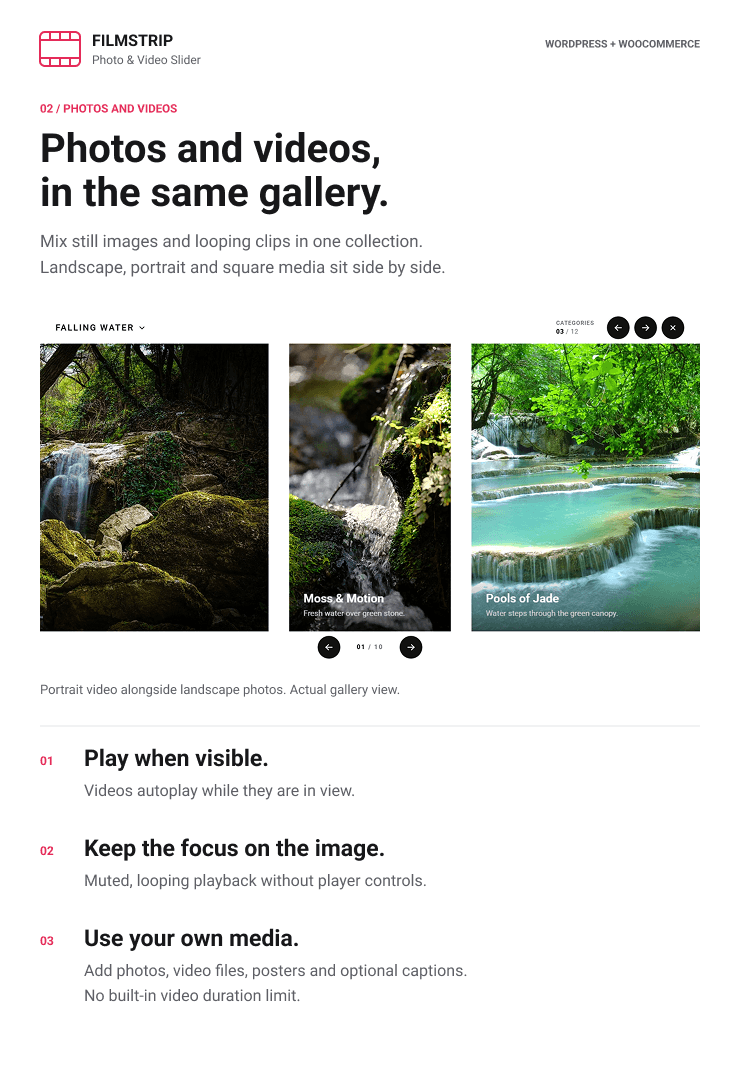
- Mixed photo and video collections: combine portrait, landscape and square media in the same gallery.
- Visible video playback: videos autoplay muted and loop while visible, without controls, and pause outside view.
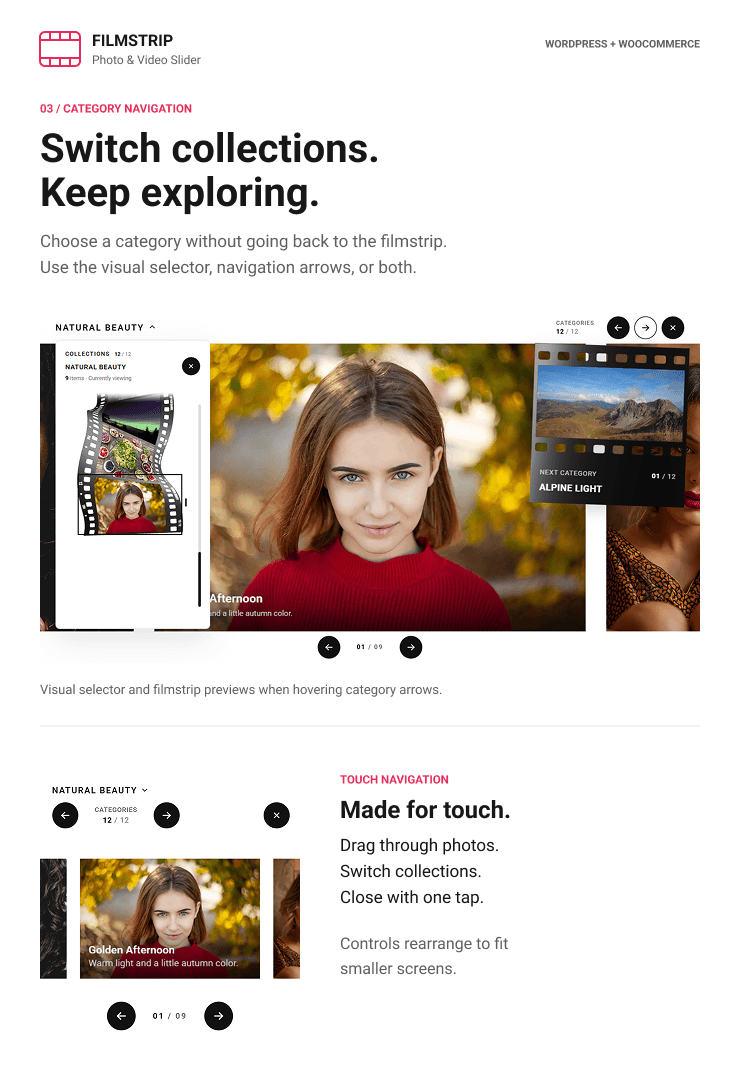
- Animated category opening: a selected frame moves into focus and becomes a horizontal media gallery, with a reverse transition when closed.
- Flexible category navigation: use a miniature filmstrip dropdown, category arrows with animated photo or video previews, both or neither.
- Image controls: previous and next buttons, counters and click-to-center navigation.
- Optional mouse wheel: separate controls for the main filmstrip, opened categories and category selector.
- Adaptive wrapping: continuous scrolling when enough media is available, with finite bounds for smaller collections.
- Category click actions: open the category, follow a link or center the frame without opening anything.
- Optional captions: separate titles and descriptions with configurable typography, colors and spacing.
- Appearance settings: adjust film colors, buttons, labels, frame proportions, curves and layout dimensions.
- Optional effects: full color or black-and-white hover effects, flowmap distortion, waves, noise and grid effects.
- Deep linking: share a direct link to a category and media item.
- Responsive layouts: adapt the gallery and its controls to desktop and mobile spaces.
- Media loading transitions: placeholders and image fades while content becomes available.
WordPress integration
- Dedicated galleries and presets managers in the WordPress dashboard.
- WordPress Media Library selection for photos, videos and video posters.
- Automatic media dimension detection.
- Drag-to-reorder categories and their media items.
- Nine independently editable presets with identical starting settings.
- Shortcode integration for pages, posts, widgets and page builders that support shortcodes.
- Compatibility with the block editor through its Shortcode block.
- A shortcode helper on page and post editing screens.
- Translation-ready strings and an included POT file.
- Locally bundled runtime assets and Roboto fonts.
Example shortcode:
[filmstrip_slider preset_name="Preset 1" gallery_name="Your Filmstrip"]
WooCommerce product galleries
Open a product’s editor, enable Filmstrip in its dedicated metabox and choose a gallery and preset. The saved assignment replaces that product’s normal gallery without requiring a shortcode. Products without a Filmstrip assignment retain their normal images.
- Replace Product Image: display the filmstrip in the product image column beside the product details.
- Replace Product Image Full Width: display the filmstrip across the product content area with the details below.
- Per-product assignments: choose which products use Filmstrip and select their gallery and preset.
- Classic and block templates: integration with standard WooCommerce gallery hooks and the Product Gallery and Product Image Gallery blocks.
- Native shopping flow: product details, cart and checkout remain part of WooCommerce.
WooCommerce is optional for galleries on ordinary pages and posts. Automatic variation-image synchronization is not included. Custom product builders that bypass the supported gallery hooks and blocks can use a manually placed shortcode.
Requirements and media
Requires WordPress 6.5 or newer, PHP 8.0 or newer and a modern browser with WebGL enabled. WooCommerce is required only for product gallery integration.
Select your own images and browser-compatible MP4 or WebM videos from the Media Library. Each video needs a poster image. Videos play muted and loop while visible, without controls. The plugin does not transcode, trim or convert your video files into adaptive streams.
Documentation and support
Read the WordPress and WooCommerce documentation for installation, gallery setup, presets, shortcodes and product assignments.
For support, use the FWDesign contact form or email [email protected] or [email protected]. Include your page URL, plugin version and the steps needed to reproduce the issue.
Only logged in customers who have purchased this product may leave a review.
Loading...
WPBay support
 Support by FWDesign
FWDesign supports this product through WPBay
Questions are handled in WPBay's private ticket system, keeping your purchase details and support conversation together.
Go to My Downloads
After purchase, open this item in My Downloads and choose Get Support.
What support includes
- Answers to product-related questions
- Help with reported bugs and issues
- Guidance for included third-party assets
What support does not include
- Customizations or new features
- Installation or setup services
Plugin
Maintenance snapshot
See recent updates, compatibility, support, and developer activity.
- Updated today
- Developer active recently
- WPBay support available
- WordPress 7.1 tested
Snapshot updated 4 hours ago
View details Hide details
Maintenance details
This is maintenance data. It does not measure product quality or sales.
- Last update Updated today
- Compatibility WordPress 7.1 tested · PHP 8.5 tested · WooCommerce 11 tested
- Releases 2 releases in the 1 days since listing
- Developer activity Developer active recently
- Support No recent support tickets to measure
- Docs and demo Documentation available · Changelog missing · Demo available
How this snapshot works
Plugin Health
The score is out of 100 and uses data WPBay can check. Ratings, popularity, and sales are not used.
- Last update 30 points
-
Plugins receive full recency points under 30 days, then step down at 90, 180, 365, and 545 days.
- Compatibility 20 points
-
WordPress, PHP, and WooCommerce (when relevant) are scored separately. The latest two PHP lines count as current. Nearby previous versions keep most of the points.
- Current version 100%
- One version behind 75%
- Two versions behind 50%
- Three versions behind 25%
- Older or not listed 0%
- Releases 15 points
-
One release earns 10, two or three earn 13, and four or more earn 15. Each accepted product ZIP counts once; reprocessing the same upload and listing-only edits do not count.
- Developer activity 15 points
-
Based on WPBay login and dashboard activity. Exact last-login dates are never shown.
- Support 15 points
-
There are no recent WPBay tickets to measure.
- Docs and demo 5 points
-
Documentation: 2. Changelog: 1. Working demo or preview: 2.
Score ranges
- 90–100 Excellent
- 75–89 Healthy
- 60–74 Fair
- 40–59 Needs attention
- 0–39 Limited
Long gaps
WPBay also checks for long gaps between updates, developer activity, support replies, and releases. Buyers do not see this score.
- Time since update 35 points
- Last developer activity 25 points
- WordPress compatibility 15 points
- Support replies 15 points
- Fewer releases 10 points
-
Quality verified by WPBay
WPBay review- Reviewed version
- 1.0.0
- Review completed
- Reviewer
- CodeRevolution
- Review type
- Initial
No unresolved approval blocker was identified during WPBay’s proportionate review of this release. This is not a security certification or a guarantee that the product contains no defects.
-
 Future updates
-
WPBay support from FWDesign
-
GPL code, proprietary assets
-
Covered by the WPBay refund policy
-
Plugin maintenance snapshot
Relevant picks
You may also like
Similar products selected by category, features, popularity and freshness.



From this seller
View seller store
More by FWDesign
Explore more bestselling products from this creator.


Reviews
There are no reviews yet.