



Countersign – Proof your team was told — without the paperwork

 Recently Updated
Well Documented
Sold Only On WPBay
Recently Updated
Well Documented
Sold Only On WPBay
What Countersign does
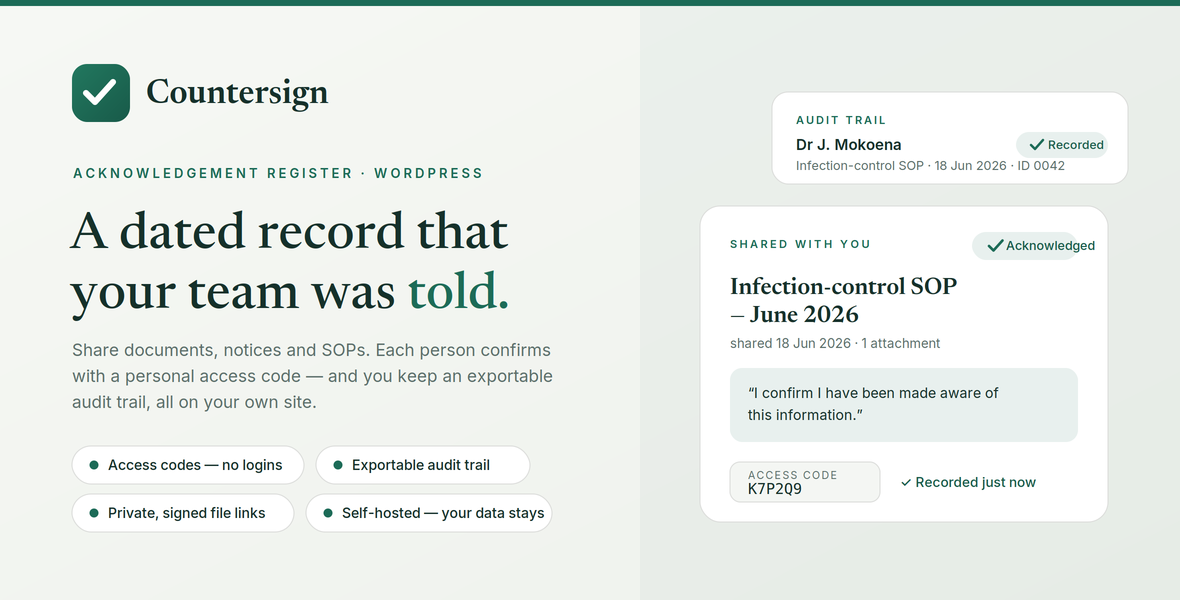
Countersign answers one recurring question: can you prove everyone was told? You share a document, notice, policy or link from your WordPress admin, decide who it goes to, and each person confirms they’ve been made aware of it. Every confirmation is logged with a date and the exact wording they agreed to, and you can export the whole register at any time. It’s designed to be effortless for the people acknowledging — no accounts, no passwords, just a personal code and one tap.
Sharing
- Share a title plus an optional note, an optional external link (e.g. a SharePoint or Drive location), and an optional private file attachment.
- Target each item to everyone or to specific people — each person sees only what’s addressed to them.
- Write your own acknowledgement statement per item (what the person is confirming), or use the sensible default.
- An overview screen shows every shared item with an “acknowledged / total” count and the names and timestamps of who has confirmed.
Acknowledgement (the person’s view)
- A single shortcode,
[countersign], turns any WordPress page into the acknowledgement page. - People enter their personal access code, see only their items, open or download any files or links, and confirm with a clear confirmation step.
- The code is remembered for the session, with a “Switch” option to clear it.
People & access codes
- Maintain a roster; each person gets a unique access code (8+ characters, letters and numbers, not case-sensitive).
- Set the length of auto-generated codes, assign a custom code, regenerate a code, or copy one to the clipboard in a click.
- Remove someone and their code stops working immediately, while their past records are kept.
Audit trail
- Every acknowledgement is recorded with the person’s name, the item, the date and time, the exact statement confirmed, the code used, the IP address and the device (browser user-agent).
- One-click CSV export of the full register for your own records or audits.
Security & privacy (self-hosted by design)
- All data lives in your own WordPress database and on your own server — nothing is sent to a third party.
- File attachments are stored in a protected folder with unguessable names, never in the public Media Library. People receive a signed link that expires after one hour and is verified against their code and the item’s recipients before the file is served.
- Uploads are type-checked and rejected if the real file type can’t be verified.
- Access-code attempts are rate-limited per IP with a short lockout to slow guessing.
- Fonts use the visitor’s own device by default — nothing loads from Google unless you switch it on.
- The admin area is protected by your normal WordPress login.
Make it yours
- Customise brand colour, text colour, page and card backgrounds, the “awaiting” status colour, and heading/body fonts, with a live preview and one-click reset.
- The look applies to both the acknowledgement page and the admin screens.
Translation-ready
- The entire interface is translatable, with a
.pottemplate included so you can localise it into any language.
What’s included
- The complete plugin, ready to install via Plugins → Add New → Upload.
- Built-in setup and usage notes, full changelog, and the translation template.
- Licensed GPLv2 or later.
Requirements
- A self-hosted WordPress site (wordpress.org), not WordPress.com.
- For attachment uploads, PHP’s
fileinfoextension is recommended so document types verify correctly.
Changelog:
Version 1.0.0
Initial release
- Share documents, notices and links (guidelines, SOPs, etc.) with your team.
- Per-doctor access codes — doctors sign in with a code, no WordPress login needed.
- Recipient targeting: send to everyone or to specific doctors; each doctor sees only what is addressed to them.
- One-tap acknowledgement of receipt with a confirmation step.
- Audit trail of every acknowledgement (name, item, date, statement) with CSV export.
- "Shared" overview showing acknowledged-of-total counts per item.
- Admin area protected by the normal WordPress login; doctor page added via the [countersign] shortcode.
Version 1.1.0
Appearance settings
- Added: Appearance tab to change colours (brand, text, page and card backgrounds, "awaiting" status colour) and heading and body fonts.
- Added: Live preview that updates as you choose colours and fonts.
- Added: Reset to defaults option.
- Changed: Colour and font choices apply to both the doctor-facing page and the admin screens for a consistent look.
Version 1.2.0 — 24 June 2026
Security & private attachments
- Added: Uploaded files are now stored in a protected folder instead of the public Media Library, with randomised, unguessable filenames.
- Added: Doctors receive a signed, time-limited download link (expires after one hour) rather than a direct file URL. Every download is verified against the doctor's access code and the document's recipient list before the file is served.
- Added: Upload restrictions — only common document and image types are accepted; script and executable files are rejected.
- Changed: File handling moved off the Media Library; the share form now uploads directly into the protected store.
- Changed: Removing a shared item now also deletes its stored file from the server.
- Maintenance: Database updates automatically on activation to support secure file storage.
Version 1.3.0
- Flexible access codes
- Added: Set the length of auto-generated codes (4–16 characters) from the Doctors tab.
- Added: Give any doctor a custom access code, either when adding them or later via "Change code".
- Added: Regenerate a random code for an existing doctor, and a Copy button next to each code.
- Custom codes accept letters and numbers (4–20 characters), are not case-sensitive, and are checked to be unique before they are saved.
- Maintenance: Added an author link to the plugin header.
Version 1.4.0 — 25 June 2026
Hardening, translation readiness & privacy = Security :
- Per-IP rate limiting + short lockout on access-code attempts.
- Minimum access-code length raised to 8 (existing shorter codes still work).
- Uploads rejected if the real file type can't be verified (no extension fallback).
- Fixed :
- "Specific doctors" with none selected no longer silently shares with Everyone.
- Audit :
- Each acknowledgement now records code used, IP address and device (user-agent), shown in the Audit tab and CSV export.
- Privacy :
- Google Fonts off by default; system fonts used unless enabled in Appearance.
- i18n :
- All interface text translatable; languages/countersign.pot included.
- Admin :
- New "Advanced" tab: opt-in "delete all data on uninstall" + security/privacy notes.
- Added uninstall.php to remove tables, options and private files when opted in.
Version 1.5.0
Added
- Groups: countersign_groups and countersign_group_members tables; Groups admin tab with create, rename, membership and delete.
- Recipient targeting extended to groups. Stored as {"people":[…],"groups":[…]}; the legacy flat-array format is still read, so pre-1.5.0 items are unaffected.
- Group membership chips on the Employees tab; optional group assignment when adding an employee.
- includes/updater.php: self-hosted update manifest, site_transient_update_plugins injection, plugins_api details, "Check for updates" link on the plugin row, Updates card in Advanced with a configurable manifest URL (12-hour cache, force-refresh button, empty URL disables checks).
- Update URI plugin header, so wordpress.org can never serve a different plugin sharing the "countersign" slug.
Changed
- Doctors tab → Employees; all user-facing strings rewritten. Database columns, table names and admin_post action names retain their original "doctor" naming for upgrade compatibility. ?tab=doctors redirects.
- Acknowledged/total counts now resolve the union of an item's groups and individuals, de-duplicated.
- REST /documents returns a person object (the doctor key is retained for cached front-end scripts).
- Translation template regenerated (~178 strings).
Fixed
- Database migrations ran only on the activation hook, so upgrading the plugin in place left the schema stale. Migrations now run on plugins_loaded and on upgrader_process_complete. This is what makes in-place updating safe.
Version 1.6.0
Added
- PDF export of the audit trail
- Export the audit trail as a PDF, grouped by employee, from the Audit trail tab.
- Choose everyone or only selected employees; "all" also includes removed employees.
- Rendered on-server with a bundled FPDF; picks up the Appearance brand colour.
- No schema change (DB ver stays 4); upgrading only replaces files.
Only logged in customers who have purchased this product may leave a review.
Loading...
WPBay support
 Support by SYS-TECH
Support by SYS-TECH
SYS-TECH supports this product through WPBay
Questions are handled in WPBay's private ticket system, keeping your purchase details and support conversation together.
Go to My Downloads
After purchase, open this item in My Downloads and choose Get Support.
What support includes
- Answers to product-related questions
- Help with reported bugs and issues
- Guidance for included third-party assets
What support does not include
- Customizations or new features
- Installation or setup services
Plugin
Maintenance snapshot
See recent updates, compatibility, support, and developer activity.
- Updated 31 days ago
- Developer active
- WPBay support available
- WordPress 7.1 tested
Snapshot updated 24 hours ago
View details Hide details
Maintenance details
This is maintenance data. It does not measure product quality or sales.
- Last update Updated 31 days ago
- Compatibility WordPress 7.1 tested · PHP 8.5 tested
- Releases 3 releases in the 99 days since listing
- Developer activity Developer active
- Support No recent support tickets to measure
- Docs and demo Documentation available · Changelog available · No demo listed
Health reflects increased activity during the last 90 days.
How this snapshot works
Plugin Health
The score is out of 100 and uses data WPBay can check. Ratings, popularity, and sales are not used.
- Last update 30 points
-
Plugins receive full recency points under 30 days, then step down at 90, 180, 365, and 545 days.
- Compatibility 20 points
-
WordPress, PHP, and WooCommerce (when relevant) are scored separately. The latest two PHP lines count as current. Nearby previous versions keep most of the points.
- Current version 100%
- One version behind 75%
- Two versions behind 50%
- Three versions behind 25%
- Older or not listed 0%
- Releases 15 points
-
One release earns 10, two or three earn 13, and four or more earn 15. Each accepted product ZIP counts once; reprocessing the same upload and listing-only edits do not count.
- Developer activity 15 points
-
Based on WPBay login and dashboard activity. Exact last-login dates are never shown.
- Support 15 points
-
There are no recent WPBay tickets to measure.
- Docs and demo 5 points
-
Documentation: 2. Changelog: 1. Working demo or preview: 2.
Score ranges
- 90–100 Excellent
- 75–89 Healthy
- 60–74 Fair
- 40–59 Needs attention
- 0–39 Limited
Long gaps
WPBay also checks for long gaps between updates, developer activity, support replies, and releases. Buyers do not see this score.
- Time since update 35 points
- Last developer activity 25 points
- WordPress compatibility 15 points
- Support replies 15 points
- Fewer releases 10 points
-
Quality verified by WPBay
WPBay review- Reviewed version
- 1.6.0
- Review completed
- Reviewer
- CodeRevolution
- Review type
- Initial
No unresolved approval blocker was identified during WPBay’s proportionate review of this release. This is not a security certification or a guarantee that the product contains no defects.
-
 Future updates
-
WPBay support from SYS-TECH
-
Fully GPL licensed
-
Covered by the WPBay refund policy
-
Plugin maintenance snapshot
Relevant picks
You may also like
Similar products selected by category, features, popularity and freshness.


 7 days free
Reviews
There are no reviews yet.