



BookWise Calendar and Booking System

 Recently Updated
Well Documented
Recently Updated
Well Documented

SPECIAL LIMITED-TIME PRICE

007AJ
Bookwise Calendar
Simple Online Booking and Appointment Scheduling
Let people book you online, day or night. Services, staff, working hours, emails and reminders are built in. Add Stripe payments, text messages and Google Calendar sync when you need them.
Fully licensed version — use on your own sites

Fully licensed
use on your own sites
Includes the extra modules
Stripe · Twilio · Google Calendar
Block + shortcode
drop it on any page
WordPress 6.3+
PHP 7.4+
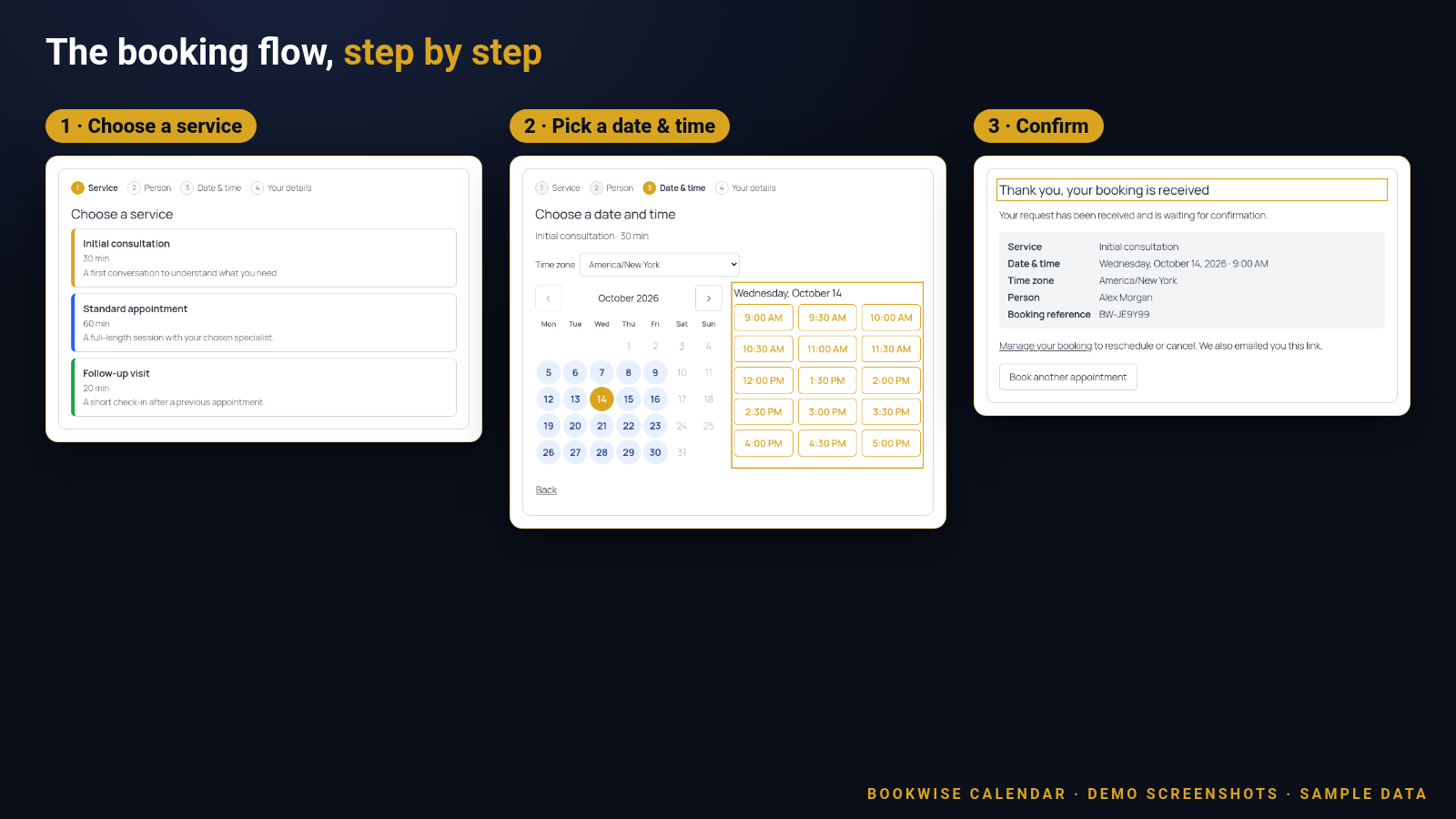
Booking made easy for your customers
A few short steps on your own page. No accounts, no back-and-forth emails.
Everything you need to take bookings
The core booking system, ready to use as soon as you add a service and a person.
Guided booking form
Visitors move through clear steps: service, person, date and time, then their details. They finish on a confirmation screen with a booking reference.
Live availability calendar
A month calendar shows which days still have free times. Pick a day and choose from the available time slots. Booked and blocked times are never offered.
Time zones handled
Visitors see times in their own time zone and can switch it on the form. You set your business time zone, and each staff member can have their own.
Services that fit your work
Name, description, duration (5 to 1440 minutes), buffer time before and after, a colour, sort order and an active switch for each service.
Multiple staff
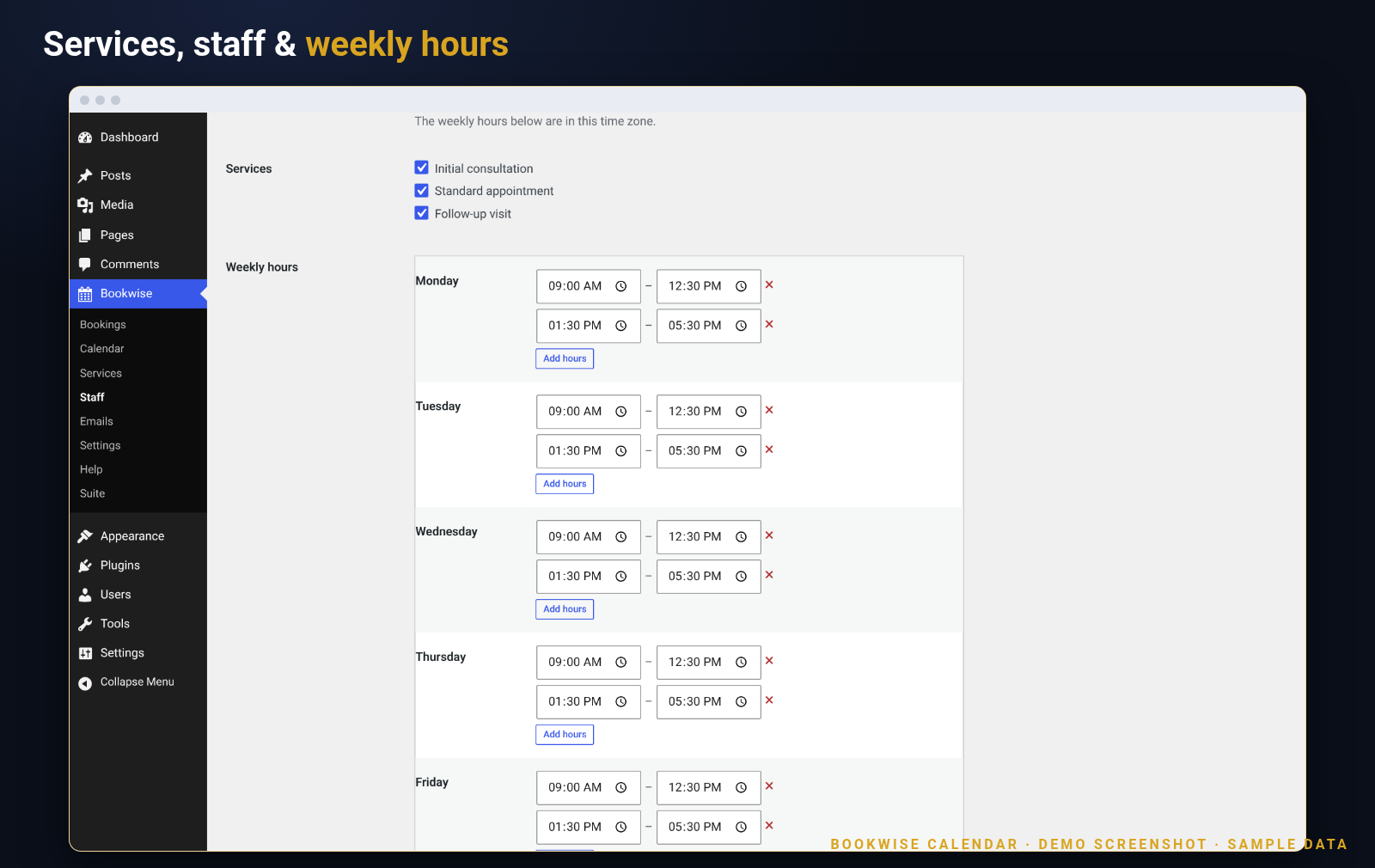
Assign each person to the services they offer, give them weekly hours (including split shifts and breaks), days off and their own time zone.
“Any available person”
Let visitors pick a person, or choose any. Bookings are then spread evenly, or go to the first free person in your staff order.
Rules you control
Minimum notice, how far ahead people can book, time slot interval, business holidays, and whether new bookings start as pending or confirmed.
Bookings list and admin calendar
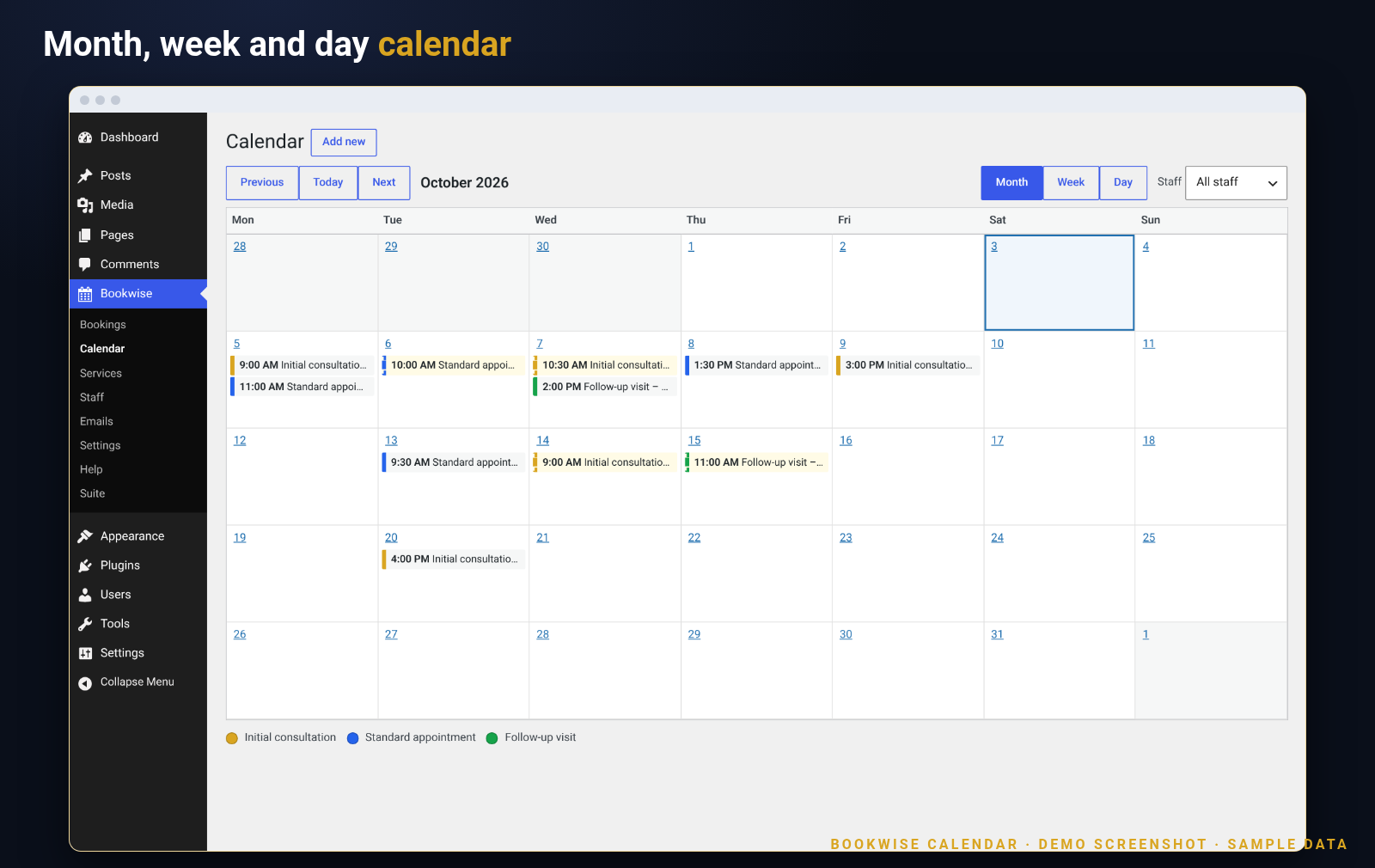
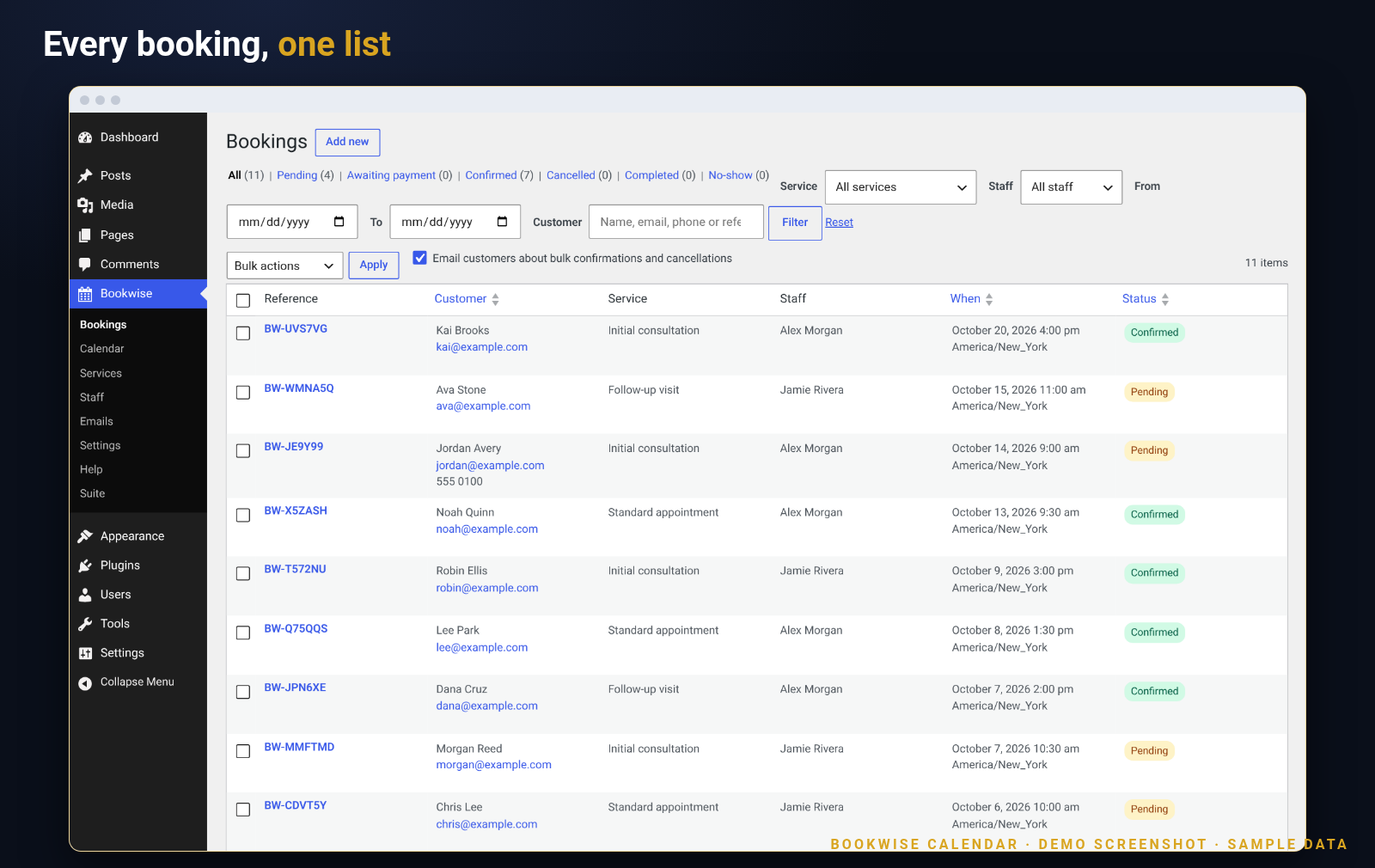
See every booking with status filters, search and bulk actions. Switch the admin calendar between month, week and day, filter by staff, and add or reschedule bookings yourself.
Automatic emails
Seven email types for customers and your team, with editable subject and message, merge tags, preview and test send. Confirmations can include a calendar (.ics) file.
Reminders
Send reminders before the appointment at the hours you choose, for example 24 and 1.
Customer cancel and reschedule
Every email links to a secure “Manage your booking” page. Set how many hours before the start customers can still cancel or reschedule, or switch it off.
Spam protection and privacy tools
Honeypot field, form time check, nonce and rate limits on the booking form. Booking data is covered by the WordPress personal data export and erase tools, and an optional consent checkbox is available.
Roles for your team
Adds “Bookwise Manager” (sees all bookings) and “Bookwise Staff” (sees only the bookings of the linked staff member) roles.
Shortcode and block
Place the form with the “Bookwise Booking Form” block or the [bookwise_booking] shortcode. Optionally lock it to one service or one person.
Make it yours
Choose the accent colour, set a location shown in emails and calendar files, add consent text with a link, and edit every email. Translation-ready.
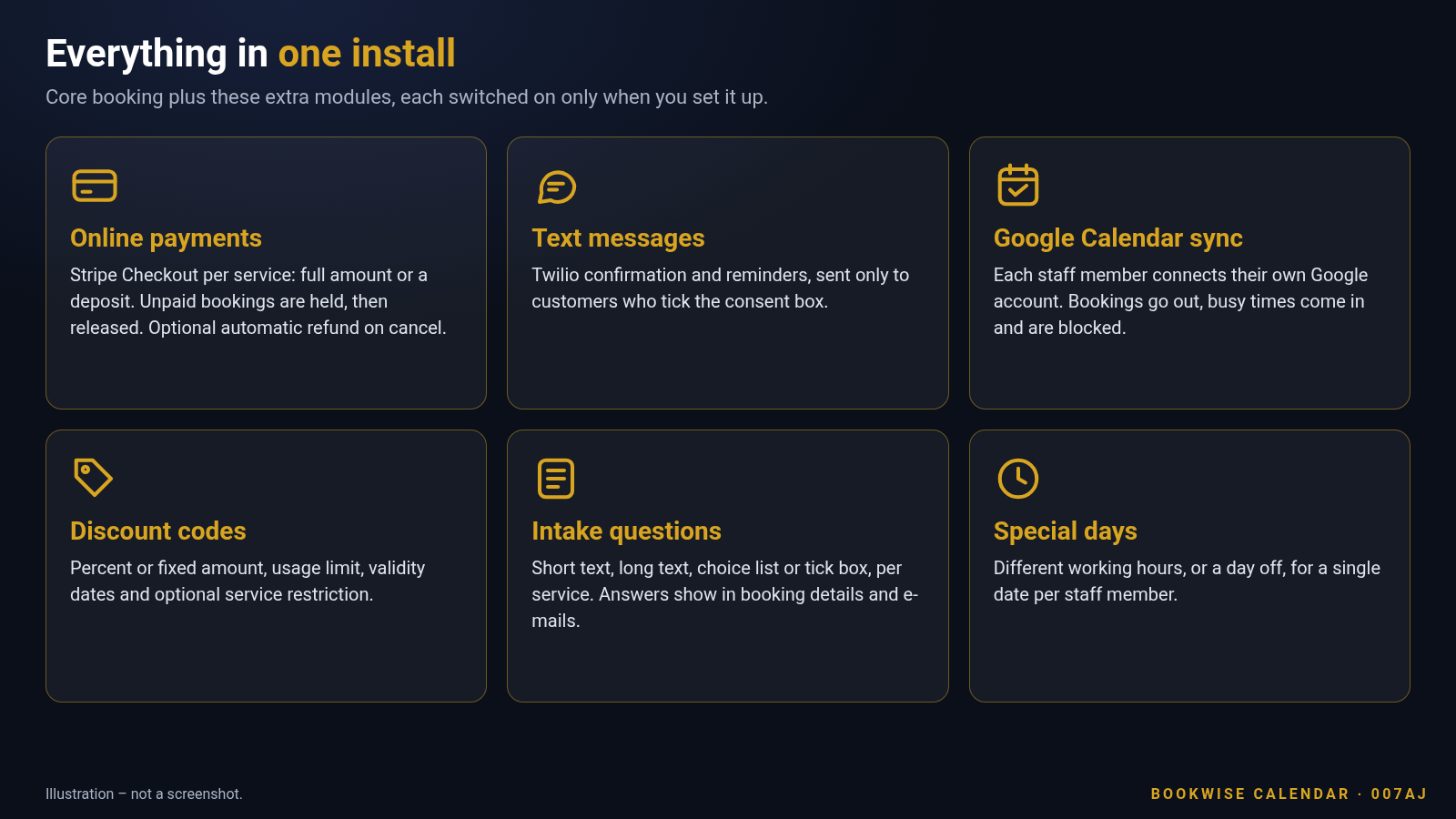
Plus the extra modules, included
Fully licensed version with the complete set. Each one stays off until you set it up.
Online payments with Stripe Checkout
Per service: no payment, full amount, or a deposit (fixed or percent). Customers pay on Stripe’s hosted page. Unpaid bookings hold the time slot for a period you choose, then release it. A verified webhook confirms payment, and you can refund, or refund automatically on cancel.
Text messages with Twilio
Confirmation and reminder texts (24 hours and 1 hour before by default), sent only to customers who tick the consent box. Phone numbers are normalised to international format.
Google Calendar sync
Pushes bookings to Google Calendar and imports Google busy times to block availability; changes made in Google are not synced back.
Discount codes
Percent or fixed amount, usage limit, valid-from and valid-until dates, optionally limited to chosen services. The form shows a discount code box once a code exists.
Custom intake questions
Add questions per service: short text, long text, choice list or tick box, required or optional. Answers appear in booking details and in the emails.
Special days
Set special working hours, or a day off, for a single date for any staff member, on top of the weekly hours and time off.
How it works
From install to first booking in four steps.
1
Add your services and people
Create each service with its duration and optional buffers, add staff, tick which services they offer and set their weekly hours.
2
Put the form on a page
Add the “Bookwise Booking Form” block, or paste [bookwise_booking]. A “Manage your booking” page for customers is created for you.
3
Customers book themselves
They choose a service and a person, pick a free time in their own time zone, and enter their details. Both sides get an email.
4
You stay in control
Confirm, reschedule, cancel or complete bookings from the list or the calendar. Reminders go out automatically.
Run it from your WordPress dashboard
A native-looking admin: bookings, calendar, services, staff, emails and settings under one “Bookwise” menu.
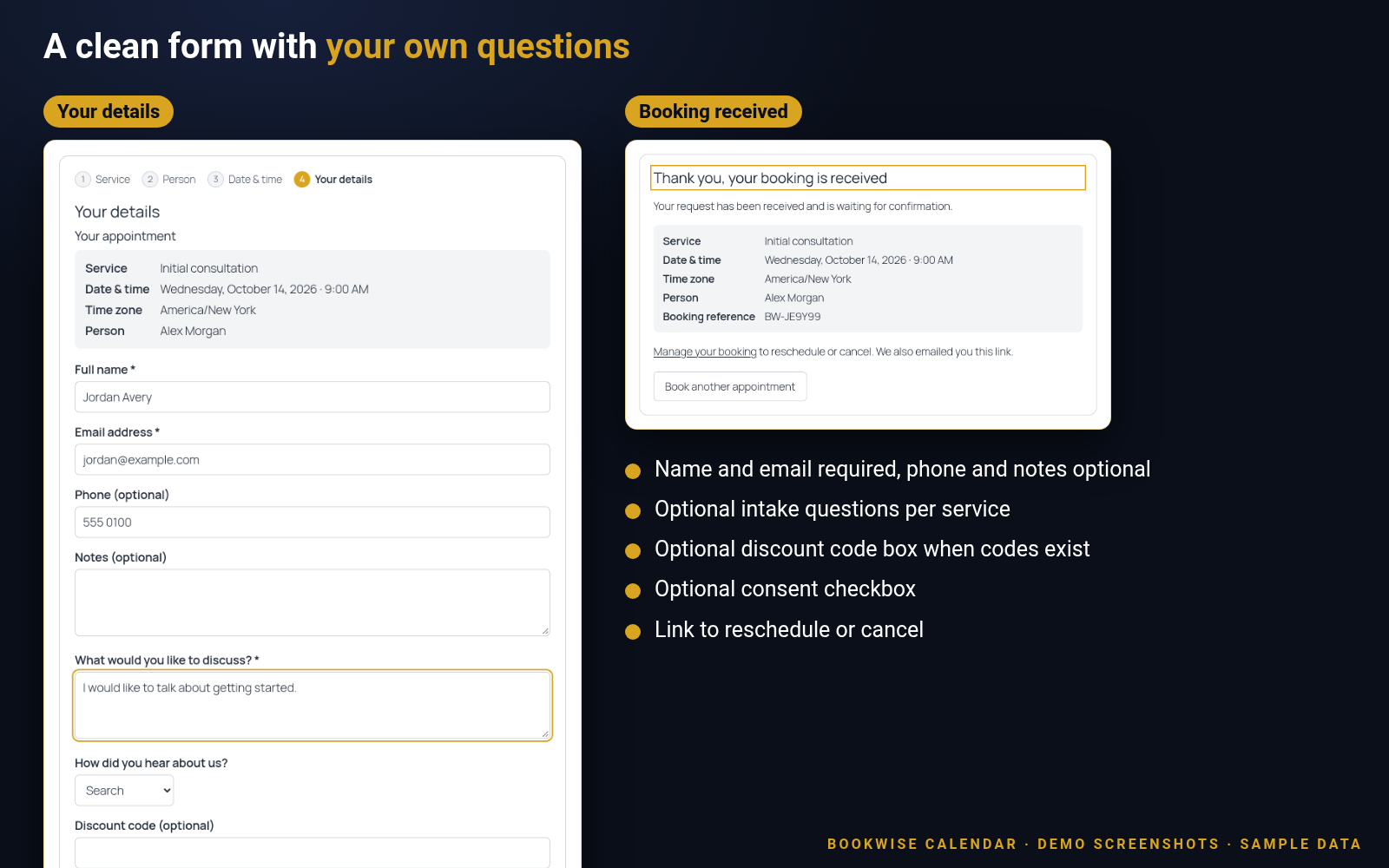
A clean form, with your own questions
Collect just what you need. Add questions per service, a discount code box and a consent checkbox.
Made for businesses that sell time
Services, people, durations and buffers fit all of these, and more.
Salons and barbersClinics and therapistsTutors and coachesConsultants and agenciesStudios and trainersRepair and service visitsAny business that sells time
Fully licensed version
Fully licensed version — use on your own sites. You get the complete edition, including all the extra modules listed above.
Requirements
- WordPress 6.3 or newer (tested up to 7.1)
- PHP 7.4 or newer
- A single-site WordPress install (multisite is not supported)
- Appears in your Plugins list as “Bookwise Appointments Suite”, with a “Bookwise” menu in the admin
- Stripe live payments need a site on HTTPS
- A Stripe, Twilio or Google Cloud account for the features that use them
- Cannot be active together with the free Bookwise Appointments plugin
Frequently asked questions
Is this the fully licensed version?
Yes. This listing is for the fully licensed version — use on your own sites.
Does it include payments, texts and Google Calendar?
Yes. This edition includes the extra modules: Stripe Checkout payments, Twilio text messages, Google Calendar sync, discount codes, custom intake questions and special days. You connect them with your own Stripe, Twilio and Google accounts.
Do I need a Stripe, Twilio or Google account?
Only for the matching feature: payments use your Stripe account, text messages use your Twilio account, and calendar sync uses your Google Cloud project. The booking form, staff, services, calendar and emails need none of them.
Are card details stored on my site?
No. Customers pay on a page hosted by Stripe, so card details never touch your site.
Can customers cancel or reschedule?
Yes, if you allow it. The email link opens a “Manage your booking” page where they can reschedule or cancel within the number of hours you set.
Can I take bookings for more than one person?
Yes. Add as many staff members as you need, each with their own services, weekly hours, days off and time zone. Visitors can pick a person or “any available person”.
Do text messages go to everyone?
No. A text is only sent to a customer who ticked the consent box on the booking form.
How are emails sent?
With the standard WordPress mail function (wp_mail), not through an outside service. For reliable delivery, use an SMTP plugin or your host’s mail setup, and a sender address on your own domain.
What licence do I get?
Each purchase is a fully licensed copy of the plugin, complete with all the extra modules, for use on your own sites.
Can I run it next to the free Bookwise Appointments plugin?
No. Use one or the other. Your services, staff and bookings are shared and kept if you switch.
Does it work on WordPress multisite?
It is built for single-site installs. WordPress multisite is not supported.
SPECIAL LIMITED-TIME PRICE
Start taking bookings with Bookwise Calendar
Give your customers a simple way to book, and give yourself fewer emails to answer. Fully licensed version — use on your own sites. Get it from this listing while the special limited-time price is available.
007AJ
Bookwise Calendar by 007AJ. Screenshots are from a demo install with sample data; the graphic labelled “Illustration” is not a screenshot. Stripe, Twilio and Google are trademarks of their respective owners; this plugin is not affiliated with them.
Only logged in customers who have purchased this product may leave a review.
Loading...
WPBay support
 Support by 007AJ.com
Support by 007AJ.com
007AJ.com supports this product through WPBay
Questions are handled in WPBay's private ticket system, keeping your purchase details and support conversation together.
Go to My Downloads
After purchase, open this item in My Downloads and choose Get Support.
What support includes
- Answers to product-related questions
- Help with reported bugs and issues
- Guidance for included third-party assets
What support does not include
- Customizations or new features
- Installation or setup services
Plugin
Maintenance snapshot
See recent updates, compatibility, support, and developer activity.
- Updated today
- Developer active recently
- WPBay support available
- WordPress 7.0 tested
Snapshot updated 5 minutes ago
View details Hide details
Maintenance details
This is maintenance data. It does not measure product quality or sales.
- Last update Updated today
- Compatibility WordPress 7.0 tested, one version behind · PHP 8.5 not marked as tested
- Releases 3 releases in the 2 days since listing
- Developer activity Developer active recently
- Support No recent support tickets to measure
- Docs and demo Documentation available · Changelog missing · Demo available
How this snapshot works
Plugin Health
The score is out of 100 and uses data WPBay can check. Ratings, popularity, and sales are not used.
- Last update 30 points
-
Plugins receive full recency points under 30 days, then step down at 90, 180, 365, and 545 days.
- Compatibility 20 points
-
WordPress, PHP, and WooCommerce (when relevant) are scored separately. The latest two PHP lines count as current. Nearby previous versions keep most of the points.
- Current version 100%
- One version behind 75%
- Two versions behind 50%
- Three versions behind 25%
- Older or not listed 0%
- Releases 15 points
-
One release earns 10, two or three earn 13, and four or more earn 15. Each accepted product ZIP counts once; reprocessing the same upload and listing-only edits do not count.
- Developer activity 15 points
-
Based on WPBay login and dashboard activity. Exact last-login dates are never shown.
- Support 15 points
-
There are no recent WPBay tickets to measure.
- Docs and demo 5 points
-
Documentation: 2. Changelog: 1. Working demo or preview: 2.
Score ranges
- 90–100 Excellent
- 75–89 Healthy
- 60–74 Fair
- 40–59 Needs attention
- 0–39 Limited
Long gaps
WPBay also checks for long gaps between updates, developer activity, support replies, and releases. Buyers do not see this score.
- Time since update 35 points
- Last developer activity 25 points
- WordPress compatibility 15 points
- Support replies 15 points
- Fewer releases 10 points
-
Quality verified by WPBay
WPBay review- Reviewed version
- 1.0.2
- Review completed
- Reviewer
- CodeRevolution
- Review type
- Initial
No unresolved approval blocker was identified during WPBay’s proportionate review of this release. This is not a security certification or a guarantee that the product contains no defects.
-
 Future updates
-
WPBay support from 007AJ.com
-
GPL code, proprietary assets
-
Covered by the WPBay refund policy
-
Plugin maintenance snapshot
Relevant picks
You may also like
Similar products selected by category, features, popularity and freshness.




Reviews
There are no reviews yet.