


DraftSync – Self-Hosted Collaborative Writing & Editorial Workflow for WordPress

 Recently Updated
Well Documented
Recently Updated
Well Documented
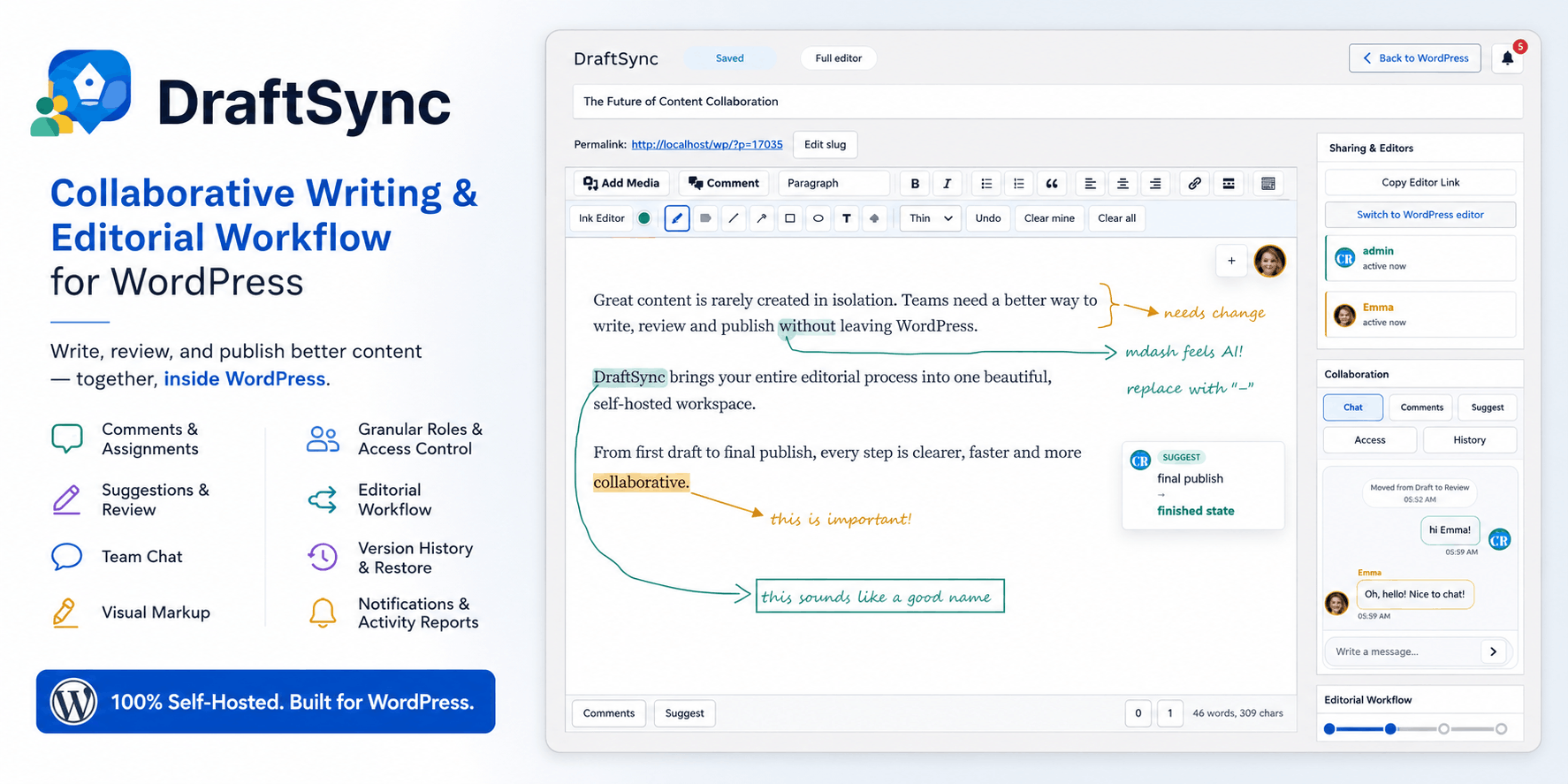
Collaborative Writing, Review, And Publishing – Inside WordPress
DraftSync is a self-hosted collaborative writing plugin for WordPress. It gives your team a dedicated editorial workspace where writers, editors, reviewers, clients, and publishers can work together before content goes live.
Instead of writing in Google Docs, collecting feedback in email, discussing edits in chat, pasting the final version into WordPress, then hoping nothing was missed, DraftSync keeps the whole editorial process connected to the WordPress post itself.
Writers can draft the article. Reviewers can comment. Editors can suggest changes. Managers can assign collaborators. Teams can discuss the draft in chat. Approvers can move the article through workflow stages. Publishers can sync or publish when the content is ready.
DraftSync is built for one simple purpose: make WordPress useful before publication, not only after the article is already finished.
Why DraftSync Exists
Most WordPress publishing teams still work in a broken loop.
The article is drafted somewhere else. Feedback is sent somewhere else. Screenshots are shared somewhere else. Final text is copied back into WordPress manually. Then someone has to check if the title, slug, categories, excerpt, featured image, comments, visibility, schedule, and publish status are still correct.
That process wastes time and creates confusion.
DraftSync gives your team a WordPress-native collaboration layer, with the tools an actual editorial workflow needs:
- Local collaborative drafts inside WordPress
- A focused writing editor with WordPress publishing controls
- Comments, replies, assignments, mentions, and reactions
- Suggested edits with accept and reject review
- Per-draft team chat
- Visual markup for layout and screenshot-style feedback
- Active collaborator presence
- Autosave and revision conflict detection
- Version history with restore
- Granular roles and capabilities
- Per-draft access lists
- Optional editorial workflow stages
- In-app, email, and optional Slack notifications
- Activity reports for editors and managers
- Controlled sync or publish back to WordPress
DraftSync is for teams that want stronger collaboration without moving their editorial process into an outside writing platform.
Self-Hosted By Design
DraftSync runs inside your WordPress installation.
Your drafts, comments, suggestions, chat messages, version history, workflow state, notifications, access rules, and collaborator data are handled locally by your WordPress site. Your team logs in with regular WordPress user accounts, and DraftSync uses WordPress permissions, post access rules, nonces, and per-draft collaborator lists to decide who can view, edit, review, manage, or publish.
No external DraftSync service account is required. No remote editor account is required. No separate collaboration SaaS is needed for the core system.
Optional Slack notifications can be enabled with a Slack Incoming Webhook URL, but the main DraftSync collaboration system is local to your site.
A Serious Writing Workspace For WordPress Teams
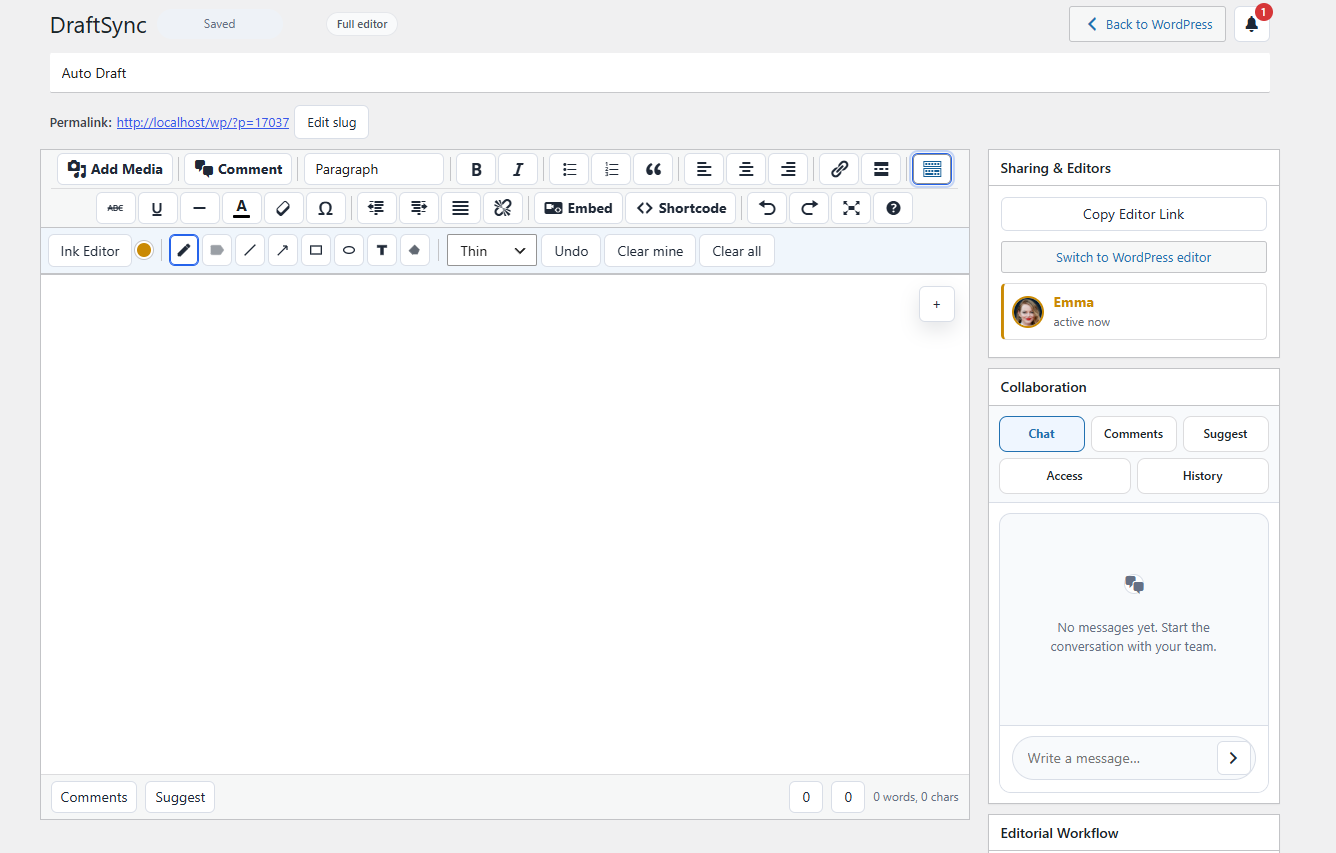
DraftSync gives authors a familiar writing environment while adding the collaboration tools missing from the normal WordPress editor.
Writers can work with a title field, content editor, formatting toolbar, links, lists, blockquotes, alignment, horizontal rules, read more tags, embeds, shortcodes, special characters, undo and redo, Add Media support, and distraction-free writing mode.
It also includes the publishing controls your team expects from WordPress:
- Preview
- Save draft
- Update
- Publish
- Move to trash
- Edit post status
- Edit visibility
- Password-protected posts
- Scheduling
- Sticky post support where available
- Slug and permalink editing
- Featured image
- Categories, including search and create-new-category support
- Tags
- Excerpt
- Discussion settings
- Post format support
- Page attributes where supported
That means your team can move from first draft to final review without constantly jumping between multiple tools.
Comments That Stay Connected To The Draft
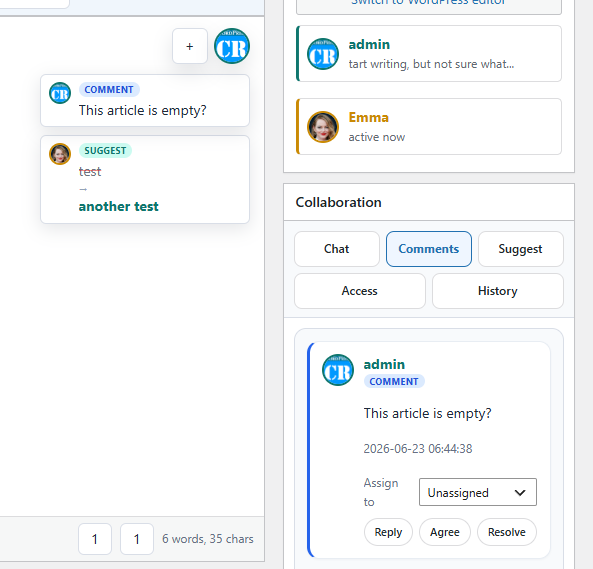
DraftSync keeps editorial feedback attached to the content.
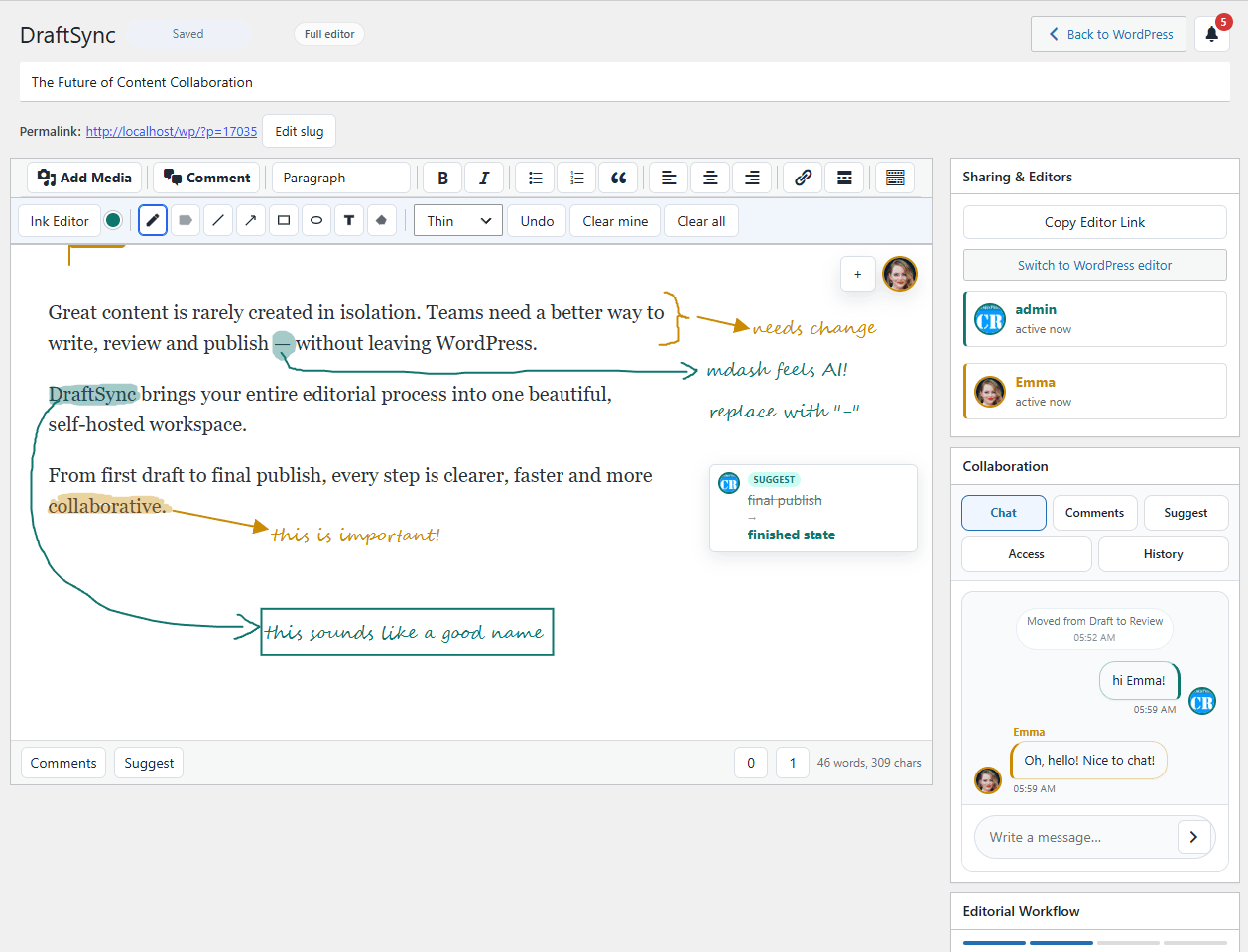
Collaborators can select text and add comments, reply to existing threads, assign feedback to another user, mention teammates with @mentions, upload attachments, resolve threads, and react to comments.
This makes the review process cleaner than email feedback, more structured than generic chat, and easier to follow than scattered notes in multiple tools.
For agencies, this is especially useful when clients need to review article drafts without receiving full editing power.
Suggested Edits With Accept And Reject Review
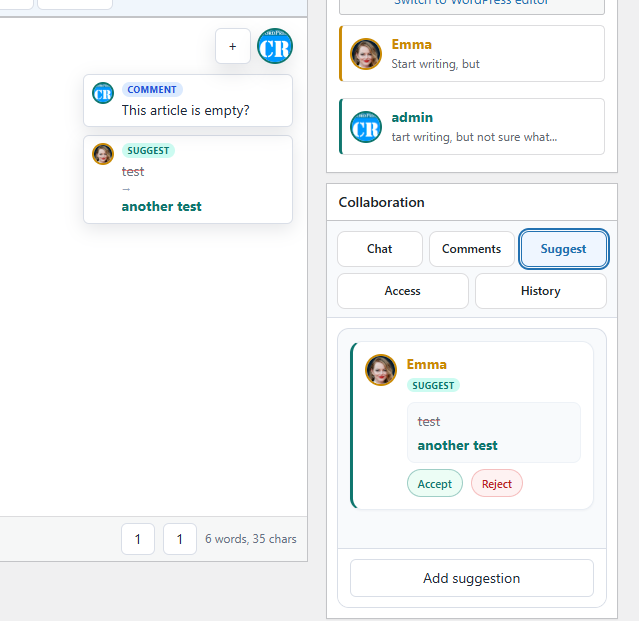
Not every reviewer should be able to directly rewrite the article.
DraftSync supports suggested edits, so collaborators can propose changes without immediately changing the main content. A reviewer can highlight text, suggest a replacement, and leave the final decision to an editor with the right permission.
Editors can accept or reject suggestions one by one, keeping the review process controlled and transparent.
This is useful for:
- Client review
- Guest author review
- Editorial approval
- Legal or compliance checks
- Documentation edits
- Multi-author websites
- Content teams where not every user should have full edit access
Built-In Draft Chat
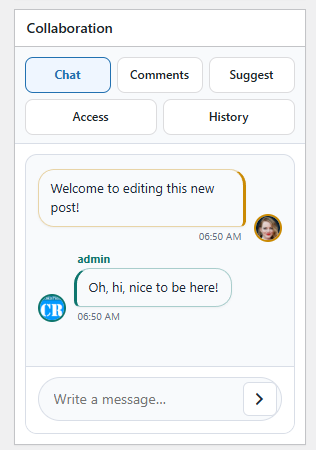
Each DraftSync draft includes a local chat thread.
Writers, editors, and reviewers can discuss the article without leaving the editor. System messages can also record important collaboration events, such as invites, workflow changes, access updates, and review activity.
The chat stays connected to the draft, so the conversation is still available when the team returns to the article later.
Visual Markup For Feedback That Is Easier To Draw
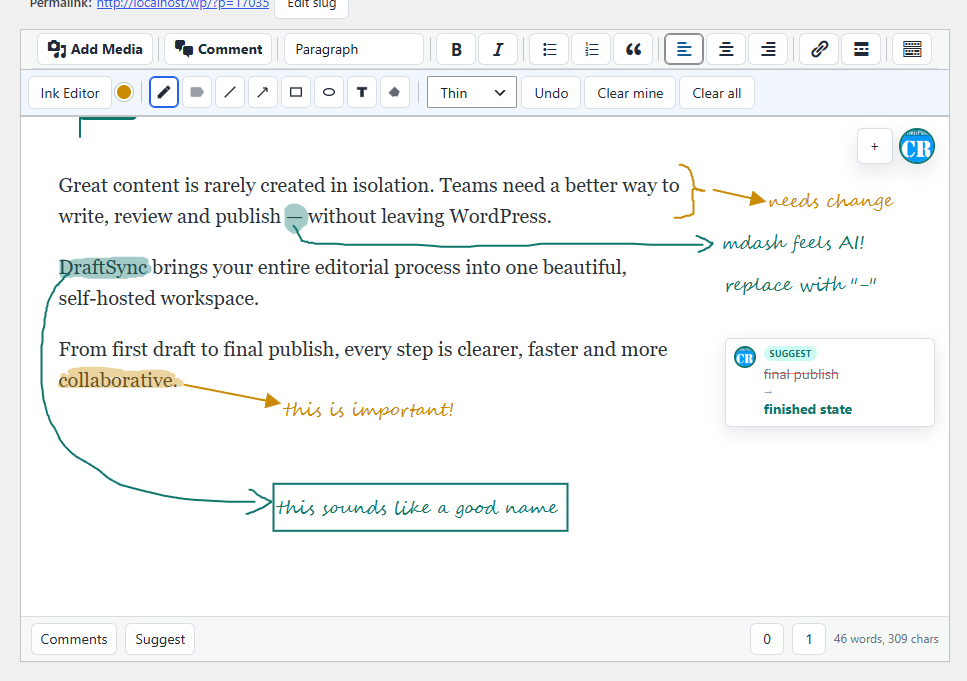
Some feedback is hard to explain in a comment.
DraftSync includes a visual markup overlay for drawing feedback directly over the draft surface. Collaborators can use tools such as pen, highlighter, line, arrow, rectangle, ellipse, text, and eraser to mark areas that need attention.
Each user can have a markup color, and permissions control who can add markup or clear existing markup.
This is useful for layout feedback, image placement notes, screenshot-style review, client comments, and design-related content discussions.
Version History And Restore
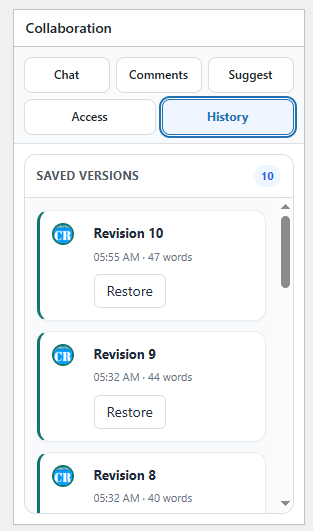
DraftSync stores local draft revisions, so your team can return to earlier saved versions when needed.
Version history makes collaboration safer. If the draft changes direction, if someone removes a section by mistake, or if an older version was better, editors can review previous versions and restore one.
Autosave also includes revision conflict detection, helping prevent one collaborator from accidentally overwriting a newer draft saved by another user.
Granular Roles And Per-Draft Access
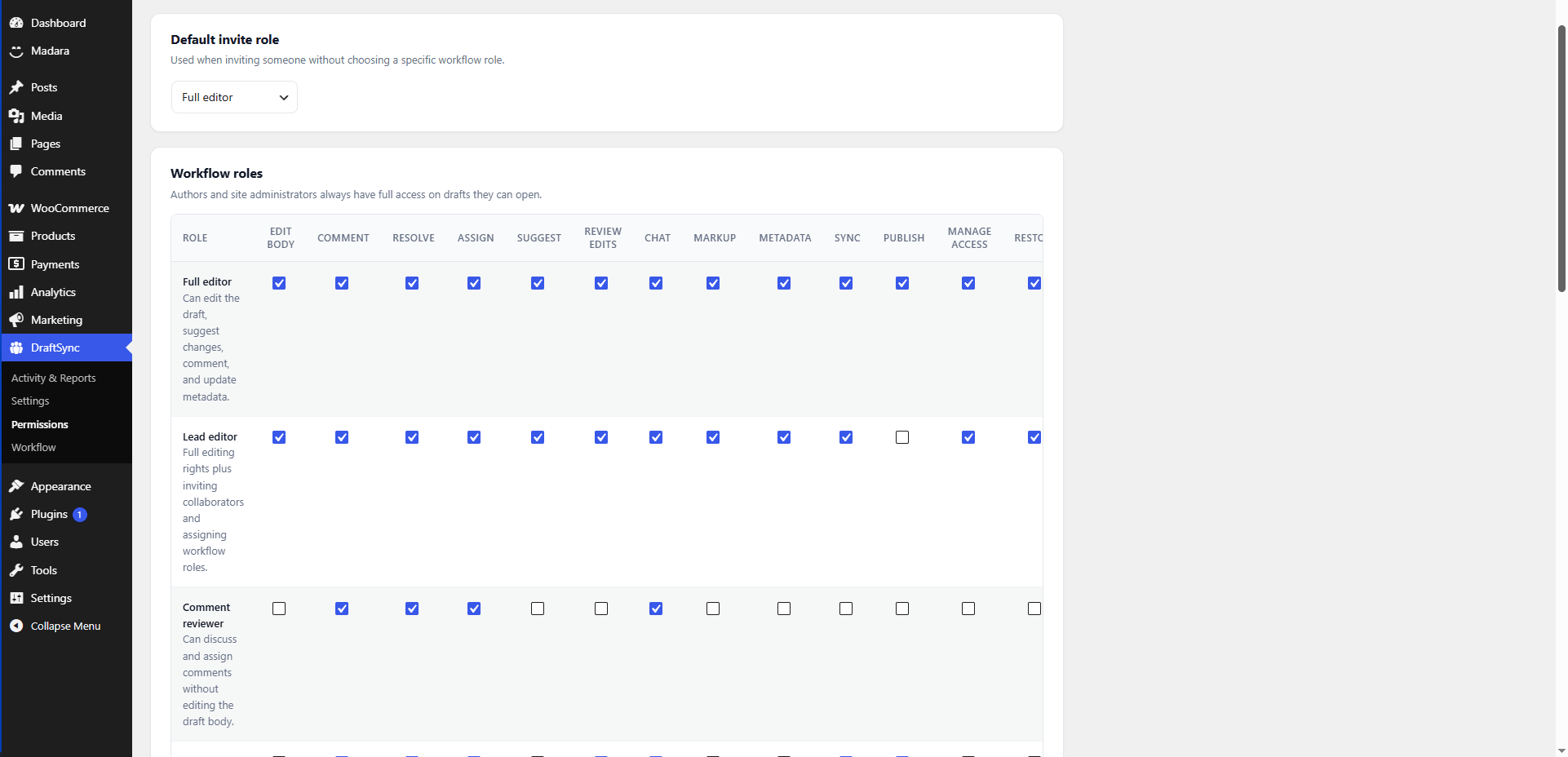
DraftSync includes a permission system made for editorial teams.
You can control who can edit, comment, suggest, review suggestions, chat, add markup, update metadata, sync, publish, manage access, restore versions, and attach files.
Built-in role types include:
- Full Editor – can edit the draft body, comment, suggest, update metadata, sync, restore, and attach files
- Lead Editor – full editing rights plus access management and workflow role assignment
- Comment Reviewer – can discuss, reply, assign, and resolve comments without editing the body text
- Approver – can review suggestions and publish without directly editing the article body
- Viewer – read-only access to the draft and collaboration activity
Access is managed per draft. That means one post can be shared with a client, while another stays available only to your internal editorial team.
DraftSync can also map WordPress roles to DraftSync workflow roles, helping site owners keep permissions organized as the team grows.
Optional Editorial Workflow Stages
For teams that need a formal approval process, DraftSync includes optional workflow stages.
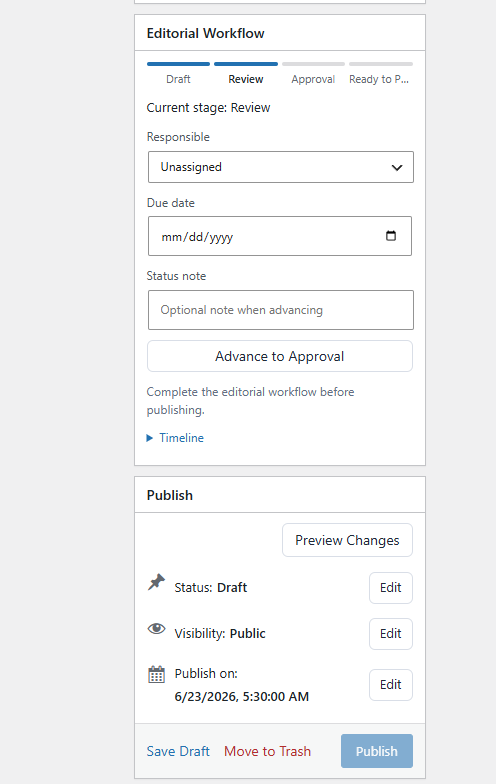
You can enable workflow globally, choose active stages, rename stage labels, decide which roles can advance each stage, assign responsible collaborators, set due dates, add workflow notes, and show the workflow timeline inside the editor.
A typical workflow can look like this:
- Draft
- Review
- Approval
- Ready to Publish
DraftSync can also block publishing until the draft reaches the final ready stage.
If your team does not need formal workflow, you can keep DraftSync simple and use it as a collaborative writing, review, and publishing workspace.
Notifications That Keep Reviews Moving
DraftSync helps collaborators know when their attention is needed.
It includes in-app notifications inside the editor, plus user-level email notification preferences. Users can be notified about draft invitations, comments, mentions, assignments, replies, workflow updates, removed posts, and revoked access.
Administrators can also enable optional Slack notifications through an Incoming Webhook URL. DraftSync can send collaboration alerts to Slack for invites, comments, mentions, assignments, replies, and workflow events.
Activity Reports For Editors And Managers
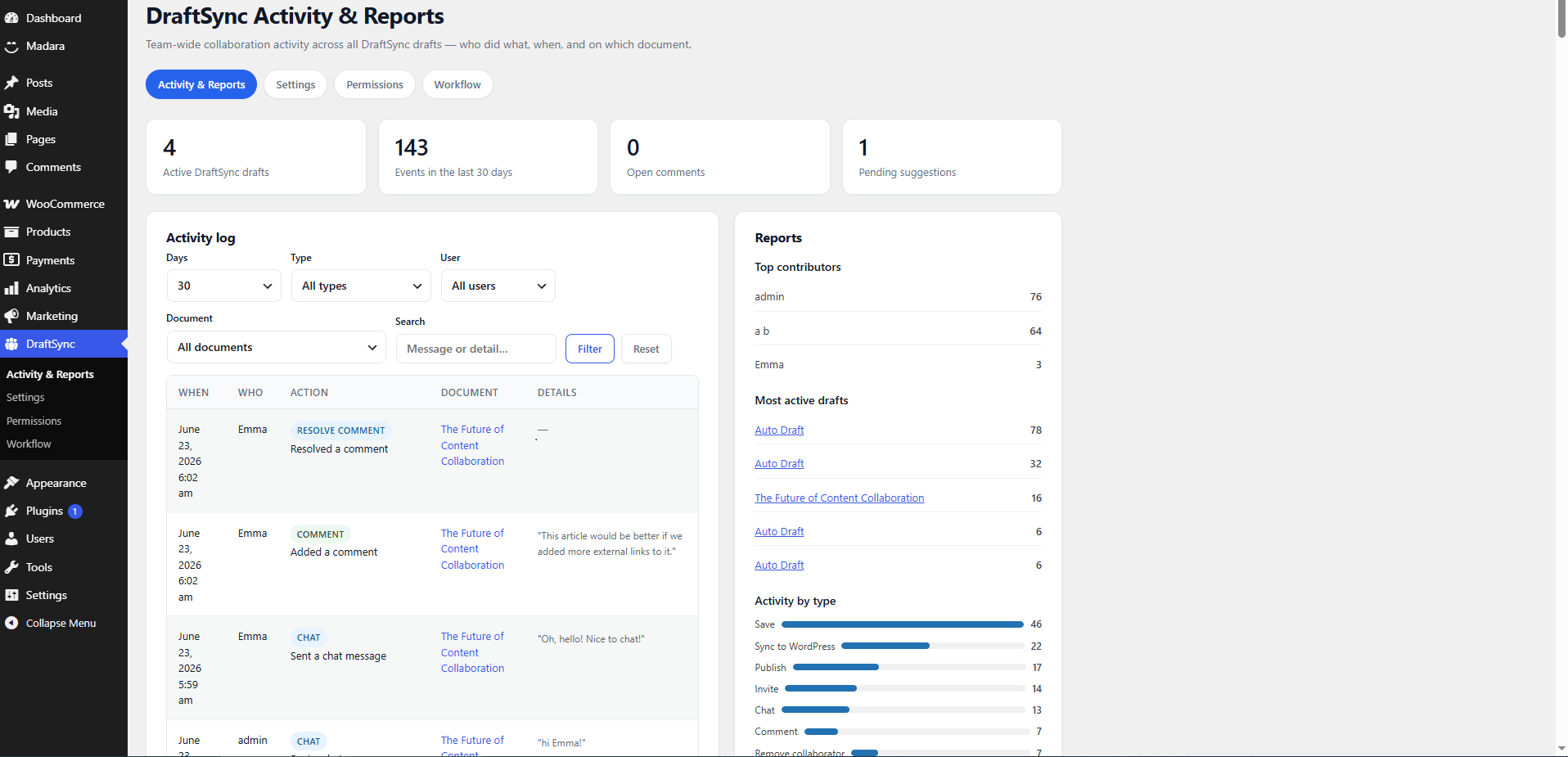
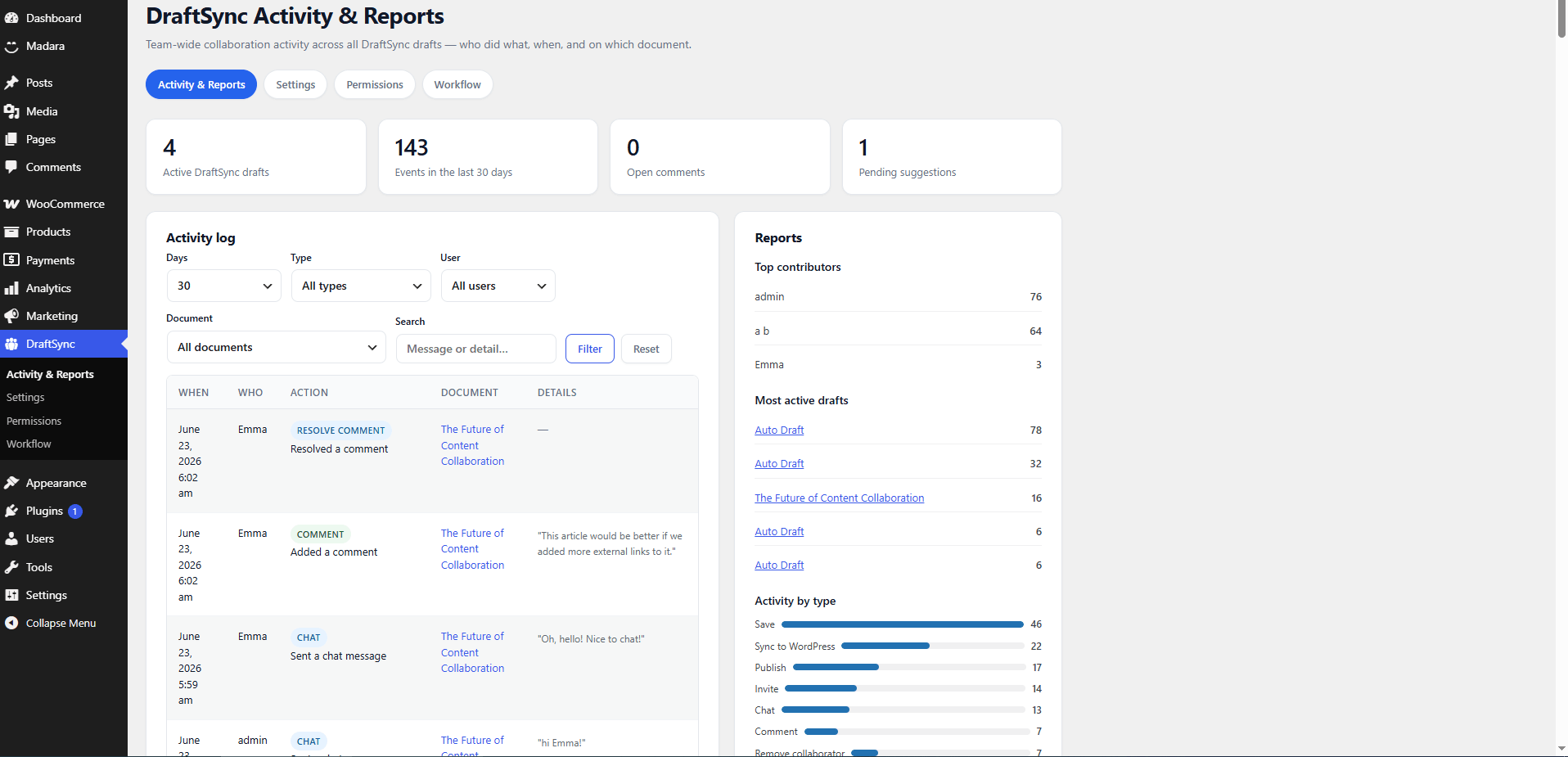
DraftSync includes an Activity & Reports dashboard for teams managing multiple drafts and contributors.
Editors and site managers can see what happened, who did it, when it happened, and which draft was affected.
The dashboard includes:
- Active DraftSync draft count
- Recent event count
- Open comment count
- Pending suggestion count
- Filterable activity log
- Filters by date range, activity type, user, document, and search text
- Top contributors
- Most active drafts
- Activity by type
This gives content managers a clearer view of where editorial work is moving and where review is still stuck.
Gutenberg And Classic Editor Friendly
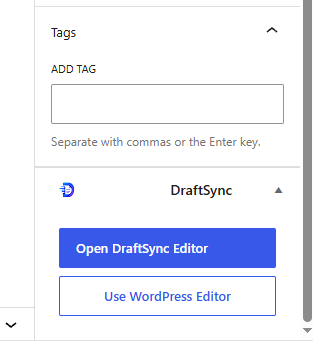
DraftSync integrates with WordPress instead of forcing every post into a new system.
In Gutenberg, DraftSync adds a document panel where authors can create a local collaborative draft, open the DraftSync editor, or return to the normal WordPress editor.
In Classic Editor, DraftSync adds a sidebar metabox and launch panel for connected posts.
Automatic DraftSync draft creation is off by default. You can keep the normal WordPress editor as your default writing experience and use DraftSync only when a post needs collaboration, review, approval, or client feedback.
Sync And Publish With Confidence
DraftSync separates local collaboration from the live WordPress post.
Your team can work on a local DraftSync version while the public post remains unchanged. When the draft is ready, users with the correct permissions can sync, update, or publish the final content back to WordPress.
DraftSync can show whether the live post is in sync or whether there are unpublished DraftSync changes, so editors know what is currently visible on the public site.
Before allowing sync, update, publish, or trash actions, DraftSync checks WordPress capabilities, post permissions, DraftSync role permissions, workflow restrictions, and per-draft access rules.
Built On WordPress Security
DraftSync uses the WordPress security model your site already depends on.
Editor access requires WordPress login. Draft routes check user access. Per-draft allowed user lists control who can collaborate. Revoked users are blocked from removed drafts. AJAX editor actions use per-post nonces. Actions are checked against WordPress capabilities and DraftSync role capabilities. Draft content is sanitized with WordPress post HTML rules before storage. JSON request body size is bounded. Deleted or trashed draft states lock the editor to prevent further writing.
For agencies, publishers, internal teams, and client review workflows, this keeps collaboration aligned with WordPress instead of creating a separate permission system outside your site.
Developer Friendly
DraftSync is built as a WordPress-native plugin and includes filters for developers who want to customize behavior.
Available filters include:
draftsync_editor_configdraftsync_editor_payloaddraftsync_permission_rolesdraftsync_workflow_configdraftsync_user_permission_mapdraftsync_allowed_post_statusesdraftsync_presence_timeoutdraftsync_special_characters
Developers can customize editor configuration, payload data, permission roles, workflow behavior, user permission mapping, allowed statuses, presence timing, and special character options using familiar WordPress hooks.
Who DraftSync Is For
DraftSync is ideal for:
- Editorial teams publishing inside WordPress
- Agencies reviewing posts with clients
- Multi-author blogs
- Online magazines
- Documentation teams
- Internal knowledge base teams
- Newsroom-style publishing workflows
- Content managers who need review and approval before publish
- Teams that want collaboration without relying on an external writing platform
- WordPress site owners who want a controlled editorial workflow inside their own admin area
What You Get
DraftSync includes:
- Self-hosted collaborative writing for WordPress
- Local DraftSync editor hosted from WordPress admin
- Gutenberg panel integration
- Classic Editor metabox integration
- Per-post switch between WordPress and DraftSync editors
- Autosave
- Revision conflict detection
- Local version history and restore
- Active collaborator presence
- Approximate live cursor context
- Selected-text comments
- Comment replies
- Comment assignments
- @mentions
- Comment reactions
- File attachments for comments and replies
- Suggested edits
- Accept and reject suggestion workflow
- Team chat per draft
- Visual ink markup overlay
- Add Media integration
- Featured image management
- Categories with create-new-category support
- Tags
- Excerpt
- Discussion settings
- Slug editing
- Publish status, visibility, password, sticky, and schedule controls
- Post format support
- Page attributes support
- Preview, save, update, publish, sync, and trash actions
- Optional workflow stages
- Workflow assignee, due date, notes, and timeline
- Granular DraftSync roles and capabilities
- WordPress role default mapping
- Per-draft user whitelisting
- Invite, remove, and re-invite collaborators
- In-app notifications
- User email notification preferences
- Optional Slack Incoming Webhook notifications
- Activity & Reports dashboard
- Top contributors and most active draft reports
- Developer filters for customization
Why Buy DraftSync
Buy DraftSync if your WordPress content process is bigger than one person writing and clicking Publish.
If you work with writers, editors, clients, reviewers, approvers, or managers, DraftSync gives your team one place to draft, discuss, review, approve, and publish.
It reduces scattered feedback, avoids manual copy-paste workflows, keeps review history close to the article, and gives your team better control before content goes live.
DraftSync does not try to replace WordPress. It gives WordPress the editorial collaboration layer it should have had already.
Installation
- Upload the DraftSync plugin folder to
/wp-content/plugins/. - Activate DraftSync from the WordPress Plugins screen.
- Go to DraftSync > Settings and confirm that local collaboration is active.
- Open a post in Gutenberg or the Classic Editor.
- Use the DraftSync panel or sidebar box to create or open a collaborative draft.
- Invite collaborators, write, review, suggest, comment, and publish when ready.
Does DraftSync require an external collaboration service?
No. DraftSync runs inside your WordPress installation. The core editor, local drafts, comments, suggestions, chat, workflow data, history, access lists, notifications, and presence data are handled by WordPress.
Does DraftSync work with Gutenberg?
Yes. DraftSync adds a Gutenberg document panel where authors can create a DraftSync draft, open the DraftSync editor, or switch back to the WordPress editor.
Does DraftSync work with the Classic Editor?
Yes. DraftSync also adds Classic Editor entry points through a sidebar metabox and launch panel.
Can I keep the normal WordPress editor as the default?
Yes. Automatic DraftSync draft creation is off by default. You can choose DraftSync only for posts that need collaboration, review, or approval.
Can I switch a DraftSync post back to WordPress?
Yes. DraftSync includes actions to sync the latest local DraftSync content back into the WordPress post and disconnect the post from DraftSync collaboration.
Can reviewers comment without editing the article?
Yes. DraftSync includes role-based permissions. You can give reviewers comment, reply, assignment, and resolve permissions without allowing them to edit the article body.
Can collaborators suggest edits instead of changing the content directly?
Yes. Collaborators with suggestion permission can highlight text and propose replacement text. Editors with review permission can accept or reject suggestions.
Can DraftSync handle an approval workflow?
Yes. DraftSync includes optional editorial workflow stages. A draft can move through stages such as Draft, Review, Approval, and Ready to Publish. Publishing can also be blocked until the final workflow stage is reached.
Does DraftSync support notifications?
Yes. DraftSync includes in-app notifications, user email notification preferences, and optional Slack notifications through an Incoming Webhook URL.
Can I invite only specific users to a draft?
Yes. DraftSync uses per-draft allowed user lists. Collaborators can be invited, assigned a DraftSync role, removed, and re-invited.
Where are drafts stored?
DraftSync stores local collaborative draft data inside WordPress, using post metadata and user metadata for draft content, history, comments, suggestions, chat, workflow state, notifications, and access data.
Is DraftSync real-time like Google Docs?
DraftSync is built for WordPress-hosted collaboration, presence, autosave, comments, suggestions, chat, workflow, and controlled publishing. It supports active collaborator presence, approximate cursor context, autosave, polling, and revision conflict detection. It should not be described as true live multi-cursor editing.
Does Slack integration require anything extra?
Yes. Optional Slack notifications require a Slack Incoming Webhook URL. The core DraftSync collaboration system does not require Slack.
Changelog:
Version 1.0.0
Initial release.
DraftSync introduces a self-hosted collaborative writing and editorial workflow system for WordPress, including a local DraftSync editor, Gutenberg and Classic Editor entry points, comments, suggestions, chat, visual markup, version history, workflow stages, granular roles, notifications, activity reports, and controlled sync or publish actions.
Only logged in customers who have purchased this product may leave a review.
Loading...
WPBay support
 Support by CodeRevolution
Support by CodeRevolution
CodeRevolution supports this product through WPBay
Questions are handled in WPBay's private ticket system, keeping your purchase details and support conversation together.
Go to My Downloads
After purchase, open this item in My Downloads and choose Get Support.
What support includes
- Answers to product-related questions
- Help with reported bugs and issues
- Guidance for included third-party assets
What support does not include
- Customizations or new features
- Installation or setup services
Plugin
Maintenance snapshot
See recent updates, compatibility, support, and developer activity.
- Updated 34 days ago
- Developer active recently
- WPBay support available
- WordPress 7.1 tested
Snapshot updated 17 hours ago
View details Hide details
Maintenance details
This is maintenance data. It does not measure product quality or sales.
- Last update Updated 34 days ago
- Compatibility WordPress 7.1 tested · PHP 8.5 tested
- Releases 1 release in the 90 days since listing
- Developer activity Developer active recently
- Support No recent support tickets to measure
- Docs and demo Documentation available · Changelog available · Demo available
Health reflects increased activity during the last 90 days.
How this snapshot works
Plugin Health
The score is out of 100 and uses data WPBay can check. Ratings, popularity, and sales are not used.
- Last update 30 points
-
Plugins receive full recency points under 30 days, then step down at 90, 180, 365, and 545 days.
- Compatibility 20 points
-
WordPress, PHP, and WooCommerce (when relevant) are scored separately. The latest two PHP lines count as current. Nearby previous versions keep most of the points.
- Current version 100%
- One version behind 75%
- Two versions behind 50%
- Three versions behind 25%
- Older or not listed 0%
- Releases 15 points
-
One release earns 10, two or three earn 13, and four or more earn 15. Each accepted product ZIP counts once; reprocessing the same upload and listing-only edits do not count.
- Developer activity 15 points
-
Based on WPBay login and dashboard activity. Exact last-login dates are never shown.
- Support 15 points
-
There are no recent WPBay tickets to measure.
- Docs and demo 5 points
-
Documentation: 2. Changelog: 1. Working demo or preview: 2.
Score ranges
- 90–100 Excellent
- 75–89 Healthy
- 60–74 Fair
- 40–59 Needs attention
- 0–39 Limited
Long gaps
WPBay also checks for long gaps between updates, developer activity, support replies, and releases. Buyers do not see this score.
- Time since update 35 points
- Last developer activity 25 points
- WordPress compatibility 15 points
- Support replies 15 points
- Fewer releases 10 points
-
Quality verified by WPBay
WPBay review- Reviewed version
- 1.0.0
- Review completed
- Reviewer
- CodeRevolution
- Review type
- Initial
No unresolved approval blocker was identified during WPBay’s proportionate review of this release. This is not a security certification or a guarantee that the product contains no defects.
-
 Future updates
-
WPBay support from CodeRevolution
-
GPL code, proprietary assets
-
Covered by the WPBay refund policy
-
Plugin maintenance snapshot
Relevant picks
You may also like
Similar products selected by category, features, popularity and freshness.



From this seller
View seller store
More by CodeRevolution
Explore more bestselling products from this creator.

Reviews
There are no reviews yet.