


YOP-Lexicon – Advanced Glossary & Lexicon Manager for WordPress

 Recently Updated
Well Documented
YOP-Lexicon – Advanced Glossary & Lexicon Manager for WordPress
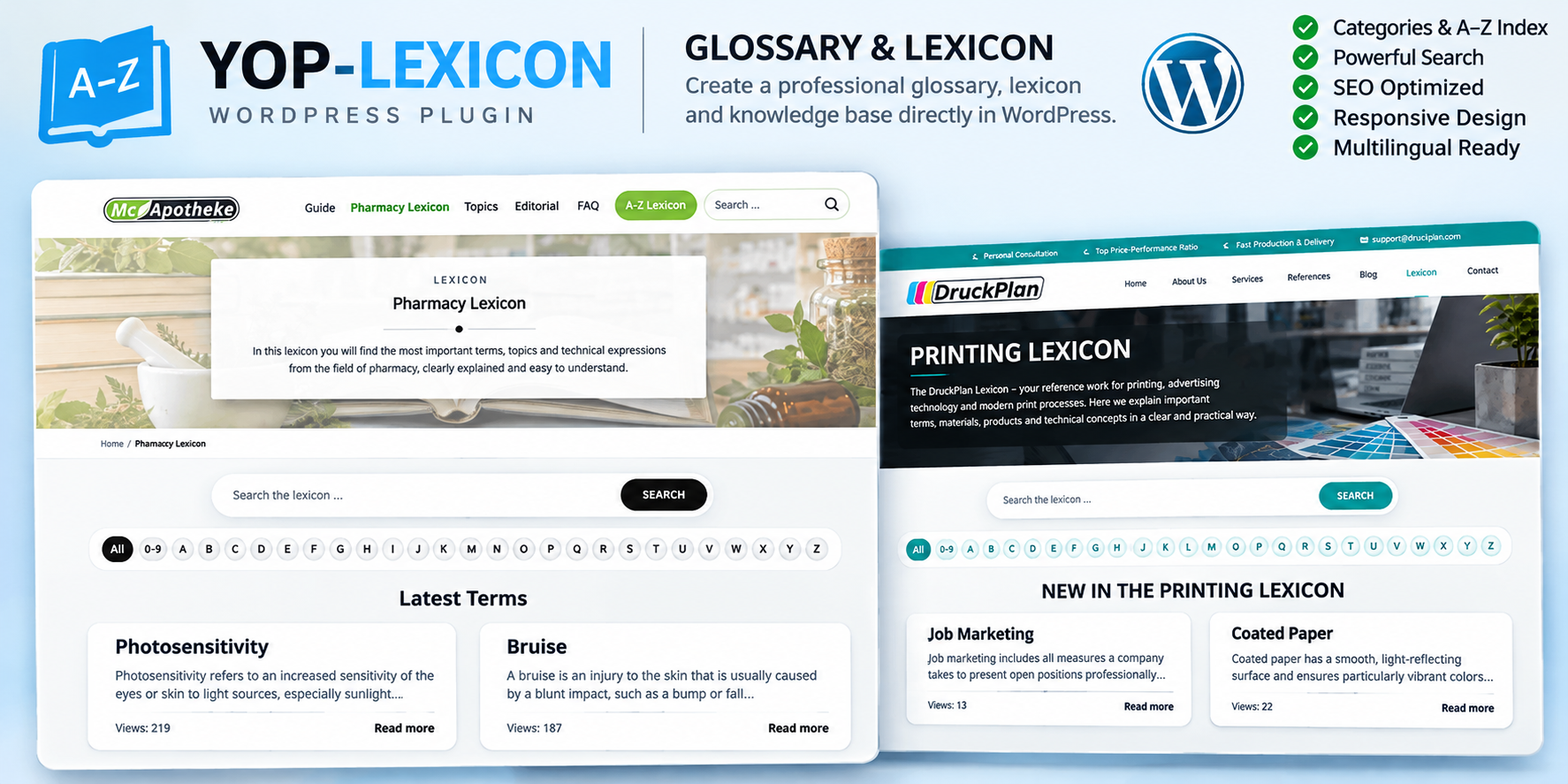
Create professional multilingual glossaries, terminology directories and knowledge bases directly in WordPress.
YOP-Lexicon is a powerful and flexible WordPress plugin designed to help businesses, agencies, educational institutions and website owners organize and present terminology in a structured, searchable and user-friendly format.
Whether you want to create a medical lexicon, technical dictionary, business glossary, product terminology database or educational knowledge base, YOP-Lexicon provides a professional solution that integrates into your existing WordPress website.
The WordPress administration interface and the public glossary pages follow the configured WordPress language. German installations display German, and English installations display English.
Current version: see changelog.
Minimum Requirements
WordPress: 6.5 or newer, tested up to 6.8
PHP: 8.1 or newer
Languages: German and English
The plugin does not require Gutenberg blocks, WP-CLI commands, Typesense or Algolia. These integrations are not included.
Included Files and Installation
The WPBay purchase includes the YOP-Lexicon WordPress plugin and the buyer guide in German and English. Current version: see changelog. The buyer guide explains installation, configuration, import, export and PRO release.
Installation Steps:
- Download the plugin installation package from your WPBay account.
- Open your WordPress administration dashboard.
- Navigate to Plugins → Add New → Upload Plugin.
- Select the installation ZIP file and click Install Now.
- Activate YOP-Lexicon.
- Open Settings → Permalinks and save the permalink configuration once.
- Navigate to YOP Lexicon Glossary → Settings and configure the public glossary path.
- The default glossary path is
lexikon. - Create your first glossary entries and categories.
- Configure your preferred design and display settings.
Purchase and PRO Release
The WPBay purchase includes this plugin. The plugin charges no extra fee.
PRO stays locked until you enter the WPBay product key and YOptimize has checked that key.
Release steps on a fresh installation:
- Open YOP Lexicon Glossary → Settings → PRO version.
- Enter the product key from your WPBay purchase in Product key.
- Click Check release.
YOptimize checks this product key and releases PRO. Until that release, the locked features stay off.
What Check Release Sends
Check release sends the WPBay product key to https://api.yoptimize.tech/api/yoptimize/wpbay/review/.
Purpose: YOptimize checks the key and releases PRO. This happens only after a click on Check release. There is no background check. Time limit: 5 seconds.
A Released Installation Stays Released
A released installation stays released. Changing the domain of that installation does not lock it again.
A new WordPress installation needs the product key and Check release again.
If https://api.yoptimize.tech/api/yoptimize/wpbay/review/ cannot be reached and this installation was already released for the same product key, it stays released. It is not locked later.
A product key that was never released stays locked until a later click on Check release succeeds.
Restricted Until YOptimize Releases the Key
Without that release, the following administration features stay locked:
- CSV import and CSV export
- Statistics export
- Custom date ranges
- Articles without views reporting
- Detailed search statistics
- Chart export
- Sources statistics
- Popular articles statistics
- Search terms statistics
- Views over time
The following public-facing features stay off until the release:
- Custom glossary layout width
- Popular glossary entries block
- Automatic links to products
- Automatic links to categories
- Automatic links to glossary entries
The theme width and the right sidebar remain available.
Key Features
1. Multilingual Support – German and English
YOP-Lexicon supports complete German and English interfaces for both the WordPress administration area and public glossary pages.
The plugin automatically uses the language configured in WordPress.
- Complete German administration interface
- Complete English administration interface
- German public glossary pages
- English public glossary pages
- Automatic language selection based on WordPress settings
- Localized labels, buttons and administration controls
- German and English language files included
English WordPress Installation: The administration interface and public glossary are displayed in English.
German WordPress Installation: The administration interface and public glossary are displayed in German.
2. A–Z Alphabetical Navigation
Help visitors quickly discover relevant terms using an intuitive alphabetical index.
- Alphabetical navigation from A to Z
- Dedicated section for numbers (0–9)
- Browse glossary entries by their initial letter
- Clear and intuitive navigation
- Easy access to terminology collections
3. Powerful Glossary Search
Make your glossary content easier to find with a dedicated search interface.
- Search glossary terms and entries
- Quickly locate relevant information
- Integrated frontend search
- User-friendly search interface
- Search statistics after YOptimize releases the product key
4. Categories & Organized Content
Organize terminology into logical groups and create a structured information resource.
- Categorize glossary entries by topic
- Manage industry-specific terminology
- Improve content organization
- Build comprehensive reference collections
5. Modern & Responsive Design
YOP-Lexicon adapts to different website styles and screen sizes.
- Responsive frontend layouts
- Clean, structured glossary pages
- Modern entry cards and content previews
- Customizable appearance
- Suitable for desktop, tablet and mobile devices
- Theme-based layout width
- Optional custom layout width after the product key is released
6. Latest & Popular Terms
Highlight important content and help visitors discover useful information.
- Display recently added glossary entries
- Showcase popular terminology after the product key is released
- Present titles and short descriptions
- Provide direct links to complete entries
The public popular-entries block stays off until YOptimize releases the key.
7. Detailed Glossary Articles
Provide more than simple definitions by creating comprehensive explanations for your visitors.
- Dedicated glossary entry pages
- Detailed descriptions and explanations
- Structured content
- Support for informative, educational and technical articles
- Controlled visibility for inactive and protected content
8. SEO-Friendly Content Structure
Create valuable, organized terminology content that can support your website’s search engine optimization strategy.
- Descriptive glossary entry pages
- Internal navigation between glossary content
- Search-engine-friendly content organization
- Opportunities to target relevant industry terminology
- Automatic content linking after the product key is released
9. Import, Export & Statistics
YOP-Lexicon provides administration tools for managing glossary content and monitoring usage.
- Glossary content management
- CSV import and export after the product key is released
- Statistics and reporting tools
- Search term analysis after the product key is released
- Popular article statistics after the product key is released
- Chart and statistics export after the product key is released
Suitable for Different Industries
Healthcare & Pharmacies
Explain medical terminology, pharmaceutical expressions and health-related topics in an accessible and organized format.
Printing & Graphic Design
Create a professional printing glossary covering production techniques, materials, printing processes and advertising terminology.
IT & Software Development
Build technical knowledge bases explaining software concepts, programming terminology, hosting and digital technologies.
Businesses & Agencies
Present industry-specific vocabulary, product terminology and technical information to customers and business partners.
Education & Training
Develop educational glossaries that help students, employees and visitors understand complex subjects.
Customizable for Your Brand
YOP-Lexicon is designed to integrate into different WordPress websites without requiring every glossary to use the same visual identity.
From elegant medical reference websites to modern technical knowledge bases, the plugin provides a consistent glossary structure while allowing the frontend presentation to match your website’s branding.
Colors, layouts, navigation and content presentation can be configured to complement your existing website design. Some advanced customization options stay off until YOptimize releases the product key.
Why Choose YOP-Lexicon?
- Professional glossary and lexicon management
- Complete German and English interface support
- Automatic WordPress language detection
- Intuitive A–Z navigation
- Searchable terminology collections
- Categorized and structured entries
- Responsive presentation
- Modern glossary cards
- Dedicated article pages
- PRO statistics and reporting after Check release
- Suitable for different industries
- Developed by YOptimize
Create Your Own WordPress Lexicon
Turn complex terminology into accessible knowledge and improve how visitors explore information on your website.
YOP-Lexicon provides German and English user interfaces, professional glossary management, flexible content presentation and PRO features after YOptimize checks the WPBay product key.
YOP-Lexicon – Advanced Glossary & Lexicon Manager for WordPress
Developed by YOptimize UG – Technology, Software Development & Process Optimization.
Changelog:
1.0.63 – 17 November 2026
Fixed
- The update check stays with this edition and does not download a different package.
1.0.62 – 17 November 2026
Fixed
- Help without the support hub goes to [email protected].
- The guide, the product description and the changelog do not name a shop.
1.0.61 – 17 November 2026
Changed
- Public images are files the web server delivers.
- Bundled images carry a version in the address.
- Uploaded images are written as their own file when you save.
1.0.60 – 17 November 2026
Changed
- The product description explains the product key, Check release and the transfer to the review address.
- A released installation stays released when the address does not answer and after a domain change.
- A new key stays locked until the check succeeds.
- Import, export, statistics and the public extras are available in the matching edition after you activate the plugin.
- Those features are not checked there.
1.0.59 – 16 November 2026
Changed
- The product description does not pin a version number. The current version is in the changelog.
1.0.58 – 16 November 2026
Added
- An additional archive uses a product key. You enter the product key. YOptimize checks it and releases PRO.
1.0.57 – 13 November 2026
Fixed
- The English guide uses the English names of menus, tabs, buttons and notices.
- The English guide quotes the privacy texts as they appear on an English site.
- Troubleshooting and support name [email protected] and the optional support hub.
1.0.56 – 13 November 2026
Fixed
- Saving again keeps backslashes and quotation marks in the short description, the SEO description, keywords and shortcode parameters.
- The CSV import writes the same fields unchanged.
1.0.55 – 13 November 2026
Changed
- Backend and frontend follow the WordPress language. German stays on a German installation, English on an English installation.
1.0.54 – 12 November 2026
Changed
- On an English WordPress site the interface is English. The language files are yop-lexikon-glossar-en_US and yop-lexikon-glossar-de_DE.
Only logged in customers who have purchased this product may leave a review.
Loading...
WPBay support
 Support by YOptimize
YOptimize supports this product through WPBay
Questions are handled in WPBay's private ticket system, keeping your purchase details and support conversation together.
Go to My Downloads
After purchase, open this item in My Downloads and choose Get Support.
What support includes
- Answers to product-related questions
- Help with reported bugs and issues
- Guidance for included third-party assets
What support does not include
- Customizations or new features
- Installation or setup services
Plugin
Maintenance snapshot
See recent updates, compatibility, support, and developer activity.
- Updated 1 day ago
- Developer active recently
- WPBay support available
- WordPress 7.1 tested
Snapshot updated 16 hours ago
View details Hide details
Maintenance details
This is maintenance data. It does not measure product quality or sales.
- Last update Updated 1 day ago
- Compatibility WordPress 7.1 tested · PHP 8.5 tested · WooCommerce 11 tested
- Releases 14 releases in the 12 days since listing
- Developer activity Developer active recently
- Support No recent support tickets to measure
- Docs and demo Documentation available · Changelog available · Demo available
Health reflects increased activity during the last 90 days.
How this snapshot works
Plugin Health
The score is out of 100 and uses data WPBay can check. Ratings, popularity, and sales are not used.
- Last update 30 points
-
Plugins receive full recency points under 30 days, then step down at 90, 180, 365, and 545 days.
- Compatibility 20 points
-
WordPress, PHP, and WooCommerce (when relevant) are scored separately. The latest two PHP lines count as current. Nearby previous versions keep most of the points.
- Current version 100%
- One version behind 75%
- Two versions behind 50%
- Three versions behind 25%
- Older or not listed 0%
- Releases 15 points
-
One release earns 10, two or three earn 13, and four or more earn 15. Each accepted product ZIP counts once; reprocessing the same upload and listing-only edits do not count.
- Developer activity 15 points
-
Based on WPBay login and dashboard activity. Exact last-login dates are never shown.
- Support 15 points
-
There are no recent WPBay tickets to measure.
- Docs and demo 5 points
-
Documentation: 2. Changelog: 1. Working demo or preview: 2.
Score ranges
- 90–100 Excellent
- 75–89 Healthy
- 60–74 Fair
- 40–59 Needs attention
- 0–39 Limited
Long gaps
WPBay also checks for long gaps between updates, developer activity, support replies, and releases. Buyers do not see this score.
- Time since update 35 points
- Last developer activity 25 points
- WordPress compatibility 15 points
- Support replies 15 points
- Fewer releases 10 points
-
Quality verified by WPBay
WPBay review- Reviewed version
- 1.0.63
- Review completed
- Reviewer
- CodeRevolution
- Review type
- Initial
No unresolved approval blocker was identified during WPBay’s proportionate review of this release. This is not a security certification or a guarantee that the product contains no defects.
-
 Future updates
-
WPBay support from YOptimize
-
GPL code, proprietary assets
-
Covered by the WPBay refund policy
-
Plugin maintenance snapshot
Relevant picks
You may also like
Similar products selected by category, features, popularity and freshness.

Reviews
There are no reviews yet.