



Jumplinks Flow – Client Feedback & Editorial Workflow

 Recently Updated
Well Documented
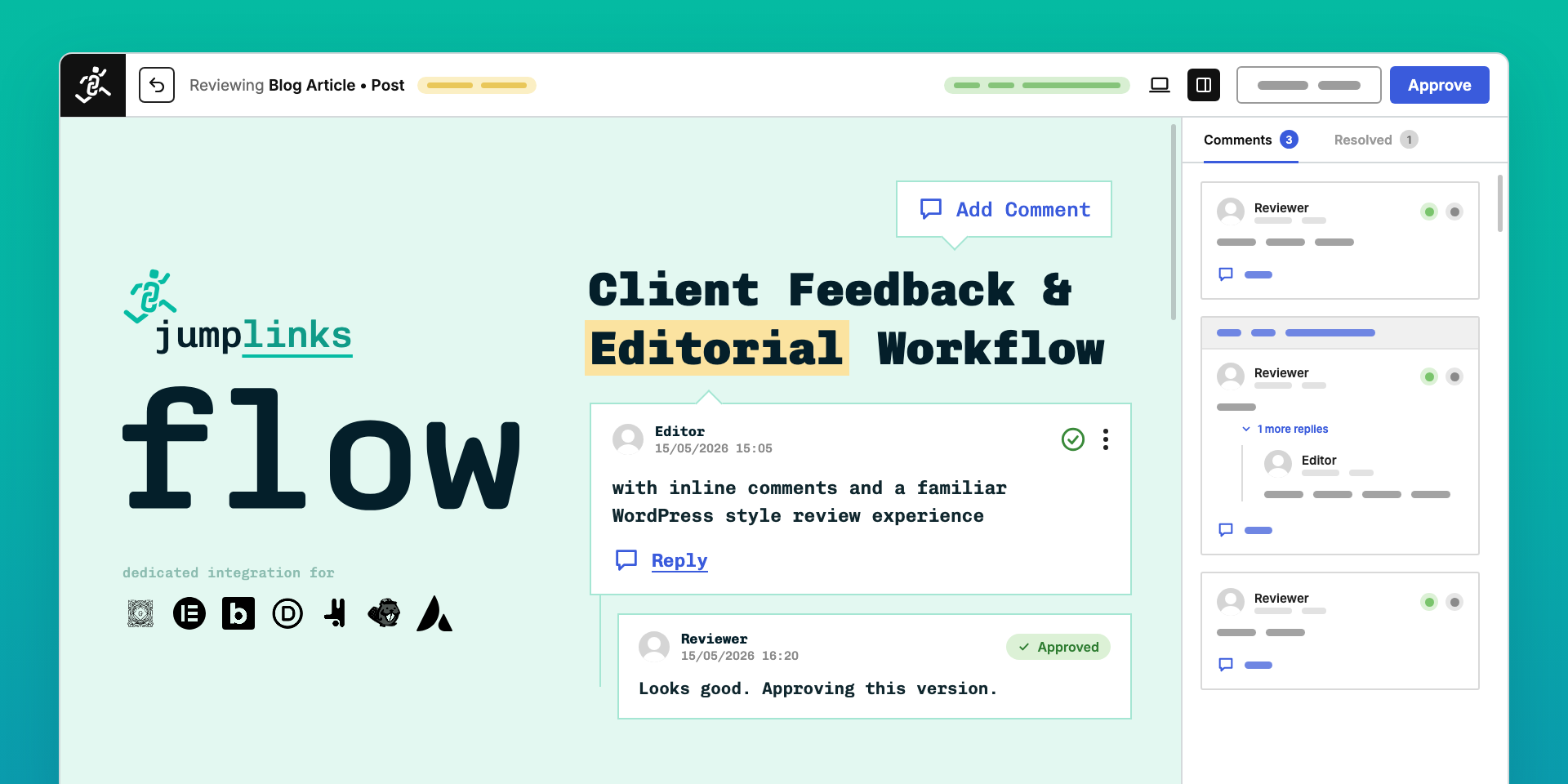
Send a page for review with one link. Your client or editor opens the page exactly as visitors will see it, comments on the exact text, image or spot, and approves or requests changes. Everything runs inside your own WordPress site. This listing is for Flow Pro. It contains every free feature plus the Pro features below, in a single plugin.
Requirements
- WordPress 6.0 or later (tested up to 7.1)
- PHP 7.4 or later
- A Flow Pro licence key (delivered with your purchase, see Licensing)
- Optional: Slack workspace (for Slack notifications), the Akismet plugin (spam checks on public reviews)
Included in Flow Pro
Free features (also included):
- Reviews on posts, pages, WooCommerce products and custom post types
- Comments on text, images, videos, buttons and any spot on the page
- Approve / request changes, resubmit, review history and restore, revisions with View original
- Mandatory review: publishing stays locked until a reviewer approves
- Email reviewers with a private magic link (no account needed)
- Open review for logged-in users, self review, “Reviewed by” credit
- Gutenberg, Classic editor, Elementor, Bricks, Beaver Builder, Divi, Avada, Breakdance, Oxygen 6
- AI agents through MCP or the WordPress Agent Connector (they can never approve)
Pro features:
- Public review: one share link anyone can comment on, without an account
- Site review: send the whole site, reviewers comment on any page, with expiring links
- Unlimited reviewers per page, with a minimum number of approvals
- Device switcher (desktop, tablet, mobile)
- Rich comments, @mentions and emoji reactions
- Slack notifications and a daily digest
- Webhooks for n8n, Zapier and Make (17 events, signed, retried, logged)
- Activity log, commenter environment info, white-label logo
Installation and setup
- Download the Flow Pro zip from your WPBay account.
- In WordPress, go to Plugins → Add New → Upload Plugin, upload the zip and click Activate. (If the free Flow plugin is installed, the upload replaces it; your settings and reviews are kept.)
- Activate your licence: on the Plugins screen click Activate License next to Flow, paste the licence key from your purchase, then click Install Pro features if prompted.
- The setup wizard opens: choose what you use Flow for (editorial workflow, client feedback, building with AI, approving AI-written content). You can change everything later under Flow → Settings.
- Open a page, pick a reviewer (a WordPress user or an email address) in the Review panel and click Send for review.
Full user guide: https://jumplinks.net/documentation/
Licensing
- How you get it: your purchase includes a Flow Pro licence key, issued and managed by Freemius, the licensing service Flow uses. You receive it by email after purchase.
- Plans (yearly price):
- Single Site: $49 per year, 1 site
- Agency: $89 per year, 10 sites
- Unlimited: $199 per year, unlimited sites
- Every plan is also available monthly or as a lifetime licence.
- What counts as a site: one WordPress installation, production or staging on that domain. A multisite network counts as one site.
- What it covers: Pro features, updates and priority support for the licensed sites while the licence is active. Lifetime licences never expire.
- Renewal: handled by Freemius. Yearly and monthly licences renew automatically; you can cancel or manage the subscription from your Freemius account (https://users.freemius.com).
- Refunds: 15-day money-back guarantee on every Pro plan, requested through Freemius.
- If the licence is inactive or expires: the Pro features switch off and Flow keeps working as the free version (reviews, comments, approvals and mandatory review keep working). Your Pro settings and data stay in place and come back as soon as the licence is renewed or reactivated.
- Version numbers: Pro builds are numbered
X.Y.Z.N— the features of release X.Y.Z, Pro build N (for example 2.7.2.1). The extra digit lets Pro upgrade the free plugin in place; the changelog entry for X.Y.Z describes the release.
External services
Flow stores reviews, comments and approvals in your own WordPress database. It contacts:
- Gravatar (Automattic): avatar images, by MD5 hash of the email address, the same as WordPress core.
- Freemius: licence activation and Pro updates. No usage data is sent unless you opt in. https://freemius.com/privacy/
- Slack (optional, only after you save a bot token): direct messages with reviewer and author names, content titles, review links and mentioned comment text. https://slack.com/privacy-policy
- Your webhook endpoints (optional, only the URLs you add): signed JSON with review status, titles, links, names, email addresses and comment text.
- Akismet (optional, only if the Akismet plugin is active): spam checks of anonymous comments on public reviews. https://akismet.com/privacy/
Support
- Pro support: priority support through Freemius, from the Contact Us link under Flow in your WordPress admin or from your Freemius account (https://users.freemius.com).
- Documentation: https://jumplinks.net/documentation/
- Free version: the WordPress.org support forum, https://wordpress.org/support/plugin/jumplinks-editorial-workflow/
Changelog
See the plugin’s readme.txt (Changelog section) for this release; older releases at https://jumplinks.net/changelog/
Changelog:
2.7.2
- The Flow Dashboard has two tabs. Received lists what you were asked to review, and other people’s open reviews. Sent lists what you sent for review. Page, open and site reviews share one list, each marked with its type. Filter by All, In review or Resolved, by type, or click a person’s name to see only their reviews. Resolved now keeps approved and cancelled reviews, 20 per page.
- Pins stay on the element you clicked when the page is viewed on another screen size. A pin near an element’s edge keeps its distance from that edge, and a pin dropped in empty space attaches to the nearest block. A pin placed on another device is marked “Pinned on mobile”, “Pinned on tablet” or “Pinned on desktop”.
- “Comment environment info” (Pro) moved to Settings → Extras.
- The count of reviews waiting for you now shows next to Flow → Dashboard instead of the top-level Flow menu.
- Pausing on a link offers a comment only on regular links and buttons. A link that wraps a whole card, such as a product with its image, title and button, is treated like page content: highlight its text or click its image to comment.
- Public review links (Pro): commenting without an account now requires the signed share link, not just the review’s ID.
- The @mention list (Pro) only shows a review’s participants to people who can open that review, and no longer exposes the email addresses of anonymous commenters.
- With Pro active, a reviewer assigned while Pro was off now appears in the reviewers list.
- On the review page, CSS in a Custom HTML block (a <style> tag) showed as text and the block lost its styling. Content now displays as on the live page when its author is allowed to use unfiltered HTML.
- The build helpers moved to
tools/build/and ship with the plugin, sonpm ci && npm run buildworks from the released package.
2.7.1
- New: White label (Pro). Under Settings White label, upload your own square logo and it replaces the Jumplinks mark in the page review and site review top bar. Choose a dark or light background. A square PNG or WebP with a transparent background works best: 128 × 128 px, shown at up to 64 × 64 px.
- New: Comment environment info (Pro). A small info icon after the author’s name on each new comment shows their OS, browser, device, and viewport — visible only to the review owner and admins. On by default under Settings Comment environment info.
- Improvement: Pausing on a link offers Add Comment. On a site review, pausing on a link that already has a comment opens that comment. On a page review the comment opens when you click, because the link itself does not leave the page.
- Improvement: Hovering an image or video highlights it in the same blue as selected text.
- Improvement: On a site review (Pro), the owner’s logo is a back button with the same hover animation, and it opens that site review’s edit page.
- Fix: On a site review (Pro), that back button opened the homepage instead of the edit page.
- Fix: In site reviews (Pro), reviewers who are not logged in, such as people invited by email or site demo visitors, can now resolve comments, and the “Disable reviewers resolving comments” setting now applies to site reviews too.
2.7.0
- New: Site review links expire after a set number of days (Pro): choose 1 to 999 days under Settings Site Review (default 30). Seven days before, the review page shows a notice where you can extend by any number of days, and the requester gets an email.
- New: Feedback summary on the site review page (Pro): open any page to see its comments with author, status and replies, filter by status or by reviewer, and jump straight to a comment with Open comment. Each reviewer shows “X comments on Y pages”.
- New: Emoji reactions on comments (Pro): react with 👍 👎 ✅ ❤️ 👀 or 🤔 from the button in a comment’s corner, like in Slack. Reactions show under the comment with a count and never send an email.
- New: Emoji in the comment editor (Pro): an emoji button after the link button inserts common reactions, and typed smileys such as 🙂 or <3 turn into emoji.
- Improvement: The general comment form in the review sidebar opens from an Add general comment link, and only one comment, reply or edit form is open at a time.
- Improvement: Site review counts are per thread: replies no longer count as open comments, and the summary sidebar shows open and resolved counts for every page, general comments included.
- Improvement: Mobile: on iPhone the comment field no longer zooms the page and stays above the keyboard, the first tap on an image or video shows its overlay and the second opens the comment, and comment dates are shorter.
- Fix: Theme styles no longer leak into Flow’s menus and comment editor, the space after a mention is kept, and the link badge fits small images.
- Fix: Updates show up straight away on sites behind Cloudflare or other caches: Flow’s script and style files now have the version in their name.
Earlier versions: https://jumplinks.net/changelog/
Only logged in customers who have purchased this product may leave a review.
Loading...
WPBay support
 Support by Jumplinks Flow
Jumplinks Flow supports this product through WPBay
Questions are handled in WPBay's private ticket system, keeping your purchase details and support conversation together.
Go to My Downloads
After purchase, open this item in My Downloads and choose Get Support.
What support includes
- Answers to product-related questions
- Help with reported bugs and issues
- Guidance for included third-party assets
What support does not include
- Customizations or new features
- Installation or setup services
Plugin
Maintenance snapshot
See recent updates, compatibility, support, and developer activity.
- Updated today
- Developer active recently
- WPBay support available
- WordPress 7.1 tested
Snapshot updated 10 hours ago
View details Hide details
Maintenance details
This is maintenance data. It does not measure product quality or sales.
- Last update Updated today
- Compatibility WordPress 7.1 tested · PHP 8.4 tested · WooCommerce 11 tested
- Releases 3 releases in the 1 days since listing
- Developer activity Developer active recently
- Support No recent support tickets to measure
- Docs and demo Documentation available · Changelog available · Demo available
How this snapshot works
Plugin Health
The score is out of 100 and uses data WPBay can check. Ratings, popularity, and sales are not used.
- Last update 30 points
-
Plugins receive full recency points under 30 days, then step down at 90, 180, 365, and 545 days.
- Compatibility 20 points
-
WordPress, PHP, and WooCommerce (when relevant) are scored separately. The latest two PHP lines count as current. Nearby previous versions keep most of the points.
- Current version 100%
- One version behind 75%
- Two versions behind 50%
- Three versions behind 25%
- Older or not listed 0%
- Releases 15 points
-
One release earns 10, two or three earn 13, and four or more earn 15. Each accepted product ZIP counts once; reprocessing the same upload and listing-only edits do not count.
- Developer activity 15 points
-
Based on WPBay login and dashboard activity. Exact last-login dates are never shown.
- Support 15 points
-
There are no recent WPBay tickets to measure.
- Docs and demo 5 points
-
Documentation: 2. Changelog: 1. Working demo or preview: 2.
Score ranges
- 90–100 Excellent
- 75–89 Healthy
- 60–74 Fair
- 40–59 Needs attention
- 0–39 Limited
Long gaps
WPBay also checks for long gaps between updates, developer activity, support replies, and releases. Buyers do not see this score.
- Time since update 35 points
- Last developer activity 25 points
- WordPress compatibility 15 points
- Support replies 15 points
- Fewer releases 10 points
-
Quality verified by WPBay
WPBay review- Reviewed version
- 2.7.2.1
- Review completed
- Reviewer
- CodeRevolution
- Review type
- Initial
No unresolved approval blocker was identified during WPBay’s proportionate review of this release. This is not a security certification or a guarantee that the product contains no defects.
-
 Future updates
-
WPBay support from Jumplinks Flow
-
GPL code, proprietary assets
-
Covered by the WPBay refund policy
-
Plugin maintenance snapshot
Relevant picks
You may also like
Similar products selected by category, features, popularity and freshness.


Reviews
There are no reviews yet.