


DesheeLabs Content Protection

 Recently Updated
Well Documented
Recently Updated
Well Documented
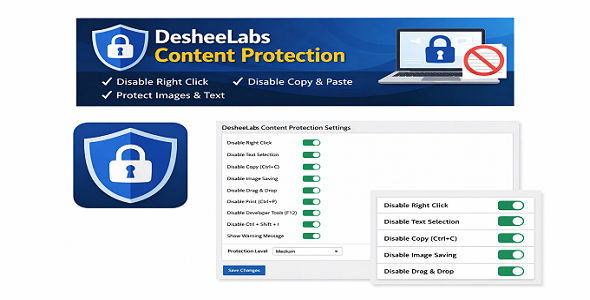
DesheeLabs Content Protection is a lightweight and easy-to-use WordPress plugin designed to help website owners deter casual content copying. It adds client-side protections to your website by disabling common actions such as right-click, text selection, copy shortcuts, image saving, dragging, printing, and popular developer tools shortcuts.
This plugin is ideal for bloggers, educators, portfolio owners, and businesses who want an additional layer of protection against basic content theft without affecting website performance or modifying core WordPress files.
The plugin works globally across your website and is compatible with the WordPress Block Editor (Gutenberg). All functionality is implemented using clean JavaScript and follows WordPress coding standards.
🔐 How It Works
DesheeLabs Content Protection applies client-side restrictions through JavaScript. When a protected action is triggered, the plugin can optionally display a warning message to inform users that copying or inspection is disabled.
⚠️ Important:
This plugin is intended to deter casual copying only. No client-side solution can provide 100% protection against advanced users.
⚙️ Key Highlights
-
Simple setup with an intuitive admin panel
-
No external libraries or dependencies
-
Does not modify WordPress core files
-
Lightweight and performance-friendly
-
All settings stored in a single WordPress option
-
Clean and readable source code
-
Suitable for personal and commercial websites
🧩 Use Cases
-
Protect blog articles and tutorials
-
Prevent image downloading on portfolio sites
-
Reduce content scraping on informational websites
-
Add basic protection for educational material
📝 Technical Notes
-
Built for WordPress
-
Client-side JavaScript based solution
-
Compatible with modern browsers
-
Tested with latest WordPress versions
📌 Disclaimer
DesheeLabs Content Protection does not guarantee complete security. It is designed to discourage basic copying actions and should not be considered a replacement for server-side security solutions.
Changelog:
Version 1.0.0
- Initial release
- Added right-click disable functionality
- Disabled text selection and copy/cut/paste shortcuts
- Prevented image saving and dragging
- Disabled print shortcut (Ctrl/Cmd + P)
- Added optional warning message
- Included basic developer tools shortcut blocking
- Lightweight and performance-friendly implementation
Only logged in customers who have purchased this product may leave a review.
 desheelabs supports this product
Supported
desheelabs supports this product
Supported

Product support includes:
- ✔ The seller will answer product related questions
- ✔ Assistance with reported bugs and issues
- ✔ Help with included third-party assets
However, product support does not include:
- ✖ Customization services
- ✖ Installation services
-
Quality verified by wpbay.com
-
Future updates
-
Support included from desheelabs


More by desheelabs
Reviews
There are no reviews yet.