


Ultimate Web Toolkit – desheelabs

 Well Documented
Ultimate Web Toolkit – Browser Extension (Chrome, Firefox, Edge)
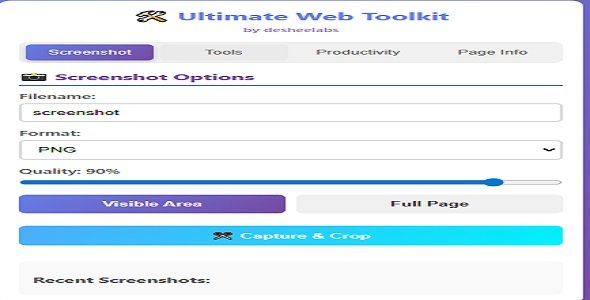
Ultimate Web Toolkit is a modern all-in-one browser extension that helps you work faster on the web. It includes screenshot tools, page utilities (dark mode, highlighter, color picker), productivity tools (notes, bookmarks, QR), and page insights (word count, links, images) in a single clean popup UI.
Key Features
- Screenshot tools: capture visible area, full page capture, capture & crop, recent history
- Dark mode: toggle a dark/inverted view on the current page
- Text highlighter: highlight selected text on the current page
- Color picker: pick an element’s background color and copy it to clipboard
- Translate page: opens Google Translate for the current URL
- QR code generator: generate a QR code for the current page
- Quick notes: save page-specific notes locally
- Bookmarks: quickly save and manage bookmarks locally
- Page stats: word count, images count, links count
- Tab tools: list tabs, switch tabs, close other tabs (with confirmation)
Supported Browsers
- Chrome (Manifest V3)
- Firefox
- Microsoft Edge
Live Store Links
- Chrome Web Store: View listing
- Firefox Add-ons: View listing
- Microsoft Edge Add-ons: View listing
Permissions (Why needed)
- activeTab: runs page tools only when you click the extension action
- scripting: injects required page logic on demand
- tabs: tab utilities and screenshot workflows
- storage: stores notes, bookmarks, and screenshot history locally
Privacy
- No user accounts required.
- No personal data is sent to our servers.
- Notes, bookmarks, and history are stored locally in the browser.
- Translate feature opens translate.google.com in a new tab.
- QR generator loads a QR image from api.qrserver.com using the current page URL as data.
Included Files
- Extension source code
- Documentation (HTML/CSS/JS)
Keywords
browser extension, chrome extension, firefox addon, edge addon, screenshot extension, full page screenshot, dark mode, color picker, text highlighter, qr code generator, notes, bookmarks, productivity tools, tab manager, page stats
Only logged in customers who have purchased this product may leave a review.
Loading...
WPBay support
 Support by desheelabs
Support by desheelabs
desheelabs supports this product through WPBay
Questions are handled in WPBay's private ticket system, keeping your purchase details and support conversation together.
Go to My Downloads
After purchase, open this item in My Downloads and choose Get Support.
What support includes
- Answers to product-related questions
- Help with reported bugs and issues
- Guidance for included third-party assets
What support does not include
- Customizations or new features
- Installation or setup services
Script
Maintenance snapshot
See recent updates, compatibility, support, and developer activity.
- Updated 276 days ago
- WPBay support available
- Documentation available
- Demo or preview available
Snapshot updated 15 hours ago
View details Hide details
Maintenance details
This is maintenance data. It does not measure product quality or sales.
- Last update Updated 276 days ago
- Compatibility Not used for scripts
- Releases 1 release in the 276 days since listing
- Developer activity Developer less active
- Support No recent support tickets to measure
- Docs and demo Documentation available · Changelog missing · Demo available
Health reflects increased activity during the last 90 days.
How this snapshot works
Script Health
The score is out of 100 and uses data WPBay can check. Ratings, popularity, and sales are not used.
- Last update 35 points
-
Scripts receive full recency points under 45 days, then step down at 120, 240, 365, and 545 days.
- Compatibility Not scored
-
Scripts do not use WordPress or PHP, so compatibility is not scored.
- Releases 20 points
-
One release earns 14, two or three earn 18, and four or more earn 20. Each accepted product ZIP counts once; reprocessing the same upload and listing-only edits do not count.
- Developer activity 20 points
-
Based on WPBay login and dashboard activity. Exact last-login dates are never shown.
- Support 15 points
-
There are no recent WPBay tickets to measure.
- Docs and demo 10 points
-
Documentation: 3. Changelog: 1. Working demo or preview: 6.
Score ranges
- 90–100 Excellent
- 75–89 Healthy
- 60–74 Fair
- 40–59 Needs attention
- 0–39 Limited
Long gaps
WPBay also checks for long gaps between updates, developer activity, support replies, and releases. Buyers do not see this score.
- Time since update 45 points
- Last developer activity 30 points
- WordPress compatibility Not scored
- Support replies 15 points
- Fewer releases 10 points
-
Quality verified by WPBay
WPBay review- Reviewed version
- Current release
- Review completed
- Reviewer
- CodeRevolution
- Review type
- Initial
No unresolved approval blocker was identified during WPBay’s proportionate review of this release. This is not a security certification or a guarantee that the product contains no defects.
-
 Future updates
-
WPBay support from desheelabs
-
GPL code, proprietary assets
-
Covered by the WPBay refund policy
-
Script maintenance snapshot
Relevant picks
You may also like
Similar products selected by category, features, popularity and freshness.


Easy Video Player
$59/yr+
From this seller
View seller store
More by desheelabs
Explore more bestselling products from this creator.
Reviews
There are no reviews yet.