



Countdown & Coming Soon

 Recently Updated
Well Documented
Overview
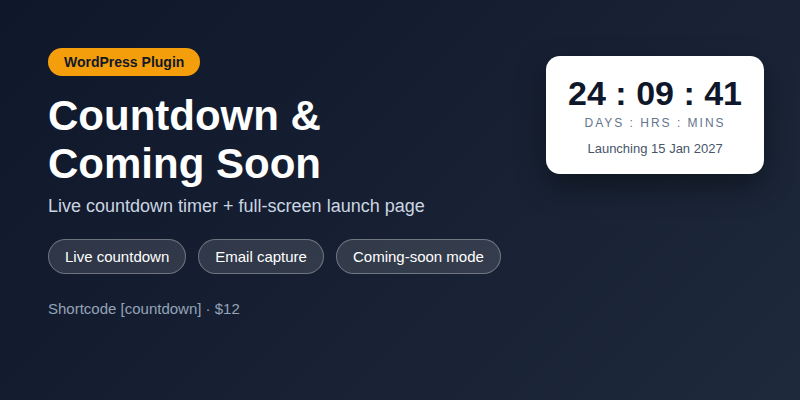
Countdown & Coming Soon for WordPress adds a live countdown timer anywhere with the [countdown] shortcode, and a full-screen coming soon page that replaces your site until launch. Visitors see your headline, a ticking countdown, an email capture form and your social links — while admins still see the normal site.
Features
- Live countdown shortcode [countdown date=”2027-01-01 00:00:00″] with days, hours, minutes and seconds; target date read in the WordPress site timezone
- Coming-soon mode: full-screen launch page with logo, headline, countdown, email form and social links
- Email capture with validation, AJAX submit and plain-POST fallback that shows a visible result message; duplicate protection (never overwritten); nonce + honeypot + per-IP rate limit (5/hour); subscriber list capped at 5,000
- Settings page for target date, headline, colours, background image and social links
- Vanilla JavaScript, no dependencies; sanitised settings and escaped output; translation-ready strings (text domain countdown-coming-soon)
Requirements
- WordPress 6.x and PHP 8.1 or higher.
- A standard theme that calls wp_head() and wp_footer().
Instructions
- In WordPress go to Plugins > Add New > Upload Plugin, choose the downloaded main.zip and activate it. (main.zip is the installable plugin package itself: it contains the single countdown-coming-soon folder.)
- Go to Settings > Countdown & Coming Soon and set the target date, headline and colours.
- Add [countdown date=”2027-01-01 00:00:00″] to any page, or tick coming-soon mode to replace the whole site.
- View collected emails under Settings > Coming Soon Subscribers.
Changelog
v1.1.2 — 2026-11-20 — Subscribers screen now paginates (20 per page) with row delete, bulk delete and a confirmed “Clear list” action (nonce-guarded, manage_options only); the subscriber option is stored with autoload “no” (existing installs are fixed on the next admin load) so 5,000 rows never land in the alloptions cache. Added a Retention / Deletion and Uninstall section to the documentation, a privacy policy text, and an exporter/eraser for WordPress privacy tools: addresses are kept until the owner deletes them, the list caps at 5,000 with oldest-first pruning, and deleting the plugin does not remove stored addresses or settings.
v1.1.0 — 2026-11-18 — (1) Email capture bounded: 5,000-subscriber cap with oldest-first pruning, 5 sign-ups per IP per hour, honeypot + nonce. (2) Atomic/deduped subscribes: duplicates return “already subscribed”, never overwritten. (3) Plain-POST submits show a visible result message. (4) Target dates use the WordPress site timezone. (5) Documentation adds Troubleshooting and the WPBay support route. (6) Front-end messages translation-ready via wp.i18n.
v1.1.1 — 2026-11-18 — Replaced placeholder Plugin/Theme URI and Author URI with the real Digishop store URL (WPBay review fix). Package rebuilt: main.zip now contains exactly one top-level plugin folder and installs directly via Plugins > Add New > Upload Plugin (nested inner plugin ZIP removed).
v1.0.1 — 2026-11-17 — Added installable plugin ZIP inside the package (superseded in v1.1.1).
v1.0.0 — 2026-11-17 — Initial release.
Changelog:
v1.1.2 — 2026-11-20 — Subscribers screen now paginates (20 per page) with row delete, bulk delete and a confirmed "Clear list" action (nonce-guarded, manage_options only); the subscriber option is stored with autoload "no" (existing installs are fixed on the next admin load) so 5,000 rows never land in the alloptions cache. Added a Retention / Deletion and Uninstall section to the documentation, a privacy policy text, and an exporter/eraser for WordPress privacy tools: addresses are kept until the owner deletes them, the list caps at 5,000 with oldest-first pruning, and deleting the plugin does not remove stored addresses or settings.
Only logged in customers who have purchased this product may leave a review.
Loading...
WPBay support
 Support by Digishop
Digishop supports this product through WPBay
Questions are handled in WPBay's private ticket system, keeping your purchase details and support conversation together.
Go to My Downloads
After purchase, open this item in My Downloads and choose Get Support.
What support includes
- Answers to product-related questions
- Help with reported bugs and issues
- Guidance for included third-party assets
What support does not include
- Customizations or new features
- Installation or setup services
Plugin
Maintenance snapshot
See recent updates, compatibility, support, and developer activity.
- Updated today
- Developer active recently
- WPBay support available
- WordPress 6.9 tested
Snapshot updated 17 hours ago
View details Hide details
Maintenance details
This is maintenance data. It does not measure product quality or sales.
- Last update Updated today
- Compatibility WordPress 6.9 tested, two versions behind · PHP 8.1 tested, three versions behind
- Releases 4 releases in the 3 days since listing
- Developer activity Developer active recently
- Support No recent support tickets to measure
- Docs and demo Documentation available · Changelog available · No demo listed
Health reflects increased activity during the last 90 days.
How this snapshot works
Plugin Health
The score is out of 100 and uses data WPBay can check. Ratings, popularity, and sales are not used.
- Last update 30 points
-
Plugins receive full recency points under 30 days, then step down at 90, 180, 365, and 545 days.
- Compatibility 20 points
-
WordPress, PHP, and WooCommerce (when relevant) are scored separately. The latest two PHP lines count as current. Nearby previous versions keep most of the points.
- Current version 100%
- One version behind 75%
- Two versions behind 50%
- Three versions behind 25%
- Older or not listed 0%
- Releases 15 points
-
One release earns 10, two or three earn 13, and four or more earn 15. Each accepted product ZIP counts once; reprocessing the same upload and listing-only edits do not count.
- Developer activity 15 points
-
Based on WPBay login and dashboard activity. Exact last-login dates are never shown.
- Support 15 points
-
There are no recent WPBay tickets to measure.
- Docs and demo 5 points
-
Documentation: 2. Changelog: 1. Working demo or preview: 2.
Score ranges
- 90–100 Excellent
- 75–89 Healthy
- 60–74 Fair
- 40–59 Needs attention
- 0–39 Limited
Long gaps
WPBay also checks for long gaps between updates, developer activity, support replies, and releases. Buyers do not see this score.
- Time since update 35 points
- Last developer activity 25 points
- WordPress compatibility 15 points
- Support replies 15 points
- Fewer releases 10 points
-
Quality verified by WPBay
WPBay review- Reviewed version
- 1.1.2
- Review completed
- Reviewer
- CodeRevolution
- Review type
- Initial
No unresolved approval blocker was identified during WPBay’s proportionate review of this release. This is not a security certification or a guarantee that the product contains no defects.
-
 Future updates
-
WPBay support from Digishop
-
GPL code, proprietary assets
-
Covered by the WPBay refund policy
-
Plugin maintenance snapshot
Relevant picks
You may also like
Similar products selected by category, features, popularity and freshness.

From this seller
View seller store
More by Digishop
Explore more bestselling products from this creator.



Reviews
There are no reviews yet.