


DirList — Business Directory PHP Script

 Recently Updated
Well Documented
Overview
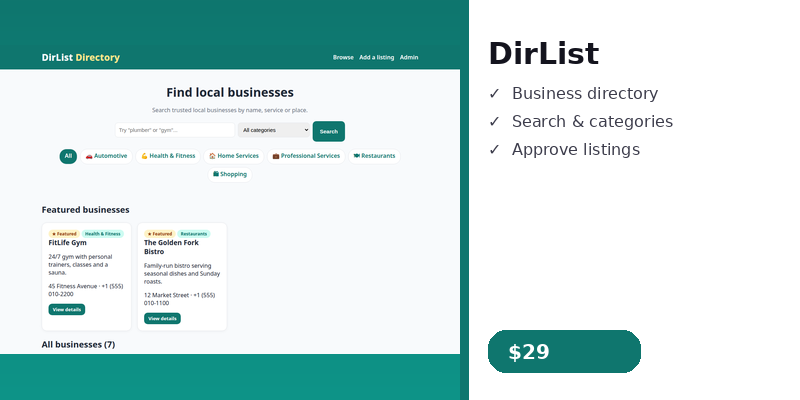
DirList — Business Directory PHP Script is a complete local business directory in plain PHP with no framework. Visitors search and browse businesses by category, business owners submit listings for free, and the admin approves, edits, features and deletes them. All code is original, commented and easy to customise, and the demo data lets you try every feature right after install.
Features
- Business listings with categories (6 demo categories, 6 demo listings)
- Search by name, description or address, plus category filter
- Listing detail page with contact details and related businesses; a website is shown as a clickable link only when it is a valid http:// or https:// URL — other schemes are rejected on save and never rendered as a link
- Submit-listing form with bounded validation and abuse controls (max 5 submissions/hour per IP); every form control has a programmatic label, including the admin login fields
- Featured listings shown first and highlighted on the home page
- Admin panel: login, dashboard with counts, listings (approve / reject / feature / edit / delete, paginated 25 per page, CSRF-protected — the check fails closed, so an empty or missing token is always refused), category management (deleting a category moves its listings to a chosen category), Settings with password change
- SQLite by default (zero setup) with a working MySQL option — portable per-driver schema. The installer stores the SQLite database in a folder above the document root by default (the exact path is shown on the installer page) and refuses a location inside the document root.
- Installer protected by a deployment setup secret (setup.key, kept OUTSIDE the document root next to the default SQLite file — a key left in the web-served folder is refused, and an Apache deny rule for setup.key is written as defence in depth; the rule does not apply on Nginx) and rolls back cleanly on failure — demo seeding is transactional and idempotent, so a failed install leaves no partial records and a retry is safe
- Admin login regenerates the session ID on login
Support
For help installing or using DirList, contact the seller through WPBay: open the product page on WPBay while logged in to your WPBay account and use the “Contact Seller” / message option there, or go to WPBay > My Orders, find your order and message the seller from the order.
Requirements
- PHP 8.1 or higher with the PDO and PDO SQLite extensions (or PDO MySQL if you choose MySQL), plus mbstring.
- A web server (Apache, Nginx, or PHP’s built-in server for testing).
- No framework, no Composer packages, no build step.
Instructions
- Unzip main.zip and upload the `dirlist` folder to your web server.
- FIRST create a file named setup.key in the folder ABOVE your document root (hosting file manager / FTP / SSH) containing one random string — the same folder as the default SQLite file (for example /home/youruser/dirlist-data/setup.key). A key left inside the web-served dirlist folder is refused, because it could be read over HTTP. Open http://your-domain/dirlist/install.php, enter that setup key, then an admin username and a strong password (at least 8 characters — there is no default password), choose SQLite or MySQL, and click “Install DirList now”.
- Log in at http://your-domain/dirlist/admin/ with the username and password you chose during install.
- Add your own categories and approve or delete the demo listings in the admin panel.
- Share the directory link with your visitors.
Changelog
v1.1.5 — 2026-11-21 — WPBay review fixes (wave 9): the installer setup secret (setup.key) now lives OUTSIDE the document root, in the folder above it next to the default SQLite file (e.g. /home/youruser/dirlist-data/setup.key) — a key file left in the web-served dirlist folder can be read over HTTP, so the installer refuses it outright and only trusts a key whose realpath is provably outside DOCUMENT_ROOT; as defence in depth the installer also writes an Apache deny rule for setup.key (which does NOT apply on Nginx, where the outside-root location is the only protection); install.php instructions, the documentation installation step and the listing now describe the protected location, and the key file is deleted from both locations on a successful install.
v1.1.4 — 2026-11-21 — WPBay review fixes (wave 8): the admin CSRF check now fails closed — both the session token and the submitted token must be non-empty strings before hash_equals() runs, because hash_equals(”, ”) is true and an empty submitted token used to pass when the session held no token (e.g. a POST sent after only visiting the dashboard); every authenticated admin page now creates a CSRF token on load, so admin forms always carry a real token.
v1.1.3 — 2026-11-20 — WPBay review fixes (wave 5): installer protected by a deployment setup secret (setup.key created by the buyer; installer refuses to run without it or with a wrong key, and the file is deleted on success), so a visitor cannot claim an unconfigured installation; MySQL install failure recovery — demo seeding now runs in one transaction and is idempotent by name, so a failed install leaves no partial tables or records and a retry tops up only the missing rows; an already-existing admin account is kept and reported instead of silently keeping the old password; admin login regenerates the session ID (session_regenerate_id(true)) so the pre-login session identifier cannot be reused.
v1.1.2 — 2026-11-20 — WPBay review fixes (wave 3): listing text caps now count characters, not bytes — mb_strlen()/mb_substr() for every user-facing cap in the submit form and admin edit forms (a 60-character CJK name and a 700-character Greek description now store and display in full; a 200+ byte admin edit saves complete and non-empty); dirlist_esc() now uses ENT_SUBSTITUTE so a truncated UTF-8 sequence can never render as an empty string; the installer now checks for the mbstring extension and refuses to install without it; v1.1.0 changelog entry corrected — the verified outside-the-web-root database default arrived in v1.1.1, not v1.1.0.
v1.1.1 — 2026-11-19 — WPBay review fixes (wave 2): SQLite database now defaults to a folder above the document root (installer proves the path with realpath and refuses an in-docroot location; deny guards in the database folder; config.sample.php computes the same default); website URLs validated strictly on scheme and host in the public submit form and the admin edit form — only http(s) with a host is stored (scheme-less values get https://), other schemes are rejected, and the detail page only links http(s) URLs; array-style request values no longer cause an HTTP 500 on any public or admin page (treated as empty with a normal validation message); admin login fields now have programmatic labels (for/id, autofocus kept).
v1.1.0 — 2026-11-18 — No default password (installer-set, changeable in Settings), CSRF on all admin actions, working MySQL install, full pagination of directory browsing, category delete moves listings to a chosen category, bounded submission validation + rate limit + labelled controls, Troubleshooting + WPBay support route.
v1.0.0 — 2026-11-17 — Initial release.
Changelog:
v1.1.5 — 2026-11-21 — WPBay review fixes (wave 9): the installer setup secret (setup.key) now lives OUTSIDE the document root, in the folder above it next to the default SQLite file (e.g. /home/youruser/dirlist-data/setup.key) — a key file left in the web-served dirlist folder can be read over HTTP, so the installer refuses it outright and only trusts a key whose realpath is provably outside DOCUMENT_ROOT; as defence in depth the installer also writes an Apache deny rule for setup.key (which does NOT apply on Nginx, where the outside-root location is the only protection); install.php instructions, the documentation installation step and the listing now describe the protected location, and the key file is deleted from both locations on a successful install.
Only logged in customers who have purchased this product may leave a review.
Loading...
WPBay support
 Support by Digishop
Digishop supports this product through WPBay
Questions are handled in WPBay's private ticket system, keeping your purchase details and support conversation together.
Go to My Downloads
After purchase, open this item in My Downloads and choose Get Support.
What support includes
- Answers to product-related questions
- Help with reported bugs and issues
- Guidance for included third-party assets
What support does not include
- Customizations or new features
- Installation or setup services
Script
Maintenance snapshot
See recent updates, compatibility, support, and developer activity.
- Updated today
- Developer active recently
- WPBay support available
- Documentation available
Snapshot updated 21 hours ago
View details Hide details
Maintenance details
This is maintenance data. It does not measure product quality or sales.
- Last update Updated today
- Compatibility Not used for scripts
- Releases 7 releases in the 4 days since listing
- Developer activity Developer active recently
- Support No recent support tickets to measure
- Docs and demo Documentation available · Changelog available · Demo available
Health reflects increased activity during the last 90 days.
How this snapshot works
Script Health
The score is out of 100 and uses data WPBay can check. Ratings, popularity, and sales are not used.
- Last update 35 points
-
Scripts receive full recency points under 45 days, then step down at 120, 240, 365, and 545 days.
- Compatibility Not scored
-
Scripts do not use WordPress or PHP, so compatibility is not scored.
- Releases 20 points
-
One release earns 14, two or three earn 18, and four or more earn 20. Each accepted product ZIP counts once; reprocessing the same upload and listing-only edits do not count.
- Developer activity 20 points
-
Based on WPBay login and dashboard activity. Exact last-login dates are never shown.
- Support 15 points
-
There are no recent WPBay tickets to measure.
- Docs and demo 10 points
-
Documentation: 3. Changelog: 1. Working demo or preview: 6.
Score ranges
- 90–100 Excellent
- 75–89 Healthy
- 60–74 Fair
- 40–59 Needs attention
- 0–39 Limited
Long gaps
WPBay also checks for long gaps between updates, developer activity, support replies, and releases. Buyers do not see this score.
- Time since update 45 points
- Last developer activity 30 points
- WordPress compatibility Not scored
- Support replies 15 points
- Fewer releases 10 points
-
Quality verified by WPBay
WPBay review- Reviewed version
- Current release
- Review completed
- Reviewer
- CodeRevolution
- Review type
- Initial
No unresolved approval blocker was identified during WPBay’s proportionate review of this release. This is not a security certification or a guarantee that the product contains no defects.
-
 Future updates
-
WPBay support from Digishop
-
GPL code, proprietary assets
-
Covered by the WPBay refund policy
-
Script maintenance snapshot
Relevant picks
You may also like
Similar products selected by category, features, popularity and freshness.

From this seller
View seller store
More by Digishop
Explore more bestselling products from this creator.




Reviews
There are no reviews yet.