


Holinest Pro: Hotel-Style Booking Engine with Stripe, PayPal, Nexi and iCal for Vacation Rentals

 Recently Updated
Well Documented
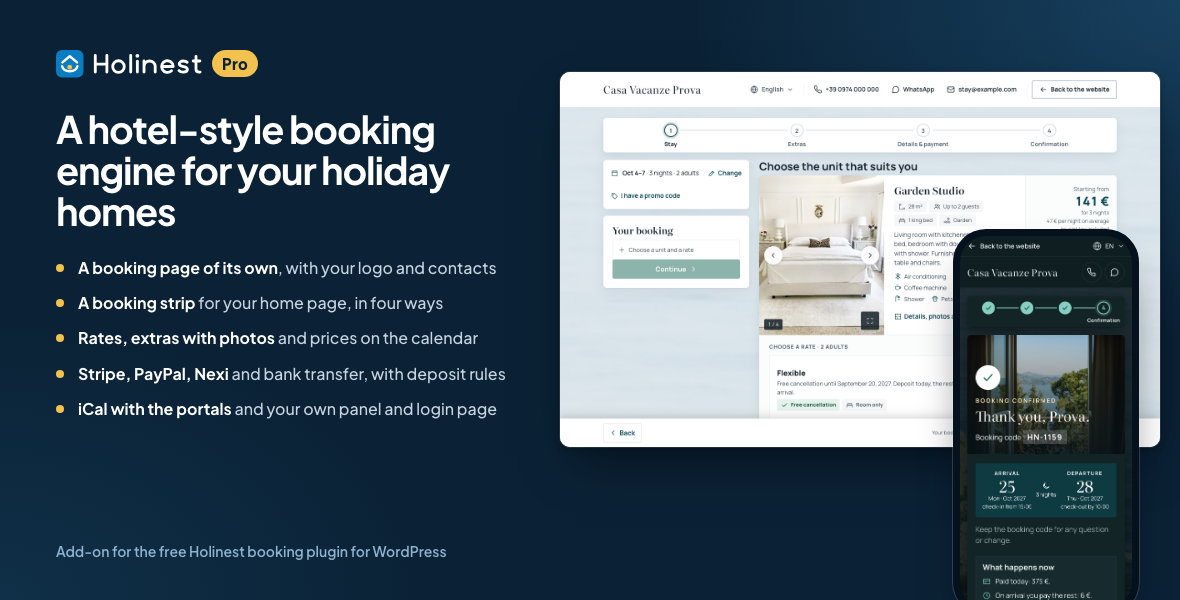
Holinest is a free booking plugin for holiday homes, apartments, small holiday villages and B&Bs. Guests book on your own website and you manage every booking from one panel. Holinest Pro is the paid add-on that turns the booking steps into a hotel-style booking engine, takes payments online and brings the dates of the portals into Holinest.
Holinest Pro needs the free Holinest plugin (version 1.2.1 or later, from WordPress.org), installed and active.
Live demo: https://demo.holinest.it/
NEW IN 1.4: A BOOKING PAGE OF ITS OWN
- The booking page opens without your theme. At the top: your logo, the languages, phone, WhatsApp, email and “Back to the website”. At the bottom: your address, contacts, privacy, “Manage cookies”, booking conditions and “Secure payment”.
- The menu, styles and scripts of the theme do not reach this page, so the theme cannot break the booking steps. Cookie banners, Analytics, translation and SEO plugins stay.
- The booking page stays out of Google and out of the sitemaps, and is never cached. The pages of your units stay in Google as a showcase, with photos, details and the button “Check availability and book”.
- Three steps and the confirmation: Stay (each unit with its rates), Extras (only when there are some), Details and payment.
NEW IN 1.4: THE BOOKING STRIP
- Dates, guests with the ages of the children, discount code and “Check availability”. It opens the booking page with the search already done.
- Four ways: over the big photo of your home page, as a bar fixed at the bottom, as a side “Book” button with a panel, or as a button at the bottom of phones.
- Three looks (light, dark, over the photo) and your colour.
- Add it with a shortcode, a block, an Elementor widget, or a code to copy for websites not made with WordPress.
- No personal data, no cookies, no tracking.
HOTEL-STYLE BOOKING ENGINE
- A calendar of two months with the price of each day and three colours for lower, medium and higher prices. Full days, minimum stays and closed arrivals or departures are respected.
- Search with adults, children with their age, pets and promo code. A summary of the booking always in view, at the bottom on phones.
- Unit cards with a photo carousel, size, guests, beds, view and services with icons. A “Details” window with the large gallery, the floor plan and the full description.
- Two looks, “Elegant light” and “Elegant dark”, with your main colour. The fonts are inside the plugin: nothing is loaded from other sites.
- When no unit is free: up to 3 nearby dates, and “Stretch to N nights” when the minimum stay is the problem.
- A clear form: errors next to the field, “Did you mean …@gmail.com?”, the country code of the phone already written.
- Confirmation with the booking code, the dates, what is paid today and on arrival, free cancellation, “Add to calendar” and “How to get here”. It prints in light colours.
RATE PLANS, EXTRAS AND FLOOR PLANS
- Rate plans: for example Flexible with free cancellation up to N days before arrival, Non-refundable with a discount and full payment, With breakfast with a price per person per night. The booking keeps the plan and its terms.
- Extras with photos: price per stay, per night, per guest or per guest per night, with a maximum quantity. Paid on arrival with the balance.
- Floor plans: one image for each unit, shown in the Details window.
PAYMENTS
- Card payments with Stripe Checkout, PayPal Checkout and card payments with Nexi XPay, next to the bank transfer of the free plugin.
- The guest chooses how much to pay today: the deposit, a higher deposit from your rules, or the full amount.
- Deposit rules by days before arrival, for example 30% when arrival is 31 days away or more and 50% when it is closer. Percentage or fixed amount.
- Test and live keys. After saving, a key is shown only with its last 4 characters.
- The dates stay held while the guest is on the payment page. Each payment is checked when the guest comes back, by a signed webhook or notification, and every few minutes. A payment is never taken twice.
- After paying, the guest comes back to the booking page, in the language from which the booking started.
- Payment links for the balance, or for the deposit of a booking taken by phone, to send by email.
PORTALS WITH ICAL
- Paste the calendar links of Airbnb, Booking.com, Vrbo, Google Calendar and others in Holinest > Channels, one field for each unit.
- Holinest recognises the portal from the link and warns you if you paste the link of another portal.
- Sync every 30 minutes (you can change it) and with the “Sync now” button. Booked dates become closed dates, without guest data.
- A log for each portal, and an email when two bookings overlap. A calendar that cannot be downloaded or arrives incomplete changes nothing.
PRICE CALENDAR AND COUPONS
- All units, 30 days at a time, with the real price of each night.
- Select one or more days and units to set a fixed price or a change in percent (for example +20% in August), a minimum stay, or to close the dates to stays, arrivals or departures.
- Coupons with percentage or fixed amount, booking period, stay period, minimum nights, units and maximum uses.
EMAILS AND REPORTS
- Editable email templates with placeholders. Arrival and balance reminders, each sent once.
- Reports of occupancy, deposits and balances, bookings by source. CSV export.
YOUR OWN PANEL AND LOGIN PAGE
- A login page with your logo, photo and colours, without the WordPress logo, on any theme.
- A full-screen panel for booking managers (and for the administrators who want it): only the Holinest panel, with its own menu, on computer and phone.
MODULES
Every part of Holinest Pro is a module. Turn off what you do not use: its pages and settings disappear.
HOW IT WORKS
1. Install the free Holinest plugin from WordPress.org and add your units and prices.
2. Install Holinest Pro. On the Plugins page click “Activate License” under Holinest Pro and paste the purchase code you get from WPBay.
3. Paste the keys of Stripe, PayPal or Nexi. Start with the test keys.
4. In Settings > Booking strip copy the shortcode or add the block to your home page.
REQUIREMENTS
- WordPress 6.5 or later, PHP 7.4 or later.
- Holinest 1.2.1 or later (free, on WordPress.org).
- An account with the payment services you want to use: Stripe, PayPal Business or Nexi XPay. Their fees are charged by them.
- A site on https, for webhooks and payment notifications.
- WP-Cron working, or a real cron job on the server.
EXTERNAL SERVICES
Holinest Pro connects to Stripe, PayPal and Nexi only when you add their keys, to create the payment pages and check the payments. It downloads the calendars you add. License and updates work through the official WPBay SDK, which talks only to wpbay.com: when you register the purchase code it sends the code, the site address, the admin email and the product; once a day it checks the code. The usage statistics of the SDK are off. Holinest takes no commission on your bookings.
LICENSE
- Activate the license with your WPBay purchase code, on the WPBay license page inside WordPress (Plugins page, “Activate License”).
- The number of sites depends on the license you choose: 1, 3 or 10 sites.
- Without an active license the Pro functions are off. The free Holinest plugin and your bookings keep working.
- Updates come from WPBay, inside WordPress. Updates and support by email for one year.
LANGUAGES
English and Italian included. Ready for translation.
SUPPORT
By email at [email protected], in English and Italian, within 2 working days. Included: questions on how the plugin works, bugs, help with Stripe, PayPal, Nexi, iCal and the booking page. Not included: installation on your site, changes to the code or to your theme, problems caused by other plugins or by the hosting.
Made by Studioweb360 di Papini Giovanni, Italy. https://holinest.it
Changelog:
1.4.2
- The booking strip uses the price calendar of the booking engine: full days crossed out, the price from each day, three colours and the minimum stay. The prices load only when the guest comes near the dates.
- The search column of the Stay step shows the prices too.
- Fixes: texts cut on phones, coupon table wider than the screen, expired coupons shown as active, prices of rate plans in the format of the site.
1.4.1
- The booking strip does not leave the page without dates: it opens the arrival calendar with a short message, in all four ways.
- Arriving from the strip or with a search in the address, the booking page goes straight to the stay step, without the big entrance. New setting "Show the big entrance with the photo".
- On phones the header no longer covers the "Dates and guests" window.
1.4.0
- New: the booking page is a page of its own, without the theme, with your header (logo, languages, phone, WhatsApp, email, "Back to the website") and footer (address, contacts, privacy, cookies, booking conditions, secure payment).
- New: booking strip in four ways (over the photo, bar at the bottom, side button, phone button), three looks, with shortcode, block, Elementor widget and a code for websites not made with WordPress.
- Shorter booking: Stay, Extras (only when there are some), Details and payment, then the confirmation. "Choose" goes to the next step.
- All the prices of a step in one request; nothing jumps while the page loads.
- Nearby dates and "Stretch to N nights" when no unit is free.
- Clearer prices (tourist tax, deposit, what is paid today), real form with inline errors, new confirmation page.
- GA4 events in the dataLayer, only if the website already has one, never with personal data.
- Unit pages as a showcase with photos, details and "Check availability and book".
- Italian translation updated.
1.3.0
- New module "Booking engine": hotel-style entrance, price calendar, rate plans, extras with photos, floor plans, two looks (light and dark).
1.2.0
- New module "Branded panel and login": login page with your look and full-screen panel without WordPress menus.
1.1.0
- PayPal and Nexi XPay payments, shared deposit rules, iCal import in the Channels page, license with a code for each site.
Only logged in customers who have purchased this product may leave a review.
Loading...
WPBay support
 Support by Holinest
Holinest supports this product through WPBay
Questions are handled in WPBay's private ticket system, keeping your purchase details and support conversation together.
Go to My Downloads
After purchase, open this item in My Downloads and choose Get Support.
What support includes
- Answers to product-related questions
- Help with reported bugs and issues
- Guidance for included third-party assets
What support does not include
- Customizations or new features
- Installation or setup services
Plugin
Maintenance snapshot
See recent updates, compatibility, support, and developer activity.
- Updated today
- Developer active recently
- WPBay support available
- WordPress 7.1 tested
Snapshot updated 1 hour ago
View details Hide details
Maintenance details
This is maintenance data. It does not measure product quality or sales.
- Last update Updated today
- Compatibility WordPress 7.1 tested · PHP 8.4 tested
- Releases 6 releases in the 3 days since listing
- Developer activity Developer active recently
- Support No recent support tickets to measure
- Docs and demo Documentation available · Changelog available · Demo available
How this snapshot works
Plugin Health
The score is out of 100 and uses data WPBay can check. Ratings, popularity, and sales are not used.
- Last update 30 points
-
Plugins receive full recency points under 30 days, then step down at 90, 180, 365, and 545 days.
- Compatibility 20 points
-
WordPress, PHP, and WooCommerce (when relevant) are scored separately. The latest two PHP lines count as current. Nearby previous versions keep most of the points.
- Current version 100%
- One version behind 75%
- Two versions behind 50%
- Three versions behind 25%
- Older or not listed 0%
- Releases 15 points
-
One release earns 10, two or three earn 13, and four or more earn 15. Each accepted product ZIP counts once; reprocessing the same upload and listing-only edits do not count.
- Developer activity 15 points
-
Based on WPBay login and dashboard activity. Exact last-login dates are never shown.
- Support 15 points
-
There are no recent WPBay tickets to measure.
- Docs and demo 5 points
-
Documentation: 2. Changelog: 1. Working demo or preview: 2.
Score ranges
- 90–100 Excellent
- 75–89 Healthy
- 60–74 Fair
- 40–59 Needs attention
- 0–39 Limited
Long gaps
WPBay also checks for long gaps between updates, developer activity, support replies, and releases. Buyers do not see this score.
- Time since update 35 points
- Last developer activity 25 points
- WordPress compatibility 15 points
- Support replies 15 points
- Fewer releases 10 points
-
Quality verified by WPBay
WPBay review- Reviewed version
- 1.4.2
- Review completed
- Reviewer
- CodeRevolution
- Review type
- Initial
No unresolved approval blocker was identified during WPBay’s proportionate review of this release. This is not a security certification or a guarantee that the product contains no defects.
-
 Future updates
-
WPBay support from Holinest
-
Fully GPL licensed
-
Covered by the WPBay refund policy
-
Plugin maintenance snapshot
Relevant picks
You may also like
Similar products selected by category, features, popularity and freshness.


Reviews
There are no reviews yet.