


Easy Virtual Tour Builder

 Well Documented
About Easy Virtual Tour Builder
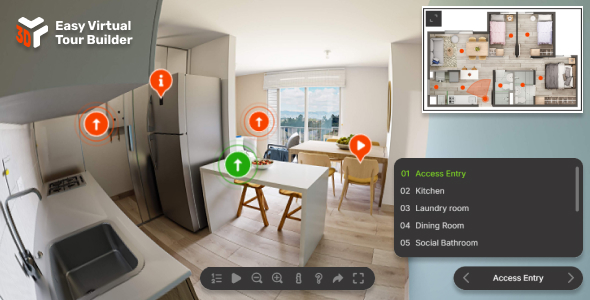
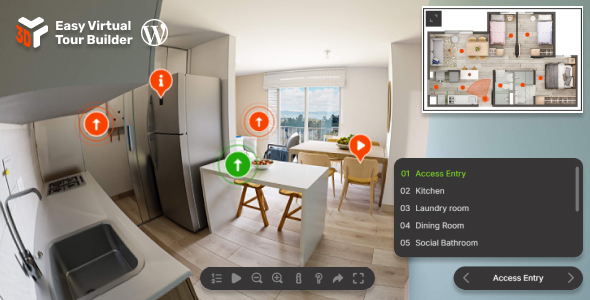
Easy Virtual Tour Builder is a responsive virtual tour solution for equirectangular 360° panoramas. Build immersive multi-scene experiences with smooth scene switching, saved camera positions, hotspots/markers, tooltips, floor-map navigation, rich HTML info windows, responsive fullscreen layouts, and touch-friendly controls for mobile and desktop.
Main features
Immersive Virtual Tours – Build interactive tours from JPG, PNG, or KTX2 equirectangular panoramas with smooth transitions between scenes and a polished cross-device viewing experience, see demos.
Responsive Layout – The viewer adapts automatically to mobile, tablet, and desktop layouts so tours stay clean, readable, and easy to navigate on any screen size.
Desktop & Mobile Optimized – Designed for mouse, touch, and keyboard interaction with mobile-friendly gestures, fullscreen support, and optional help guidance.
Lazy Scrolling / Loading – Initialize the tour when it becomes visible on the page to improve loading performance for off-screen viewers.
Flexible Embed Size – Place the viewer anywhere in your layout with fixed sizing or responsive sizing that fits naturally inside any container.
Inline Or Lightbox Display – Embed the tour directly inside the page or launch it in a responsive lightbox triggered by a click or external action, example here.
Smooth Scene Switching – Move visitors naturally between rooms or viewpoints with seamless transitions that keep the tour feeling continuous and easy to follow.
Saved Camera Presets – Define starting views and camera target positions for each scene so every location opens from the exact angle you want.
Hotspots / Markers – Add markers anywhere inside the tour to navigate to other scenes, open links, jump to camera positions, or trigger built-in actions, example here.
Tooltips & Rich Info Windows – Display simple labels or detailed popups with full HTML/CSS content including images, video, links, and custom layouts.
Floor-Map Navigation – Add a floor-plan style floormap with styled markers, orientation feedback, and optional expand/collapse behavior for compact layouts.
Table Of Contents & Camera Position Menus – Help visitors move quickly through larger tours using structured scene navigation and optional camera position selection controls.
Customizable Controller – Configure playback, zoom, fullscreen, help, share, table of contents, and other on-screen controls to match your preferred experience.
Marker & Tooltip Styling – Customize marker colors, borders, selected states, animations, sizes, and tooltip appearance individually or globally.
Info Window Content Flexibility – Show advanced content blocks with images, embedded video, text, links, and styled sections directly inside the tour experience.
Preloader – Optional loading screen with configurable text, colors, and progress feedback while panoramas and assets are being prepared.
Easy To Configure And Install – Includes sample demos, clear configuration structure, and a setup flow designed to be approachable for both beginners and advanced users, with JavaScript documentation and WordPress documentation.
One-Time Purchase – Buy once and keep lifetime access to updates for the product version you purchase.
Direct Support – Ongoing support and product maintenance from the developer, Tibi @ FWD.
Only logged in customers who have purchased this product may leave a review.
Loading...
WPBay support
 Support by FWDesign
Support by FWDesign
FWDesign supports this product through WPBay
Questions are handled in WPBay's private ticket system, keeping your purchase details and support conversation together.
Go to My Downloads
After purchase, open this item in My Downloads and choose Get Support.
What support includes
- Answers to product-related questions
- Help with reported bugs and issues
- Guidance for included third-party assets
What support does not include
- Customizations or new features
- Installation or setup services
Script
Maintenance snapshot
See recent updates, compatibility, support, and developer activity.
- Updated 105 days ago
- Developer active recently
- WPBay support available
- Documentation available
Snapshot updated 2 hours ago
View details Hide details
Maintenance details
This is maintenance data. It does not measure product quality or sales.
- Last update Updated 105 days ago
- Compatibility Not used for scripts
- Releases 1 release in the 106 days since listing
- Developer activity Developer active recently
- Support No recent support tickets to measure
- Docs and demo Documentation available · Changelog missing · Demo available
Health reflects recent activity during the last 90 days.
How this snapshot works
Script Health
The score is out of 100 and uses data WPBay can check. Ratings, popularity, and sales are not used.
- Last update 35 points
-
Scripts receive full recency points under 45 days, then step down at 120, 240, 365, and 545 days.
- Compatibility Not scored
-
Scripts do not use WordPress or PHP, so compatibility is not scored.
- Releases 20 points
-
One release earns 14, two or three earn 18, and four or more earn 20. Each accepted product ZIP counts once; reprocessing the same upload and listing-only edits do not count.
- Developer activity 20 points
-
Based on WPBay login and dashboard activity. Exact last-login dates are never shown.
- Support 15 points
-
There are no recent WPBay tickets to measure.
- Docs and demo 10 points
-
Documentation: 3. Changelog: 1. Working demo or preview: 6.
Score ranges
- 90–100 Excellent
- 75–89 Healthy
- 60–74 Fair
- 40–59 Needs attention
- 0–39 Limited
Long gaps
WPBay also checks for long gaps between updates, developer activity, support replies, and releases. Buyers do not see this score.
- Time since update 45 points
- Last developer activity 30 points
- WordPress compatibility Not scored
- Support replies 15 points
- Fewer releases 10 points
-
Quality verified by WPBay
WPBay review- Reviewed version
- Current release
- Review completed
- Reviewer
- CodeRevolution
- Review type
- Initial
No unresolved approval blocker was identified during WPBay’s proportionate review of this release. This is not a security certification or a guarantee that the product contains no defects.
-
 Future updates
-
WPBay support from FWDesign
-
GPL code, proprietary assets
-
Covered by the WPBay refund policy
-
Script maintenance snapshot
Relevant picks
You may also like
Similar products selected by category, features, popularity and freshness.


Easy Video Player
$59/yr+
From this seller
View seller store
More by FWDesign
Explore more bestselling products from this creator.


Reviews
There are no reviews yet.