


Bubblegum – Fashion & Boutique WooCommerce Theme

 Recently Updated
Well Documented
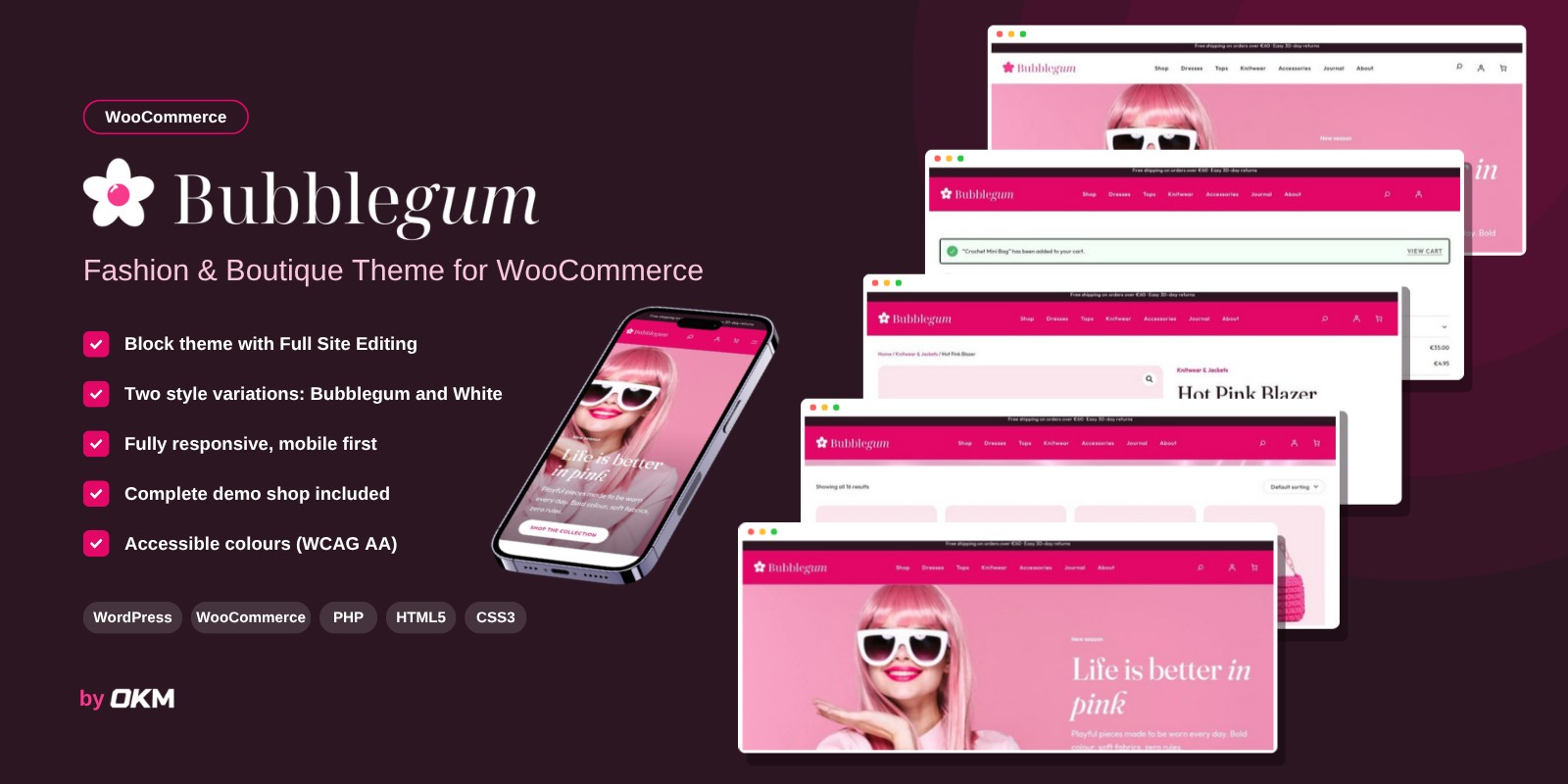
Bubblegum is a WooCommerce block theme for fashion and boutique stores: bold, playful and easy to edit. Everything is changed with the WordPress Site Editor, with no page builder and no extra plugins, so your store stays fast and simple to look after.
Live demo: See Bubblegum in action
Video: Watch the video
Features
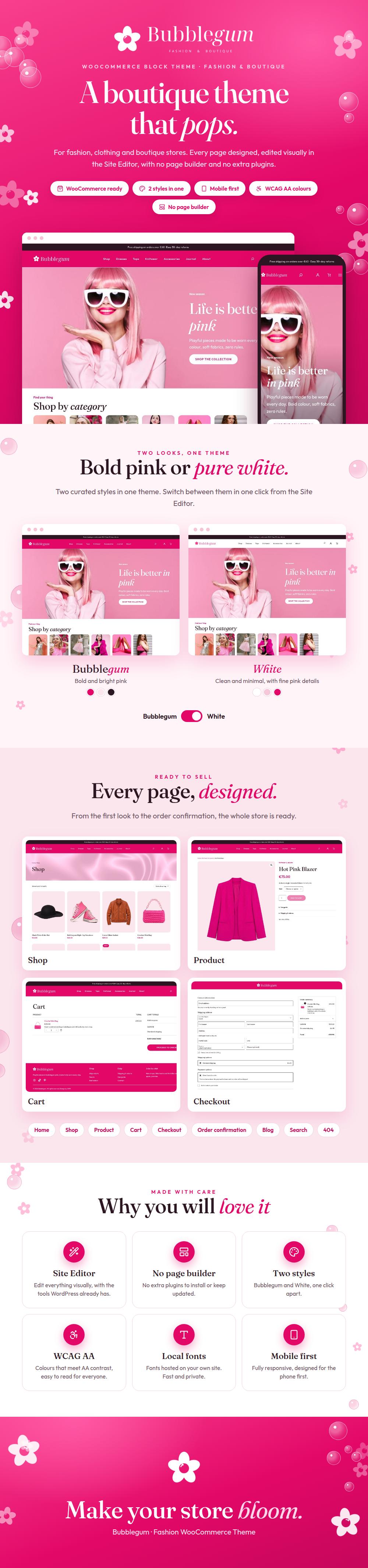
- Two styles: Bubblegum, bold and bright pink, and White, clean and minimal with fine pink details
- WooCommerce templates for the shop, product page, cart, checkout, order confirmation and product search
- Journal (blog) with comments and threaded replies
- Menu with a playful bubble effect, set up in Appearance > Menus
- Curated colour palette with good contrast (WCAG AA)
- Demo content that recreates the live demo: 16 products with sizes, home page, About, Contact, Size guide, Shipping & returns, FAQ, the Journal with three posts and the main menu
Requirements
- WordPress 7.0 or higher
- WooCommerce 10.0 or higher (required)
- PHP 7.4 or higher (8.3 recommended)
What is included
- The installable theme ZIP
- Demo content file (demo-content/bubblegum-demo.xml inside the theme folder)
- English documentation (documentation/index.html inside the theme folder)
- Licence files for the theme and the fonts
Installation
- Go to Appearance > Themes > Add New Theme > Upload Theme, choose the theme ZIP and click Install Now, then Activate.
- Install and activate WooCommerce from Plugins > Add New Plugin.
- To import the demo: unzip the theme ZIP on your computer, go to Tools > Import > WordPress, upload bubblegum-demo.xml and tick Download and import file attachments.
- In Settings > Reading, set Home as the homepage and Journal as the posts page.
Support and updates
Support through WPBay’s support system for one year from your purchase: questions about using the theme, help with its features and bug fixes. New versions are published here on WPBay.
Changelog:
1.1.3
- Fixed: the "Soft, sweet & a little extra" homepage section was empty after importing the demo content.
- Changed: that section now shows products tagged "Shop the look" (sorted by title) instead of fixed product IDs.
- Docs: guide and FAQ updated.
1.1.2
Fixed: after importing the demo content, the header shows the imported Main menu (Shop, Dresses, Tops, Knitwear, Accessories, Journal, About) automatically, with no need to touch Appearance > Menus or the Site Editor. A menu assigned to the Primary Menu location still takes priority.
1.1.1: Documentation: new Troubleshooting & FAQ section (demo import and images, author assignment, WooCommerce pages, front page, comments on journal posts), linked from the navigation.
1.1.0: Improved: the header announcement and the product page shipping and returns panel now use neutral sample texts. Improved: clearer licensing information. Improved: documentation explains where to edit every shipping and returns text.
1.0.2: Comments on journal posts (comment list, form and threaded replies). Documentation: real package contents and licence paths.
Only logged in customers who have purchased this product may leave a review.
Loading...
WPBay support
 Support by OK Multimedia
OK Multimedia supports this product through WPBay
Questions are handled in WPBay's private ticket system, keeping your purchase details and support conversation together.
Go to My Downloads
After purchase, open this item in My Downloads and choose Get Support.
What support includes
- Answers to product-related questions
- Help with reported bugs and issues
- Guidance for included third-party assets
What support does not include
- Customizations or new features
- Installation or setup services
Theme
Maintenance snapshot
See recent updates, compatibility, support, and developer activity.
- Updated today
- Developer active recently
- WPBay support available
- WordPress 7.1 tested
Snapshot updated 56 minutes ago
View details Hide details
Maintenance details
This is maintenance data. It does not measure product quality or sales.
- Last update Updated today
- Compatibility WordPress 7.1 tested · PHP 8.5 tested · WooCommerce 11 tested
- Releases 8 releases in the 4 days since listing
- Developer activity Developer active recently
- Support No recent support tickets to measure
- Docs and demo Documentation available · Changelog available · Demo available
Health reflects increased activity during the last 90 days.
How this snapshot works
Theme Health
The score is out of 100 and uses data WPBay can check. Ratings, popularity, and sales are not used.
- Last update 25 points
-
Themes receive full recency points under 60 days, then step down at 120, 240, 365, and 545 days.
- Compatibility 20 points
-
WordPress, PHP, and WooCommerce (when relevant) are scored separately. The latest two PHP lines count as current. Nearby previous versions keep most of the points.
- Current version 100%
- One version behind 75%
- Two versions behind 50%
- Three versions behind 25%
- Older or not listed 0%
- Releases 10 points
-
Themes often update less frequently: one release earns 7, two earn 9, and three or more earn 10. Each accepted product ZIP counts once; reprocessing the same upload and listing-only edits do not count.
- Developer activity 15 points
-
Based on WPBay login and dashboard activity. Exact last-login dates are never shown.
- Support 15 points
-
There are no recent WPBay tickets to measure.
- Docs and demo 15 points
-
Documentation: 4. Changelog: 1. Working demo or preview: 10.
Score ranges
- 90–100 Excellent
- 75–89 Healthy
- 60–74 Fair
- 40–59 Needs attention
- 0–39 Limited
Long gaps
WPBay also checks for long gaps between updates, developer activity, support replies, and releases. Buyers do not see this score.
- Time since update 35 points
- Last developer activity 25 points
- WordPress compatibility 15 points
- Support replies 15 points
- Fewer releases 10 points
-
Quality verified by WPBay
WPBay review- Reviewed version
- 1.1.3
- Review completed
- Reviewer
- CodeRevolution
- Review type
- Initial
No unresolved approval blocker was identified during WPBay’s proportionate review of this release. This is not a security certification or a guarantee that the product contains no defects.
-
 Future updates
-
WPBay support from OK Multimedia
-
Fully GPL licensed
-
Covered by the WPBay refund policy
-
Theme maintenance snapshot
Relevant picks
You may also like
Similar products selected by category, features, popularity and freshness.

From this seller
View seller store
More by OK Multimedia
Explore more bestselling products from this creator.
Reviews
There are no reviews yet.