


B2BKing Company Credit – WooCommerce Line of Credit System (Add-on)

 Recently Updated
Well Documented
Recently Updated
Well Documented

Prerequisites
Important! – This item is a B2BKing add-on and it requires B2BKing – The Ultimate WooCommerce B2B & Wholesale Plugin to be purchased separately.
What is B2BKing Company Credit ?
B2BKing Company Credit allows you to extend a line of credit to your B2B customers, who will be able to purchase items on credit, up to their individual credit limit.
Main features:
- Credit payment gateway / method is available during checkout, if order total does not exceed available credit.
- Company credit panel is added to users’ my account panel, or can be added via shortcode. Outstanding balance, available credit, and credit limit is monitored.
- Credit limit can be set globally, by group, or by user.
- Credits / reimbursements can be added manually for each user by admin, alongside notes.
- Users can reimburse credit or add balance for later usage from their my account panel. Credits are added to the user’s account once the order is marked as completed by admin.
- Credit transaction history is recorded in both the user’s my account panel and in the user’s backend profile.
- Through the main B2BKing plugin, the credit gateway can be enabled for only specific groups, or only orders under or over certain amounts.
- Through the main B2BKing plugin, users can be manually approved, and only have access to credit once reviewed and approved by admin.
- Credits can be redeemed by customers as coupons (optional feature), so customers can use credits together with any other payment gateway. (New!)
- Credit gateway can always show during checkout, but will let the user know if there are insufficient credits. (New!)
Live Demo
Demo can be tested at demo site.
What is B2BKing?
B2BKing is a featured item and weekly bestseller plugin on Envato market. It is a complete solution for running a B2B / wholesale store or B2B + B2C hybrid store with WooCommerce. 
B2BKing takes care of everything, from basic B2B aspects such as hiding prices for guest users, to complex features such as tiered pricing structures, tax exemptions, VAT handling, and multiple buyers per account. From an extended business registration and separate B2B/B2C registration forms, to custom billing fields, an invoice payment gateway and negotiated price offers, B2BKing does it all.
B2BKing Reviews – From Our Amazing Customers

Screenshots
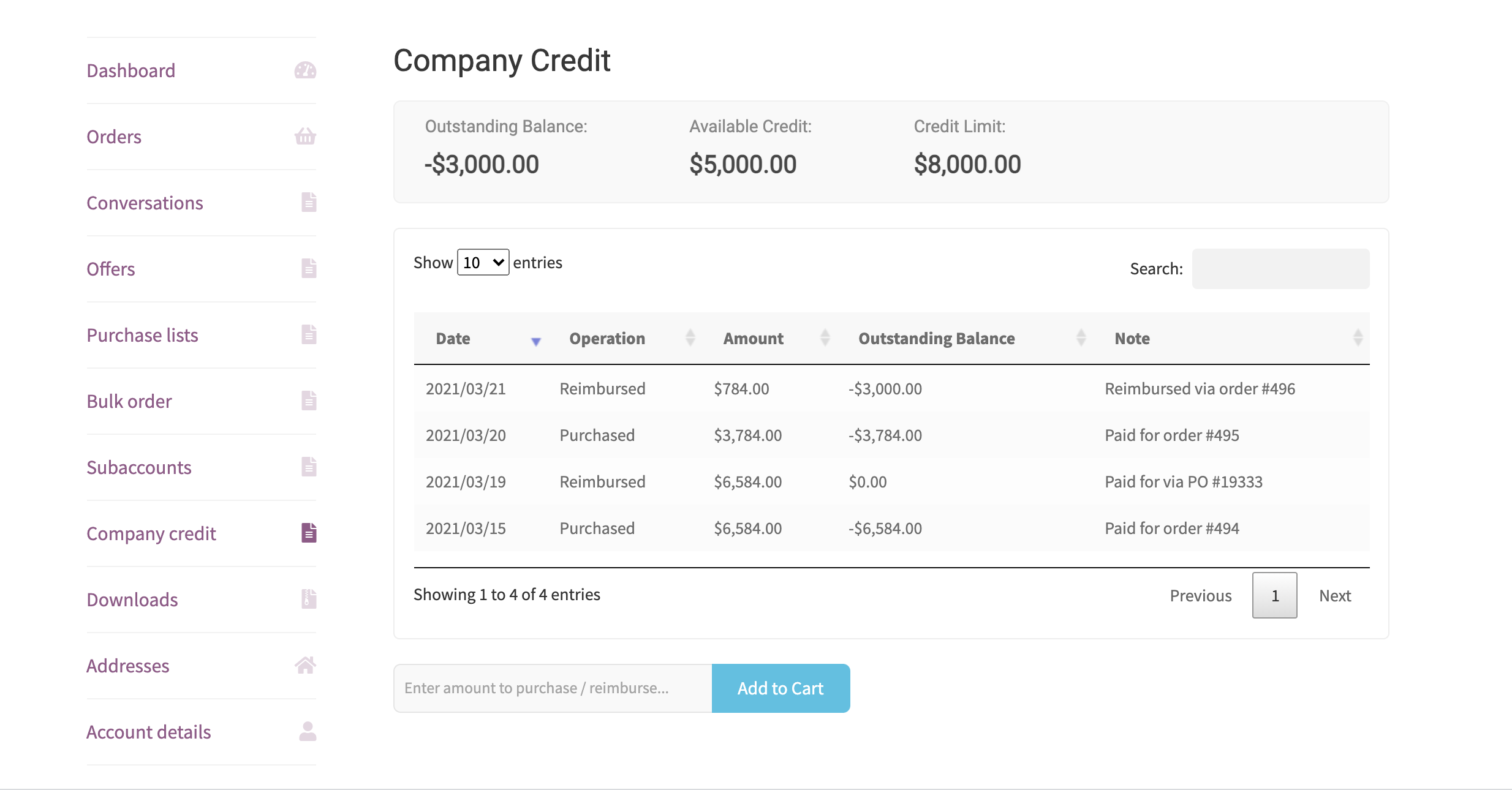
Company credit tab in the user’s My Account panel. Users can view credit history, as well as reimburse used credit OR purchase credit for later usage. 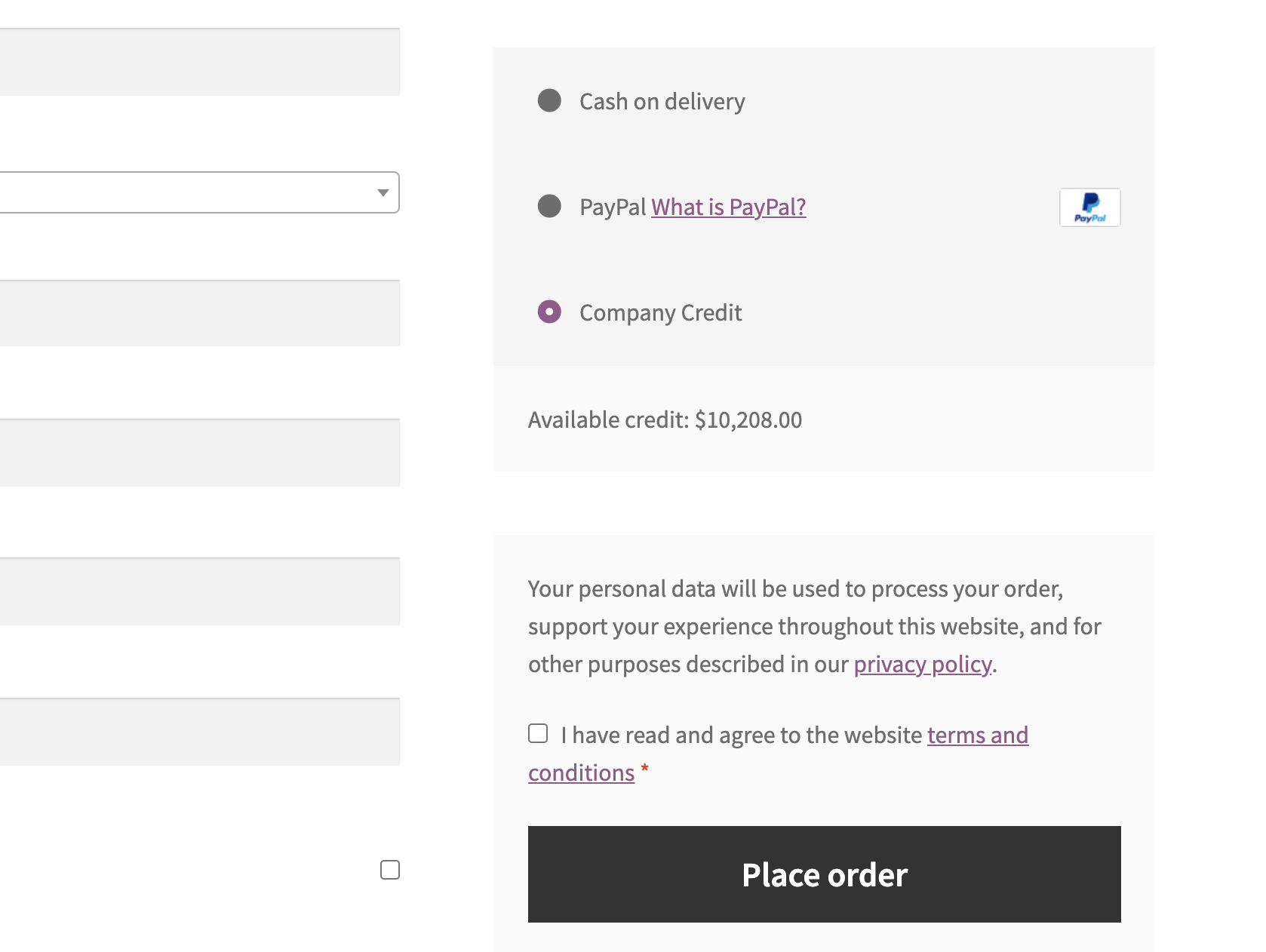
Users can pay via credit during checkout, if their available credit exceeds the cart total value. 
Orders appear in the backend as paid for via company credit. Details such as outstanding balance and available credit are shown in order notes. 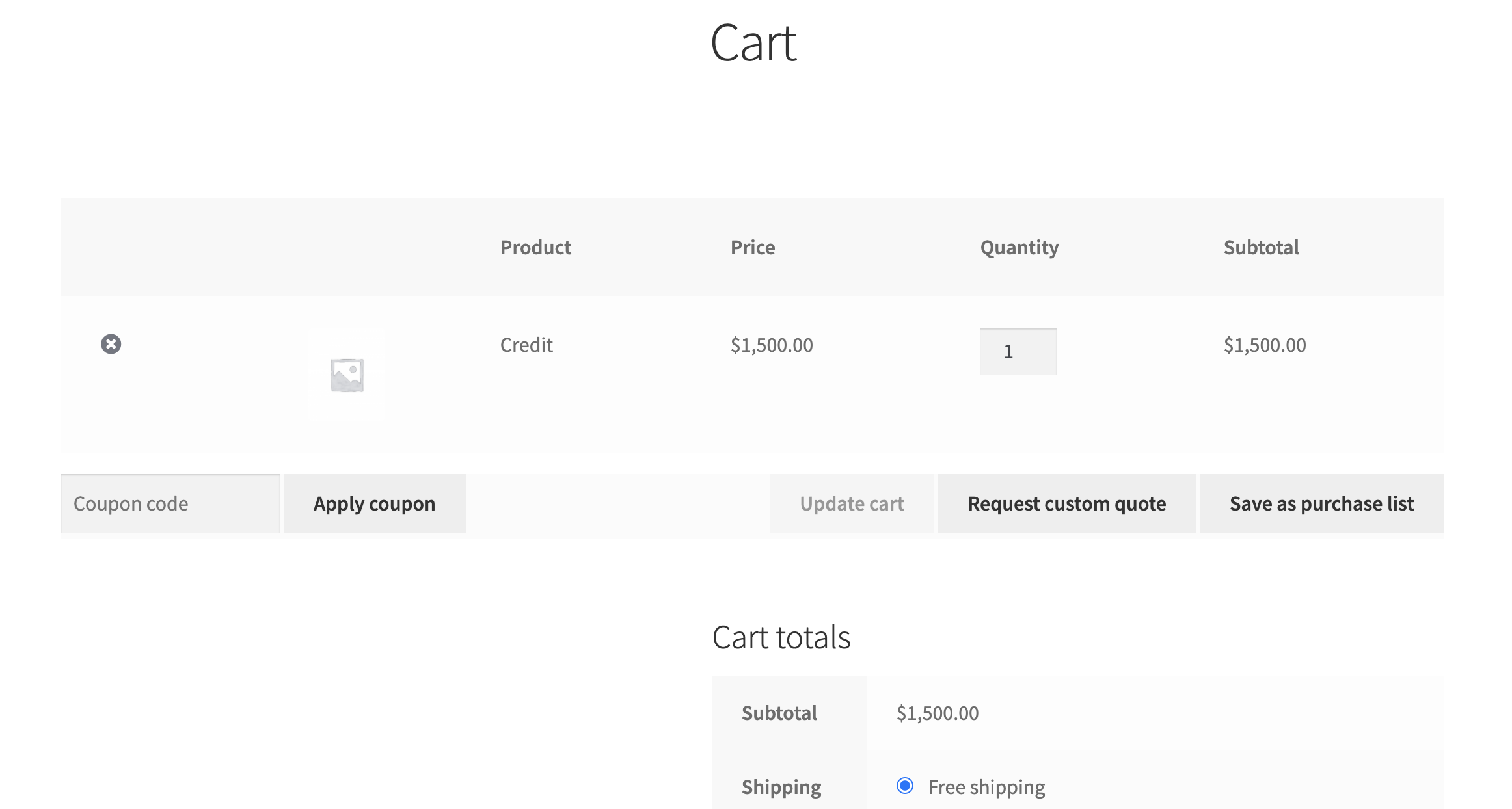
To reimburse credits / purchase balance, users can simply add credits to cart, and then pay for them using any method (except credit itself). Once the order status is marked as “completed”, the credits are added to the user’s account.
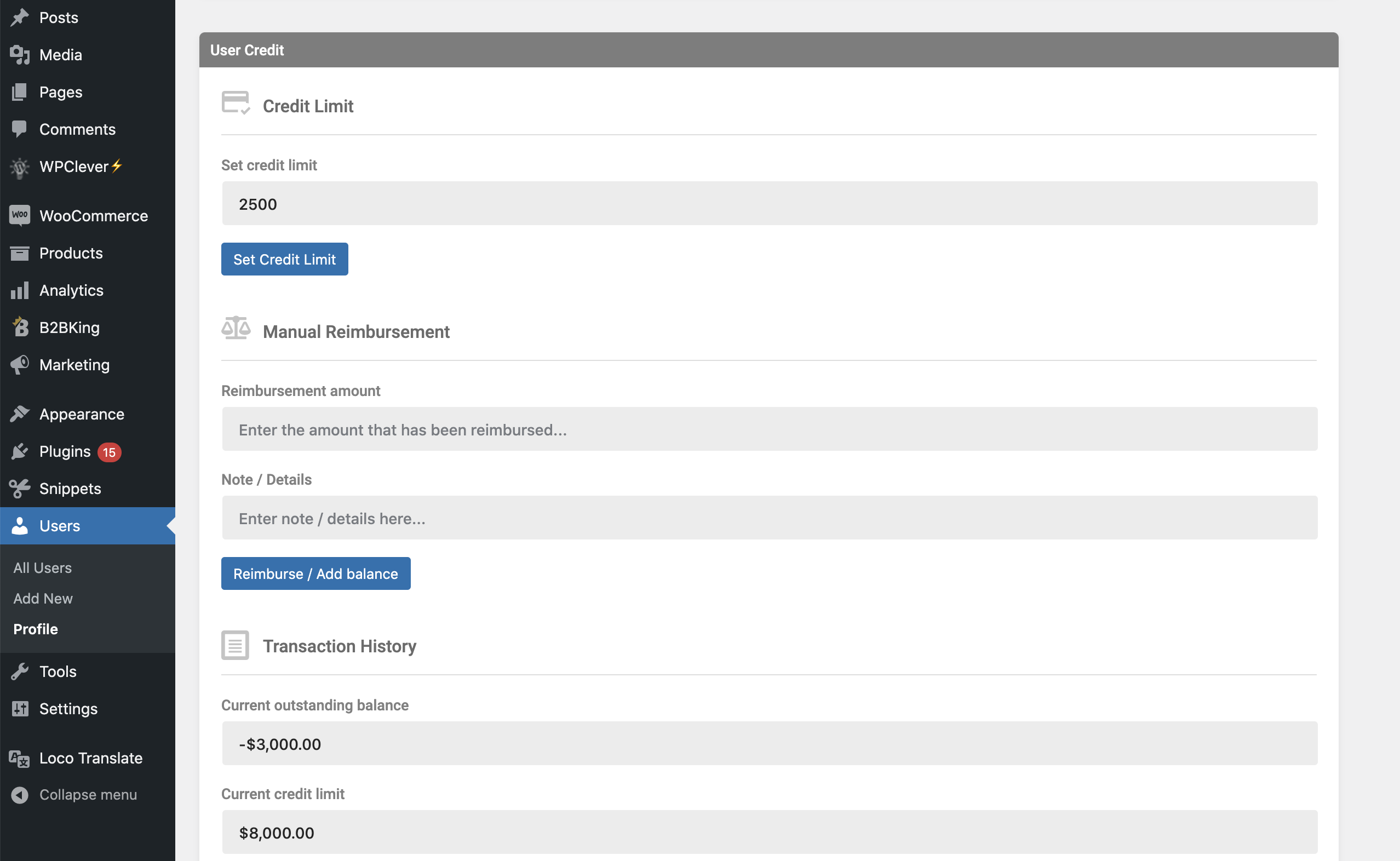
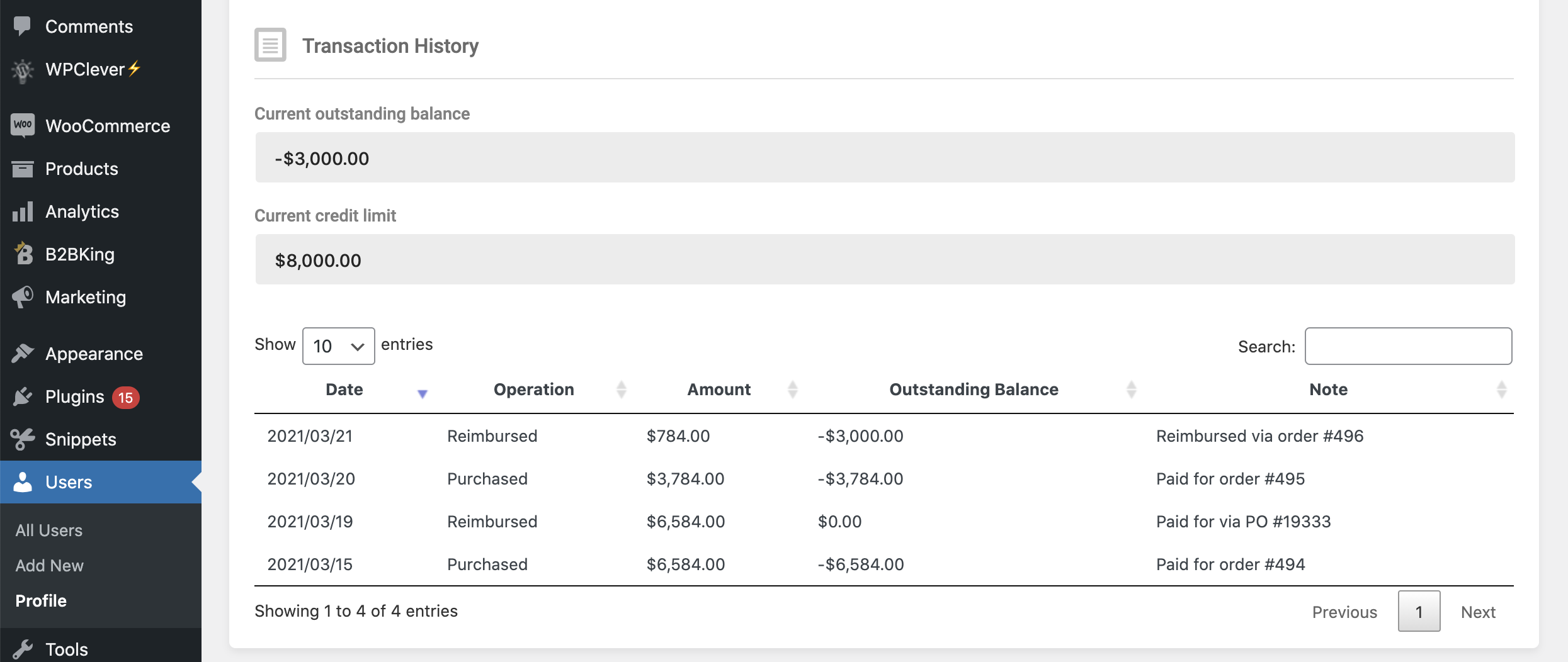
Backend user panel – here the shop admin can set an individual credit limit for an user, reimburse payments manually (or correct errors by adding/removing credit).
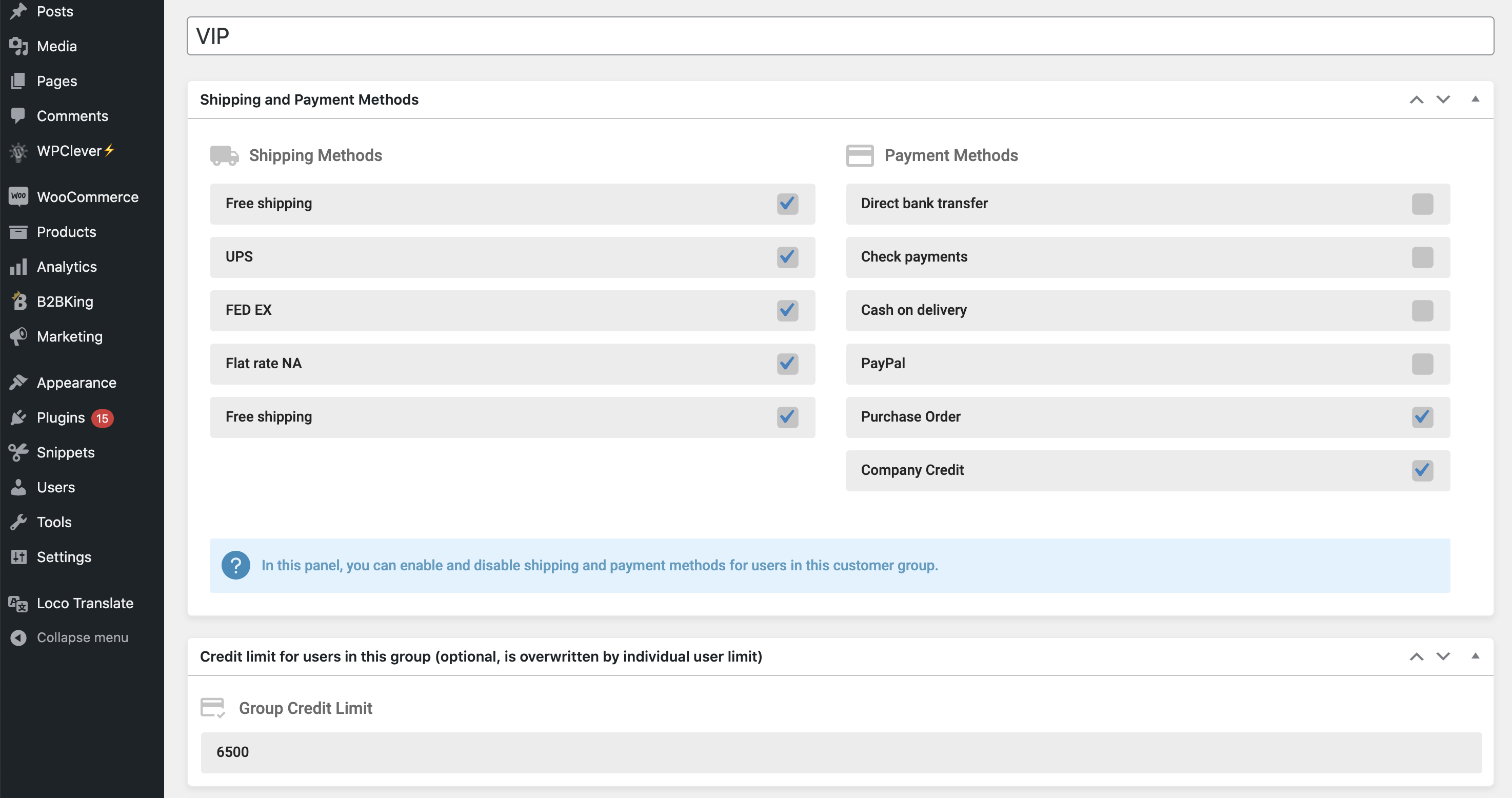
Credit limit can also be set by group, while paying with credit can also be disabled for specific groups. Through the B2BKing plugin, users can be subject to manual approval before being added to a group and having access to credit. 
Not enough credit. If the user would like to use the credit and pay the difference, they can redeem the credit as a coupon first.
Version 1.6.0
- Minor updates and improvements
Version 1.5.5
- Credit is now restored automatically to customers if their order is cancelled, failed or refunded.
- Fixed bug where subaccount ordering credit did not correctly deduct credit from the main account.
- Added HPOS support
Version 1.4.0
New Features:
-> Redeem credits as coupons. Through this method, customers redeem credit as a coupon, and can also use this coupon with any other payment gateway.

Enhancements:
-> When there is insufficient credit, the credit method will now show, but will be disabled.
For old behaviour, use: 	add_filter('b2bking_hide_credit_method_not_enough_points','__return_true');
Version 1.3.0
- Enhancement: Credit can now be deducted for manual orders placed in the backend using the credit method.
- Code restructuring
- Bug fixes and improvements
Version 1.2.0
- Various bug fixes and enhancements
- New order status for credit purchase orders
Version 1.0.0
Initial Release
Only logged in customers who have purchased this product may leave a review.
Loading...
Seller support site
 Support by King's Plugins
Support by King's Plugins
King's Plugins provides support on their own website
The seller uses an external help center for product questions, bug reports, and support requests.
Visit support site
Opens the seller's support website in a new tab.
What support includes
- Answers to product-related questions
- Help with reported bugs and issues
- Guidance for included third-party assets
What support does not include
- Customizations or new features
- Installation or setup services
Plugin
Maintenance snapshot
See recent updates, compatibility, support, and developer activity.
- Updated 8 days ago
- Developer active recently
- Developer-site support available
- Documentation available
Snapshot updated 4 hours ago
View details Hide details
Maintenance details
This is maintenance data. It does not measure product quality or sales.
- Last update Updated 8 days ago
- Compatibility WordPress 6.7 tested, several versions behind · PHP 8.5 not marked as tested · WooCommerce 8 tested, three versions behind
- Releases 1 release in the last 12 months
- Developer activity Developer active recently
- Support Support is offered on the developer's site, not through WPBay tickets
- Docs and demo Documentation available · Changelog missing · Demo available
Health reflects increased activity during the last 90 days.
How this snapshot works
Plugin Health
The score is out of 100 and uses data WPBay can check. Ratings, popularity, and sales are not used.
- Last update 30 points
-
Plugins receive full recency points under 30 days, then step down at 90, 180, 365, and 545 days.
- Compatibility 20 points
-
WordPress, PHP, and WooCommerce (when relevant) are scored separately. The latest two PHP lines count as current. Nearby previous versions keep most of the points.
- Current version 100%
- One version behind 75%
- Two versions behind 50%
- Three versions behind 25%
- Older or not listed 0%
- Releases 15 points
-
One release earns 10, two or three earn 13, and four or more earn 15. Each accepted product ZIP counts once; reprocessing the same upload and listing-only edits do not count.
- Developer activity 15 points
-
Based on WPBay login and dashboard activity. Exact last-login dates are never shown.
- Support Not scored
-
WPBay cannot measure response times for email or support on another site, so support is not scored.
- Docs and demo 5 points
-
Documentation: 2. Changelog: 1. Working demo or preview: 2.
Score ranges
- 90–100 Excellent
- 75–89 Healthy
- 60–74 Fair
- 40–59 Needs attention
- 0–39 Limited
Long gaps
WPBay also checks for long gaps between updates, developer activity, support replies, and releases. Buyers do not see this score.
- Time since update 35 points
- Last developer activity 25 points
- WordPress compatibility 15 points
- Support replies Not scored
- Fewer releases 10 points
-
Quality verified by WPBay
WPBay review- Reviewed version
- 1.6.02
- Review completed
- Reviewer
- CodeRevolution
- Review type
- Initial
No unresolved approval blocker was identified during WPBay’s proportionate review of this release. This is not a security certification or a guarantee that the product contains no defects.
-
 Future updates
-
Support through the seller website
-
GPL code, proprietary assets
-
Covered by the WPBay refund policy
-
Plugin maintenance snapshot
Relevant picks
You may also like
Similar products selected by category, features, popularity and freshness.


Reviews
There are no reviews yet.