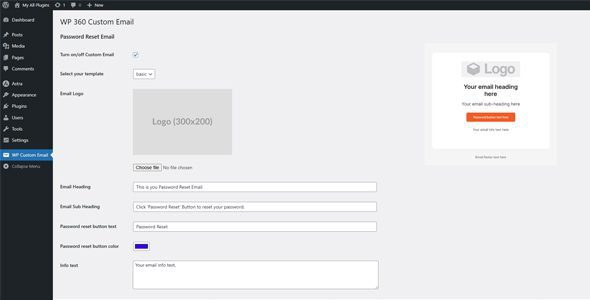
WP Custom Email gives you full control over the WordPress password reset email template. It allows you to create and manage your own email templates with ease, enhancing both branding and user experience.
Features
Customize the password reset email template.
Use your own HTML or plain text design.
Easily swap templates by adding new files.
Visual preview via matching .jpg image thumbnails.
Template Setup
To create a custom email template, follow these steps:
Create a new PHP file in the plugin’s email-template directory.
After purchase, open this item in My Downloads and choose Get Support.
What support includes
Answers to product-related questions
Help with reported bugs and issues
Guidance for included third-party assets
What support does not include
Customizations or new features
Installation or setup services
Plugin
Maintenance snapshot
See recent updates, compatibility, support, and developer activity.
Updated 387 days ago
WPBay support available
Documentation available
Demo or preview available
Snapshot updated 3 hours ago
View detailsHide details
Maintenance details
This is maintenance data. It does not measure product quality or sales.
Last updateUpdated 387 days ago
CompatibilityWordPress 6.8 tested, three versions behind · PHP 8.5 not marked as tested · WooCommerce 8 tested, three versions behind
Releases0 releases in the last 12 months
Developer activityDeveloper less active
SupportNo recent support tickets to measure
Docs and demoDocumentation available · Changelog missing · Demo available
Health remained stable during the last 90 days.
How this snapshot works
Plugin Health
The score is out of 100 and uses data WPBay can check. Ratings, popularity, and sales are not used.
Last update30 points
Plugins receive full recency points under 30 days, then step down at 90, 180, 365, and 545 days.
Compatibility20 points
WordPress, PHP, and WooCommerce (when relevant) are scored separately. The latest two PHP lines count as current. Nearby previous versions keep most of the points.
Current version100%
One version behind75%
Two versions behind50%
Three versions behind25%
Older or not listed0%
Releases15 points
One release earns 10, two or three earn 13, and four or more earn 15. Each accepted product ZIP counts once; reprocessing the same upload and listing-only edits do not count.
Developer activity15 points
Based on WPBay login and dashboard activity. Exact last-login dates are never shown.
Support15 points
There are no recent WPBay tickets to measure.
Docs and demo5 points
Documentation: 2. Changelog: 1. Working demo or preview: 2.
Score ranges
90–100 Excellent
75–89 Healthy
60–74 Fair
40–59 Needs attention
0–39 Limited
Long gaps
WPBay also checks for long gaps between updates, developer activity, support replies, and releases. Buyers do not see this score.












Reviews
There are no reviews yet.