



 15 days free

 Recently Updated
Well Documented
Recently Updated
Well Documented
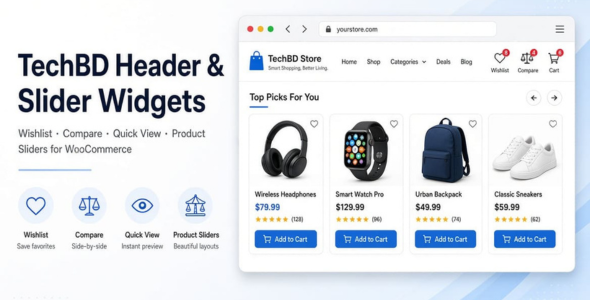
TechBD Header & Slider Widgets
Modern wishlist, compare, Quick View, header icons, and product carousels for WooCommerce — works with any theme and page builder.
Give your store the tools shoppers expect without changing your theme. TechBD Header & Slider Widgets adds a complete set of frontend features through shortcodes and a clean admin dashboard.
Header icons with live counts: Display Wishlist, Compare, Account, and Cart icons in your header. Badge counts update instantly as customers add or remove products.
Wishlist: Let customers save products for later. Includes a dedicated wishlist page, success and remove popups, quantity controls, Add to Cart, and optional social sharing (Facebook, X, WhatsApp, Pinterest, Email). Works for both guests and logged-in users.
Product comparison: Allow shoppers to compare products side by side on a dedicated compare page, with a live count in the header.
Quick View: Open a product preview modal (image, title, price, short description, and purchase actions) without leaving the current page.
Product sliders & tabs Showcase latest, best-selling, on-sale, featured, top-rated, and other product groups in responsive carousels or tabbed sections — perfect for homepages and landing pages. Optional hover icons (Wishlist, Compare, Quick View, Cart) can be enabled on slider cards.
Simple admin control: Turn features on or off, set colors, icon sizes, popup text, social networks, and custom CSS from the TechBD Widgets settings page. No coding required for everyday use.
[techbd_header_icons]
[techbd_wishlist_page]
[techbd_compare_page]
[techbd_product_slider type="latest" title="New Arrivals" count="10"]
[techbd_product_tabs types="featured,best-selling,top-rated" count="10"]
Slider types: latest, new-arrivals, best-selling, top-rated, featured, on-sale, trending, most-viewed, recommended
Store owners who want wishlist, compare, Quick View, and product carousels without switching themes or buying a heavy all-in-one suite. Agencies and freelancers who need a lightweight, shortcode-based toolkit that works on existing client sites.
Short version (for cards / limited fields):
Wishlist, Compare, Quick View, header icons with live counts, and product sliders for WooCommerce. Works with any theme and page builder. Easy shortcodes + clean admin settings.
Changelog:
TechBD Header & Slider Widgets — Changelog
==========================================
1.0.0
-----
* Marketplace-ready release (GPL-2.0-or-later, full docs, uninstall cleanup)
* Professional plugin headers (WP + WooCommerce compatibility tags)
* Admin dashboard: General, Header Icons, Colors & Style, Popups, Social Share, How to Use, Advanced
* Settings link on the Plugins screen
* Wishlist success/remove popup; cart success popup
* Social share on wishlist page (Facebook, X, WhatsApp, Pinterest, Email)
* Cart-style wishlist layout; compact qty / remove / add-to-cart actions
* Feature flags driven by dashboard settings
* Custom CSS and color variables from settings
3.x
---
* Header icons, wishlist, compare, quick view, hover icons
* Product sliders and product tabs
* Mobile refinements for badges and wishlist UI
Only logged in customers who have purchased this product may leave a review.
 Support by Gani Private Limited
Questions are handled in WPBay's private ticket system, keeping your purchase details and support conversation together.
After purchase, open this item in My Downloads and choose Get Support.
See recent updates, compatibility, support, and developer activity.
Snapshot updated 3 hours ago
This is maintenance data. It does not measure product quality or sales.
Health reflects recent activity during the last 90 days.
The score is out of 100 and uses data WPBay can check. Ratings, popularity, and sales are not used.
Plugins receive full recency points under 30 days, then step down at 90, 180, 365, and 545 days.
WordPress, PHP, and WooCommerce (when relevant) are scored separately. The latest two PHP lines count as current. Nearby previous versions keep most of the points.
One release earns 10, two or three earn 13, and four or more earn 15. Each accepted product ZIP counts once; reprocessing the same upload and listing-only edits do not count.
Based on WPBay login and dashboard activity. Exact last-login dates are never shown.
There are no recent WPBay tickets to measure.
Documentation: 2. Changelog: 1. Working demo or preview: 2.
Score ranges
WPBay also checks for long gaps between updates, developer activity, support replies, and releases. Buyers do not see this score.
No unresolved approval blocker was identified during WPBay’s proportionate review of this release. This is not a security certification or a guarantee that the product contains no defects.
 Future updates
WPBay support from Gani Private Limited
GPL code, proprietary assets
Covered by the WPBay refund policy
Plugin maintenance snapshot
Future updates
WPBay support from Gani Private Limited
GPL code, proprietary assets
Covered by the WPBay refund policy
Plugin maintenance snapshot
Similar products selected by category, features, popularity and freshness.


Reviews
There are no reviews yet.