



Inventory Management in Laravel

 Recently Updated
Well Documented
Sold Only On WPBay
Recently Updated
Well Documented
Sold Only On WPBay
INVENTORY MANAGEMENT SYSTEM
Project Description and User Experience
1. WHAT THIS SYSTEM IS
Inventory Management is a web application designed for businesses that need to track stock, sales, purchases, and related data in one centralized system.
After logging in, users are presented with a dashboard and a sidebar navigation menu.
What each user can see and access depends on permissions assigned by the administrator.
- Some users may only see a few sections.
- Administrators can access all sections and manage users.
This ensures secure access control and role-based functionality.
2. DUMMY LOGIN FOR TESTING
Username: [email protected]
Password: password
3. FEATURES AND USER FUNCTIONALITY
DASHBOARD
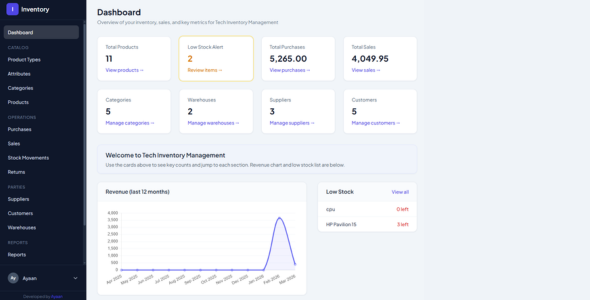
When users open the application, the Dashboard provides a quick overview of system data.
It displays:
- Total number of products
- Low-stock alert count
- Total purchases
- Total sales
- Revenue chart for the last 12 months
The dashboard also shows:
- Products that are running low on stock
-
Quick shortcuts to important sections such as:
- Products
- Categories
- Warehouses
- Suppliers
- Customers
Only users with dashboard permission can access this page.
CATALOG
Product Types
Users can create product types such as:
- CPU
- Laptop
- Monitor
Each product type can have its own custom attributes, making the product catalog well organized.
Attributes
Attributes can be added to product types.
Examples include:
- RAM
- Processor
- Color
Attribute types include:
- Text
- Number
- Select (dropdown)
- Yes / No
When creating a product, users fill in the values for these attributes.
Multiple attributes can be added at once on the create page.
Categories
Users can create categories and subcategories to organize products.
Categories help with:
- Filtering
- Product organization
- Easier navigation in the catalog
Products
Users can:
- Add products
- Edit products
- View product details
- Delete products
Each product includes:
- Product type
- Category (optional)
- Name
- Price
- Quantity
- Product image (optional)
Users can also define a minimum stock level.
If stock falls to or below this level, the system automatically marks the product as low stock.
Product list features include:
- Search
- Sorting
- Filtering by product type
- Low-stock filter
Products can also be imported using a CSV file.
Only users with product permissions can access this section.
OPERATIONS
Purchases
Purchases represent orders made from suppliers.
Each purchase includes:
- Supplier
- Purchase date
- Product line items
- Quantity
- Unit price
Users can:
- Create purchases
- Edit purchases
- View purchase records
- Print purchase PDF
When a purchase is recorded, stock quantity automatically increases.
Only users with purchase permissions can access this section.
Sales
Users can create sales invoices.
Each sale includes:
- Customer (optional walk-in customer)
- Warehouse
- Date
- Products
- Quantity
- Sale price
During sale creation, the system displays in real time:
- Purchase price
- Current stock
- Remaining quantity
- Profit
Once the sale is saved:
- Stock is automatically reduced
Users can also view sales and print invoices.
Only users with sales permissions can access this section.
Stock Movements
Stock movements provide a complete history of inventory changes, including:
- Purchases
- Sales
- Manual adjustments
Users can also create manual stock adjustments to:
- Increase quantity
- Decrease quantity
These adjustments can optionally be linked to a specific warehouse.
Only users with stock movement permissions can access this section.
Returns
Users can mark products as returned.
Returned products appear in a dedicated Returns section.
Administrators can:
- Add products to returns
- Remove products from returns
Products remain in the returns list until manually removed.
Only users with returns permissions can access this section.
PARTIES
Suppliers
Suppliers represent companies or individuals from whom products are purchased.
Users can:
- Add suppliers
- Edit supplier information
- View supplier details
Suppliers are linked to purchase records.
Only users with supplier permissions can manage suppliers.
Customers
Customers represent individuals or companies who purchase products.
Users can:
- Add customers
- Edit customers
- View customer information
Customers are linked to sales records.
Only users with customer permissions can manage customers.
Warehouses
Warehouses represent storage locations for inventory.
Users can:
- Add warehouses
- Edit warehouses
- View warehouse details
Warehouses are used in:
- Sales
- Stock movements
Only users with warehouse permissions can manage warehouses.
REPORTS
The system provides several business reports, including:
- Sales report (date range filter)
- Purchases report (date range filter)
- Profit and loss report
- Product profit report
- Customer sales summary
- Supplier report
The system also maintains Activity Logs, which record actions performed in the system.
Only users with report and activity log permissions can access these sections.
ADMIN: USERS AND PERMISSIONS
Users with Manage Users permission can access the Users and Permissions section.
Administrators can:
- Create new users
- Assign permissions
- Control system access
New users require:
- Name
- Password
Administrators can specify which sections each user can access.
Example:
Staff User
- Products
- Sales
Admin User
- Full system access
- Users & Permissions management
When a user logs in, they are automatically redirected to the first section they have permission to access.
Only users with Manage Users permission can access this area.
PROFILE
Every logged-in user can access their profile page.
Users can:
- Update name
- Update email
- Change password
Users can also log out using the sidebar.
User registration can be disabled, allowing only administrators to create new accounts.
USER EXPERIENCE
Users experience the following when using the system:
- Single login access
- Sidebar showing only allowed sections
-
Clean layout
- Sidebar navigation
- Main content area
- Card and table-based design
The system provides real-time feedback where needed.
Example:
On the sales page, profit and remaining stock update automatically as users enter:
- Sale price
- Quantity
Additional usability features include:
- Search functionality
- Filters on product lists
- Low-stock indicators
- Product type filters
Product images are:
- Stored securely
- Displayed correctly on detail and edit pages
- Served in a way that works even when servers block direct storage access
When administrators assign permissions to users:
- Unauthorized sections do not appear in the menu
- Direct access to restricted pages is blocked
SUMMARY
The Inventory Management System enables businesses to efficiently manage:
- Product types
- Product attributes
- Categories
- Products
- Purchases
- Sales
- Inventory stock
The system also helps manage:
- Suppliers
- Customers
- Warehouses
- Product returns
Additionally, it provides powerful reports and activity logs for business insights.
Administrators can create users and fully control system access through permissions.
The application is designed for daily business use, focusing on:
- Simplicity
- Security
- Clear user permissions
- Reliable performance on both local and live hosting environments.
Only logged in customers who have purchased this product may leave a review.
Loading...
Email support
 Support by Ayaandev
Support by Ayaandev
Ayaandev provides support by email
Contact the seller directly by email for product questions and issue reports.
Email support
Opens your default email app.
What support includes
- Answers to product-related questions
- Help with reported bugs and issues
- Guidance for included third-party assets
What support does not include
- Customizations or new features
- Installation or setup services
Script
Maintenance snapshot
See recent updates, compatibility, support, and developer activity.
- Updated 54 days ago
- Email support available
- Alpine.js
- Documentation available
Snapshot updated 4 hours ago
View details Hide details
Maintenance details
This is maintenance data. It does not measure product quality or sales.
- Last update Updated 54 days ago
- Compatibility Not used for scripts
- Releases 1 release in the 192 days since listing
- Developer activity No recent developer activity
- Support Support is offered by email, not through WPBay tickets
- Docs and demo Documentation available · Changelog missing · Demo available
Health reflects recent activity during the last 90 days.
How this snapshot works
Script Health
The score is out of 100 and uses data WPBay can check. Ratings, popularity, and sales are not used.
- Last update 35 points
-
Scripts receive full recency points under 45 days, then step down at 120, 240, 365, and 545 days.
- Compatibility Not scored
-
Scripts do not use WordPress or PHP, so compatibility is not scored.
- Releases 20 points
-
One release earns 14, two or three earn 18, and four or more earn 20. Each accepted product ZIP counts once; reprocessing the same upload and listing-only edits do not count.
- Developer activity 20 points
-
Based on WPBay login and dashboard activity. Exact last-login dates are never shown.
- Support Not scored
-
WPBay cannot measure response times for email or support on another site, so support is not scored.
- Docs and demo 10 points
-
Documentation: 3. Changelog: 1. Working demo or preview: 6.
Score ranges
- 90–100 Excellent
- 75–89 Healthy
- 60–74 Fair
- 40–59 Needs attention
- 0–39 Limited
Long gaps
WPBay also checks for long gaps between updates, developer activity, support replies, and releases. Buyers do not see this score.
- Time since update 45 points
- Last developer activity 30 points
- WordPress compatibility Not scored
- Support replies Not scored
- Fewer releases 10 points
-
Quality verified by WPBay
WPBay review- Reviewed version
- Current release
- Review completed
- Reviewer
- CodeRevolution
- Review type
- Initial
No unresolved approval blocker was identified during WPBay’s proportionate review of this release. This is not a security certification or a guarantee that the product contains no defects.
-
 Future updates
-
Email support from Ayaandev
-
GPL code, proprietary assets
-
Covered by the WPBay refund policy
-
Script maintenance snapshot
Relevant picks
You may also like
Similar products selected by category, features, popularity and freshness.

Reviews
There are no reviews yet.