



FormCourier CRM PRO – WordPress Forms to CRM

 Recently Updated
Well Documented
Recently Updated
Well Documented
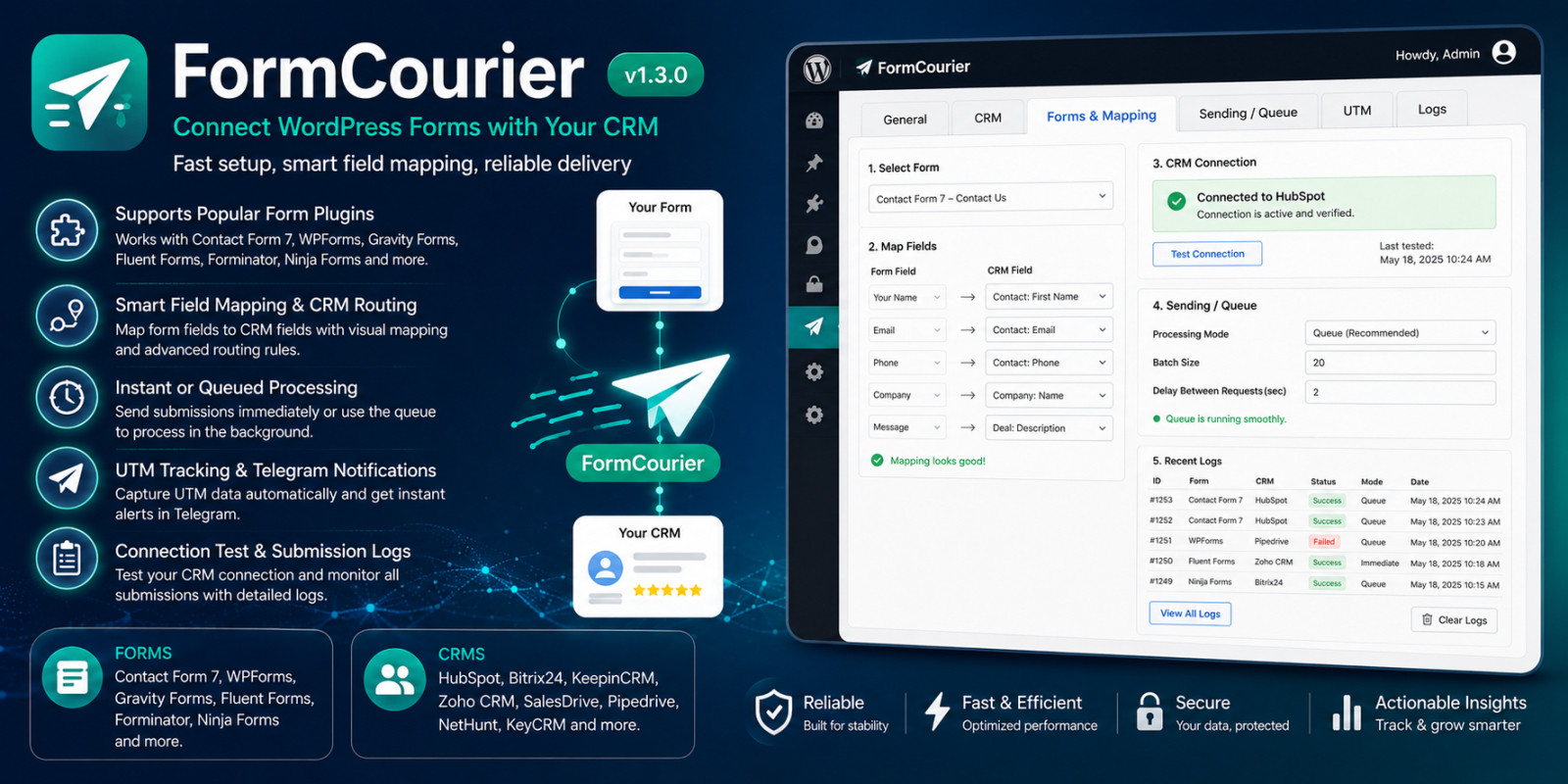
Connect WordPress Forms to Popular CRM Systems
FormCourier CRM PRO sends form submissions from WordPress directly to your CRM. Configure field mapping, process submissions through a reliable background queue, track UTM parameters, receive Telegram notifications and review detailed diagnostic information from one interface.
Supported WordPress Form Plugins
- Contact Form 7
- WPForms
- Fluent Forms
- Forminator
- Ninja Forms
- Gravity Forms
Supported CRM Systems
- HubSpot CRM
- Bitrix24
- KeepinCRM
- Zoho CRM
- SalesDrive
- Pipedrive
- NetHunt
- KeyCRM
Main Features
- Visual mapping between form fields and CRM fields
- Global mapping and individual mapping for specific forms
- Immediate sending, background sending and queue-only modes
- Automatic retries with configurable limits and retry delays
- Background queue with failed and inactive submission management
- Submission logs with request, response and processing history
- UTM source, medium, campaign, term and content tracking
- Landing page, referrer, form ID and form name tracking
- Optional gclid and fbclid attribution
- Privacy-aware tracking modes with consent support
- Custom Telegram notification templates
- Masked sensitive data in logs and diagnostic reports
- Encrypted storage for credentials and queued payloads
- Built-in CRM connection testing
- System diagnostics with a downloadable technical report
- Automatic cleanup for old logs and processed queue records
- English, Ukrainian and Russian interface translations
Reliable Background Processing
FormCourier CRM PRO can save submissions to a queue before sending them to the selected CRM. Failed requests can be retried automatically with configurable batch size, maximum attempts and retry delay.
Administrators can review sent, pending, failed and inactive submissions, inspect processing history and manually retry selected records.
Visual Field Mapping
Connect any supported form field to the appropriate CRM field. You can create a default mapping for all forms or configure separate mappings for individual form IDs.
UTM Tracking and Privacy
Choose between tracking the current page without cookies, storing attribution after visitor consent, always storing attribution in a cookie or disabling tracking completely.
The plugin can automatically capture standard UTM parameters, landing page, referrer, form information and optional advertising click identifiers.
Telegram Notifications
Send customizable notifications to a Telegram group or channel. Message templates support form data, CRM information, UTM parameters and additional submission fields.
Logs and Diagnostics
Review CRM requests, responses and submission history from the WordPress administration area. Sensitive values such as API keys, tokens, authorization headers and webhook secrets can be masked automatically.
The built-in system status page checks the WordPress environment, PHP version, OpenSSL, HTTPS, WP-Cron, queue status and integration configuration.
System Requirements
- WordPress 6.0 or newer
- PHP 7.4 or newer
- PHP OpenSSL extension for encrypted credentials and queue payloads
- At least one supported form plugin
- CRM account and valid API credentials
- HTTPS is recommended for production websites
Documentation
The download package includes complete offline documentation with installation instructions, configuration examples, troubleshooting information and descriptions of all supported integrations.
Documentation is also available directly from the WordPress Plugins page through the built-in View details link.
Marketplace License
No additional license key activation is required for marketplace customers. All plugin features are available after installation. Updates can be downloaded from the customer’s marketplace account.
Included Files
- Installable WordPress plugin ZIP
- Complete HTML documentation
- Installation guide
- License information
- Changelog
Quality and Compatibility
FormCourier CRM PRO 1.3.0 includes an automated release process, production archive validation and more than 400 automated tests covering integrations, mapping, queues, diagnostics, security and release packaging.
Features
- Connects 6 popular WordPress form plugins to 8 CRM systems
- Supports Contact Form 7, WPForms, Fluent Forms, Forminator, Ninja Forms and Gravity Forms
- Integrates with HubSpot CRM, Bitrix24, KeepinCRM, Zoho CRM, SalesDrive, Pipedrive, NetHunt and KeyCRM
- Visual mapping between form fields and CRM fields
- Default field mapping and individual mapping for specific forms
- Immediate sending, background sending and queue-only modes
- Reliable background queue with automatic retry attempts
- Configurable queue batch size, maximum attempts and retry delay
- Manual retry for failed and inactive submissions
- Submission logs with request, response and processing history
- Automatic masking of API keys, tokens, webhook URLs and sensitive data
- Encrypted storage for CRM credentials and queued submissions
- UTM source, medium, campaign, term and content tracking
- Landing page, referrer, form ID and form name tracking
- Optional gclid and fbclid attribution
- Privacy-aware tracking with cookie consent support
- Custom Telegram notification templates
- Built-in CRM connection testing
- System diagnostics with downloadable technical reports
- Automatic cleanup of old logs and processed queue records
- Built-in offline HTML documentation
- English, Ukrainian and Russian interface translations
- No additional license key activation required for marketplace customers
Requirements
- WordPress 6.0 or newer
- PHP 7.4 or newer
- PHP OpenSSL extension for encrypted credentials and queued payloads
- At least one supported WordPress form plugin installed and activated
- An account and valid API credentials for the selected CRM system
- WordPress administrator access for installation and configuration
- WP-Cron or a server cron job for background queue processing
- HTTPS is recommended for production websites and external API communication
- A modern web browser with JavaScript enabled
Instructions
- Download the purchased package and extract it on your computer.
- Open the Plugin folder inside the downloaded package.
- In WordPress, go to Plugins > Add New > Upload Plugin.
- Upload the included formcourier-crm-pro-1.3.0.zip file.
- Click Install Now and then activate FormCourier CRM PRO.
- Open in the WordPress administration menu.
- Enable CRM integration on the General tab.
- Select the installed form plugin and the CRM provider you want to use.
- Open the CRM tab and enter the required API credentials.
- Use the built-in connection test to verify the CRM configuration.
- Open Forms & Mapping and map form fields to CRM fields.
- Configure immediate or background processing under Sending / Queue.
- Optionally configure UTM tracking and Telegram notifications.
- Save the settings and submit a test form.
- Open the submission logs to confirm that the test record was created in the CRM.
Complete installation, configuration and troubleshooting instructions are included in the downloadable HTML documentation.
The built-in documentation can also be opened from the WordPress Plugins page by clicking View details next to FormCourier CRM PRO.
Only logged in customers who have purchased this product may leave a review.
Loading...
WPBay support
 Support by Denslav Plugin
Support by Denslav Plugin
Denslav Plugin supports this product through WPBay
Questions are handled in WPBay's private ticket system, keeping your purchase details and support conversation together.
Go to My Downloads
After purchase, open this item in My Downloads and choose Get Support.
What support includes
- Answers to product-related questions
- Help with reported bugs and issues
- Guidance for included third-party assets
What support does not include
- Customizations or new features
- Installation or setup services
Plugin
Maintenance snapshot
See recent updates, compatibility, support, and developer activity.
- Updated 49 days ago
- Developer active recently
- WPBay support available
- WordPress 7.1 tested
Snapshot updated 4 hours ago
View details Hide details
Maintenance details
This is maintenance data. It does not measure product quality or sales.
- Last update Updated 49 days ago
- Compatibility WordPress 7.1 tested · PHP 8.5 tested
- Releases 2 releases in the 50 days since listing
- Developer activity Developer active recently
- Support No recent support tickets to measure
- Docs and demo Documentation available · Changelog missing · No demo listed
Health reflects recent activity during the last 90 days.
How this snapshot works
Plugin Health
The score is out of 100 and uses data WPBay can check. Ratings, popularity, and sales are not used.
- Last update 30 points
-
Plugins receive full recency points under 30 days, then step down at 90, 180, 365, and 545 days.
- Compatibility 20 points
-
WordPress, PHP, and WooCommerce (when relevant) are scored separately. The latest two PHP lines count as current. Nearby previous versions keep most of the points.
- Current version 100%
- One version behind 75%
- Two versions behind 50%
- Three versions behind 25%
- Older or not listed 0%
- Releases 15 points
-
One release earns 10, two or three earn 13, and four or more earn 15. Each accepted product ZIP counts once; reprocessing the same upload and listing-only edits do not count.
- Developer activity 15 points
-
Based on WPBay login and dashboard activity. Exact last-login dates are never shown.
- Support 15 points
-
There are no recent WPBay tickets to measure.
- Docs and demo 5 points
-
Documentation: 2. Changelog: 1. Working demo or preview: 2.
Score ranges
- 90–100 Excellent
- 75–89 Healthy
- 60–74 Fair
- 40–59 Needs attention
- 0–39 Limited
Long gaps
WPBay also checks for long gaps between updates, developer activity, support replies, and releases. Buyers do not see this score.
- Time since update 35 points
- Last developer activity 25 points
- WordPress compatibility 15 points
- Support replies 15 points
- Fewer releases 10 points
-
Quality verified by WPBay
WPBay review- Reviewed version
- 1.3.0
- Review completed
- Reviewer
- CodeRevolution
- Review type
- Initial
No unresolved approval blocker was identified during WPBay’s proportionate review of this release. This is not a security certification or a guarantee that the product contains no defects.
-
 Future updates
-
WPBay support from Denslav Plugin
-
GPL code, proprietary assets
-
Covered by the WPBay refund policy
-
Plugin maintenance snapshot
Relevant picks
You may also like
Similar products selected by category, features, popularity and freshness.




From this seller
View seller store
More by Denslav Plugin
Explore more bestselling products from this creator.
Reviews
There are no reviews yet.