



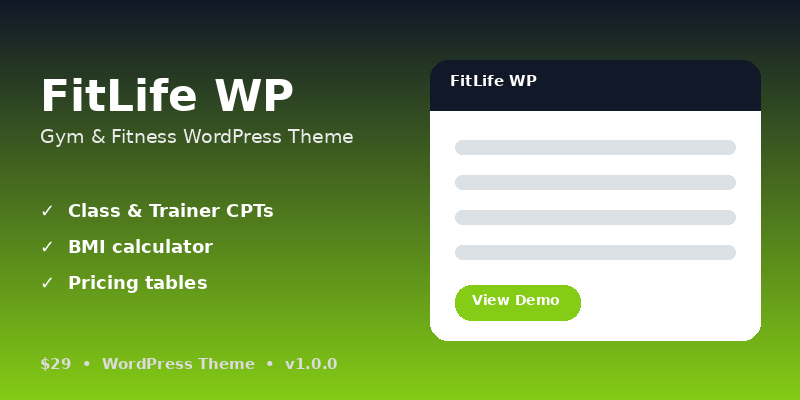
FitLife WP — Gym & Fitness WordPress Theme

 Recently Updated
Well Documented
FitLife WP — Gym & Fitness WordPress Theme
FitLife WP: gym & fitness WordPress theme — classes, trainers, BMI calculator, pricing & demo content.
Overview
FitLife WP is a bold, high-energy WordPress theme for gyms, fitness studios, personal trainers and sports clubs. Dark charcoal sections, a lime-green accent and big athletic typography give every page a strong, modern gym look.
Features
- Class post type (via the included FitLife Companion plugin) with a Details field (schedule, trainer, duration and capacity in one line) shown on cards and single pages, plus archive and single class pages
- Trainer post type (via the included FitLife Companion plugin) with a Details field (speciality and experience) shown on cards and single pages, plus archive and single trainer pages
- Pricing tables section with three membership plans and a highlighted popular plan — plan names, prices, currency, billing periods, benefits, the highlighted plan and its badge are all set in the Customizer (Appearance > Customize > FitLife Homepage Sections), with a switch to hide the whole section; “Join Now” buttons link to your Membership page (Customizer page picker / URL / membership slug; omitted when no membership page exists)
- BMI calculator section with instant JavaScript results and a weight-range label (Underweight / Healthy weight / Overweight / Obese) — decimal weights and heights accepted, result to one decimal with a matching label
- Customizer: primary colour, phone (header tel: link), email, hero title (falls back to your site name), hero badge text (leave empty to hide the badge), hero text, opening hours and social links (email and social links render in the footer when filled in), plus membership link and button text and Contact / Blog / Membership page pickers; a second panel (FitLife Homepage Sections) holds the show/hide switches and heading/text settings for every homepage section, the membership plans and your own testimonial (the theme ships with no testimonial text, so no fictional feedback is shown)
- Classes grid, trainers grid, testimonial, blog and call-to-action sections on the homepage, plus the content of the page assigned as the static homepage (shown above the class grid only when Settings > Reading is set to a static page, switchable in the Customizer)
- Responsive layout, mobile menu with keyboard-accessible sub-menus (desktop hover/focus, mobile chevron toggles, Escape closes the deepest level; closing a parent resets every descendant expansion state, so aria-expanded always matches what is visible), visible skip link on focus, accessible default action colours (dark text on lime, 8.98:1; Customizer colours are contrast-checked on light and dark surfaces, 4.5:1), custom logo, menus and widget areas
- Threaded comments with pagination and page links for multi-page posts
- Translation-ready (text domain: fitlife-wp)
- Demo content (WXR 1.2) with 4 pages, 4 classes, 3 trainers, 3 blog posts and a populated Primary menu
What is included
- Theme folder (fitlife-wp/)
- FitLife Companion plugin (fitlife-companion.zip — install and activate first; registers the Classes and Trainers content types and their category taxonomy)
- demo-content.xml (WXR 1.2 demo content: 4 pages, 4 classes, 3 trainers, 3 blog posts and a populated Primary menu)
- documentation.txt (installation, Customizer, demo import, troubleshooting and support)
- Bundled images — no hotlinked images, no copyrighted assets
Requirements
- WordPress 6.0 or higher (tested up to 6.7)
- PHP 8.1 or higher
- MySQL 5.7+ or MariaDB 10.3+
- Optional: WordPress Importer plugin (free, for demo content)
Instructions
- Install the companion plugin first: download fitlife-companion.zip from the product’s Companion Plugins file, then in your WordPress dashboard go to Plugins > Add New > Upload Plugin. Choose fitlife-companion.zip, click “Install Now”, then “Activate Plugin”. (This registers the Classes and Trainers content types.)
- Upload the downloaded package (main.zip) itself — it carries only the theme folder (fitlife-wp/) at its top level. Do NOT unzip it first to look for a theme file inside; there is none.
- In your WordPress dashboard go to Appearance > Themes > Add New > Upload Theme.
- Choose main.zip and click “Install Now”.
- Click “Activate” to activate FitLife WP.
- Go to Settings > Permalinks and click “Save Changes” once (registers the custom post type URLs).
- Go to Tools > Import > WordPress, install the WordPress Importer if asked, and import demo-content.xml (inside the theme folder).
- Go to Settings > Reading: set “Your homepage displays” to “A static page”, Homepage = Home, Posts page = Blog.
- Go to Appearance > Menus and assign your menu to the “Primary Menu” location.
- Go to Appearance > Customize > FitLife WP Settings and set your colours, phone, email, hero text, opening hours, social links and membership link. Pick your Contact / Blog / Membership pages here if you have (or renamed) those pages.
- Add widgets under Appearance > Widgets (Blog Sidebar and the three footer columns) if you want them.
- Upload featured images for your items (Media > Add New, JPG or PNG). Until you do, the cards show no image.
Support
For help installing or customising the theme, contact the seller through WPBay: open the FitLife WP product page on WPBay while logged in to your WPBay account and use the “Contact Seller” / message option there, or go to WPBay > My Orders, find your FitLife WP order and message the seller from the order. Please include your WordPress version, PHP version, the theme version (1.1.11) and a screenshot of the issue. Free support covers installation and bug fixes. Custom design changes and new features are available as paid customisation.
Changelog
v1.1.12 — 2026-11-27 – Fixed (WPBay review): the theme header said Tested up to 6.7 while the listing and documentation said tested up to 6.7 — the theme header now says Tested up to 6.7.x, and the listing and documentation say the same, matching common marketplace practice. The WPBay listing’s WordPress compatibility field must be set to 6.7.x at resubmission. No code change — the shipped theme is unchanged apart from the version identifiers. Verified: the rebuilt packages pass php -l on all files and testzip clean, and documentation.zip is byte-identical to the shipped documentation.txt (version 1.1.12). v1.1.11 — 2026-11-26
– Fixed (WPBay review): every article element now prints the core WordPress post classes — template-parts/content-post.php and content-item.php use post_class( ‘card’ ) (keeping the existing ‘card’ class) and single.php, page.php, single-fitlife_class.php and single-fitlife_trainer.php use post_class(), each with id=”post-” plus the post ID, so the blog index, archives, search results, single posts, pages and single classes/trainers all render post-, type-, status- and hentry classes (and .sticky on sticky posts). The front-page and index loops render through content-post.php / content-item.php, so the fix there covers them.
– Fixed (WPBay review): the Classes and Trainers content types no longer live in the theme — the FitLife Companion plugin (fitlife-companion.zip, supplied as the product’s Companion Plugins file) now registers the fitlife_class and fitlife_trainer post types, the fitlife_wp_category taxonomy and their Details meta, with the same slugs and labels, so existing content and demo content keep working and survive a theme switch. Install and activate the companion plugin first, then the theme; the theme shows a dashboard warning while the plugin is inactive.
– Verified by harness: 45 checks pass (PHP, stubbed WordPress) — see the documentation changelog.
– Version identifiers unified at 1.1.11 (theme and companion plugin).
v1.1.10 — 2026-11-25
– Fixed (WPBay review): the homepage page-content block no longer prints post bodies when the front page shows the latest posts — it now renders only when the front page really is a static page (is_front_page() and show_on_front is ‘page’) and the Customizer switch is on, so with “Your latest posts” only the hero, classes, trainers, pricing, BMI, testimonial and Latest News sections appear; with a static homepage its content still renders once above the class grid, and turning the switch off still hides it.
– Fixed (WPBay review): the documentation ZIP is regenerated from the shipped 1.1.10 guide — header, support line and changelog now name 1.1.10, with the HOMEPAGE SECTIONS section and the v1.1.9 changelog entry present. The uploaded copy was one version behind the package.
– Verified by harness: 21 checks pass (PHP, stubbed WordPress) — see the documentation changelog.
– Version identifiers unified at 1.1.10.
v1.1.9 — 2026-11-24
- Fixed (WPBay review): membership pricing is now fully configurable in the Customizer (Appearance > Customize > FitLife Homepage Sections) — plan names, prices, currency, billing periods, benefits (one per line), the highlighted plan and its badge — plus a switch to hide the whole pricing section. No more editing front-page.php; the defaults reproduce the previous Starter $19 / Pro $39 / Elite $59 plans exactly.
- Fixed (WPBay review): the homepage testimonial and its attribution are now Customizer settings with a switch to hide the section, and the theme ships with NO testimonial text at all — no fictional customer feedback is ever shown as website content. Write your own real testimonial (or leave the text empty and the section is not printed).
- Fixed (WPBay review): the homepage now renders the content of the page assigned as the static homepage (Settings > Reading), above the class grid, with a Customizer switch to hide it; every homepage section (classes, trainers, pricing, BMI calculator, testimonial, blog) has its own heading/text settings and a show/hide switch in Appearance > Customize > FitLife Homepage Sections.
- Fixed (WPBay review): the demo Primary menu’s Classes and Trainers items are now post-type archive links (fitlife_class / fitlife_trainer) instead of root-relative custom links, so they resolve correctly on subdirectory installs and with plain permalinks — no post-import menu fix-up is needed. Sections 2 and 5 say so.
- Fixed (WPBay review): on small screens an open menu item now shows only its immediate submenu (child combinator in the CSS) and rotates only its own chevron; closing a parent submenu (chevron, Escape or closing the navigation) resets every descendant expansion state, so aria-expanded and visibility stay in agreement on a three-level menu.
- Verified by harness: 65/65 checks pass (33 PHP, stubbed WordPress; 32 Node/jsdom, three-level mobile menu) — see the documentation changelog.
- Version identifiers unified at 1.1.9.
v1.1.8 — 2026-11-23 — Fixed: the saved listing description is now clean buyer-facing copy — the TITLE / SHORT DESCRIPTION / FULL DESCRIPTION / TAGS / PRICE / CATEGORY / DEVELOPMENT HOURS / DEMO URL NOTE scaffolding labels and the DEMO URL NOTE / DEVELOPMENT HOURS / PRICE / CATEGORY / TAGS blocks are removed, keeping only the buyer-facing title, short description and full description (Overview, Features, Requirements, Instructions, Changelog). No hosted demo is provided, so the description says nothing about demos. A ‘What is included’ list and a support route are added. Version identifiers unified at 1.1.8.
v1.1.7 — 2026-11-22 — Fixed: the theme’s own sales description no longer appears in the buyer’s footer or hero — the footer paragraph now shows the site tagline (get_bloginfo( ‘description’ ), hidden when empty) and the hero text falls back to the site tagline when the Hero Text setting is empty (the paragraph is hidden when there is no tagline either). Saving a distinct Hero Text in Appearance > Customize > FitLife WP Settings still replaces the default, and clearing it returns to the tagline. No empty paragraph or dangling markup is printed. Version identifiers unified at 1.1.7.
v1.1.6 — 2026-11-22 — Fixed: main.zip now contains exactly one top-level directory (fitlife-wp/) — the documentation.txt that used to sit beside the theme folder at the archive root is removed, so uploading main.zip as the theme works (‘Theme installed successfully’); the documentation still ships inside the theme folder and in documentation.zip. Fixed: the demo Primary menu’s Classes and Trainers items are now relative custom links (/fitlife_class/ and /fitlife_trainer/) instead of https://example.com URLs, so after import they resolve to the buyer’s own class and trainer archives on any domain. Version identifiers unified at 1.1.6.
v1.1.5 — 2026-11-21 — Fixed: the homepage hero no longer prints the Hero Title twice — the badge is now its own optional Hero Badge Text setting (default “Gym · Fitness · Community”, empty hides it), the H1 falls back to the site name when Hero Title is empty, and the hero text default no longer names the theme. Fixed: the theme now really flushes rewrite rules on activation — the class and trainer post types are registered first, then flush_rewrite_rules() runs in an after_switch_theme callback — so the troubleshooting advice matches the code. Version identifiers unified at 1.1.5.
v1.1.4 — 2026-11-21 — Fixed: the registered Footer Menu location is now rendered in the footer (labelled nav, above the copyright line); the header now shows the site name (last word in the accent span) instead of the hardcoded theme name when no custom logo is set, and the footer heading and copyright line use the site name too; the Blog Sidebar now actually shows on archive and search pages (archive.php and search.php render get_sidebar() in the same .content-area grid layout as index.php). Version identifiers unified at 1.1.4.
v1.1.3 — 2026-11-20
- Customizer colour guard now covers dark surfaces too: accent text on dark backgrounds (BMI result, site-title accent, navigation hover) uses a lightened variant of the chosen colour that reaches at least 4.5:1 against the dark background, mirroring the existing darkened variant for light backgrounds; documentation now states exactly what is guarded.
- Duplicate stylesheet removed: all theme styles live in assets/css/main.css, the only stylesheet enqueued; style.css carries the WordPress theme header only. The rendered page is unchanged.
- Details renderer no longer prints its own paragraph: it returns the escaped detail text and the templates keep the one <p class=”meta”> wrapper, so cards and single pages have no nested paragraphs; an empty Details field prints no empty paragraph.
- Demo file corrected: demo-content.xml no longer claims the theme shows built-in fallback images — cards show no image until a featured image is set, as the code, documentation (sections 2 and 5) and listing already said; the advice to upload the bundled PNGs and set featured images is unchanged.
- Version identifiers unified at 1.1.3.
v1.1.2 — 2026-11-20
- Password protection now covers the Details field (hidden in cards and single pages, including the whole Details panel, until the password is accepted).
- Calls to action use Customizer Contact / Blog / Membership page pickers (with published-slug fallback); header phone links to a working tel: destination; Join/enquiry buttons omitted when no destination exists.
- Mobile sub-menus keep ancestor branches open (third-level items reachable), Escape closes the deepest level, announced state matches visibility; docs now match the implementation (desktop hover/focus, mobile chevrons).
- Accessible default colours (dark text on lime 8.98:1, darkened accent text 4.99:1, meta 7.0:1) with the same contrast guard applied to Customizer colour choices; skip link reveals on focus.
- BMI accepts decimals, rejects non-finite/out-of-range values, categorises on the rounded one-decimal result.
- Translation: remaining footer defaults use the fitlife-wp text domain; JavaScript strings localised as plain text for textContent.
- Ordering: classes/trainers support the Menu Order field; homepage grids order by menu order, then title.
- Installation/docs now match the delivered package: upload main.zip itself (theme folder at top level; no theme zip inside it). Version identifiers unified at 1.1.2.
v1.1.0 — 2026-11-18
v1.1.1 — 2026-11-18 — Replaced placeholder example.com Plugin/Theme URI and Author URI with the real Digishop store URL (WPBay review fix).
- Demo content rebuilt as a valid WXR 1.2 file (the 1.0.0 file failed to parse — a bare “&” in a class slug broke the XML); now includes 4 pages, a populated Primary menu and proper menu assignments.
- Installation docs rewritten to match the package: unzip main.zip first and upload fitlife-theme.zip, NOT main.zip; troubleshooting section and WPBay support route added. (Note: that layout was incorrect — corrected in v1.1.2: upload main.zip itself.)
- Feature claims corrected to match the code: class/trainer Details are one free-text field each (no separate trainer social-link fields, no class timetable); BMI weight-range label described as a guide only.
- Email and social Customizer settings now render in the footer (mail link + Facebook/Instagram links, only when filled in).
- Mobile menu toggle is now one working controller (toggles nav, updates aria-expanded, Escape/outside-click close) with keyboard-accessible sub-menu chevron toggles.
- Membership “Join Now” buttons now link to the Membership page (/membership/) by default, configurable in the Customizer — no more “#” placeholders.
- All user-facing strings translation-ready (text domain fitlife-wp) in PHP and JavaScript (via wp_localize_script).
- Comment pagination (paginate_comments_links) and multi-page content links (wp_link_pages) added; header now calls wp_body_open().
v1.0.0 — 2026-11-17
- Initial release: full WordPress theme with custom post types, Customizer, widget areas, templates, demo content and documentation.
Changelog:
v1.1.12 — 2026-11-27
- Fixed (WPBay review): the theme header said Tested up to 6.7 while the listing and documentation said tested up to 6.7 — the theme header now says Tested up to 6.7.x, and the listing and documentation say the same, matching common marketplace practice. The WPBay listing's WordPress compatibility field must be set to 6.7.x at resubmission. No code change — the shipped theme is unchanged apart from the version identifiers. Verified: the rebuilt packages pass php -l on all files and testzip clean, and documentation.zip is byte-identical to the shipped documentation.txt (version 1.1.12).
Only logged in customers who have purchased this product may leave a review.
Loading...
WPBay support
 Support by Digishop
Digishop supports this product through WPBay
Questions are handled in WPBay's private ticket system, keeping your purchase details and support conversation together.
Go to My Downloads
After purchase, open this item in My Downloads and choose Get Support.
What support includes
- Answers to product-related questions
- Help with reported bugs and issues
- Guidance for included third-party assets
What support does not include
- Customizations or new features
- Installation or setup services
Theme
Maintenance snapshot
See recent updates, compatibility, support, and developer activity.
- Updated today
- Developer active recently
- WPBay support available
- Documentation available
Snapshot updated 1 hour ago
View details Hide details
Maintenance details
This is maintenance data. It does not measure product quality or sales.
- Last update Updated today
- Compatibility WordPress 6.7 tested, several versions behind · PHP 8.1 tested, three versions behind
- Releases 13 releases in the 10 days since listing
- Developer activity Developer active recently
- Support No recent support tickets to measure
- Docs and demo Documentation available · Changelog available · No demo listed
Health reflects increased activity during the last 90 days.
How this snapshot works
Theme Health
The score is out of 100 and uses data WPBay can check. Ratings, popularity, and sales are not used.
- Last update 25 points
-
Themes receive full recency points under 60 days, then step down at 120, 240, 365, and 545 days.
- Compatibility 20 points
-
WordPress, PHP, and WooCommerce (when relevant) are scored separately. The latest two PHP lines count as current. Nearby previous versions keep most of the points.
- Current version 100%
- One version behind 75%
- Two versions behind 50%
- Three versions behind 25%
- Older or not listed 0%
- Releases 10 points
-
Themes often update less frequently: one release earns 7, two earn 9, and three or more earn 10. Each accepted product ZIP counts once; reprocessing the same upload and listing-only edits do not count.
- Developer activity 15 points
-
Based on WPBay login and dashboard activity. Exact last-login dates are never shown.
- Support 15 points
-
There are no recent WPBay tickets to measure.
- Docs and demo 15 points
-
Documentation: 4. Changelog: 1. Working demo or preview: 10.
Score ranges
- 90–100 Excellent
- 75–89 Healthy
- 60–74 Fair
- 40–59 Needs attention
- 0–39 Limited
Long gaps
WPBay also checks for long gaps between updates, developer activity, support replies, and releases. Buyers do not see this score.
- Time since update 35 points
- Last developer activity 25 points
- WordPress compatibility 15 points
- Support replies 15 points
- Fewer releases 10 points
-
Quality verified by WPBay
WPBay review- Reviewed version
- 1.1.12
- Review completed
- Reviewer
- CodeRevolution
- Review type
- Initial
No unresolved approval blocker was identified during WPBay’s proportionate review of this release. This is not a security certification or a guarantee that the product contains no defects.
-
 Future updates
-
WPBay support from Digishop
-
GPL code, proprietary assets
-
Covered by the WPBay refund policy
-
Theme maintenance snapshot
Relevant picks
You may also like
Similar products selected by category, features, popularity and freshness.


From this seller
View seller store
More by Digishop
Explore more bestselling products from this creator.


Reviews
There are no reviews yet.