



3D Product Presenter

 Recently Updated
Well Documented
Sold Only On WPBay
Recently Updated
Well Documented
Sold Only On WPBay
About
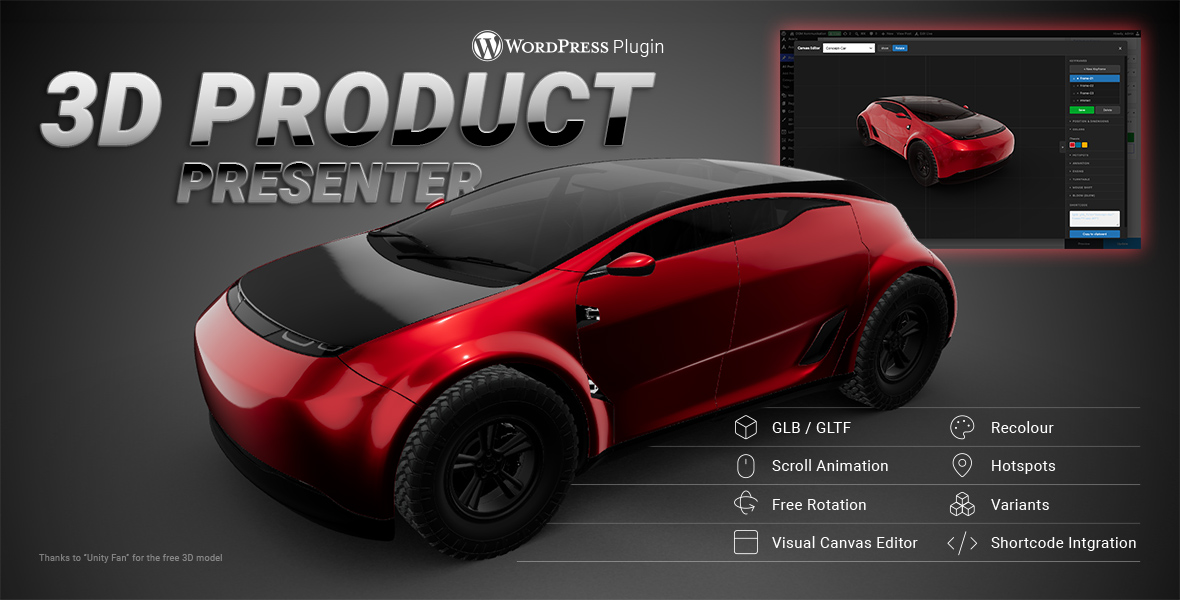
3D Product Presenter for WordPress is a visual plugin for creating interactive GLB/GLTF 3D product presentations.
It allows you to upload 3D models, create visual states as frames, animate them with scroll, trigger changes with clicks, add hotspots, switch product variants, and build more engaging product showcases without creating a custom Three.js scene from scratch.
The plugin is designed for product pages, landing pages, digital showrooms, configurator-style presentations, and interactive 3D storytelling.
Key Features
Visual Canvas Editor
Set up your 3D model in a visual editor.
Position, rotate and scale your model, prepare scene states, create frames, and control how the model appears in different parts of the presentation.
Frames / Keyframes
Save different states of your 3D scene as frames.
Frames can be used for static 3D views, scroll-based transitions, click interactions, product variants, visual effects, and interactive product states.
A frame can store different model and scene settings, such as position, rotation, scale, color, object visibility, variants, effects, and animation states.
Scroll Animation
Create smooth scroll-based 3D animations between frames.
As the visitor scrolls, the model can smoothly change between different states. This can include position, rotation, scale, FOV, Roll, color, visibility, variants, visual effects, and internal model animations.
Click Interactions
Trigger model changes with buttons, links, or page elements.
Use click interactions to change colors, switch variants, show or hide objects, start model animations, or move the 3D scene into another prepared state.
GLB / GLTF Model Support
Use modern GLB and GLTF 3D models for interactive product presentations.
The plugin is suitable for product models, technical objects, product showcases, configurator-style layouts, and animated 3D page sections.
Product Variants
Create product variants directly from objects inside your 3D model.
Supported variant logic includes:
- either-or variants
- additive variants
- show / hide object controls
- product part switching
- accessory toggles
- visual configuration options
This can be used for wheel rims, attachments, accessories, product modules, alternative parts, or different object versions.
Hotspots
Attach interactive hotspots to parts of your 3D model.
Hotspots can display information, open panels, link to content, or guide visitors through specific product details.
Built-In GLB Animations
Use animations that are already included inside your GLB/GLTF model.
Depending on the setup, internal model animations can be connected to frames, scroll behavior, links, or interactive actions.
Visual Effects and Interaction Tools
Improve the presentation with visual and interaction features such as:
- Bloom / Glow effects
- Rendering Mode settings
- Environment Maps
- Turntable / automatic rotation
- Free Rotation
- Mouse Shift / Parallax
- frontend zoom and interaction options
Typical Use Cases
- interactive 3D product presentations
- scroll-based product reveals
- animated 3D hero sections
- product configurators
- digital showrooms
- landing pages with 3D models
- technical product showcases
- automotive presentations
- visual explainer pages
- interactive product detail sections
Best For
This plugin is especially useful for:
- web agencies
- WordPress designers
- 3D designers
- motion designers
- product marketing teams
- companies with visual or technical products
- developers who want to create interactive 3D presentations without building a custom Three.js scene from scratch
Changelog:
# Changelog
All notable changes to this project are documented in this file.
The format is based on [Keep a Changelog](https://keepachangelog.com/en/1.1.0/),
and this project adheres to [Semantic Versioning](https://semver.org/).
## [0.15.0] - 2026-07-07 — Internationalization (i18n)
### Added
- **Complete internationalization** of the plugin using the WordPress translation system (Gettext): all text in the admin interface, Canvas Editor, shortcode modal, meta boxes, error messages, and frontend viewer (preloader, zoom hint) is now translatable (text domain `3d-product-presenter`, approximately 400 strings).
- New `languages/` directory containing a translation template (`.pot`) as well as completed German translations: `de_DE` and `de_DE_formal` (`.po` + compiled `.mo`). On German websites, the interface remains unchanged in German.
- JavaScript strings are now translated server-side and passed to the scripts as `i18n` objects (`glbAdminPageI18n`, `glbStorytellingData.i18n`, `glbCanvasEditorConfig.i18n`, `glbViewerConfig.i18n`) with English fallbacks if no translation object is available.
### Changed
- **The codebase language is now English** (following WordPress conventions): all previously German source strings have been converted to English. German translations are now provided through language files. Additional languages can easily be created using tools such as Loco Translate or Poedit based on the `.pot` template.
- Added `Domain Path: /languages` to the plugin header. Translation files are now loaded using `load_plugin_textdomain()`.
- Import summary quantities (e.g. "3 Color Group(s)") now use proper pluralization via `_n()`.
---
## [0.14.0] - 2026-07-02 — Import / Export of Settings & Frames
### Added
- New **"Import / Export"** meta box for each 3D model: all settings (colors, variants, hotspots, rendering & environment maps, free rotation, mouse shift, render mode) as well as all Canvas frames can now be **exported** as a `.json` file and **imported** into another model. This makes it easy to reuse the same frames and settings for a new 3D object.
- Import now includes an optional checkbox to also import the GLB file URL (disabled by default), allowing the target model to keep its own 3D asset if desired. All imported values are sanitized server-side using the same validation rules as the regular save process (requires a valid nonce and `edit_post` capability).
### Changed
- Canvas frame sanitization has been consolidated into `GLB_Model_CPT::sanitize_canvasframes()`, which is now shared by both the regular save process and the import functionality, eliminating duplicate logic.
---
## [0.13.0] - 2026-06-29 — Three.js r185 + ES Modules (Major Architecture Upgrade)
> **Summary of the differences compared to 0.12.0 (r147):**
> Up to version 0.12.0, the plugin relied on classic `<script>` loading with the global `window.THREE` namespace and Three.js r147. Starting with version 0.13.0, Three.js **r185** runs as **ES modules via an Import Map** (build-free, locally bundled). Functionality remains the same, but with a more modern renderer, improved color accuracy, new glass effects, and fixes for shader and browser compatibility issues. The r147 version remains available as tag `v0.12.0`.
### Changed
- **Upgraded Three.js from r147 to r185.** This is the largest architectural change in the plugin's history. Three.js is now loaded as an **ES module** using `import` instead of a global `<script>`. Integration is handled through an **Import Map** in the frontend footer and admin footer (Canvas Editor), requiring **no build process or bundler**. Three.js and all addons are bundled **locally** in `assets/vendor/three/`, eliminating runtime CDN dependencies.
- **Minimum WordPress version remains 5.8.** The Import Map is injected manually rather than relying on the Script Modules API introduced in WordPress 6.5.
- **Color management** now follows the r185 defaults using `outputColorSpace` / `SRGBColorSpace` instead of `outputEncoding` / `sRGBEncoding`. Post-processing now finishes with `OutputPass`.
- **Loader modernization:** `RGBELoader` has been replaced with `HDRLoader`. HDR textures now use `HalfFloatType` because r185 no longer supports `UnsignedByteType` for HDR images. The deprecated `DRACOLoader.setDecoderConfig()` has been removed.
- **Asset loading has been restructured:** individual `threejs-*` script handles are no longer required. The Viewer and Canvas Editor now import Three.js and all rendering passes directly. `GLB_Asset_Manager::enqueue_bloom()` is now effectively a no-op since rendering passes are imported as modules. GSAP continues to be loaded as a traditional global script.
### Added
- **New glass rendering features:** `dispersion` (prism/rainbow effect) and `iridescence` (thin-film interference) from r185 are now supported. These effects are automatically used whenever the GLB file contains the corresponding material extensions (such as `KHR_materials_dispersion`). They are not enabled by default and must be configured in the 3D authoring software.
### Fixed
- **Canvas Editor no longer displayed any objects** (regression caused by newer browsers and graphics drivers). The legacy r147 shader failed validation (`CUBEUV_TEXEL_HEIGHT`, `cannot convert from 'const int' to 'highp float'`), preventing rendering. This issue is resolved in r185.
- **Per-keyframe Interact mode now works correctly.** Previously, scrolling immediately disabled free rotation again because keyframes are reached via scrolling. The new `setKeyframeInteract()` implementation remembers the desired interaction state and restores it after scrolling ends, allowing `interact="on"` to remain active at the corresponding keyframe.
## [0.12.0] - 2026-06-27 — Three.js Updated to r147 & True Glass Rendering (Transmission)
### Changed
- **Upgraded Three.js from r128 to r147** (core loaded via cdnjs). This was intentionally a moderate version upgrade **without architectural changes**. The plugin continues to use the global `THREE` namespace and the classic WordPress script loading mechanism (`wp_enqueue_script`). r147 is the last Three.js version that still includes the global add-on modules (`examples/js`). Starting with r148, these are only available as ES modules, which would have required a major refactor. Additionally, r147 predates the color and lighting changes introduced in r152, ensuring that the rendered appearance remains unchanged.
- **Updated all bundled Three.js add-on modules to r147:** `GLTFLoader`, `RGBELoader`, `DRACOLoader`, as well as all post-processing passes (`EffectComposer`, `RenderPass`, `ShaderPass`, `SSAOPass`, `SMAAPass`, `UnrealBloomPass`) including their associated shaders.
### Fixed
- **Glass transmission: Objects behind glass disappeared.** The opacity logic incorrectly set `transparent = true` on **all** materials every frame. This caused two issues: (1) transmission materials (`KHR_materials_transmission`) lost their intended rendering behavior, and (2) **opaque objects were excluded from the transmission buffer**, causing them to disappear behind glass instead of being refracted correctly (Three.js only renders opaque objects into the transmission buffer). Transparency is now enabled **only when scene opacity is below 100%**. At full opacity, the original material state provided by the loader is preserved, allowing refraction and transmission to render correctly.
**Note:** Visible refraction requires **detailed content behind the glass** (such as textured objects or structured environment maps). Uniform backgrounds cannot produce noticeable distortion, and the HTML page behind the transparent canvas cannot be refracted for technical reasons. This fix applies to both the frontend viewer (`glb-viewer.js`) and the Canvas Editor (`glb-canvas-editor.js`).
---
## [0.11.0] - 2026-06-17 — Admin UI Refinements (Light Theme) & Hotspot Improvements
### Added
- **Upload custom hotspot icons:** New **"Custom Image"** option for each hotspot. Icons can now be selected or uploaded via the WordPress Media Library (PNG/SVG). Previously, only the three built-in icons (Info, Plus, Pin) were available. The uploaded image is displayed in the frontend as a circular hotspot button (`icon_url`).
### Changed
- **More consistent admin interface** for both the **"Edit 3D Model"** screen and the plugin settings page. Improvements include consistent spacing, aligned labels and form rows, subtle separators, rounded meta boxes/cards with headers, unified input styling including focus states, and standardized layouts for colors, variants, and hotspots. The overall appearance intentionally remains native to the WordPress admin interface.
- **Unified form typography:** All input fields now use consistent font size and weight. Previously, fields nested inside `<label>` elements incorrectly inherited `font-weight: 600`.
- **Hotspot meta box reorganized:** Section headings have been added above Name/Node/Icon and above the URL field. The fields **"Open In"**, **"Window Width"**, and **"Window Height"** are now displayed on a single row. X/Y/Z offsets are presented as a three-column grid. Panel-specific options (size and hidden classes) are only shown when the hotspot uses Panel mode.
---
## [0.10.0] - 2026-06-17 — Hotspot Windows: Hide CSS Classes
### Added
- **Hide CSS classes inside hotspot windows (per hotspot):** New **"Hide Classes"** field for each hotspot in the **Hotspots** meta box. This option is only available when the link target is set to **"Panel Window (Overlay)"**. CSS classes entered here (comma-separated, leading dots optional) are hidden inside the linked panel content using `display: none`, making it easy to remove elements such as theme headers (`fusion-tb-header`) or footers. This feature works only for content served from the same domain (same-origin).
---
## [0.9.5] - 2026-06-17 — Hotspot Icons Remain Clickable Above Page Content
### Fixed
- **Hotspot icons could be covered by page content.** Previously, hotspot icons existed within the overlay stacking context (`z-index: 999`) and could be obscured by website elements with higher `z-index` values, making them unclickable. Hotspot buttons are now rendered in their own fixed viewport layer directly under `<body>` (`z-index: 9999`, just below the hotspot panel) and positioned using viewport coordinates. As a result, hotspot icons always remain visible and clickable above page content. This change only affects the icons themselves; the 3D model may still be covered by page elements.
### Changed
- When a scene is hidden (for example via `hide_on_mobile`), the hotspot button layer is hidden as well.
---
## [0.9.4] - 2026-06-17 — Hotspots: Link Targets & Window Size
### Added
- **Hotspot link targets:** Each hotspot can now define how its URL should be opened: **Panel Window (Overlay)** (existing behavior), **Same Tab (`_self`)**, or **New Tab (`_blank`)**. When one of the link modes is selected, the URL is opened directly instead of displaying the overlay panel. Configurable per hotspot through the new `link_target` field (default: `panel`).
- **Per-hotspot panel dimensions:** Individual hotspot panels can now define their own width and height (`panel_width` / `panel_height`) using `px`, `%`, `vw`, or `vh`. Leaving these fields empty uses the global default panel size. Size settings are only shown when Panel mode is selected.
### Changed
- The hotspot panel is now centered after being inserted into the DOM using its actual rendered dimensions. This ensures correct positioning even when percentage-, viewport-, or responsive units are used. A hotspot-specific size no longer overwrites the shared default size after manually resizing the panel.
---
## [0.9.3] - 2026-06-16 — Mouse Shift: Touch Gestures & Gyroscope Toggle
### Added
- **Mouse Shift for touch gestures:** On touch devices, the parallax effect now responds to finger movement. Swiping across the screen tilts the model just like mouse movement on desktop. When the touch ends, the model smoothly returns to its resting position. This works independently of the gyroscope and requires no additional configuration.
- **Per-model gyroscope toggle:** New **"Mouse Shift (Parallax)"** meta box with the checkbox **"Use device orientation (gyroscope) on mobile devices"**. This allows the gyroscope-based interaction introduced in version 0.9.2 to be enabled or disabled individually for each model. Enabled by default.
### Changed
- Introduced the new post meta field `_glb_mouse_shift_gyro` (CPT), resolved via `resolve_mouse_shift_gyro()`, and passed to the viewer as the `data-mouse-shift-gyro` attribute. The gyroscope event binding (`_bindTilt`) is now only initialized when this option is enabled.
---
## [0.9.2] - 2026-06-16 — Mouse Shift on Mobile Devices (Gyroscope)
### Added
- **Mouse Shift via device orientation:** Since touch devices do not support mouse hover, the Mouse Shift parallax effect is now controlled using the device's gyroscope (`DeviceOrientation`). Slightly tilting the phone rotates the model in the same way as mouse movement on desktop. The neutral position is calibrated automatically using the first sensor reading. On iOS 13 and later, permission is requested automatically after the first touch. Android devices do not require permission. No new configuration is necessary—the existing **Mouse Shift** toggle now enables both desktop mouse interaction and mobile gyroscope control.
## [0.9.1] - 2026-06-16 — Layer / Depth per Scene
### Added
- **Layer / Depth per Scene (z-index):** New `z_index` attribute for `[glb]` that defines the stacking order of multiple GLB scenes on the same page (higher values appear in front, lower values behind). Configurable in the shortcode modal under **Display** and documented in the shortcode reference. Default: `999` (matching the previous overlay z-index).
- **Note:** The attribute is named `z_index` (underscore, not `z-index`) and is a **scene-level attribute**. It must be set on the **first** `[glb]` shortcode of a model (the one that creates the scene). It has no effect on subsequent keyframes.
---
## [0.9.0] - 2026-06-16 — Bloom Effect & Mouse Shift
### Added
- **Mouse Shift (Mouse Parallax):** New **Mouse Shift** toggle per frame. The model subtly tilts toward the cursor position (rotation around the X and Y axes), creating a smooth parallax effect. The maximum tilt angle can be adjusted via a slider. Settings are stored per Canvas frame and can also be defined via shortcode (`mouse_shift="on" mouse_shift_amount="8"`). The feature can be enabled or disabled per scroll segment.
- **Bloom Effect (Post Processing):** New glow effect for 3D models based on the Three.js `UnrealBloomPass`. The Bloom effect has its own toggle and is independent of the selected render mode (`composer` / `toon`). When enabled, it is rendered as an additional post-processing pass. SMAA remains the final pass to preserve transparency of the overlay canvas.
- **Bloom via shortcode:** `[glb ... bloom="on" bloom_strength="1.2" bloom_radius="0.4" bloom_threshold="0.85"]` enables and configures the Bloom effect at scene level. Default values: Strength `0.8`, Radius `0.4`, Threshold `0.85`.
- **Bloom per frame (Canvas Editor):** New collapsible **Bloom (Glow)** section with its own enable/disable toggle and controls for strength, radius, and threshold, including live preview inside the Canvas Editor. Values are stored per Canvas frame.
- **Animated Bloom (Scroll):** Bloom strength, radius, and threshold are interpolated smoothly between keyframes (similar to camera position), while the on/off state switches instantly for each segment.
### Changed
- **Canvas Editor panels:** The **Easing** and **Turntable** sections are now independent collapsible panels (consistent with Colors, Hotspots, Animation, and Bloom). Added a dedicated **Mouse Shift** section.
- Added bundled Three.js r128 scripts: `UnrealBloomPass.js` and `LuminosityHighPassShader.js`. The post-processing pipeline is loaded on the frontend only when Bloom is used, while it is always registered in the admin area to support the Canvas Editor preview.
---
## [0.8.4] - 2026-03-25 — Node Tree, Interaction Controls, Animation & Hotspot Fixes
### Added
- **Node Tree View (Variants):** The node checklist now displays the hierarchical structure of the GLB model as a collapsible tree, complete with indentation, expandable groups, and **Expand All / Collapse All** toolbar buttons. Group checkboxes automatically select or deselect all child nodes and support an indeterminate state.
- **Hierarchical Node Dropdowns:** Node selection dropdowns (for example the hotspot node selector) now display the node hierarchy with indentation and group prefixes.
- **`interact` attribute (Canvas Editor & Frontend):** New attribute available per Canvas frame / keyframe that enables (`on`) or disables (`off`) free user interaction (free rotation) for each scroll segment.
- **`animate` attribute (Canvas Editor & Frontend):** New attribute that plays a model animation once when entering a scroll segment, independent of scroll-driven animation.
### Changed
- **Hotspot offset precision:** The increment for hotspot X/Y/Z offsets has been reduced from `0.1` to `0.001`, allowing much more precise positioning in both the admin interface and the Canvas Editor.
- **Hotspot wrapper:** Hotspot buttons are now rendered inside a dedicated wrapper `<div>` using `pointer-events: none` on the wrapper and `pointer-events: auto` on the buttons, resulting in more reliable click handling.
- **Hotspot panel z-index:** Increased from `1100` to `10000`. The close button now has its own z-index and a larger clickable area.
- **Node checklist maximum height:** Increased from `150px` to `260px` for improved usability.
- **Canvas Editor animation panel:** Reorganized so that **Interact**, **Play Animation**, and **Animate To (Scroll)** are now presented as separate sections.
### Fixed
- **Canvas frame / keyframe data:** `animate` and `interact` are now saved, loaded, and exported to the shortcode correctly.
- **Scene element `frame_map`:** The `interact` attribute is now correctly transferred from the frame data.
- **Keyframe `frame_map`:** Added missing mappings for `color`, `hotspots`, `turntable`, `interact`, `animate`, `animate_to`, and `animate_reverse`.
---
## [0.8.3] - 2026-03-11 — Turntable Settings, Live Color Preview & Frame Rename
---
## [0.8.2] - 2026-03-10 — Drag & Drop Frame Ordering in the Canvas Editor
---
## [0.8.1] - 2026-03-10 — Canvas Editor Enhancements, Canvas Frame Frontend Fix & Turntable Idle
---
## [0.8.0] - 2026-03-10 — Unified `[glb]` Shortcode, Toon Render Mode, Scroll Animations & Camera Roll
---
## [0.7.1] - 2026-02-28 — Bug Fixes & Improvements
---
## [0.7.0] - 2026-02-28 — Render Mode (SSAO), Per-Model Environment Maps & sRGB Color Fix
---
## [0.6.3] - 2026-02-27 — Glass-Style Hotspot Panel
---
## [0.6.2] - 2026-02-26 — Canvas Editor, Canvas Frames & Rename Fix
---
## [0.5.1] - 2026-02-25 — Zoom, Turntable, Draco + Hotspots, Variants & Colors
Only logged in customers who have purchased this product may leave a review.
Loading...
WPBay support
 Support by DGM Kommunikation
Support by DGM Kommunikation
DGM Kommunikation supports this product through WPBay
Questions are handled in WPBay's private ticket system, keeping your purchase details and support conversation together.
Go to My Downloads
After purchase, open this item in My Downloads and choose Get Support.
What support includes
- Answers to product-related questions
- Help with reported bugs and issues
- Guidance for included third-party assets
What support does not include
- Customizations or new features
- Installation or setup services
Plugin
Maintenance snapshot
See recent updates, compatibility, support, and developer activity.
- Updated 89 days ago
- Developer active
- WPBay support available
- WordPress 7.0 tested
Snapshot updated 4 hours ago
View details Hide details
Maintenance details
This is maintenance data. It does not measure product quality or sales.
- Last update Updated 89 days ago
- Compatibility WordPress 7.0 tested, one version behind · PHP 8.5 tested
- Releases 1 release in the 90 days since listing
- Developer activity Developer active
- Support No recent support tickets to measure
- Docs and demo Documentation available · Changelog available · Demo available
Health reflects increased activity during the last 90 days.
How this snapshot works
Plugin Health
The score is out of 100 and uses data WPBay can check. Ratings, popularity, and sales are not used.
- Last update 30 points
-
Plugins receive full recency points under 30 days, then step down at 90, 180, 365, and 545 days.
- Compatibility 20 points
-
WordPress, PHP, and WooCommerce (when relevant) are scored separately. The latest two PHP lines count as current. Nearby previous versions keep most of the points.
- Current version 100%
- One version behind 75%
- Two versions behind 50%
- Three versions behind 25%
- Older or not listed 0%
- Releases 15 points
-
One release earns 10, two or three earn 13, and four or more earn 15. Each accepted product ZIP counts once; reprocessing the same upload and listing-only edits do not count.
- Developer activity 15 points
-
Based on WPBay login and dashboard activity. Exact last-login dates are never shown.
- Support 15 points
-
There are no recent WPBay tickets to measure.
- Docs and demo 5 points
-
Documentation: 2. Changelog: 1. Working demo or preview: 2.
Score ranges
- 90–100 Excellent
- 75–89 Healthy
- 60–74 Fair
- 40–59 Needs attention
- 0–39 Limited
Long gaps
WPBay also checks for long gaps between updates, developer activity, support replies, and releases. Buyers do not see this score.
- Time since update 35 points
- Last developer activity 25 points
- WordPress compatibility 15 points
- Support replies 15 points
- Fewer releases 10 points
-
Quality verified by WPBay
WPBay review- Reviewed version
- 0.16.0
- Review completed
- Reviewer
- CodeRevolution
- Review type
- Initial
No unresolved approval blocker was identified during WPBay’s proportionate review of this release. This is not a security certification or a guarantee that the product contains no defects.
-
 Future updates
-
WPBay support from DGM Kommunikation
-
GPL code, proprietary assets
-
Covered by the WPBay refund policy
-
Plugin maintenance snapshot
Relevant picks
You may also like
Similar products selected by category, features, popularity and freshness.



 1 month free
Reviews
There are no reviews yet.