


Live Event Seating for WooCommerce – Interactive Visual Seat Booking & Ticketing Plugin WordPress

 Well Documented
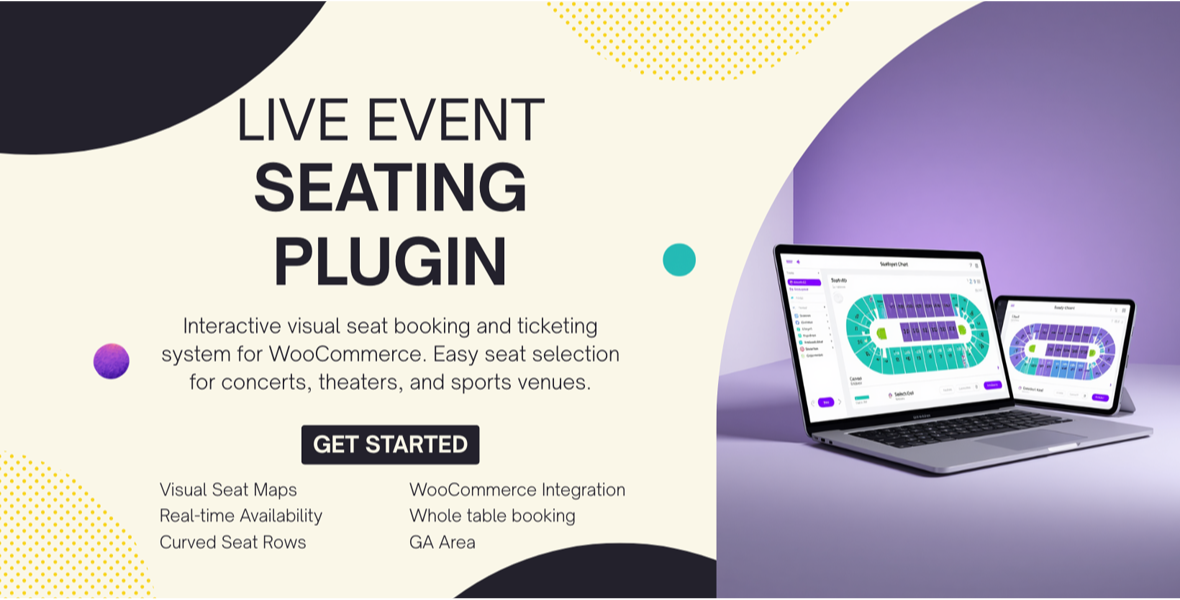
Live Event Seating is the most powerful WordPress seating chart plugin for selling event tickets with WooCommerce. Let your customers visually pick their perfect seat on a beautiful, interactive SVG map — then check out securely using any WooCommerce payment gateway. From gala dinners and theater performances to conferences and weddings, this all-in-one visual ticket booking plugin handles everything from seat design to QR code check-in.
Stop losing sales to clunky booking forms. Give attendees a premium, Amazon-style seat selection experience and watch your ticket revenue soar.
🎯 Key Features
🗺️ Drag-and-Drop Visual Seating Plan Builder
Build your venue layout in minutes with an intuitive admin canvas. Add round tables, rectangular tables, stages, and theater-style seat blocks. Resize, reposition, zoom, and pan with full precision. What you design is exactly what your customers see — no coding required.
🖱️ Interactive Frontend Seat Selector
Your customers see a responsive, SVG-based seating map that works beautifully on desktop, tablet, and mobile. Click a seat to select it, click a table to book all seats at once. The visual experience dramatically improves conversion rates compared to standard dropdown booking forms.
🛒 Deep WooCommerce Integration
Every seat is processed as a WooCommerce product, giving you access to the world’s largest payment gateway ecosystem. Selected seat IDs appear directly in the cart, checkout, and order confirmation. Supports Simple Products for flat pricing and Variable Products for tiered pricing (e.g., VIP vs. Standard sections).
📱 Automatic QR Code Tickets
A unique QR code is automatically generated for every order and included on the Thank You page and in the WooCommerce order confirmation email. Customers can also print a clean ticket with one click.
📷 Built-In Ticket Scanner & Check-In Dashboard
No third-party apps needed. Use your device’s camera directly from the WordPress admin to scan attendee QR codes at the door for fast, efficient guest check-in. A manual entry fallback is also available.
🔒 Real-Time Seat Locking (No Double Bookings)
The moment a user adds a seat to their cart, it is temporarily locked (default: 15 minutes). Other visitors will see it as unavailable, eliminating double-booking conflicts during peak sales periods.
🧠 Intelligent Orphan Seat Prevention
Maximize revenue with smart booking logic that prevents unsellable isolated seats. When a customer’s selection would leave a single lonely seat at a table, the system prompts them to adjust — ensuring you never lose a seat to a gap that nobody wants to fill.
📅 Flexible Booking Windows
Set a Booking Open and Booking Close date for each event. The seating plan will only be visible and active during the defined sales window — perfect for presale launches and ticket cutoff deadlines.
🎨 Fully Customizable Seat Colors & Branding
Use built-in color pickers to style Available, Selected, and Booked seat states to match your brand identity. The frontend legend updates dynamically to always reflect your chosen colors.
♻️ Layout Templates (Export)
Designed a great venue layout? Export it as a JSON file. Save hours of setup time when running recurring events in the same venue.
🌍 Multilingual & Translation-Ready
Fully .pot file included with pre-built translations for Bengali (bn_BD), German (de_DE), Spanish (es_ES), French (fr_FR), Italian (it_IT), Japanese (ja), Dutch (nl_NL), Portuguese (pt_PT), and Russian (ru_RU).
📊 Admin Booking Overview
A dedicated Current Bookings panel on each event shows exactly which seats are sold, along with the linked WooCommerce order for each — giving you complete visibility at a glance.
🏟️ Perfect For
- Gala Dinners & Fundraisers — Assign table seats and manage VIP sections
- Theaters & Performance Venues — Sell tickets for plays, concerts, musicals, and comedy shows
- Conferences & Seminars — Assign seating for workshops, keynotes, and breakout sessions
- Wedding Planners — Manage guest seating charts and RSVPs with ease
- Restaurants & Supper Clubs — Handle table reservations for special events and holiday dinners
- Community Centers & Schools — Sell seats for performances, award nights, and graduation ceremonies
- Sports & Entertainment Venues — Manage block seating and row-by-row booking
⚙️ How It Works – Quick Setup in 4 Steps
- Create a Ticket Product — Set up a Simple or Variable WooCommerce product with your ticket price(s).
- Build Your Event — Go to the new Events menu in your dashboard and add a new event. Link your ticket product and design your venue layout using the drag-and-drop builder.
- Embed the Seating Map — Copy the auto-generated shortcode (e.g.,
[event_seating_plan id="123"]) and paste it onto any page or post. - Go Live & Get Paid — Customers browse your interactive map, select seats, and checkout through WooCommerce. QR code tickets are sent automatically.
📋 Requirements
- WordPress: 5.8 or higher
- WooCommerce: Required (latest version recommended)
- PHP: 7.4 or higher
- PHP GD Library: Required for QR code generation (available on all standard hosts)
❓ Frequently Asked Questions
Q: Do I need WooCommerce installed?
Yes. This plugin is a WooCommerce extension. It uses WooCommerce for all cart, checkout, payment, and order management functionality.
Q: How do I display the seating plan on my website?
After creating an event, a unique shortcode like [event_seating_plan id="123"] is automatically generated. Paste it into any WordPress page, post, or widget area.
Q: Can I set different prices for different sections?
Yes. Link your event to a WooCommerce Variable Product and assign different price tiers (e.g., “VIP,” “Standard”) to specific tables or seat blocks directly in the builder.
Q: What prevents two people from booking the same seat?
The plugin uses a real-time seat locking system. Once a seat is added to any cart, it is locked for 15 minutes (configurable), preventing any other user from selecting it.
Q: Is it mobile-friendly?
Yes. The frontend seating map is fully responsive and supports touch gestures for panning and selection on all smartphones and tablets.
Q: Can I limit how many tickets one person can buy?
Yes. The global Settings page includes a configurable “Max Seats Per Order” limit enforced on both the frontend and server side.
🔄 Latest Updates
- Fix: Full compatibility with the Gutenberg Block Editor — seating plan data now saves reliably in both Block and Classic Editor modes.
- Tweak: Refactored JavaScript save mechanism for more robust, instant data persistence.
- Previous : Added global Max Seats Per Order limit, dynamic color legend on frontend, and server-side seat limit validation.
🚀 Elevate Your Event Ticketing Today
Join event organizers, venue managers, and wedding planners who use Live Event Seating to deliver a world-class booking experience. With a visual seating builder, seamless WooCommerce integration, QR code tickets, and real-time seat locking, everything you need is in one plugin.
Get Live Event Seating now and give your attendees the experience they deserve.
Only logged in customers who have purchased this product may leave a review.
Loading...
WPBay support
 Support by Live Event Seating Chart
Support by Live Event Seating Chart
Live Event Seating Chart supports this product through WPBay
Questions are handled in WPBay's private ticket system, keeping your purchase details and support conversation together.
Go to My Downloads
After purchase, open this item in My Downloads and choose Get Support.
What support includes
- Answers to product-related questions
- Help with reported bugs and issues
- Guidance for included third-party assets
What support does not include
- Customizations or new features
- Installation or setup services
Plugin
Maintenance snapshot
See recent updates, compatibility, support, and developer activity.
- Updated 134 days ago
- WPBay support available
- WordPress 7.0 tested
- Documentation available
Snapshot updated 2 hours ago
View details Hide details
Maintenance details
This is maintenance data. It does not measure product quality or sales.
- Last update Updated 134 days ago
- Compatibility WordPress 7.0 tested, one version behind · PHP 8.5 not marked as tested · WooCommerce 10 tested, one version behind
- Releases 1 release in the 137 days since listing
- Developer activity No recent developer activity
- Support No recent support tickets to measure
- Docs and demo Documentation available · Changelog missing · Demo available
Health reflects recent activity during the last 90 days.
How this snapshot works
Plugin Health
The score is out of 100 and uses data WPBay can check. Ratings, popularity, and sales are not used.
- Last update 30 points
-
Plugins receive full recency points under 30 days, then step down at 90, 180, 365, and 545 days.
- Compatibility 20 points
-
WordPress, PHP, and WooCommerce (when relevant) are scored separately. The latest two PHP lines count as current. Nearby previous versions keep most of the points.
- Current version 100%
- One version behind 75%
- Two versions behind 50%
- Three versions behind 25%
- Older or not listed 0%
- Releases 15 points
-
One release earns 10, two or three earn 13, and four or more earn 15. Each accepted product ZIP counts once; reprocessing the same upload and listing-only edits do not count.
- Developer activity 15 points
-
Based on WPBay login and dashboard activity. Exact last-login dates are never shown.
- Support 15 points
-
There are no recent WPBay tickets to measure.
- Docs and demo 5 points
-
Documentation: 2. Changelog: 1. Working demo or preview: 2.
Score ranges
- 90–100 Excellent
- 75–89 Healthy
- 60–74 Fair
- 40–59 Needs attention
- 0–39 Limited
Long gaps
WPBay also checks for long gaps between updates, developer activity, support replies, and releases. Buyers do not see this score.
- Time since update 35 points
- Last developer activity 25 points
- WordPress compatibility 15 points
- Support replies 15 points
- Fewer releases 10 points
-
Quality verified by WPBay
WPBay review- Reviewed version
- 1.4.0
- Review completed
- Reviewer
- CodeRevolution
- Review type
- Initial
No unresolved approval blocker was identified during WPBay’s proportionate review of this release. This is not a security certification or a guarantee that the product contains no defects.
-
 Future updates
-
WPBay support from Live Event Seating Chart
-
Fully GPL licensed
-
Covered by the WPBay refund policy
-
Plugin maintenance snapshot
Relevant picks
You may also like
Similar products selected by category, features, popularity and freshness.


 1 month free
Reviews
There are no reviews yet.