


Easy Virtual Tour Builder WordPress & WooCommerce Plugin

 Recently Updated
Well Documented
Recently Updated
Well Documented
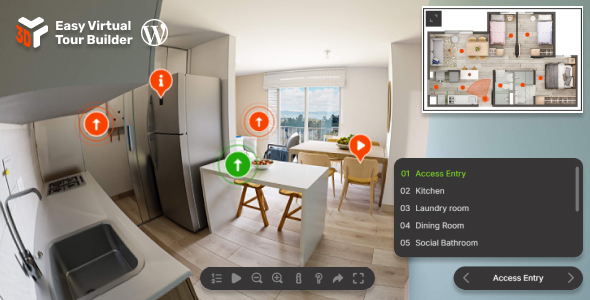
About Easy Virtual Tour Builder
Easy Virtual Tour Builder is a responsive virtual tour solution for equirectangular 360° panoramas. Build immersive multi-scene experiences with smooth scene switching, saved camera positions, hotspots/markers, tooltips, floor-map navigation, rich HTML info windows, responsive fullscreen layouts, and touch-friendly controls for mobile and desktop.
Main features
Immersive Virtual Tours – Build interactive tours from JPG, PNG, or KTX2 equirectangular panoramas with smooth transitions between scenes and a polished cross-device viewing experience, see demos.
Responsive Layout – The viewer adapts automatically to mobile, tablet, and desktop layouts so tours stay clean, readable, and easy to navigate on any screen size.
Desktop & Mobile Optimized – Designed for mouse, touch, and keyboard interaction with mobile-friendly gestures, fullscreen support, and optional help guidance.
Lazy Scrolling / Loading – Initialize the tour when it becomes visible on the page to improve loading performance for off-screen viewers.
Flexible Embed Size – Place the viewer anywhere in your layout with fixed sizing or responsive sizing that fits naturally inside any container.
Inline Or Lightbox Display – Embed the tour directly inside the page or launch it in a responsive lightbox triggered by a click or external action, example here.
Smooth Scene Switching – Move visitors naturally between rooms or viewpoints with seamless transitions that keep the tour feeling continuous and easy to follow.
Saved Camera Presets – Define starting views and camera target positions for each scene so every location opens from the exact angle you want.
Hotspots / Markers – Add markers anywhere inside the tour to navigate to other scenes, open links, jump to camera positions, or trigger built-in actions, example here.
Tooltips & Rich Info Windows – Display simple labels or detailed popups with full HTML/CSS content including images, video, links, and custom layouts.
Floor-Map Navigation – Add a floor-plan style floormap with styled markers, orientation feedback, and optional expand/collapse behavior for compact layouts.
Table Of Contents & Camera Position Menus – Help visitors move quickly through larger tours using structured scene navigation and optional camera position selection controls.
Customizable Controller – Configure playback, zoom, fullscreen, help, share, table of contents, and other on-screen controls to match your preferred experience.
Marker & Tooltip Styling – Customize marker colors, borders, selected states, animations, sizes, and tooltip appearance individually or globally.
Info Window Content Flexibility – Show advanced content blocks with images, embedded video, text, links, and styled sections directly inside the tour experience.
Preloader – Optional loading screen with configurable text, colors, and progress feedback while panoramas and assets are being prepared.
Easy To Configure And Install – Includes sample demos, clear configuration structure, and a setup flow designed to be approachable for both beginners and advanced users, with JavaScript documentation and WordPress documentation.
One-Time Purchase – Buy once and keep lifetime access to updates for the product version you purchase.
Direct Support – Ongoing support and product maintenance from the developer, Tibi @ FWD.
Only logged in customers who have purchased this product may leave a review.
 FWDesign supports this product
Supported
FWDesign supports this product
Supported

Product support includes:
- ✔ The seller will answer product related questions
- ✔ Assistance with reported bugs and issues
- ✔ Help with included third-party assets
However, product support does not include:
- ✖ Customization services
- ✖ Installation services
-
Quality verified by wpbay.com
-
Future updates
-
Support included from FWDesign


More by FWDesign

Filmstrip Carousel WordPress & WooCommerce Plugin
From: $29 / month



Reviews
There are no reviews yet.