


Inventory Management in Laravel

 Recently Updated
Well Documented
Sold Only On WPBay
Recently Updated
Well Documented
Sold Only On WPBay
INVENTORY MANAGEMENT SYSTEM
Project description and user experience
================================================================================
WHAT THIS SYSTEM IS
================================================================================
Inventory Management is a web application for businesses that need to track
stock, sales, purchases, and related data in one place. After logging in, users
see a dashboard and a sidebar menu. What each user can see and do depends on
the permissions an administrator has given them. Some users may only see a few
sections; others (such as admins) can access everything and manage other users.
================================================================================
FEATURES AND WHAT USERS CAN DO
================================================================================
DUMMY LOGIN FOR TEST
Username: admin@gmail.com
password: password
DASHBOARD
———
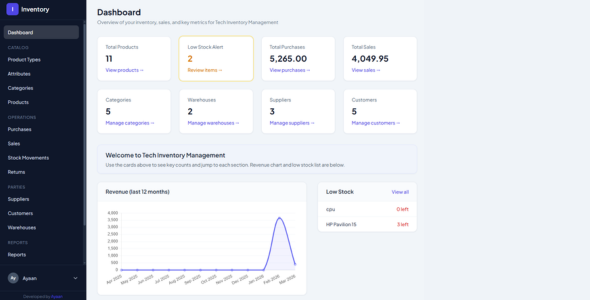
When you open the app, the dashboard gives you a quick overview. You see total
number of products, a low-stock alert count, total purchases, and total sales.
A revenue chart shows the last twelve months. A list of products that are low
on stock is shown so you can reorder in time. Shortcuts let you jump to
products, categories, warehouses, suppliers, customers, and other sections.
Only users with dashboard access see this page.
CATALOG
——-
Product types
You can define product types (for example, CPU, Laptop, Monitor). Each type can
have its own set of attributes. This keeps the catalog organised and makes it
easy to add products that share the same kind of information.
Attributes
You can add attributes to product types (for example RAM, Processor, Colour).
Attributes can be text, number, select (dropdown), or yes/no. When creating a
product of that type, you fill in these attribute values. You can add several
attributes at once on the create page.
Categories
You can create categories (and subcategories) and assign products to a category.
This helps with filtering and organising the product list.
Products
You can add, edit, view, and delete products. For each product you choose a
product type and optionally a category, enter name, price, quantity, and an
optional image. You can set a minimum stock level; the system will flag the
product when stock falls at or below that level. The product list supports
filtering by product type and “low stock only,” and you can search and sort.
Products can be imported from a CSV file. Only users with product access can
see and manage products.
OPERATIONS
———-
Purchases
You can record purchases (orders from suppliers). Each purchase has a supplier,
date, and line items (product, quantity, unit price). You can view, create,
edit, and print a PDF for a purchase. Stock is updated when purchases are
recorded. Only users with purchase access can use this section.
Sales
You can create sales or invoices. You pick a customer (or leave as walk-in), a
warehouse, date, and add one or more products with quantity and sale price.
The system shows purchase price, stock quantity, remaining quantity after the
sale, and profit in real time as you enter data. When you save the sale, stock
is reduced. You can view sales and print an invoice. Only users with sales
access can use this section.
Stock movements
You can see a history of stock changes (from purchases, sales, and manual
adjustments). You can create a manual adjustment to add or remove quantity for
a product, optionally linked to a warehouse. Only users with stock-movements
access can use this section.
Returns
You can mark products as “returned.” Returned products appear in a dedicated
Returns section. An admin can add a product to returns or remove it from
returns. Products stay in the returns list until someone removes them. Only
users with returns access can use this section.
PARTIES
——-
Suppliers
You can add, edit, and view suppliers (companies or people you buy from).
Suppliers are linked to purchases. Only users with supplier access can manage
suppliers.
Customers
You can add, edit, and view customers (companies or people you sell to).
Customers are linked to sales. Only users with customer access can manage
customers.
Warehouses
You can add, edit, and view warehouses (storage locations). Warehouses can be
used in sales and stock movements. Only users with warehouse access can manage
warehouses.
REPORTS
——-
You can view several reports: sales report (with date range), purchases
report (with date range), profit and loss, product profit, customer sales
summary, and supplier report. Activity logs show a history of actions in the
system. Only users with reports and activity-logs access can see these.
ADMIN: USERS AND PERMISSIONS
—————————-
Users who have “manage users” permission can open the Users and Permissions
section. There they can add new users (name, email, password) and choose which
sections (tabs) each user is allowed to see. For example, you can create a
“staff” user who only sees Products and Sales, and an “admin” who sees
everything including Users and Permissions. When a new user logs in, they are
taken to the first section they are allowed to access (not always the
dashboard). Only users with manage-users permission see this section.
PROFILE
——-
Every logged-in user can open their profile to change their name, email, and
password. They can log out from the sidebar. Registration can be disabled so
only an admin creates new users.
================================================================================
WHAT USERS EXPERIENCE
================================================================================
– A single login; after that, the sidebar shows only the sections they are
allowed to use.
– A clear layout: sidebar on the left, main content on the right, with cards
and tables that are easy to read and use.
– Real-time feedback where it helps: for example on the sales page, profit and
remaining quantity update as you type the sale price and quantity.
– Search and filters on key lists (e.g. products by type and low stock) so
users can find what they need quickly.
– Product images that are stored securely and displayed on product detail and
edit pages; the system serves them in a way that works even when the server
blocks direct access to storage folders.
– When an admin creates a new user and selects permissions, that user only
sees and can open the allowed sections; other sections do not appear in the
menu and are not accessible.
================================================================================
SUMMARY
================================================================================
Inventory Management lets you manage product types, attributes, categories,
and products; record purchases and sales with automatic stock updates; track
suppliers, customers, and warehouses; handle returns; and run reports and
activity logs. Administrators can create users and control exactly which parts
of the system each user can see and use. The application is built for daily
use in a business environment, with a focus on clarity, permissions, and
reliable behaviour on both local and live hosting.
Only logged in customers who have purchased this product may leave a review.
Loading...
 Ayaandev supports this product
Supported
Ayaandev supports this product
Supported

Product support includes:
- ✔ The seller will answer product related questions
- ✔ Assistance with reported bugs and issues
- ✔ Help with included third-party assets
However, product support does not include:
- ✖ Customization services
- ✖ Installation services
-
Quality verified by wpbay.com
-
Future updates
-
Support included from Ayaandev

Reviews
There are no reviews yet.